Antigravity CLI (agy): Commands, Modes, and Auto-Approve
Antigravity CLI (agy) replaced Google's Gemini CLI. Install, slash commands, the three execution modes, and how auto-approve and YOLO mode actually work.
Antigravity CLI is Google's terminal coding agent, invoked with the agy command. It shipped as the replacement for Gemini CLI, which Google shut down for free, Pro, and Ultra users on June 18, 2026. If you typed gemini in your terminal, agy is what Google wants you typing now.
This is the practical guide to the tool itself: what it is, how to install it, the commands that matter, and the honest comparison against Claude Code. If your goal is specifically moving off the dead Gemini CLI, read the Gemini CLI shutdown and migration guide first, then come back here for the day-to-day usage.
What Is Antigravity CLI?
Antigravity CLI is a Go-based binary that brings Google's agent-first workflow into the terminal. It's the command-line sibling of Google Antigravity, the agent IDE - same multi-agent model, no editor window.
Three things define it:
- Single Go binary. It ships as one compiled executable - install is a one-line script, no Node or Python runtime to manage. It picks a Flash-tier Gemini model by default, and you can override with
/modelin-session or the--modellaunch flag. - Multi-agent by default. Like the Antigravity IDE,
agyis built to dispatch and coordinate multiple agents rather than run one linear chat. It shares the same agent harness and settings as Antigravity 2.0. - A Google-led product, not a community project. Gemini CLI was open source and took 6,000+ community pull requests before Google wound it down.
agyis built and controlled by Google around that shared harness - don't expect the same community-extension flow.
One caveat worth knowing before you commit: at launch, Antigravity CLI does not have full 1:1 feature parity with Gemini CLI. Google kept the critical pieces (Agent Skills, Hooks, Subagents, and Extensions-now-plugins), but if you depended on a specific flag, check it works in agy before you rewrite your scripts.
How to Install Antigravity CLI
Install is a one-line script. On macOS or Linux:
curl -fsSL https://antigravity.google/cli/install.sh | bash
On Windows (PowerShell):
irm https://antigravity.google/cli/install.ps1 | iex
Then start it and authenticate:
agy
agy authenticates through your system keyring, falling back to Google Sign-In (pick "Use a Google Cloud project" when prompted). Check your setup with /config, then smoke-test it non-interactively:
agy -p "summarize this repo"
Both agy and the old gemini command can coexist on the same machine, which makes a gradual cutover easier if you still have a paid API key keeping Gemini CLI alive.
The Slash Commands That Run It
agy is driven by slash commands in the TUI. These are the ones you'll actually use:
| Command | What it does |
|---|---|
/goal | Run autonomously to completion - use when you trust the plan |
/grill-me | Agent asks clarifying questions first - use for ambiguous or destructive work |
/agent / /agents | Dispatch a named background subagent / monitor all running subagents |
/browser | Opt in to browser use for this run (scraping, JS-heavy sites, OAuth) |
/schedule | One-off (capped at 15 min out) or recurring cron-style runs |
/usage | Quota and rate-limit status across models - check this constantly |
/context | Token usage by category + checkpoint management |
/model | Switch models mid-session |
/config | Settings: model, theme, MCP servers, Pro upgrade |
/export | Push the session into Antigravity 2.0 to continue in the GUI |
Two design changes worth flagging if you're coming from Gemini CLI. Browser use is now opt-in via /browser - Google moved it behind a command because the agent kept reaching for the browser when it shouldn't. And subagents are dynamic: you hand the orchestrator a goal in plain English and it decides what specialized subagents to spawn and runs them in parallel, no orchestration code from you.
/goal and /schedule are the pair worth sitting with. /goal keeps the current task running until it is completely finished, without stopping to ask you for input along the way. /schedule runs an instruction later as a one-time timer or on a recurring schedule - a separate scheduled task, not a repeat of the run you're in. That's the actual mechanics of loop engineering: deciding when an agent keeps going, when it stops, and when it starts again on its own, not just what to prompt it with.
On models, Antigravity's platform page lists Gemini 3.7, 3.6, and 3.5 Flash, Gemini 3.1 Pro, Claude Sonnet 4.6 and Claude Opus 4.6 (thinking variants), and GPT-OSS-120b as of late August 2026; what /model actually offers in agy depends on your account and plan. Skills work like Gemini CLI: drop a markdown file at .agents/skills/lint.md and it becomes /lint. Hooks are JSON lifecycle interceptors (before tool call, after file edit, on session start), with workspace hooks overriding global ones. Sandboxing uses nsjail on Linux and sandbox-exec on macOS.
Free AI Builder Newsletter
Weekly guides on AI tools & builder strategies.
Does agy Have a YOLO Mode?
No. There is no --yolo flag in agy. Gemini CLI had one, Antigravity CLI replaced it with two separate controls, and which one you reach for depends on whether you care about file writes or shell commands.
Execution modes handle file edits. There are three, and you set one at launch:
agy --mode=accept-edits
| Mode | What it does |
|---|---|
default | Asks for approval before it applies an edit |
accept-edits | Applies file edits without prompting |
plan | Plan generation mode |
In accept-edits, the standard file operations (write_to_file, replace_file_content, multi_replace_file_content) run automatically. Press Shift+Tab inside the prompt box to cycle default, accept-edits, plan, and back without restarting the session. To make a mode your default, set agentMode in ~/.gemini/antigravity-cli/settings.json or open the settings editor with /config.
Shell commands are governed separately. Modes only cover edits. run_command still goes through your tool permission rules in every mode, and you manage those with /permissions. So switching to accept-edits will not on its own get you an unattended run: the first command the agent wants to execute still stops and waits.
The actual approve-everything switch is --dangerously-skip-permissions, which approves all tool calls including file writes and command execution:
agy -p "Run the test suite and report failures" --dangerously-skip-permissions
That is the closest thing to the old --yolo, and the flag name is the warning. Run it in a container or a sandbox, not on your laptop pointed at a repo you care about.
Migrating from Gemini CLI
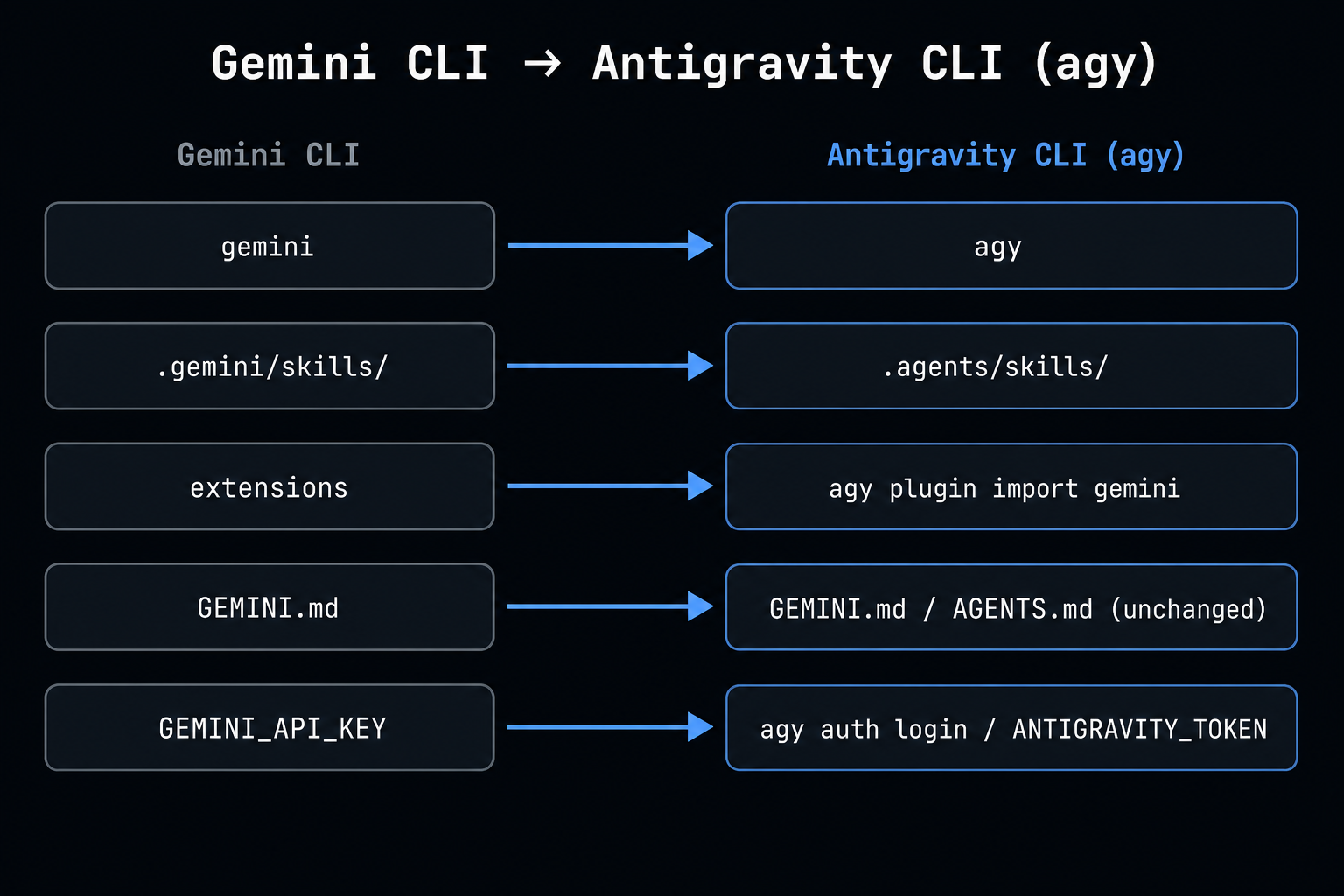
If you're coming straight off Gemini CLI, the move is mostly mechanical and agy ships an importer:
- Import your extensions:
agy plugin import geminiconverts installed Gemini CLI extensions into Antigravity plugins. - Move workspace skills:
mv .gemini/skills/ .agents/skills/- Antigravity looks for them under.agents/skills/. - MCP config: Antigravity uses a dedicated
mcp_config.json(workspace path:.agents/mcp_config.json). For remote servers, rename theurlfield toserverUrl. Release 1.1.16 (2026-08-20) addedagy mcp add,remove,list,enable, anddisablefor the user-level MCP config; workspace-scoped servers still live in.agents/mcp_config.jsonand may require direct editing. - Context files stay put:
GEMINI.mdkeeps working - no rename needed.agyreads bothGEMINI.mdandAGENTS.md. New projects increasingly standardize onAGENTS.md, but that's optional. - Update automation: swap every
geminicall in CI/CD, shell scripts, and cron jobs foragy.
The one that bites people is automation. Any pipeline calling gemini -p "..." broke on June 18 with no grace period. Audit your scripts first - that's where the silent failures hide. Full checklist in the migration guide.
The Quota Trap (Read This Before You Commit)
This is the single biggest complaint from early agy users, and it's not a bug - it's how the tool works. Subagents burn quota in parallel. One plain-English goal can spin up a nested loop of 10+ model calls without asking, and the meter runs the whole time.
The numbers from the field are brutal. One paid Google AI Pro user reported being locked out with an "Individual quota reached" error after exactly two prompts in agy - the same Pro quota that survived 1,000+ code modifications in the old Gemini CLI. The quota is also shared across the Antigravity desktop app, CLI, and SDK, so running agents in parallel across projects drains it even faster.
Three habits keep you out of the lockout:
- Watch
/usageconstantly. Unlike Gemini CLI, the agent can't see its own remaining quota and won't throttle itself. You are the governor. - Don't over-parallelize. Pro/Ultra quotas comfortably support 3 to 5 parallel subagents. Past that you hit the ceiling before lunch. Less parallelism often means more total throughput across the day.
- Reach for
/grill-meon expensive work so the agent plans before it spends, instead of looping autonomously on a vague goal.
If you're on the free tier, expect aggressive throttling and queued subagents that never start. For real throughput, connect a billing-enabled Google Cloud project.
Scripting and CI Gotchas
If you automate agy, three traps will cost you a debugging session each:
- A bare
agycall is not a script. Non-interactive runs need-p(aliases--printand--prompt), which runs the prompt once and exits. Approval is a separate flag:--dangerously-skip-permissionsapproves all tool calls, including file writes and command execution. There is no--headlessflag and no--approvepolicy, soagy -p "..." --dangerously-skip-permissionsinside a sandbox is the unattended shape. - Auth has to exist before CI runs. By default headless mode uses cached credentials, so sign in once from an interactive
agysession on that machine first. Since 1.1.13 (2026-08-14) there is a second path built for CI: setmodelProvider: "gemini"insettings.jsonand exportGEMINI_API_KEY, andagyruns against the Gemini API directly with no sign-in (aGOOGLE_GEMINI_BASE_URLoverride is available for custom endpoints). Note this restores the environment variable earlier releases ignored, so re-check any migration notes written before mid-August. An unauthenticated non-interactive run exits with anauthentication requirederror rather than hanging. - Pick an output format if a script reads the result.
--output-formattakestext(the default),jsonfor a single object with metadata, orstream-jsonfor newline-delimited events. Early versions could also silently drop stdout when-pran under a pipe, subprocess, or redirect, so verify you actually get bytes back before trusting it.
None of these are dealbreakers, but they're the difference between a clean cutover and a broken Monday pipeline. Test on a throwaway workflow first.
Antigravity CLI vs Claude Code
This is the comparison most builders are actually searching for, because Claude Code is the closest terminal-native analog. Here's the honest split:
Antigravity CLI (agy) | Claude Code | |
|---|---|---|
| Install | One-line curl / PowerShell script | npm install -g @anthropic-ai/claude-code |
| Runtime | Single Go binary | Node.js |
| Default model | Flash-tier Gemini (override with /model or --model) | Claude Sonnet / Opus |
| Core strength | Multi-agent orchestration | Complex multi-file reasoning |
| Pricing | Google account / Cloud project tiers | Pro $20 / Max $100-$200 per month |
| Maturity | New, no full Gemini CLI parity | Mature, large ecosystem |
| Best for | Google-stack builders, parallel runs | Day-to-day terminal shipping |
Short version: if you live in the Google ecosystem and want parallel agents from the terminal, agy is the natural pick. If you want the most mature terminal coding agent today and don't care which cloud it talks to, Claude Code is still the safer bet. Many builders will run both - agy for Gemini-backed tasks, Claude Code for everything else.
For the full field including Cursor and the Antigravity IDE, see our best AI coding agent comparison.
Should You Switch?
- You were on Gemini CLI free/Pro/Ultra: You have to move - the tool is dead.
agyis the path of least resistance if your work is Google-centric. - You hold an enterprise Gemini Code Assist license: You keep both tools, so there's no rush. Test
agyon a side project before you standardize on it. - You're tool-shopping fresh: Don't pick
agypurely because it's new. The missing Gemini CLI parity and the quota trap are real trade-offs - if you run high-volume agent loops, the per-prompt cost ceiling will bite. Weigh it against Claude Code and Cursor on the work you actually do.
The smart play right now is to install agy, port one real workflow, and keep your fallback alive until the CLI proves it covers your cases. New tools earn trust by surviving your actual pipeline, not a toy demo.
Frequently Asked Questions
Does Antigravity CLI (agy) have a YOLO mode?
There is no --yolo flag. Gemini CLI's is gone and agy splits the job in two. Execution modes cover file edits: launch with agy --mode=accept-edits and it applies file writes without stopping to ask, or press Shift+Tab in the prompt box to cycle modes mid-session. Shell commands are governed separately by your tool permission rules in every mode, so accept-edits alone will not give you a hands-off run. The approve-everything switch is --dangerously-skip-permissions, which approves all tool calls including file writes and command execution. That is the real YOLO equivalent, and the name is the warning. Keep it inside a sandbox.
What are agy's execution modes?
Three: default, accept-edits, and plan. Set one at launch with the --mode flag, for example agy --mode=accept-edits, or press Shift+Tab inside the prompt box to cycle default, accept-edits, plan, and back. In accept-edits the standard file operations (write_to_file, replace_file_content, multi_replace_file_content) run automatically. Shell commands (run_command) still go through your tool permission rules in every mode, which you manage with /permissions. To make a mode stick across sessions, set agentMode in ~/.gemini/antigravity-cli/settings.json or open the settings editor with /config.
How do I turn on auto accept or auto approve in agy?
For file edits, that is accept-edits mode: agy --mode=accept-edits at launch, or Shift+Tab to switch into it mid-session. For everything including shell commands, it is --dangerously-skip-permissions, which approves all tool calls. There is no separate auto-approve flag, and there is no --approve policy. If you only want to speed up approvals rather than remove them, /permissions lets you set per-tool rules instead.
How do I import my Gemini CLI extensions into agy?
Run agy plugin import gemini. It converts your installed Gemini CLI extensions into Antigravity plugins in one pass. Workspace skills move separately: mv .gemini/skills/ .agents/skills/, since agy looks for them under .agents/skills/. Your GEMINI.md context file keeps working with no rename, and agy also reads AGENTS.md.
How do I run agy headless in CI or a script?
Pass your prompt with -p (aliases --print and --prompt) to run once and exit, for example agy -p "summarize this repo". Add --dangerously-skip-permissions if the run has to approve its own tool calls unattended, and --output-format json or stream-json if a script parses the result. Auth is the part that catches people: by default headless mode uses cached credentials, so sign in once from an interactive agy session on that machine first. Since release 1.1.13 (2026-08-14) there is also a keyless path: set modelProvider: "gemini" in settings.json and export GEMINI_API_KEY to run against the Gemini API directly, which is the cleaner option for CI. An unauthenticated non-interactive run exits with an authentication required error rather than hanging. Early versions could also drop stdout under a pipe or redirect, so verify you actually get output back before a script trusts it.
How do I change the model in agy?
Two ways. Switch mid-session with the /model slash command, or set it on launch with the --model flag, for example agy --model="Gemini 3.5 Flash". Antigravity's platform models page (late August 2026) lists Gemini 3.7, 3.6, and 3.5 Flash, Gemini 3.1 Pro, Claude Sonnet 4.6 and Claude Opus 4.6 in thinking variants, and GPT-OSS-120b; the models agy's /model picker actually shows depend on your account and plan.
Why does agy hit its quota so fast?
Subagents burn quota in parallel. One plain-English goal can spin up 10+ nested model calls without asking, and the quota is shared across the Antigravity desktop app, CLI, and SDK. Watch /usage constantly since the agent can't see its own remaining quota, keep parallel subagents to around 3 to 5 on Pro or Ultra, and reach for /grill-me on expensive work so it plans before it spends.
Sources & Verification
Built from Google's official Antigravity docs and the Google Developers Blog announcement transitioning Gemini CLI to Antigravity CLI (June 18, 2026), the Antigravity I/O 2026 feature deep-dive, and the public antigravity-cli GitHub issue tracker. The quota and CI gotchas are drawn from a June 2026 scan of the GitHub issues, Hacker News, and the Google AI Developers forum. Re-verified on August 4, 2026 against the official CLI docs: the execution modes, auto-approve, headless and Gemini CLI migration pages. Every flag, mode, and settings key on this page is quoted from those docs; the tool is new and changing fast, so verify against the official docs before you script against it.
- Transitioning Gemini CLI to Antigravity CLI (Google Developers Blog) - Official announcement of the agy CLI and the June 18, 2026 transition
- Antigravity CLI Overview (official docs) - Official install, auth, and Gemini CLI migration reference
- Choose an execution mode (official docs) - Primary source for the default / accept-edits / plan modes, the --mode flag, Shift+Tab cycling, and the agentMode setting
- Running AGY in headless mode (official docs) - Primary source for -p / --print / --prompt, --dangerously-skip-permissions, --output-format, and CI authentication
- Migrating from Gemini CLI (official docs) - Primary source for agy plugin import gemini, the .agents/skills/ move, and the mcp_config.json serverUrl change
- Google I/O 2026 Feature Deep Dive (Antigravity Blog) - Official source for the new slash commands (/schedule, /browser) and hooks
- Antigravity CLI release notes (GitHub) - Primary source for GEMINI_API_KEY support (1.1.13, 2026-08-14) and the agy mcp subcommands (1.1.16, 2026-08-20)
- Supported models (official docs) - The platform-level model lineup as of late August 2026; agy's /model picker availability varies by account and plan
- antigravity-cli GitHub issues - Community-reported quota lockouts (#56) and non-TTY stdout drop (#76)
- Bye-bye Gemini CLI (The Register) - Independent reporting on the transition
Join AI Builder Club


$37/mo
Get the free newsletter
Weekly deep-dives on AI tools, automation workflows, and builder strategies. Join 5,000+ readers.
No spam. Unsubscribe anytime.