Gemini 3 Tips: Unlock Its Hidden Power (2026 Guide)
Most people run Gemini 3 on defaults and get generic output. The thinking levels, prompting rules, and 4 specialization levers that actually move quality.
Gemini 3 punishes old prompting habits. The tricks you learned on GPT-4-era models - low temperature for reliability, elaborate chain-of-thought scaffolding, walls of context up front - actively make Gemini 3 worse. Google says so in its own developer guide. Which means most people are running one of the strongest model families available on settings that fight it, then concluding it's mid.
This guide is the fix, in two passes: first the general techniques that raise output quality on any Gemini 3 task, then the levers that specialize it for your use case - because a model that's 8/10 at everything becomes 10x more useful when it's tuned to the one job you actually need done.
What Are You Actually Working With in Gemini 3?
The lineup as of mid-2026, per Google DeepMind's model page and the API docs:
| Model | Built for | Notes |
|---|---|---|
| Gemini 3.1 Pro | Complex reasoning, broad knowledge | 77.1% on ARC-AGI-2 - more than double 3 Pro. Defaults to high thinking. 3.5 Pro is "coming soon" |
| Gemini 3.5 Flash | Agents and coding at Flash speed/pricing | The newest frontier model in the family (how it stacks up against Claude Sonnet) |
| Gemini 3.1 Deep Think | Science, research, hard engineering problems | The enhanced reasoning mode, now its own tier |
| Gemini 3.1 Flash-Lite | High-volume, cost-sensitive workloads | The cheap workhorse |
Under the hood, three properties define the family. A 1M-token input window with up to 64k output - entire codebases, hour-long videos, stacks of PDFs in one call. Native multimodality - text, images, audio, video, and documents as first-class inputs, not bolt-ons. And a controllable thinking process - you decide how much reasoning happens before the first token, per request.
That last one is where the hidden power lives.
Here's the full walkthrough of the techniques below - AI Jason's video on unlocking Gemini 3's hidden power covers what actually changed and how to prompt it:
Which Techniques Actually Move Output Quality?
1. Set the thinking level deliberately
thinking_level has four values - minimal, low, medium, high - and Google treats them as relative allowances for thinking, not strict token budgets. Gemini 3.1 Pro defaults to high; minimal isn't supported on it at all.
The mechanism: thinking tokens are where multi-step reasoning happens, and they're spent before you see a single output token. Starve the budget on a hard task and the model commits to its first plausible answer. Overspend on a trivial task and you're paying reasoning-tax on latency and cost for nothing.
| Task | Level |
|---|---|
| Extraction, reformatting, classification | minimal / low |
| Everyday generation, summarization | medium |
| Debugging, math, planning, anything multi-step | high |
The migration note buried in Google's docs is the real tell: if you used chain-of-thought prompt engineering to force Gemini 2.5 to reason, delete it and use thinking_level: "high" with a simpler prompt. The reasoning moved from your prompt into the model. Prompts that re-teach it how to think just add noise.
2. Leave temperature at 1.0 - seriously
This is the single most common self-inflicted wound. Every production playbook since 2023 said "temperature 0.2 for deterministic tasks." On Gemini 3, Google strongly recommends keeping temperature at its default of 1.0, and warns that lowering it can cause looping and degraded performance on complex reasoning. The sampling behavior was tuned around the thinking process; fighting it breaks the model in ways that look like model weakness but are actually config.
3. Put instructions after the data, and keep them terse
Gemini 3 responds best to direct, concise instructions - and for long or multimodal context, Google's guidance is to place your question at the end of the prompt, after the data. Load the 200-page PDF, the video, the codebase - then ask. Instructions buried above 500k tokens of context lose the fight for attention. (This is context engineering in one sentence: what the model sees last, it weighs most.)
Also expect less verbosity by default. Gemini 3 gives you the answer, not an essay around the answer. If you want elaboration, ask for it explicitly instead of assuming terseness means low effort.
Free AI Builder Newsletter
Weekly guides on AI tools & builder strategies.
4. Crank media resolution for dense documents
A quieter parameter: media_resolution. For dense PDFs - scanned invoices, tables, small text - media_resolution_high makes the model actually read what it's looking at, at the cost of more tokens per page. For video, the newer defaults got cheaper. If your document extraction feels sloppy, this setting is usually the culprit, not the model.
How Do You Make Gemini 3 Perform 10x for Your Specific Use Case?
Everything above raises the floor. But generic Gemini 3 is still a generalist: it answers your legal question like a smart intern, not like your paralegal who knows your document formats, your jurisdiction, and your definition of done. Specialization is where the 10x lives, and it comes from four levers - no fine-tuning required.
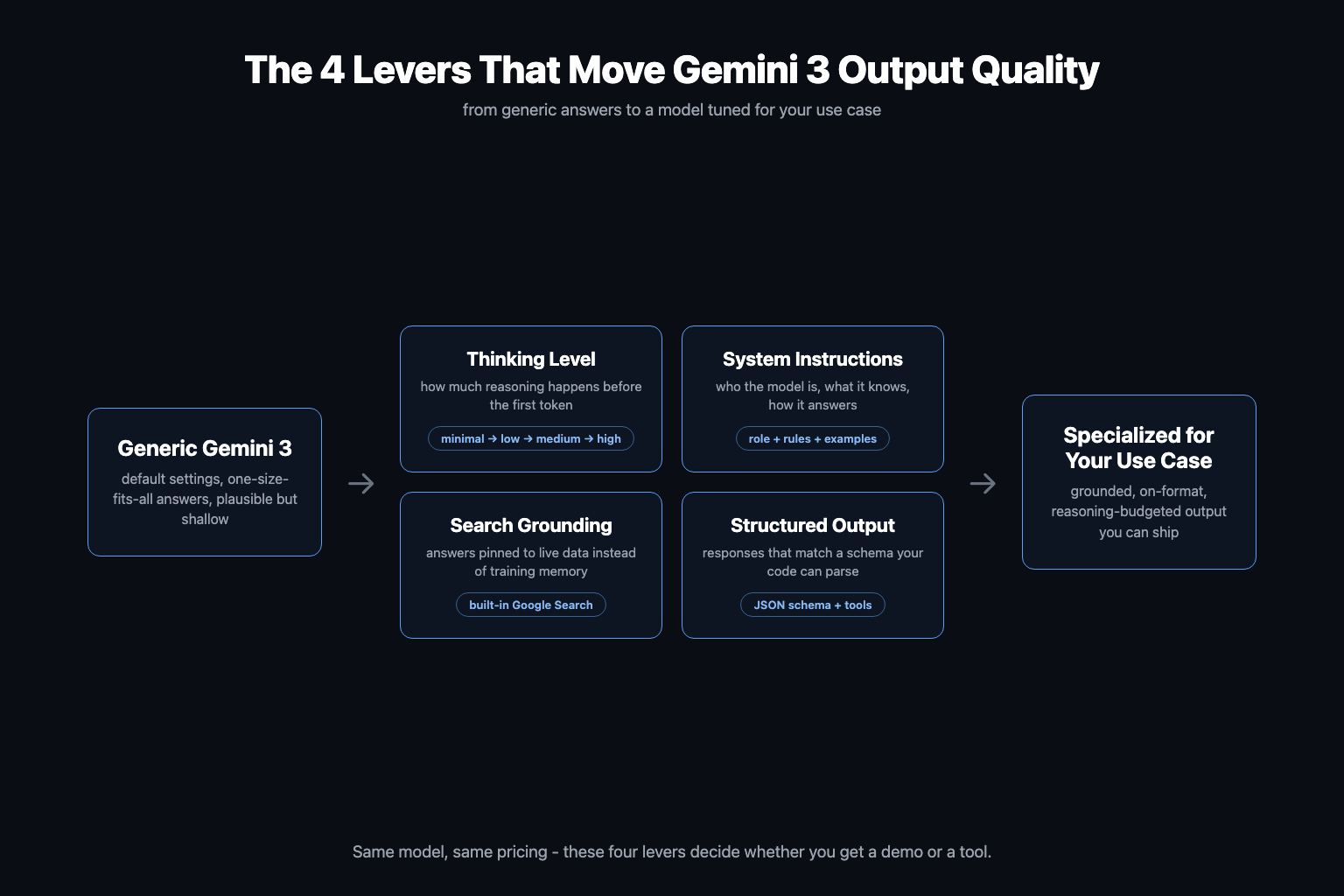
AI Jason's second video walks through this end to end - taking Gemini 3 from generic answers to performing 10x on one specific use case:
Lever 1: System instructions that define a job, not a vibe
"You are a helpful assistant" is a wasted lever. A working system instruction defines the role (what the model is), the rules (what it must and must not do), the format (what output looks like), and one or two examples of a perfect answer. Gemini 3's instruction-following is strong enough that these actually hold across long sessions - which cuts both ways, because it will also follow a sloppy instruction off a cliff. Write them like a spec, not a mood. (The full craft is in our prompt engineering guide.)
Lever 2: Grounding with Google Search
Training memory is stale by definition. Grounding with Google Search is built into the API and pins answers to live results, with citations. For any use case touching prices, news, docs, laws, or competitors, this is the difference between "plausible" and "correct" - and it's one config flag, not a RAG pipeline. When your knowledge is private rather than public, that's when you reach for RAG or long context instead.
Lever 3: Structured output, combined with tools
Gemini 3 lets you attach a JSON schema and get responses that conform to it - and, new in this generation, you can combine structured outputs with built-in tools like Search grounding, code execution, and function calling in the same request. That combination is the whole ballgame for builders: the model searches live data, reasons at your chosen thinking level, and returns an object your code consumes directly. No regex parsing of markdown. That's a component, not a chatbot.
Lever 4: Prototype in AI Studio, ship on the API
The workflow that ties it together:
| Stage | Tool | Why |
|---|---|---|
| Explore | Gemini app | Quick feel for capability |
| Tune | AI Studio | Free playground for the levers above - system instructions, thinking level, schemas, grounding - with instant iteration |
| Ship | Gemini API / Vertex AI | Same settings, exported to code, plus thought signatures for multi-step reasoning continuity |
| Build agentic | Gemini CLI / Antigravity | Where Gemini 3 does long-horizon coding work |
One API-only detail worth knowing: thought signatures, encrypted representations of the model's reasoning state that keep multi-turn reasoning coherent across calls. Use the stateful mode (previous_interaction_id) and the server handles them for you.
On cost: Gemini 3.1 Pro runs $2/$12 per million input/output tokens under 200k context ($4/$18 above), Gemini 3 Flash-class models around $0.50/$3 with a free tier. The move is to find your quality ceiling on Pro, then test whether Flash holds it at a quarter of the price. And if the task is small and private enough, a local Gemma 4 agent might make the API bill zero.
The Mistakes That Keep Gemini 3 Looking Average
- Migrated prompts, unmigrated habits. Low temperature, chain-of-thought scaffolding, instructions-first ordering: all three were best practice on 2.5-era models, all three degrade Gemini 3.
- One thinking level for everything. Defaulting to
highburns money on trivial calls; hardcodinglowquietly caps quality on hard ones. Match the level to the task. - Treating the 1M window as a dumping ground. Room for a million tokens is not a reason to send them. Curate context; put the question last.
- Stopping at chat. If you never touch system instructions, grounding, or schemas, you're using maybe 30% of the model. The levers are the product.
The pattern behind all four: Gemini 3's power isn't hidden in some secret prompt phrasing. It's sitting in plain sight in the parameters most people never change. Pick one real use case this week, write the system instruction like a spec, wire up grounding and a schema in AI Studio, and compare the output to what default-settings chat gives you. That gap is the 10x.
Related Content
- Gemini 3.5 Flash vs Claude Sonnet - Which frontier workhorse wins on agents, coding, and cost in 2026.
- Google Antigravity: The Complete Guide - Google's agentic coding platform, where Gemini 3 does long-horizon work.
- Prompt Engineering Guide 2026 - The system-instruction craft this article leans on, in full.
- RAG vs Long Context vs Fine-Tuning - How to choose when grounding on public search isn't enough.
- Gemma 4 for Local Agents - When the right Gemini is the one running on your own machine.
Start Here
Take one task you run weekly, open AI Studio, and pull the four levers on it: spec-grade system instructions, the right thinking level, Search grounding, a JSON schema. Measure the before and after.
For teardowns of real Gemini 3 builds, working system-instruction templates, and builders comparing notes on what actually ships, join the AI Builder Club.
Frequently Asked Questions
What is the thinking_level parameter in Gemini 3?
thinking_level controls how much internal reasoning Gemini 3 does before it responds, with values of minimal, low, medium, and high. Google treats the levels as relative allowances for thinking rather than strict token guarantees. High is the default on Gemini 3.1 Pro and buys maximum reasoning depth at higher latency; low and minimal are for simple, high-throughput calls where speed matters more than depth.
Should I lower the temperature on Gemini 3?
No. Google strongly recommends keeping temperature at its default of 1.0 for Gemini 3 models. Lowering it, which was standard practice on older models for deterministic tasks, can cause looping and degraded performance on complex reasoning tasks. If you are migrating from Gemini 2.5, removing your explicit low-temperature settings is one of the first fixes to make.
Does Gemini 3 still need chain-of-thought prompting?
Mostly no. The reasoning that chain-of-thought prompts used to force now happens natively inside the thinking process. Google's own migration guidance says that if you used complex chain-of-thought engineering on Gemini 2.5, you should try Gemini 3 with thinking_level set to high and a simplified prompt instead. Elaborate step-by-step scaffolding often just adds noise.
How do I make Gemini 3 better for my specific use case?
Four levers, in order: write real system instructions that define the model's role, rules, and output format; turn on Grounding with Google Search so answers come from live data instead of training memory; use structured outputs with a JSON schema so responses are machine-parseable; and set the thinking level to match the task. Gemini 3 lets you combine structured outputs with built-in tools like Search in the same call, which is where most of the specialization power comes from.
What is the difference between Gemini 3.1 Pro and Gemini 3.5 Flash?
As of mid-2026, Gemini 3.1 Pro is the deep-reasoning model for complex tasks (77.1% on ARC-AGI-2, defaults to high thinking), while Gemini 3.5 Flash is the newer frontier model optimized for agents and coding at Flash speed and pricing. Flash-class models also have a free API tier while Pro does not. Prototype on Pro to find your quality ceiling, then test whether Flash holds it at a fraction of the cost.
Sources & Verification
This guide is written from hands-on testing, then cross-checked against primary sources - official documentation and first-party announcements. Field results and opinions are labeled as such. See our editorial standards.
- Gemini 3 Developer Guide (Google AI for Developers) - Official reference for model IDs, thinking_level values, the 1M/64k window, temperature guidance, thought signatures, structured output + tools, and 2.5 migration notes
- Gemini 3.1 Pro: A smarter model for your most complex tasks (Google) - The Feb 2026 announcement: ARC-AGI-2 at 77.1%, availability across AI Studio, Vertex, Gemini CLI, and Antigravity
- Gemini models (Google DeepMind) - The current lineup as of mid-2026: Gemini 3.5 Flash, 3.1 Pro, 3.1 Deep Think, 3.1 Flash-Lite
- Gemini thinking (Google AI for Developers) - How the thinking process works and how thinking levels trade latency and cost against reasoning depth
Join AI Builder Club


$37/mo
Get the free newsletter
Weekly deep-dives on AI tools, automation workflows, and builder strategies. Join 5,000+ readers.
No spam. Unsubscribe anytime.