Function Calling Explained: How LLMs Actually Use Tools
The model only outputs JSON - your code executes. Menu-order-serve mechanics, constrained decoding, and OpenAI vs Anthropic vs Gemini formats compared.
Course outline · Build AI Agents (1.3)
The first thing to unlearn: AI doesn't "operate" anything. When Claude Code edits your file, there's no invisible hand on your filesystem. The model output a blob of JSON - {"name": "edit_file", "arguments": {...}} - and a regular program you can read executed it. The model decides; your code acts. Every agent ever built runs on this split.
Understand function calling and the entire agent stack stops being magic. Here's the mechanism, the three API dialects, and the description-writing rules that determine whether your agent picks the right tool.
And the mechanism is still evolving - watch how Anthropic is rethinking tool calling itself:
Before 2023: Prompt Hacks and Regex
The pre-history explains the design. To make GPT-3-era models "use tools," builders wrote prompts like: "When you need weather, output ACTION: get_weather("Tokyo")" - then parsed the model's freeform text with regex. This was ReAct-style tooling, and it was held together with tape:
- JSON parse failures ran 15-25% - missing quotes, hallucinated commas
- Models invented tools that didn't exist
- Long conversations forgot the format entirely
June 2023: OpenAI ships native function calling - models fine-tuned to emit schema-conforming JSON when they want a tool. November 2023: the tools parameter and parallel calls. Anthropic and Google followed in 2024. The prompt-hack era ended; parse failures dropped to near zero.
The Mechanism: Menu, Order, Serve
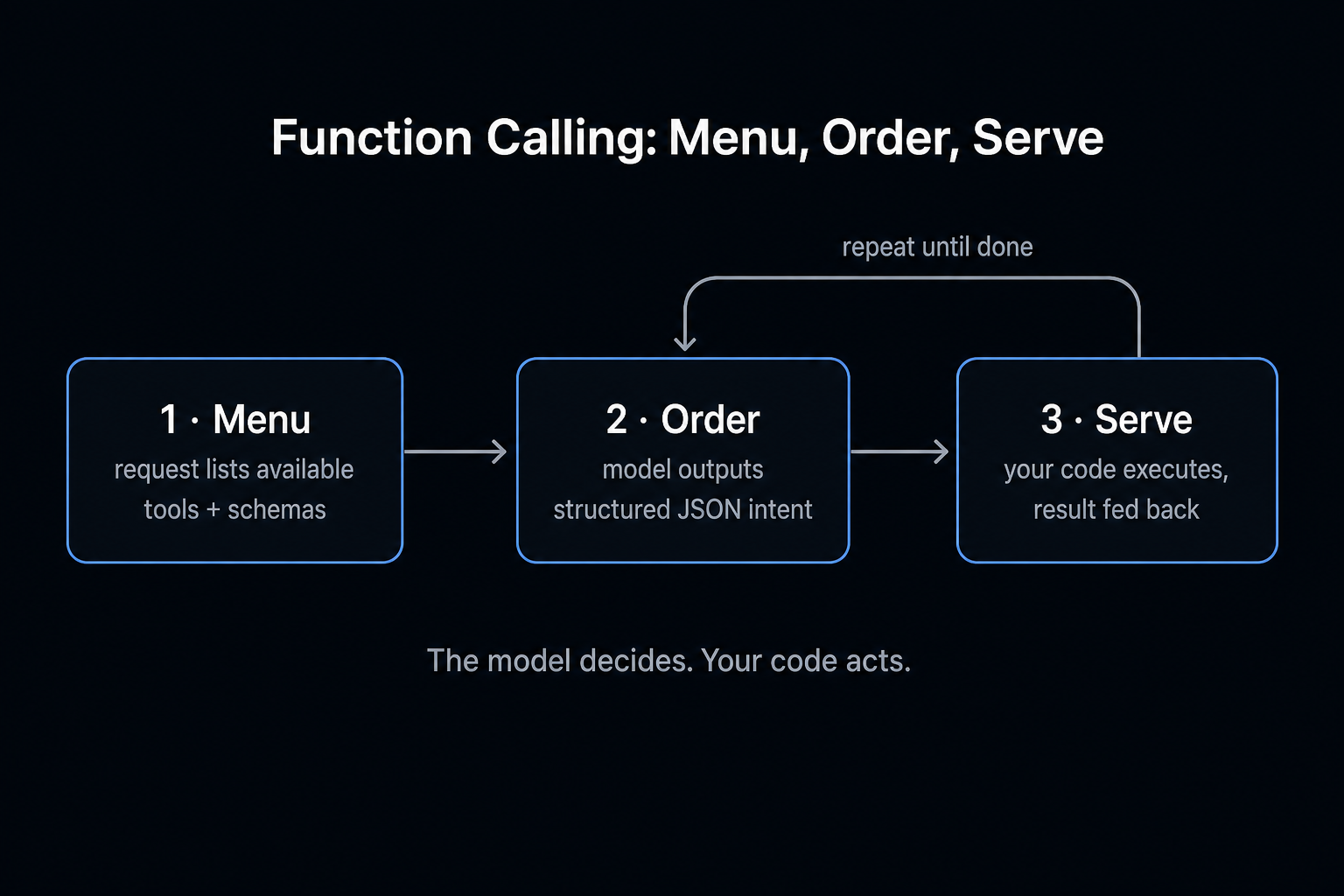
Every function-calling interaction is the same three steps:
- Menu - your request lists available tools: names, descriptions, parameter schemas
- Order - the model replies with structured JSON: "call this tool with these arguments"
- Serve - your code executes, feeds the result back as a new message
The loop repeats: the model reads the result, maybe orders again, or answers the user. A real exchange:
User: any TODO comments in checkout.ts?

Model → tool_call: read_file({ path: "src/checkout.ts" })
Your code → executes fs.readFile → returns content

Model → tool_call: search_text({ pattern: "TODO", path: "src/checkout.ts" })
Your code → executes → returns matches

Model: "3 TODOs - lines 12, 45, 89. The one on 45 references a missing Stripe webhook."
The model never touched disk. It ordered; your runtime served.
The Menu Format: JSON Schema
All three major providers describe tools with JSON Schema:
{
  "name": "get_weather",
  "description": "Get current weather for a city",
  "parameters": {
    "type": "object",
    "properties": {
      "city": { "type": "string", "description": "City name, e.g. Tokyo" },
      "unit": { "type": "string", "enum": ["celsius", "fahrenheit"] }
    },
    "required": ["city"]
  }
}
Three fields punch above their weight:
description- the model picks tools by semantic-matching this text. It's prompt engineering, not documentation.enum- locks values. Without it, expect"Celsius","C", and"celsius"in the same afternoon.required- everything else is optional and the model will decide for you.
Keep schemas shallow. Past three nesting levels, argument accuracy visibly degrades.
Free AI Builder Newsletter
Weekly guides on AI tools & builder strategies.
Three Providers, One Skeleton
Same architecture, different field names:
| OpenAI | Anthropic | Gemini | |
|---|---|---|---|
| Tool definition | tools[].function | tools[] (flat) | functionDeclarations[] |
| Schema field | parameters | input_schema | parameters |
| Call appears in | message.tool_calls[] | content[] as tool_use block | parts[] as functionCall |
| Arguments | JSON string (parse it!) | object | object |
| Call ID | tool_call_id | tool_use_id | matched by name |
| Result role | role: "tool" | role: "user" + tool_result | role: "user" + functionResponse |
| Force/forbid calls | tool_choice | tool_choice | functionCallingConfig |
Two gotchas that bite in practice: OpenAI's arguments is a string needing JSON.parse; Anthropic interleaves text and tool_use blocks in one content array, so the model can narrate-call-narrate within a single message. Switching providers is field-mapping work, not architecture work.
Why It's Reliable: Constrained Decoding
Two layers make modern tool calls nearly error-proof:
Training: models ingest millions of examples of (request → tool choice → arguments → result → answer) during fine-tuning. That's why you don't write "use get_weather when asked about weather" in your system prompt - selection is learned.
Inference: when emitting a tool call, the engine switches to constrained decoding - at each token, everything violating the JSON schema gets its probability zeroed. If unit is enum-locked to celsius | fahrenheit, the token for "C" is mathematically unreachable. Bonus: structural tokens (braces, field names) skip full sampling, so structured output often generates faster than prose.
15-25% → ~0%
tool-call parse failure rate: prompt-hack era vs constrained decoding. The problem didn't get better - it got deleted.
Parallel Calls and tool_choice
Parallel calls: all three APIs let a model request multiple tools in one response - "weather in Tokyo AND London" comes back as two calls you can execute concurrently. Models go parallel when calls are independent, sequential when one feeds the next. Return each result tagged with its call ID so the model can match them up.
tool_choice controls the menu discipline:
auto- model decides (default)required/any- must call something- named tool - must call that
none- text only
The sleeper feature is forcing a named tool: define extract_order_info with a strict schema, force it, and the model becomes a structured-data parser with guaranteed-shape output. Cleanest extraction pattern available.
Writing Descriptions That Get Picked Correctly
Tool selection quality is mostly description quality:
- Write when-to-use, not what-it-does. "Query the products table" loses to "Use when the user asks about product price, stock, or details. NOT for orders - use get_order."
- Draw boundaries when tools are siblings. Two similar tools without explicit "this not that" guidance = coin-flip selection. Boundary lines in descriptions cut wrong-tool calls ~40%.
- Cap parameters at 5-8. Beyond that, argument errors climb. Split the tool or default the long tail.
enumeverything enumerable.- Put examples in descriptions.
"City name, e.g. 'Tokyo', 'New York'"kills format ambiguity cheaply. - Name for skimmability.
search_code_by_regexbeatssearchbeatstool_2.
Errors: Feed Them Back, Don't Eat Them
Tools fail - timeouts, bad paths, permissions. The move is returning the failure to the model with enough context to self-correct:
{
  "role": "tool",
  "tool_call_id": "call_abc123",
  "content": "Error: no file at 'src/main.ts'. Files in src/: index.ts, app.ts, utils.ts"
}
Given that, the model retries with index.ts on its own. Three rules: errors carry context (what's valid, not just "failed"); retries cap at 2-3 before escalating to the user; recoverable (bad argument) and unrecoverable (no permission) errors get distinguished - retrying the second wastes everyone's time.
Where This Sits in the Stack
Function calling is the contract every layer above depends on: the agent loop is function calling repeated until done; MCP standardizes how menus get distributed across clients; Claude Code is function calling with very good tools and a very good harness.
Model outputs intent as JSON. Your code makes it real. Everything else is elaboration.
Sources & Verification
This guide is written from hands-on testing, then cross-checked against primary sources - official documentation and first-party announcements. Field results and opinions are labeled as such. See our editorial standards.
- Function calling (OpenAI Platform Docs) - Official OpenAI guide to defining tools and handling tool calls
- Tool use with Claude (Anthropic Docs) - Official Anthropic docs on tool definitions, tool_use blocks, and tool results
Join AI Builder Club


$37/mo
Get the free newsletter
Weekly deep-dives on AI tools, automation workflows, and builder strategies. Join 5,000+ readers.
No spam. Unsubscribe anytime.
Continue Learning
Mastering AI Agents
The builder's deep dive into agent loops, tools, context engineering & memory. Go from using AI to building it.
AI Agent 101
Build autonomous research agents with tool use, API access, web scraping, and deep search.
Build Production LLM Apps
Build production-ready LLM apps with real-time APIs, multimodal models, and agentic workflows.