AI Agents in 2026: Build, Deploy, and Scale (Full Guide)
What AI agents are, how the agent loop works, frameworks vs raw API, memory, multi-agent systems, and MCP. The 2026 builder's roadmap.
Course outline · Build AI Agents (1.1)
An AI agent is a program that loops between calling an LLM and executing tools the LLM picks, until a goal is reached. The whole pattern fits in ~60 lines of Python. Frameworks add convenience for some patterns and complexity for others. This is the complete pillar guide: what agents are, how the loop works, when frameworks earn their cost, and links to every deep-dive in the series.
If you read one resource on agents, this is it. If you want to go deep, every section links to a dedicated guide.
Prefer to watch? Here's the video on where the biggest agent opportunities are and how to build for them:
How This Course Works
This is lesson 1.1 - the overview. The full course runs four numbered modules, visible in the course outline on this page:
Module 1: Fundamentals - what agents are, function calling, memory, and the free AI Agents 101 series that builds a working agent step by step.
Module 2: Build From Scratch - the 60-line Python agent loop, multi-agent coordination, and LangChain vs CrewAI vs raw API honestly compared.
Module 3: Tools & Infrastructure - MCP from first server to wire-level internals to security, plus context engineering.
Module 4: Production - permission modes, sandboxing, and the harness engineering discipline that separates demos from deployed systems.
Lessons are sequenced but self-contained - skip to what you need. The rest of this page is the reference layer: every core concept in one place, with links into the deep-dive lesson for each.
What an AI Agent Actually Is
An AI agent is three things plus a loop:
- An LLM that supports tool use — Claude (Sonnet/Haiku/Opus), GPT-4o, Gemini 2.0+. The model can return "I want to call function X with args Y" instead of just text.
- A set of tools — Python functions you write, or APIs, or MCP servers (read_file, search_web, query_db, charge_card).
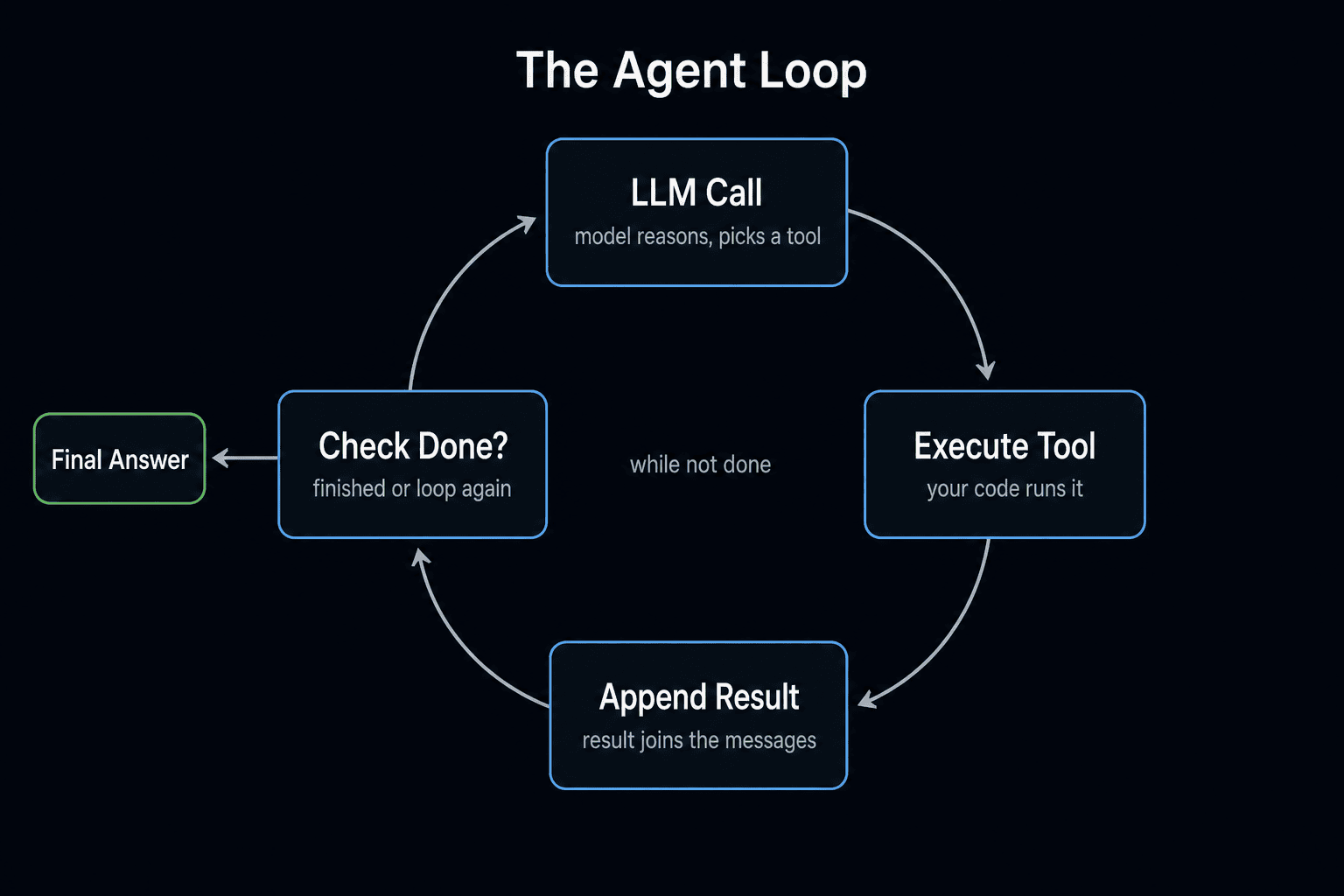
- A loop — send a user message, receive either text or tool calls, execute tool calls, append results, send back, repeat until the model is done.
That's it. Memory, planning, reflection, multi-agent orchestration — all of it is built on top of these three primitives. Master the primitives first. Once you have built the loop yourself, every framework becomes legible.
How the Agent Loop Works
The pattern is the same across every implementation. In pseudo-code:
while not done and step < max_steps:
    response = llm.call(messages, tools)
    messages.append(response)

    if response.stop_reason == "end_turn":
        return response.text

    if response.stop_reason == "tool_use":
        for tool_call in response.tool_calls:
            result = execute_tool(tool_call)
            messages.append(result)
Five lines do the actual work. Everything else is error handling, observability, and convenience. The full Python implementation is in how to build an AI agent from scratch.
The most important thing for beginners: always cap max_steps. A confused agent without a step cap will loop forever and burn money. 10–25 is usually enough; alert if exceeded.
Frameworks: When to Use Each
Three real options in 2026.
Raw Anthropic/OpenAI SDK — best for: single-loop agents, learning, production where you want full control. Default choice. ~60 lines for a working agent. No lock-in.
CrewAI — best for: role-based multi-agent crews ("Researcher → Writer → Editor"). ~30 lines for a working pipeline. Great fit for content/research workflows; awkward fit for everything else.
LangChain — best for: heavy RAG with multi-store retrieval, or projects needing 5+ pre-built tool integrations (Notion, Slack, GitHub). Largest ecosystem; heaviest dependency footprint; abstraction debt to manage.
The decision tree: are you learning or building agents 1–3? → raw API. Role-based crew? → CrewAI. Heavy RAG or many tool integrations? → LangChain. Default to raw API. Full breakdown in LangChain vs CrewAI vs raw API.
Memory: When You Need It and What to Use
Three patterns, in order of complexity:
1. In-context memory. Just append to the messages list. Works for any single-session agent. Free.
2. External file memory. Write a JSON or markdown file when the agent learns something worth keeping. Read on next session start. Works for cross-session persistence up to ~50K tokens of memory. Cheap.
3. Vector database memory. ChromaDB, Pinecone, Weaviate. Use when you have hundreds of facts to recall semantically across many sessions. Pay for it only when files become unmanageable.
Most first agents don't need anything beyond #1. Most production agents stop at #2. The AI Agents 101 series walks through all three patterns with code.
Free AI Builder Newsletter
Weekly guides on AI tools & builder strategies.
Multi-Agent Systems
When one agent isn't enough, the pattern that works is coordinator + workers, not "agents talking to each other in free-form chat".
A coordinator agent receives the goal, decides which specialized worker agents to dispatch (often in parallel), collects results, handles failures, and synthesizes the final answer. Workers have focused prompts and specific tools — sharper output than asking one generalist agent to do everything.
Three signals you need multi-agent:
- The task naturally splits into specialized roles (research + writing + editing)
- Sub-tasks have conflicting system prompts
- Sub-tasks should run in parallel for speed
Multi-agent typically costs 3–8x a single-agent run and adds coordination overhead. Pay it only when you get measurable wallclock or quality wins. Full architecture + working code in multi-agent system Python tutorial.
MCP and the Tool Ecosystem
MCP (Model Context Protocol) is an open Anthropic standard that lets any LLM client load custom tools through a consistent interface. Released in late 2024, by 2026 it's supported by Claude Desktop, Claude Code, Cursor, Continue, Cody, Zed, and a growing list of clients.
Why it matters for agent builders: instead of writing custom integrations for every model API, you build (or install) one MCP server and every MCP-compatible agent can use it. Tool reuse compounds.
Common useful MCP servers:
- GitHub MCP — read/write issues, PRs, commits
- Linear MCP — manage tasks
- Postgres MCP — query your database
- Brave Search MCP — web search
- Filesystem MCP — extended file access
You can also build your own — the protocol is JSON-RPC over stdio, and an MCP server in Python takes ~60 lines. See MCP 101 for the full walkthrough, and MCP internals for how the protocol works on the wire.
Cost and Production Considerations
Agents cost real money in production. Three cost categories:
Per-session token costs. A single-loop agent runs $0.05–$0.50 on Sonnet 4.5. Multi-agent systems hit $0.50–$5 per coordination run.
Scale costs. 1000 sessions/day on Sonnet = ~$30–$300/day. Production agents at large scale need cost monitoring infrastructure (Datadog, Anthropic billing API alerts).
Engineering costs. Observability matters. Log every tool call, every failure, every token spend. You will need this when something breaks at 2am.
Three biggest cost levers:
- Prompt caching — 90% off cached input tokens. Stable system prompt + tools = massive savings on multi-turn sessions.
- Model routing — Haiku for simple tasks (3x cheaper than Sonnet). Opus only when needed.
- max_steps caps — prevents runaway loops. Always cap.
For Claude-specific cost patterns, see reduce Claude Code API costs — most patterns transfer to general agent code.
Common Pitfalls (Avoid These)
1. Skipping the from-scratch step. If you start with LangChain, you'll never deeply understand what's happening. Build the 60-line loop first.
2. No max_steps cap. Confused agents loop forever. Always cap at 10–25.
3. Vague tool descriptions. Tool descriptions tell the model when to call each tool. "Read a file" is fine. "Read a file using advanced parsing" misleads the model.
4. Returning Python objects to the model. Tool results must be strings (or JSON-serializable structures the SDK serializes). Don't return raw dicts of objects.
5. Treating frameworks as best practice. Most companies running production agents use hand-written loops or thin wrappers, not frameworks. Frameworks are tools, not table stakes.
6. Free-form agent-to-agent chat. Two agents in open conversation will loop, hallucinate, or burn tokens. Always have a coordinator with explicit handoffs.
7. Ignoring observability. Agents fail silently in subtle ways. Log every tool call, every result, every cost. Audit when something seems off.
Career: Skills That Matter for Agent Engineers
The hiring market for "agent engineers" took off in 2025. The skills companies actually pay for, in order:
-
Build agents from scratch fluently. Hire signal #1. If you can't write the 60-line loop without a framework, you don't really know how agents work.
-
Tool design. Writing useful, well-described tools is half the engineering work. Bad tools produce bad agents regardless of model.
-
Production patterns. Error handling, max_steps caps, cost monitoring, observability, failure recovery. These are rarer than they should be.
-
Multi-agent orchestration. Coordinator patterns, parallel dispatch, handoff protocols. See multi-agent system tutorial.
-
MCP server design. Building reusable tool servers that work across clients. Future-proof skill.
-
Framework literacy (LangChain, CrewAI, AutoGen). Less important than the above, but useful for reading codebases and evaluating tradeoffs.
The "vibe coder who once made a chatbot" doesn't get hired. The engineer who has shipped 3 production agents (with error handling, monitoring, and clear cost discipline) does.
Who AI Agents Are For
Software engineers automating internal workflows: code review agents, test generators, deploy bots, customer support triage. Highest ROI in 2026 — agents replace whole categories of glue code.
Indie hackers and solo founders: agents replace expensive SaaS for narrow workflows (research, lead gen, data extraction). Cheap leverage if you can build them.
Operations and analytics teams: data analysis agents, reporting agents, dashboard agents. Plays well with multi-agent patterns.
Researchers and writers: research-and-write pipelines benefit massively from CrewAI-style multi-agent setups.
Not for everyone: agents are still flaky for tasks needing high reliability or low latency. Voice agents, real-time customer support, anything where 90% accuracy isn't acceptable. Build with eyes open.
What to Learn Next
Pick the path that matches where you are.
Total beginner: Start with how to build an AI agent from scratch — 60 lines of Python, fully understood. Then read AI Agents 101 Part 1 for the conceptual deep-dive.
Already built one agent: Read the framework comparison before reaching for LangChain. Most agents don't need it.
Building production agents: Add memory (AI Agents 101 series covers this) and observability. Read reduce API costs — patterns transfer.
Ready for multi-agent: Multi-agent system tutorial covers the coordinator pattern in 200 lines.
Want a standardized tool ecosystem: Learn MCP 101.
For the structured path with hands-on workflows on real projects, our AI Agent 101 course covers everything in this guide plus deployment, observability, and case studies.
The Bottom Line
AI agents are not a framework, a product, or a buzzword. They're a 60-line Python pattern: LLM, tools, loop. Once you build that loop yourself, every "agent framework" becomes a tradeoff calculation rather than a black box.
The skills compound: from-scratch agent → framework literacy → memory → multi-agent → MCP. Each step builds on the last. Most of the value comes from the first two; everything beyond that is for specific shapes of problem.
If you do nothing else this week: write the 60-line agent loop. Run it on a real task. Let the loop do something useful. The rest of the cluster lives here whenever you're ready.
Frequently Asked Questions
What is an AI agent?
An AI agent is a program that loops between calling an LLM and executing tools the LLM picks, until a goal is reached. The "agent" part is the loop, not the model. Three components: (1) an LLM that supports tool use (Claude, GPT-4o, Gemini), (2) a set of tools (Python functions, APIs, MCP servers), (3) a loop that runs LLM → tool call → tool result → LLM until the model says it is done. Memory, planning, multi-agent orchestration — all built on top of these primitives.
How is an AI agent different from a chatbot?
A chatbot replies with text. An agent replies with actions — calling APIs, querying databases, writing files, running code, executing transactions in the real world. The model is similar; the wrapper is what changes. Claude.ai is a chatbot. Claude Code is an agent (it edits files, runs tests, commits to git). The difference is whether the LLM can affect the world beyond the chat window.
Should I learn agents from scratch or with a framework like LangChain?
Start from scratch. The agent loop is ~60 lines of Python — see how to build an AI agent from scratch. Once you understand the loop, frameworks become legible (you can read CrewAI's source and immediately see what it adds). Without that foundation, every framework feels like magic, which is the worst place to be when something breaks. After the from-scratch agent works, evaluate frameworks honestly for your use case — see LangChain vs CrewAI vs raw API.
Which LLM is best for building AI agents in 2026?
Claude Sonnet 4.5 is the strongest tool-use model — best balance of reliability, speed, and cost ($3/M input, $15/M output). GPT-4o and GPT-5 are competitive on tool use, slightly weaker on instruction following over many turns. Gemini 2.0 Flash is the cheapest serious option ($0.10/M input). Haiku 4 for high-throughput simple agents. Opus 4.5 for the hardest reasoning. For learning, Sonnet 4.5 is the default — patterns transfer to every other tool-use-capable model with minimal changes.
Do I need a vector database to build an agent?
No, not to start. Vector databases solve "long-term memory across many sessions". Most first agents do not need that. Three-step memory progression: (1) in-context memory — just append to the messages list, (2) external file memory — write a JSON file when persistence matters, (3) vector DB (ChromaDB, Pinecone) only when you have hundreds of facts to recall semantically. Adding a vector store on day one is premature optimization 90% of the time.
When do I need a multi-agent system?
Three signals: (1) The task naturally splits into specialized roles (research + writing + editing). (2) Sub-tasks need conflicting system prompts ("be terse" vs. "be thorough"). (3) Sub-tasks should run in parallel for speed. If your task is sequential, single-purpose, or trivially small — one agent is better. Multi-agent typically costs 3–8x and adds coordination overhead. Pay it only when you get measurable quality or speed gains. Full pattern in our multi-agent system Python tutorial.
How does MCP relate to building agents?
MCP (Model Context Protocol) is an open standard that lets your agent call external tools through a consistent interface. Instead of writing custom code for every API, you build (or install) an MCP server and any MCP-compatible agent (Claude Desktop, Claude Code, Cursor, your own) can use it. For your own agents, MCP is the cleanest way to add tools that work across multiple LLM providers without rewrites. See MCP 101.
How much does running an AI agent cost?
Single-loop agents (one LLM call per turn, 5–10 turns): typically $0.05–$0.50 per session on Sonnet 4.5. Multi-agent systems (coordinator + 3–6 workers): $0.50–$5 per session. Production agents at scale (1000s of sessions/day): can hit $1K–$10K/month per agent. Three biggest cost levers: (1) prompt caching (90% off cached input), (2) routing simple tasks to Haiku (3x cheaper), (3) capping max_steps to prevent runaway loops. Always cap.
Sources & Verification
This guide is written from hands-on testing, then cross-checked against primary sources - official documentation and first-party announcements. Field results and opinions are labeled as such. See our editorial standards.
Join AI Builder Club


$37/mo
Get the free newsletter
Weekly deep-dives on AI tools, automation workflows, and builder strategies. Join 5,000+ readers.
No spam. Unsubscribe anytime.