Multi-Agent System Python Tutorial (2026)
Build a multi-agent system in Python: a coordinator delegates to specialized workers and handles failures. Complete code, no framework lock-in.
Course outline · Build AI Agents (2.2)
A multi-agent system is software where one coordinator agent delegates to specialized worker agents and synthesizes their results. Done well, it produces better output than one generalist agent. Done badly, it's an expensive way to recreate what one agent could do.
This tutorial walks through building a working coordinator + worker system in ~200 lines of Python — no LangChain, no CrewAI, just the Anthropic SDK. The pattern transfers to OpenAI, Gemini, or any tool-use-capable LLM with minimal changes.
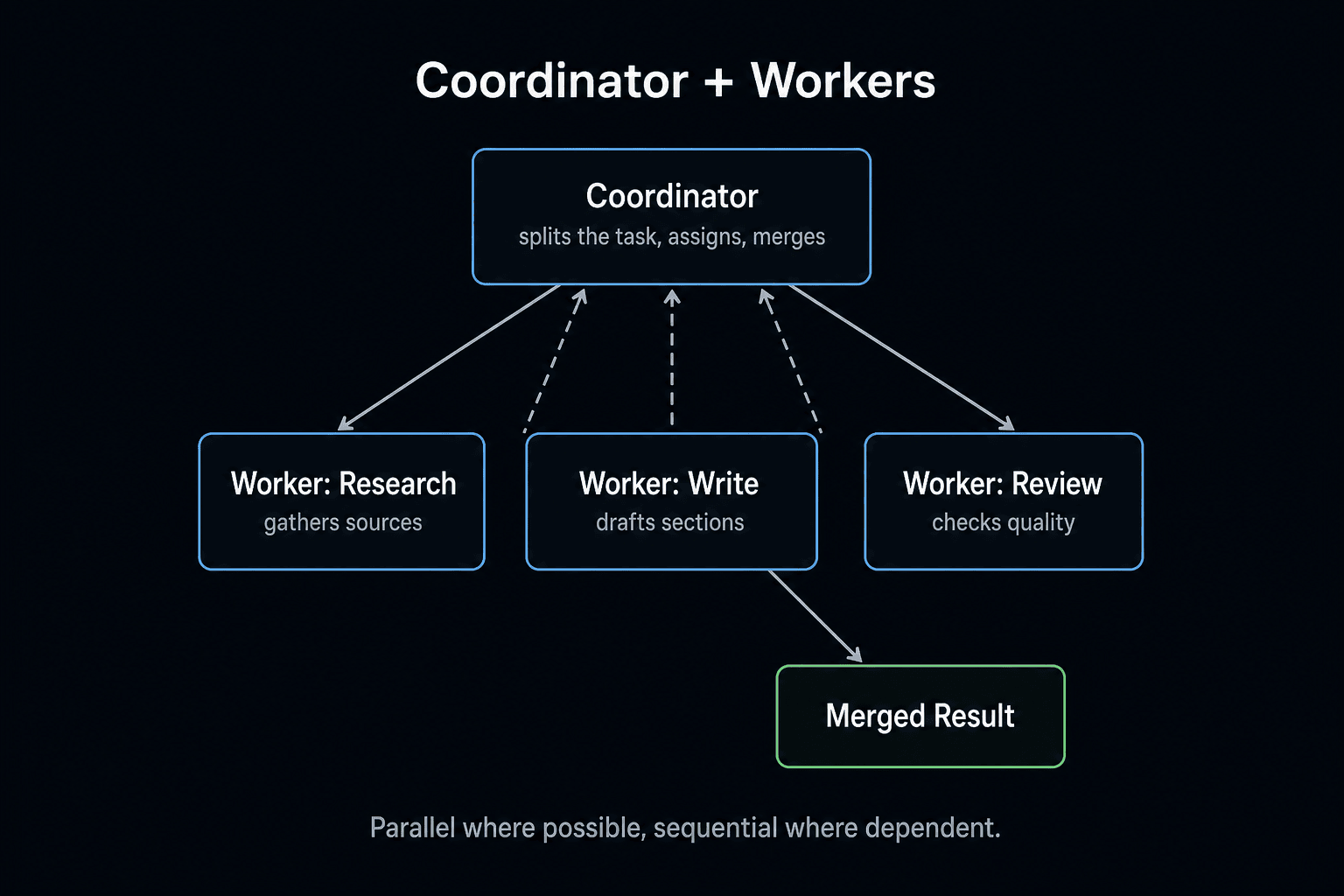
The Coordinator + Worker Pattern
Three components:
- Coordinator — one agent that receives the user's goal, decides which workers to call, dispatches tasks, collects results, and produces the final answer.
- Workers — specialized agents with focused prompts and their own tools. Each does one thing well.
- Dispatch logic — Python code that wires the coordinator to the workers and handles parallel execution + errors.
The user only ever talks to the coordinator. Workers are invisible internal infrastructure.
This pattern wins because: each worker has a tight, focused system prompt (which produces sharper output), workers run in parallel (which cuts wallclock), and the coordinator handles cross-cutting concerns (validation, retries, synthesis) instead of muddling them into worker prompts.
When to Use This vs. One Agent
Use multi-agent when:
- The task naturally splits into specialized roles (research, writing, validation)
- Sub-tasks have conflicting system prompts ("be terse" vs. "be thorough")
- Sub-tasks should run in parallel for speed
- The output needs cross-checking by a different "voice"
Use one agent when:
- The task is single-purpose
- The task is sequential and small
- You haven't built a single-agent version yet (always start there)
If you're not sure, start with one agent. Multi-agent adds coordination overhead and ~3–8x the cost. Pay it only when you get measurable quality or speed gains.
The Goal: A Research-and-Write System
We'll build a system that takes a topic and produces a 500-word factual brief. Three workers:
- Researcher — searches the web, returns 5 sources
- Writer — drafts the brief from the sources
- Fact-Checker — validates claims, flags any that aren't supported
The coordinator routes the work, runs research and fact-checking in parallel where possible, and assembles the final output.
Step 1: Define the Worker Agents (60 lines)
Each worker is a function that takes inputs and returns a string. Internally, each is a small agent loop with a focused system prompt.
from anthropic import Anthropic

client = Anthropic()

def run_worker(system_prompt: str, user_message: str, tools: list = None, model: str = "claude-sonnet-4-5", max_steps: int = 8) -> str:
    """Generic worker runner — runs an agent loop with a focused system prompt."""
    messages = [{"role": "user", "content": user_message}]

    for _ in range(max_steps):
        response = client.messages.create(
            model=model,
            max_tokens=4096,
            system=system_prompt,
            tools=tools or [],
            messages=messages,
        )
        messages.append({"role": "assistant", "content": response.content})

        if response.stop_reason == "end_turn":
            return next((b.text for b in response.content if hasattr(b, "text")), "")

        if response.stop_reason == "tool_use":
            tool_results = []
            for block in response.content:
                if block.type == "tool_use":
                    result = execute_tool(block.name, block.input)
                    tool_results.append({
                        "type": "tool_result",
                        "tool_use_id": block.id,
                        "content": str(result),
                    })
            messages.append({"role": "user", "content": tool_results})

    return "Worker exceeded max_steps."


# === RESEARCHER ===
RESEARCHER_PROMPT = """You are a research analyst. Given a topic, use the web_search tool to find 5 high-quality sources. Return a JSON list of {url, title, key_facts} objects. Prefer primary sources. Never invent URLs."""

def researcher(topic: str) -> str:
    return run_worker(
        system_prompt=RESEARCHER_PROMPT,
        user_message=f"Research this topic: {topic}",
        tools=[WEB_SEARCH_TOOL_DEF],
        model="claude-haiku-4",  # fast + cheap for research
    )


# === WRITER ===
WRITER_PROMPT = """You are a tech writer. Given research notes, produce a 500-word factual brief. Use plain English, cite sources inline as [1], [2], etc. No marketing fluff. No introductions like 'In this article'."""

def writer(topic: str, research: str) -> str:
    return run_worker(
        system_prompt=WRITER_PROMPT,
        user_message=f"Topic: {topic}\n\nResearch:\n{research}\n\nWrite the brief.",
        model="claude-sonnet-4-5",  # writing benefits from Sonnet
    )


# === FACT-CHECKER ===
FACT_CHECKER_PROMPT = """You are a fact-checker. Given a brief and the source research, identify any claims in the brief not supported by the sources. Return a JSON list of {claim, severity, suggested_fix} for each unsupported claim. Empty list if all claims are supported."""

def fact_checker(brief: str, research: str) -> str:
    return run_worker(
        system_prompt=FACT_CHECKER_PROMPT,
        user_message=f"Brief:\n{brief}\n\nSource research:\n{research}\n\nFlag unsupported claims.",
        model="claude-haiku-4",  # narrow task, Haiku is enough
    )
Three workers, three focused prompts, three different model choices based on task. Each worker is independently testable and replaceable.
Free AI Builder Newsletter
Weekly guides on AI tools & builder strategies.
Step 2: The Coordinator (60 lines)
The coordinator orchestrates. It dispatches workers (sometimes in parallel), handles failures, and synthesizes output.
import concurrent.futures
import json

COORDINATOR_PROMPT = """You are a research-and-write coordinator. Given a topic, decide what research workers to dispatch and synthesize their outputs into a final answer."""

def coordinate(topic: str) -> dict:
    """Run the full multi-agent pipeline. Returns the final brief + audit trail."""

    # Step 1: Research (one worker)
    print(f"[coordinator] Dispatching researcher for: {topic}")
    research = researcher(topic)

    # Step 2: Write (one worker, depends on research)
    print(f"[coordinator] Dispatching writer.")
    brief = writer(topic, research)

    # Step 3: Fact-check (parallel — runs independently of writing if we had multiple variants)
    print(f"[coordinator] Dispatching fact-checker.")
    fact_check_result = fact_checker(brief, research)

    # Step 4: Synthesize — if any claims flagged, retry the writer
    flagged = json.loads(fact_check_result) if fact_check_result.startswith("[") else []

    if flagged:
        print(f"[coordinator] Fact-checker flagged {len(flagged)} claims. Retrying writer with fixes.")
        brief = writer(
            topic,
            f"{research}\n\nIMPORTANT: avoid these unsupported claims:\n{json.dumps(flagged)}"
        )

    return {
        "topic": topic,
        "brief": brief,
        "research": research,
        "fact_check": fact_check_result,
        "iterations": 2 if flagged else 1,
    }
Notice what's not here: agents talking to agents in free-form chat, complex state machines, agents pulling work off a queue. The coordinator is just Python code that calls workers and handles results. Boring is good.
Step 3: Add Parallelism Where It Helps (20 lines)
Research and writing are sequential — the writer needs the research. But if you wanted to research multiple sub-topics in parallel, that's where concurrent.futures comes in.
def parallel_research(subtopics: list[str]) -> dict:
    """Research multiple subtopics in parallel."""
    results = {}
    with concurrent.futures.ThreadPoolExecutor(max_workers=4) as executor:
        future_to_topic = {executor.submit(researcher, t): t for t in subtopics}
        for future in concurrent.futures.as_completed(future_to_topic):
            topic = future_to_topic[future]
            try:
                results[topic] = future.result()
            except Exception as e:
                results[topic] = f"Error: {e}"
    return results
Four workers run concurrently. Wallclock for 4 research tasks: ~30 seconds instead of ~120 seconds. API rate limits are the only ceiling.
This is where multi-agent systems pay back: wallclock parallelism on independent subtasks.
Step 4: Add Error Handling
Real systems fail. Workers crash, APIs timeout, JSON parses fail. The coordinator must handle these gracefully.
def coordinate_safe(topic: str) -> dict:
    """Coordinator with retry and fallback."""
    try:
        research = researcher(topic)
    except Exception as e:
        print(f"[coordinator] Researcher failed: {e}. Using cached fallback.")
        research = load_cached_research(topic) or "[no research available]"

    try:
        brief = writer(topic, research)
    except Exception as e:
        return {"error": f"Writer failed: {e}", "topic": topic}

    # Fact-checking is optional — degrade gracefully if it fails
    try:
        fact_check = fact_checker(brief, research)
    except Exception:
        fact_check = "[]"

    return {"topic": topic, "brief": brief, "fact_check": fact_check}
The pattern: critical workers fail loudly; optional workers degrade gracefully. A flaky fact-checker shouldn't block the brief.
Step 5: Run It
if __name__ == "__main__":
    result = coordinate("MCP server adoption in 2026")
    print(result["brief"])
    print(f"\nFact check: {result['fact_check']}")
You'll see:
[coordinator] Dispatching researcher for: MCP server adoption in 2026
[coordinator] Dispatching writer.
[coordinator] Dispatching fact-checker.
[coordinator] Fact-checker flagged 1 claim. Retrying writer with fixes.

# 500-word brief about MCP adoption with [1], [2] citations.
A working multi-agent system in ~200 lines. No framework. No magic.
Common Multi-Agent Mistakes
1. Agents that "chat" with each other. Two agents in free-form conversation will loop, hallucinate, or burn tokens. Use a coordinator with explicit handoffs instead.
2. Bloated worker prompts. A worker prompt should be 50–200 words. Past that, you're not specializing — you're recreating the generalist agent.
3. No max_steps cap on coordinator. A buggy coordinator can recursively dispatch workers forever. Always cap.
4. Synchronous when async would help. If 4 workers are independent, run them in parallel. concurrent.futures.ThreadPoolExecutor is sufficient for most cases.
5. Sharing state by pickling agents. Don't. Pass strings between workers. Workers are stateless functions; the coordinator owns all state.
6. Treating multi-agent as default. If one agent does the job, ship one agent. Multi-agent is a tool for specific shapes of problem, not a best practice.
When to Reach for a Framework
You can build this entire pattern in raw Python. But there are cases where a framework genuinely saves time:
- Role-based crews with 4+ agents in well-defined roles → CrewAI does this with one decorator
- Complex state machines with conditional transitions → LangGraph
- Heavy RAG with multi-step retrieval across many vector stores → LangChain
For everything else, raw Python beats frameworks on debuggability and dependency footprint. See LangChain vs CrewAI vs raw API for the full decision tree.
Production Considerations
If you're shipping multi-agent to production, three things to add:
Observability. Log every worker dispatch, every result, every failure. You will need this when something goes wrong at 2am. LangSmith works; so does plain JSON logs to CloudWatch/Datadog.
Cost monitoring. Multi-agent systems are 3–8x the cost of single-agent. Track token spend per coordination run, set per-run caps, and alert on anomalies.
Idempotency. If the coordinator crashes mid-run, can it resume? Save intermediate results (research, brief drafts) so retries don't re-pay for completed work.
The Bottom Line
A working multi-agent system is ~200 lines of Python. Coordinator pattern, focused worker prompts, parallel dispatch where independent, graceful failure handling. No framework required.
The real skill isn't picking a framework — it's deciding whether you need multi-agent at all. Most "AI agent" projects don't. Start with one agent (see build agent from scratch). Add a second only when you hit a wall the first can't climb. Add a coordinator only when two workers can't stay coordinated implicitly.
Build the simplest thing that works. Add complexity only when it earns its keep.
Frequently Asked Questions
What is a multi-agent system?
A multi-agent system is software where multiple AI agents collaborate to solve a problem one agent can't solve alone. The most common architecture is coordinator + workers: one orchestrator agent decomposes the goal, delegates subtasks to specialized worker agents, collects results, and synthesizes a final answer. Each worker has a focused prompt, its own tools, and its own context — which produces sharper results than asking one generalist agent to do everything.
When do I actually need a multi-agent system vs. one agent?
Three signals you need multi-agent: (1) The task naturally splits into specialized roles (research + writing + editing). (2) Sub-tasks need different system prompts that conflict in a single agent. (3) Sub-tasks should run in parallel for speed. If your task is sequential, single-purpose, or trivially small — one agent is better. Multi-agent adds coordination overhead; only pay it when you get a real benefit.
How is this different from Claude Code sub-agents?
Claude Code sub-agents are an in-process feature for one-shot parallelism inside a single Claude Code workflow — see our sub-agents guide. Multi-agent systems (this tutorial) are standalone Python programs you run as services, scripts, or APIs. They handle long-running coordination, persistent state, error recovery across agents, and arbitrary deployment targets. Use sub-agents inside Claude Code; build multi-agent systems for everything else.
What is the coordinator pattern?
The coordinator pattern uses one "orchestrator" agent that receives the user goal, decides which specialized worker agents to invoke, dispatches tasks (often in parallel), collects results, handles failures, and produces a final synthesized output. The user only talks to the coordinator; workers are invisible. This pattern beats "agents talking to agents in a loop" for production reliability — there's always one agent in charge of the conversation.
How do I prevent agents from looping or arguing?
Three controls: (1) Step caps — each agent has a max_steps limit; coordinator has a max_workers limit. (2) No agent-to-agent free chat — workers return one result to the coordinator and stop. They don't discuss. (3) Explicit handoffs — the coordinator decides what each worker gets; workers don't pull tasks. The "two agents arguing forever" problem comes from giving them open-ended chat protocols. Don't.
Should I use LangGraph or CrewAI for multi-agent systems?
It depends on the pattern. CrewAI is built specifically for role-based crews (Researcher → Writer → Editor) — fastest to ship if your workflow fits. LangGraph is better for complex state-machine workflows where agents transition based on conditions. Raw Python (this tutorial) is better when you want full control, minimal dependencies, and easy debugging. We default to raw Python for production, CrewAI when the role pattern fits cleanly. See the framework comparison for the full breakdown.
Are multi-agent systems worth the cost?
They typically cost 3–8x a single-agent run (one call per worker + coordination overhead). They pay back when: (a) the parallelism cuts wallclock significantly, (b) the specialization produces visibly better output, (c) the task is repeated often enough that the architecture pays for itself in maintainability. They lose when applied to tasks one good agent could handle. Measure quality and cost before committing.
Sources & Verification
This guide is written from hands-on testing, then cross-checked against primary sources - official documentation and first-party announcements. Field results and opinions are labeled as such. See our editorial standards.
Join AI Builder Club


$37/mo
Get the free newsletter
Weekly deep-dives on AI tools, automation workflows, and builder strategies. Join 5,000+ readers.
No spam. Unsubscribe anytime.