Fan Out Sub-Agents in Claude Code for 3x Output
Fan out sub-agents in Claude Code to run search, testing, and refactoring in parallel. The Task tool patterns and real workflows that 3x throughput without bloating context.
Course outline · Claude Code Fundamentals (2.3)
Sub-agents are the Claude Code feature that turns a fast workflow into a fan-out workflow. Instead of one agent reading 8 files in series, four sub-agents read two files each in parallel — and the parent gets back four crisp summaries instead of 8 noisy tool results. Used well, they cut multi-file work by 50–70%. Used badly, they 3x your token bill for no gain.
This guide is the version we wish we had after wasting our first month overusing them.
Watch the full video on using sub-agents the right way after 20+ hours of testing:
What Sub-Agents Actually Are
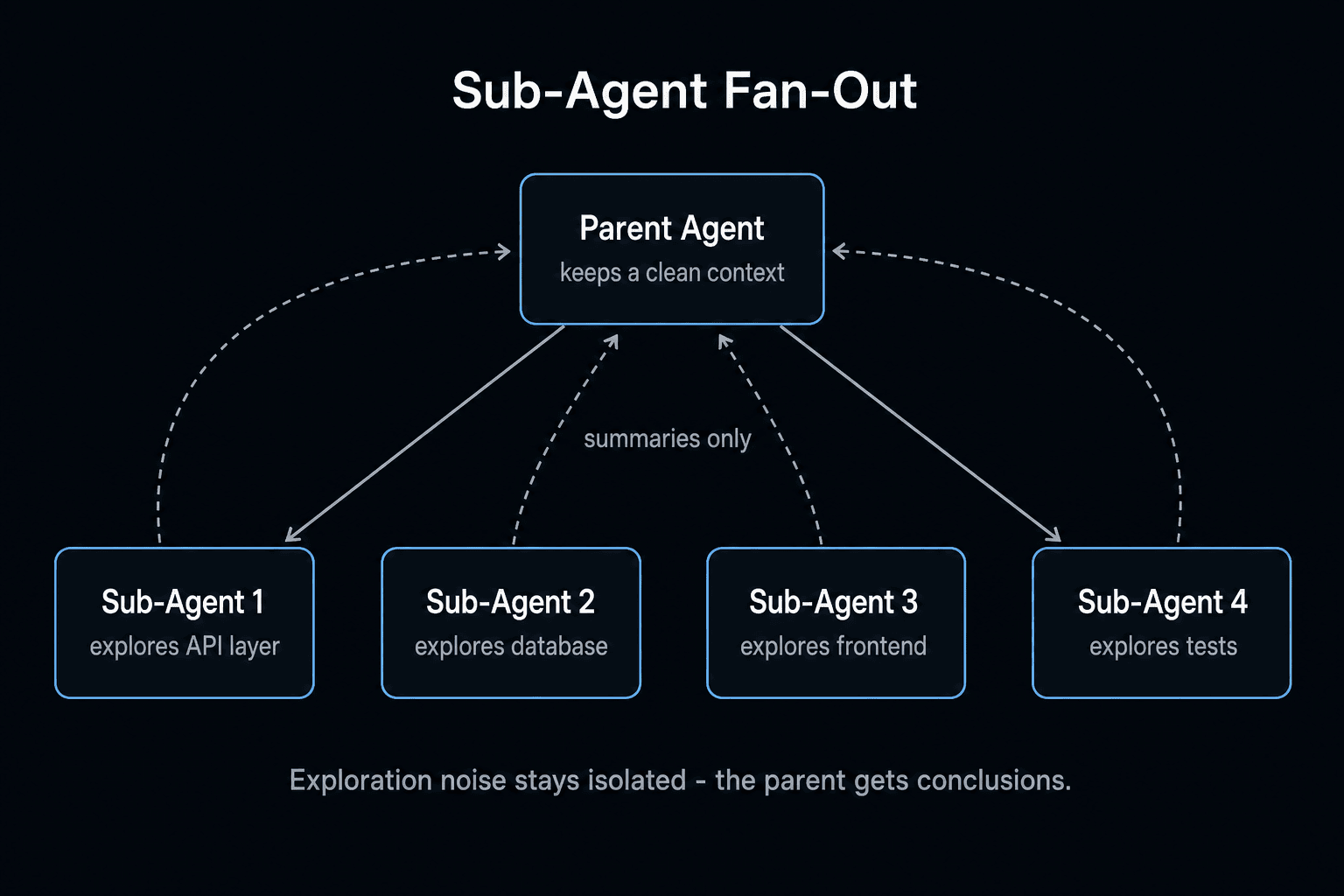
A sub-agent is a separate Claude Code session spawned by the parent via the Task tool. The parent passes a focused prompt and (optionally) a list of files; the sub-agent runs in its own fresh context window, does the work, and returns a single string result.
Three properties matter:
- Isolated context — the parent's context isn't polluted by the sub-agent's exploration.
- Parallel execution — multiple sub-agents run concurrently, bounded by Anthropic API rate limits.
- Single return value — the parent only sees the sub-agent's final answer, not its trajectory.
The parent agent decides when to spawn a sub-agent. You can nudge it via prompt ("use the Task tool to explore in parallel"), but the model picks the actual moment based on its own planning.
When to Use Sub-Agents
Three patterns where sub-agents earn their cost.
Pattern 1: Parallel Exploration
You're starting a feature in an unfamiliar codebase. Instead of one agent reading 12 files in sequence, spawn 4 sub-agents:
- Sub-agent 1: read auth-related files, summarize the auth pattern
- Sub-agent 2: read API route files, summarize the routing pattern
- Sub-agent 3: read DB schema and queries, summarize the data layer
- Sub-agent 4: read the test suite, summarize the testing pattern
Each returns a 200-word summary. The parent now has a 4-paragraph briefing instead of 12 file dumps in its context. Faster wallclock, cleaner context.
Pattern 2: Parallel Application
Same template, different inputs. You're adding a unit test to each of 6 modules. Instead of one agent doing them in series:
- Spawn 6 sub-agents, each given one module + the test template
- Each writes its own test file in isolation
- Parent collects results, runs the suite, fixes any failures
Wallclock drops from ~12 minutes to ~3. Token cost is roughly the same total (you're doing the same work) but parallelism is 4–6x.
Pattern 3: Specialized Personas
Sometimes you want a sub-agent with a very specific prompt — a "ruthless code reviewer", a "performance auditor", a "security checker". A specialized prompt in a fresh context produces sharper output than the same instruction tacked onto the parent's already-loaded context.
When NOT to Use Sub-Agents
Three anti-patterns that waste tokens.
1. Sequential work. "Explore, then plan, then code, then test, then commit" is sequential — each step needs the previous step's context. Sub-agents lose that context. Use one agent.
2. Trivial tasks. Spawning a sub-agent has setup overhead (~3–5 seconds plus a few hundred tokens). For a 30-second task, just do it inline.
3. Tasks that need shared state. If sub-agent A's output should influence sub-agent B mid-flight, you can't do that — sub-agents don't communicate during execution. Run them sequentially or use a coordinator pattern (see our multi-agent system tutorial).
The Task Tool: How Parents Spawn Sub-Agents
Inside Claude Code, the Task tool exposes sub-agent spawning. You don't call it directly — the parent agent decides when to use it. But you can prompt the parent to use it explicitly:
Use the Task tool to spawn 4 sub-agents in parallel. Each one should read a different layer of this codebase (auth, api, db, tests) and return a 150-word summary of the patterns it sees.
The parent agent will plan the 4 sub-agent prompts, fire them concurrently, and aggregate results. You see the parent's planning, the spawning event, and each sub-agent's final return — but not the sub-agent's intermediate steps. This is by design: clean parent context.
A Real Sub-Agent Workflow
Here's a workflow we run weekly in our own codebase. Goal: triage and fix all open bugs tagged "high-priority".
Step 1: Parent agent fetches the list
Parent agent uses the GitHub MCP server to pull issues. Returns a list of 7 open high-priority bugs with descriptions.
Step 2: Spawn 7 explorer sub-agents
Parent fans out:
For each of these 7 bugs, spawn a sub-agent. Each sub-agent should: (a) reproduce the bug locally, (b) read the relevant files, (c) propose a fix, (d) return a short report with: file paths to change, proposed diff, confidence score 1–10. Do not implement yet.
Seven sub-agents run in parallel. Each takes 2–5 minutes. Total wallclock: ~5 minutes.
Step 3: Parent reviews + prioritizes
Parent receives 7 reports. Filters by confidence — keeps the 5 with score ≥7. Asks the human: "5 confident fixes ready. Apply all? Or review individually?"
Step 4: Parent applies fixes sequentially
For each approved fix, parent agent applies the diff, runs tests, commits. Sequential because tests need to run cleanly between fixes.
Total time: 25–40 minutes for what would have been a half-day of bug triage.
The 3 Most Useful Sub-Agent Templates
Templates that compound. Save them in your CLAUDE.md or a snippets file.
Template 1: The Codebase Explorer
Spawn N sub-agents, one per directory in this list: [...]. Each sub-agent reads its directory, identifies the 3 most important files, and returns a 100-word summary covering: purpose, key patterns, dependencies. Aggregate into a 500-word architecture brief.
Template 2: The Test Generator
Spawn N sub-agents, one per module in this list: [...]. Each sub-agent reads its module + existing test patterns from /tests, then writes one test file matching the existing patterns. Return only the test file content, not implementation changes.
Template 3: The Solution Surveyor
Spawn 3 sub-agents. Each one researches a different approach to [problem]: (a) library-based, (b) custom code, (c) external service. Each returns a 200-word comparison of pros, cons, and rough cost/complexity. Synthesize into a recommendation.
Cost Math for Sub-Agents
Sub-agents cost real money. Here's the back-of-envelope:
| Workflow | # Sub-agents | Tokens (approx) | Cost (Sonnet 4.5) |
|---|---|---|---|
| Single agent baseline | 0 | 100k in / 10k out | ~$0.45 |
| Codebase exploration (4-fan-out) | 4 | 400k in / 25k out | ~$1.58 |
| Test generation (6-fan-out) | 6 | 600k in / 30k out | ~$2.25 |
| Bug triage (7-fan-out) | 7 | 700k in / 50k out | ~$2.85 |
Sub-agents typically cost 3–6x a single-agent run — but cut wallclock by 50–80%. The tradeoff is paying with money to save time. Whether that's worth it depends on what your time costs and how often the parallel pattern fires.
For cost-sensitive workflows, see reduce Claude Code API costs — the same techniques (Haiku for sub-agents, prompt caching, scoped context) compound on sub-agent workflows.
Common Sub-Agent Mistakes
1. Spawning sub-agents for serial work. If sub-agent B needs sub-agent A's output, you can't parallelize. Just run sequentially.
2. Bloating sub-agent prompts. A sub-agent prompt should be 100–300 words. Past that, you're not specializing — you're loading the same context into every fresh window.
3. Not aggregating results. If you spawn 6 sub-agents and just dump their outputs end-to-end, you've wasted the isolation benefit. Have the parent synthesize.
4. Ignoring rate limits. On API Tier 1, more than ~5 concurrent sub-agents will queue. If you're paying for parallelism and getting serial execution, check your rate limits in the Anthropic console.
5. Using Opus for sub-agents. Opus is 5x the cost of Sonnet for marginal gains on most sub-agent tasks. Default sub-agents to Sonnet (or Haiku for trivial tasks); reserve Opus for the parent.
When to Reach for Multi-Agent Systems Instead
Sub-agents are great for fan-out within one workflow. They're not designed for long-running multi-agent systems with handoffs, shared memory, and coordinator/worker patterns. For that, you need a real multi-agent framework — see our multi-agent system Python tutorial and LangChain vs CrewAI vs raw API breakdown.
The boundary is clear: sub-agents are a Claude Code feature for one-shot parallelism. Multi-agent systems are an architecture for ongoing autonomous work.
The Bottom Line
Sub-agents are the highest-leverage advanced feature in Claude Code, and the easiest one to misuse. Use them for parallel exploration, parallel application of one template, and specialized personas. Don't use them for sequential work or trivial tasks. Default to Sonnet, cap at 4–6 concurrent, and always have the parent synthesize results.
The right mental model: sub-agents are how you trade money for wallclock. If wallclock matters more than cost on a given task, fan out. Otherwise, one agent is fine.
Frequently Asked Questions
What is a Claude Code sub-agent?
A sub-agent is a separate Claude Code session spawned by the parent agent via the Task tool. The parent gives the sub-agent a focused task and a fresh context window; the sub-agent does the work in isolation and returns a single result. Sub-agents are how you run parallel work — search, explore, test, refactor — without polluting the parent agent's context. They are also how you specialize: a "test-writer" sub-agent with a tight prompt produces better tests than a generalist parent.
How do I fan out sub-agents in Claude Code?
Fanning out means spawning several sub-agents at once with the Task tool, each on its own slice of the work, so they run in parallel instead of one after another. In practice you tell the parent something like "use the Task tool to explore these four areas in parallel," and it launches one sub-agent per branch that each returns a short summary. The parent stays lean because it only sees those summaries, not each sub-agent's full trajectory. Fan-out starts paying off at four or more independent branches: parallel search, parallel tests, parallel refactors. Keep it in the 3 to 8 range so you don't hit API rate limits.
When should I use sub-agents instead of just one Claude Code session?
Three rules: (1) The work is parallelizable — searching 5 directories, writing tests for 3 modules, exploring competing solutions. (2) You want context isolation — the parent's context is already loaded with critical files; you don't want to bloat it with exploration. (3) The task is repetitive — same template, different inputs. If the task is sequential and small, sub-agents add overhead with no benefit. Rule of thumb: sub-agents start paying off at 4+ parallel branches.
How many sub-agents can I run in parallel?
Practically, 3–8 is the sweet spot. The Anthropic API has rate limits (typically 50 requests/minute on Tier 1, much higher on Tier 4); past that, sub-agents queue and you lose the parallelism win. Cost also scales linearly — 6 sub-agents cost ~6x a single session's tokens. For most workflows, 4 sub-agents = best ROI.
How do sub-agents differ from MCP tools?
MCP tools extend the capabilities of one agent (e.g. add Linear access, add a SQL runner). Sub-agents extend the parallelism of one workflow (e.g. run 4 explorations at once). They compose — a parent agent can spawn sub-agents that each use MCP tools. See our MCP 101 guide for MCP server basics.
Do sub-agents share context with the parent?
No — each sub-agent gets a fresh context window with only what the parent passes in. This is the feature, not a bug. It is why sub-agents are useful for context isolation. The parent gets back only the sub-agent's final answer (a few hundred to a few thousand tokens), not the sub-agent's entire trajectory. This keeps the parent's context lean even when the sub-agent did massive exploration.
What is the biggest mistake people make with sub-agents?
Using them for things that should be one agent. Running 5 sub-agents to "plan, code, test, review, commit" is worse than one agent doing all 5 sequentially — because each sub-agent loses context the next one needs. The Task tool was designed for parallel exploration and parallel application of the same template. Use it for that. Use one agent for sequential work.
How do I debug a misbehaving sub-agent?
Two techniques. (1) Print the prompt — add an instruction in the parent like "before spawning, output the sub-agent prompt you are about to use" and inspect it. 90% of sub-agent failures are bad prompts. (2) Run it standalone — copy the sub-agent prompt and run it as a regular Claude Code session. If it works there but fails in parallel, the issue is concurrency or rate limits, not the prompt itself.
Sources & Verification
This guide is written from hands-on testing, then cross-checked against primary sources - official documentation and first-party announcements. Field results and opinions are labeled as such. See our editorial standards.
- Create custom subagents (Claude Code Docs) - Official docs: built-in subagents, YAML frontmatter, /agents, tool restrictions
- Run agents in parallel (Claude Code Docs) - How subagents compare to teams, tasks, and dynamic workflows
Join AI Builder Club


$37/mo
Get the free newsletter
Weekly deep-dives on AI tools, automation workflows, and builder strategies. Join 5,000+ readers.
No spam. Unsubscribe anytime.