Claude Code Tutorial for Beginners: Ship in 30 Minutes
Claude Code tutorial for beginners: install, configure CLAUDE.md, run your first agent session, and ship a real feature in under 30 minutes.
Course outline · Claude Code Fundamentals (1.2)
Claude Code is an AI agent that runs in your terminal, reads your entire codebase, edits files directly, runs your tests, and commits to git — all in plain English. This tutorial gets you from zero to shipping a real feature in 30 minutes, with the exact commands, the workflow that actually works, and the mistakes to avoid.
If you've never used a terminal-based agent before, the mental model is simple: you describe the outcome, the agent does the work and proves it.
What Claude Code Actually Is
Claude Code is the official Anthropic CLI agent for software engineering. Released in 2024 and matured through 2025–2026, it ships as an npm package (@anthropic-ai/claude-code) and runs in any terminal — macOS, Linux, WSL on Windows.
The difference from a chatbot like Claude.ai is concrete: Claude Code has filesystem access, shell execution, and git integration built in. It can read your repo, write files, run npm test, run pytest, run docker build, and commit changes. You don't copy-paste code between a chat window and your editor — the agent edits your files directly.
It runs on Claude Sonnet 4.5 by default (with extended thinking on hard problems), and you can opt into Opus for the heaviest tasks. Most beginners will only ever need Sonnet.
Step 1: Install Claude Code (2 minutes)
You need Node.js 18+ installed. Verify with node --version. Then install Claude Code globally:
npm install -g @anthropic-ai/claude-code
Verify the install:
claude --version
If you see a version number, you're done. If you get a permissions error on macOS/Linux, prefix with sudo or fix your global npm prefix to a directory you own (npm config set prefix ~/.npm-global).
Common gotcha: some terminals cache the path to the previous binary. If claude isn't found after install, open a fresh terminal window.
Step 2: Authenticate (5 minutes)
You have two paths. Pick one based on usage pattern.
Option A: Claude Pro/Max plan ($20/$100 per month)
Run claude login and follow the OAuth flow in your browser. Claude Code now uses your subscription — no per-token billing, just a usage cap. Best for individual developers with predictable daily use.
Option B: Anthropic API key (pay per token)
Get a key at console.anthropic.com, then add it to your shell:
export ANTHROPIC_API_KEY="sk-ant-..."
Add the line to ~/.zshrc or ~/.bashrc so it persists. Best for teams, scripts, or anyone who wants exact cost control. Sonnet 4.5 is roughly $3 per million input tokens and $15 per million output tokens as of 2026 — a typical feature costs $1–3.
You can switch later with claude logout and re-running claude login or setting the env var.
Step 3: Initialize Your First Project (3 minutes)
Navigate to a project you want to work on. A real one is best — Claude Code shines on real codebases.
cd ~/projects/my-app
claude init
This generates a starter CLAUDE.md file at your project root. Open it and replace the boilerplate with the actual answers for your project:
# Project: my-app

A Next.js 14 SaaS app with Stripe billing. App Router, TypeScript strict, Tailwind, Supabase for DB/auth.

## Tech stack
- Next.js 14.2 (App Router)
- TypeScript strict mode
- Tailwind v3 + shadcn/ui
- Supabase (Postgres + Auth)
- Stripe (subscriptions)

## Conventions
- Server components by default; mark client with 'use client' explicitly
- API routes return Result<T, E> objects, never throw
- Components in components/, hooks in lib/hooks/, server logic in lib/server/
- Never add comments unless they explain non-obvious intent

## Commands
- npm run dev — local dev server
- npm run build — production build
- npm run lint — eslint
- npm test — vitest suite

## Constraints
- No `any` types ever
- No third-party UI libs beyond shadcn/ui
- All db calls through lib/db/ — never inline supabase client
That CLAUDE.md is the difference between Claude Code being a generic AI and being your project's AI. Spend 10 minutes on it now and save 10 hours later. Stack-specific templates live in our full CLAUDE.md guide.
Step 4: Your First Claude Code Session (5 minutes)
In your project root, type:
claude
You're now in an interactive Claude Code session. Try a small, scoped first task. Don't start with "build me Stripe billing" — start with something the agent can verify in 60 seconds.
Good first prompts:
Read the README and tell me what this project does in 5 bullets.
Look at the test files. What testing patterns does this codebase use?
Add a /health endpoint to the API that returns { status: "ok" }. Add a test for it.
Watch what it does. Claude Code shows you every tool call — every file it reads, every command it runs. This transparency is the point. You're not handing off blindly; you're watching a fast assistant work.
Step 5: Understand the Agent Loop
Every Claude Code session runs the same loop:
- Read — pulls files into context (uses tools like
read_file,grep,glob) - Reason — decides what to do next based on what it read
- Act — calls a tool: edit a file, run a command, search the web
- Observe — reads the tool result, decides the next step
- Repeat until the task is done or it asks you a question
The most important thing for beginners: the model only knows what's in the context window. If it's making bad decisions, the fix is almost always more context — paste the file, point to the convention, link to the docs. "It can read the repo" doesn't mean it always reads the right parts.
Step 6: The Explore-Plan-Code-Commit Workflow
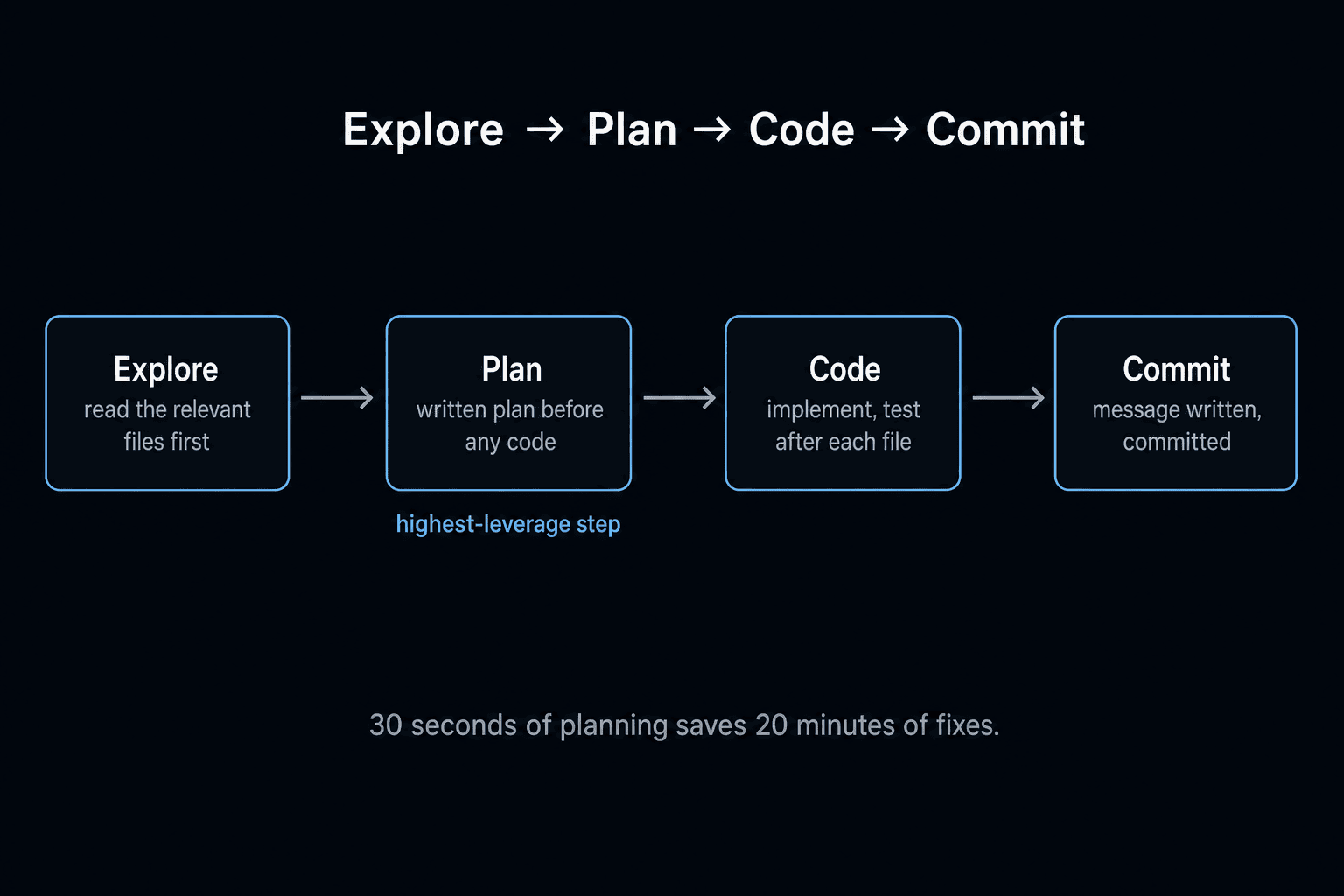
This is the pattern that separates beginners from power users. For any non-trivial task:
Explore — Ask Claude to read relevant files and summarize what's there.
Read app/api/billing and lib/stripe. Explain how subscriptions work in this codebase.
Plan — Ask for a written plan before any code changes.
Now plan how to add a "cancel subscription" endpoint. List the files you'll touch, the new functions, and the test cases. Don't write code yet.
Code — Approve the plan, then let it implement.
Looks good. Implement the plan. Run the tests after each file.
Commit — Have it write the commit message and commit.
All tests pass. Commit with a clear message and push to a new branch.
The Plan step is the highest-leverage one. Skipping it produces 80% of the bad output. Forcing a plan first costs 30 seconds and saves 20 minutes of fixes.
Step 7: Connect MCP Servers (Optional, 5 minutes)
MCP (Model Context Protocol) servers extend Claude Code with new tools — GitHub, Linear, Notion, your internal APIs, your database. Add them to .claude/mcp.json in your project:
{
  "mcpServers": {
    "github": {
      "command": "npx",
      "args": ["-y", "@modelcontextprotocol/server-github"],
      "env": { "GITHUB_PERSONAL_ACCESS_TOKEN": "ghp_..." }
    }
  }
}
Restart Claude Code. Now you can ask:
Look at my open GitHub issues tagged "bug". Pick the smallest one and fix it.
For a deeper walkthrough of writing your own MCP server, see our MCP 101 guide.
Common Beginner Mistakes (Avoid These)
1. Asking too vague. "Improve the auth flow" is not a prompt. "Refactor lib/auth/session.ts to use Supabase Auth helpers instead of manual JWT verification, and update the login API route to match" is a prompt.
2. Skipping the Plan step. Diving straight into "code this for me" produces sprawl. Force a plan first, even for medium tasks.
3. Letting context bloat. If you've been chatting in one session for 2 hours, the context window is full of stale tool results. Run /clear (or quit and restart) to reset.
4. Trusting tests blindly. Claude Code will sometimes write tests that pass tautologically (expect(result).toBe(result)). Spot-check 1–2 tests per feature.
5. Not committing often. Claude Code can do a lot in one session. If something goes wrong 40 minutes in, you want a recent commit to roll back to. Commit after every working step.
6. Ignoring CLAUDE.md drift. Your CLAUDE.md is a living document. When Claude Code suggests a pattern that contradicts it, decide: update the file, or correct the agent. Either way, don't let them drift.
What to Build First
The best learning project is the smallest real thing that you'd otherwise procrastinate on. Examples that work well for beginners:
- Add a /pricing page to your existing site
- Refactor one messy file you've been avoiding
- Add a missing test suite to one module
- Set up a GitHub Action that runs your linter on PRs
- Add an export-to-CSV button to your dashboard
These are scoped enough to finish in one session and real enough to teach you the workflow. After 5–10 of these, you'll be ready to scaffold whole features.
What to Learn Next
You've shipped your first feature. The next three skills, in order of impact:
- Master CLAUDE.md — see the full configuration guide for templates by stack.
- Use sub-agents for parallel work — see the Claude Code sub-agents guide to run multiple agents concurrently.
- Optimize cost — see reduce Claude Code API costs for the patterns that cut spend by 60–80%.
If you want a structured path with hands-on workflows, the Claude Code 101 course covers all of this plus hooks, the Task tool, and the Explore-Plan-Code-Commit workflow on real projects.
The Bottom Line
Claude Code goes from "interesting demo" to "indispensable" the moment you stop treating it like a chatbot. It's an agent. You direct, it executes, and you verify. The 30 minutes you spent on this tutorial — install, auth, CLAUDE.md, first session, the EPCC workflow — are the only setup you'll ever need to do. Everything else is repetition until the workflow is muscle memory.
Ship one real thing this week. That's the only homework that matters.
Frequently Asked Questions
What is Claude Code and how is it different from a chatbot?
Claude Code is an AI agent that runs in your terminal. Unlike Claude.ai (chat interface), Claude Code reads your entire codebase, edits files directly, runs your tests, executes shell commands, and commits to git — all in a single session. You describe what you want in English, it does the work and proves it works. Think of it as a junior engineer with full repo access who never gets tired.
Do I need an Anthropic API key to use Claude Code?
You have two options. Option A (Pro plan): subscribe to Claude Pro/Max and run claude login — Claude Code uses your subscription, no per-token billing. Best for individual developers with predictable usage. Option B (API key): set ANTHROPIC_API_KEY in your shell and pay per token (~$3/M input, $15/M output for Sonnet). Best for teams, heavy usage, or production scripts. You can switch between them with claude logout / claude login.
How much does Claude Code cost for a beginner?
On the Pro plan ($20/month) you get a generous usage cap that covers ~5–10 hours/week of active coding for most beginners. On the API, expect $1–3 per real feature (multi-file edit + tests) for Sonnet 4.5; $0.20–0.50 if you stay on Haiku. A typical learning week (10–20 sessions, mostly small) runs $5–15 on the API or $0 marginal on Pro. See our reduce Claude Code API costs guide for cost-optimization patterns.
What is the first thing I should do after installing Claude Code?
Create a CLAUDE.md file at your project root. It is the highest-leverage 5-minute setup in Claude Code — without it, every session starts from zero. Include: project overview (2 sentences), tech stack with versions, naming conventions, how to run/test/build, and 3–5 things to never do. See our CLAUDE.md guide for stack-specific templates.
Can Claude Code break my codebase?
Only if you let it. Claude Code asks for permission before destructive operations (file deletions, git push, sudo) — you confirm each one with y/n. For the first week, run it on a fresh git branch so any mistake is one git checkout away. After that, set --dangerously-skip-permissions only inside a sandboxed dev environment if you want speed. The agent also writes a transcript every session, so you can audit exactly what it did.
What is the Explore-Plan-Code-Commit workflow?
It is the four-step pattern that gets the best results from Claude Code: (1) Explore — ask Claude to read relevant files and explain the current architecture, (2) Plan — ask for a written plan before any code changes, (3) Code — let it implement the plan, (4) Commit — have it run tests and write the commit message. The Plan step is the highest-leverage one — 80% of bad outputs come from skipping it.
Should I use Claude Code or Cursor as a beginner?
Start with whichever matches your dominant workflow. If you live in a terminal, learn Claude Code first — the agent loop is the future of AI coding. If you prefer a GUI editor, start with Cursor — same model power, lower learning curve. Most beginners we coach end up using both within a month. See our Claude Code vs Cursor comparison for the full decision framework.
Sources & Verification
This guide is written from hands-on testing, then cross-checked against primary sources - official documentation and first-party announcements. Field results and opinions are labeled as such. See our editorial standards.
Join AI Builder Club


$37/mo
Get the free newsletter
Weekly deep-dives on AI tools, automation workflows, and builder strategies. Join 5,000+ readers.
No spam. Unsubscribe anytime.