The CLAUDE.md Guide: Configure Claude Code for Any Project
CLAUDE.md turns Claude Code from a generic AI into your project's AI. How to write one that improves output, with templates for every stack.
Course outline · Claude Code Fundamentals (1.3)
CLAUDE.md is the single highest-leverage file in any Claude Code project.
It's a markdown file at your project root that Claude Code reads automatically at the start of every session. Think of it as a persistent system prompt — except it's version-controlled, shareable, and evolves with your codebase.
Without it, every Claude Code session starts from zero. With it, every session starts with full context on your stack, your conventions, and your preferences.
Here's how to write one that actually works.
Why CLAUDE.md Matters
Claude Code reads your entire codebase. It knows your files. But it doesn't know:
- Which patterns are intentional vs. which are legacy code you want to migrate away from
- Your deployment constraints (Vercel edge? Docker? Cloudflare Workers?)
- Your team's conventions (do you use barrel exports? which state management? how do you name things?)
- What not to touch (that one file that breaks everything)
- Which dependencies you prefer (Radix? shadcn? don't add any without asking?)
CLAUDE.md fills this gap. It's onboarding docs for your AI teammate.
The Structure
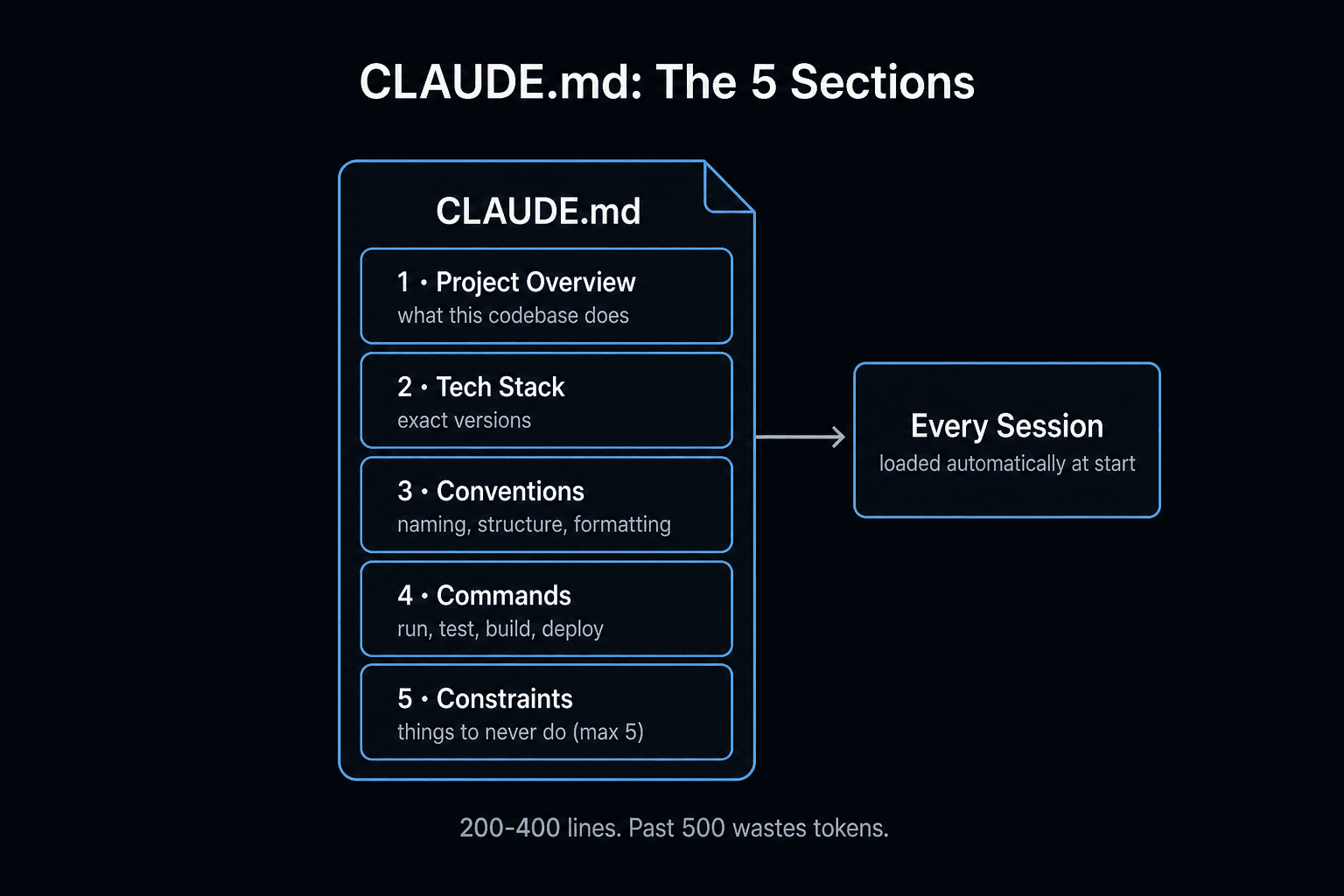
Every effective CLAUDE.md has five sections:
# CLAUDE.md

## Project Overview
What this project is, in 2-3 sentences.

## Stack & Key Dependencies
The tech you use and versions that matter.

## Conventions
How code should be written in this project.

## Important Files
Files that Claude Code should reference or be careful with.

## Don'ts
Things Claude Code should never do without asking.
Let's break each one down.
Section 1: Project Overview
Keep it short. Claude Code doesn't need your product roadmap — it needs enough context to make smart decisions.
Good:
## Project Overview
SaaS analytics dashboard. Users connect data sources,
build custom dashboards, and share them with their team.
B2B product, ~500 paying customers.
Too much:
## Project Overview
Founded in 2024, we're a Series A company building the next generation
of business intelligence... [500 words later]
The overview helps Claude Code make judgment calls: "Should I build this as a simple page or a complex interactive component?" Context about the product's maturity and audience informs those decisions.
Section 2: Stack & Key Dependencies
List the stack with specifics that affect code generation.
## Stack
- Next.js 14, App Router, TypeScript (strict mode)
- Tailwind for styling (no CSS modules, no styled-components)
- Supabase for auth and database
- Stripe for billing
- Resend for transactional email
- Vercel for deployment (Edge Runtime for API routes where possible)
- PostHog for analytics
Why versions matter: "Next.js 14 App Router" tells Claude Code to use route.ts not pages/api. "TypeScript strict" means no implicit any. These specifics prevent the #1 source of bad output: wrong framework version patterns.
Section 3: Conventions
This is the most impactful section. Be specific about your patterns.
## Conventions

### File structure
- Pages in app/ using App Router conventions
- Reusable components in components/ui/ (Radix-based)
- Feature components in components/[feature]/
- Server utilities in lib/
- Type definitions in types/
- No barrel exports (import from specific files)

### Components
- Server components by default
- 'use client' only when event handlers or hooks are needed
- Props types defined inline for simple components, separate interface for complex ones
- Use cn() from lib/utils for conditional classes

### API routes
- Reference pattern: app/api/stripe/checkout/route.ts
- Always validate input with zod
- Return typed JSON responses
- Handle errors with try/catch, return appropriate status codes

### Database
- All queries through lib/supabase/queries.ts
- Use row-level security, never trust client-side auth checks alone
- Migrations in supabase/migrations/ with descriptive names

### Naming
- Components: PascalCase (UserProfile.tsx)
- Utilities: camelCase (formatDate.ts)
- API routes: kebab-case directories (user-preferences/)
- Database: snake_case (user_profiles)
Section 4: Important Files
Flag the files that matter most.
## Important Files
- middleware.ts — auth protection, route matching. Be very careful editing this.
- lib/plans.ts — pricing tiers and Stripe IDs. Changes here affect billing.
- app/api/webhook/stripe/route.ts — Stripe webhook handler. Test thoroughly after any changes.
- lib/supabase/queries.ts — all database queries. Reference this before writing new queries.
- .env.local.example — keep this updated when adding new env vars.
This prevents Claude Code from casually refactoring your webhook handler when you asked it to "clean up the API routes."
Section 5: Don'ts
Explicit guardrails prevent the most painful mistakes.
## Don'ts
- Don't install new npm packages without asking first
- Don't modify middleware.ts without explicit approval
- Don't change Stripe webhook handling without confirmation
- Don't use \`any\` type — always define proper types
- Don't add console.log for debugging (use proper logging)
- Don't create new utility functions if one exists in lib/utils.ts
- Don't put API keys or secrets in code (always use env vars)
Stack-Specific Templates
Next.js + Supabase + Stripe (SaaS)
# CLAUDE.md

## Project
[Your product] — [one sentence description]. [Stage/scale context].

## Stack
Next.js 14 App Router, TypeScript strict, Tailwind, Supabase (auth + DB),
Stripe (billing), Vercel.

## Conventions
- Server components by default, 'use client' only for interactivity
- API reference: app/api/stripe/checkout/route.ts
- Component reference: components/ui/Button.tsx
- All DB queries: lib/supabase/queries.ts
- Zod for API input validation
- cn() for conditional Tailwind classes

## Important
- middleware.ts: auth protection — careful with changes
- app/api/webhook/stripe/route.ts: billing critical — test after changes
- lib/plans.ts: pricing config — changes affect all billing

## Don'ts
- No new npm packages without asking
- No \`any\` types
- No modifications to middleware or webhooks without approval
- No console.log (use structured logging)
Python + FastAPI + PostgreSQL (API)
# CLAUDE.md

## Project
[Your API] — [one sentence]. Serves [X] clients.

## Stack
Python 3.12, FastAPI, SQLAlchemy 2.0, PostgreSQL, Alembic for migrations,
Pydantic v2 for validation, pytest for tests.

## Conventions
- Routes in app/routes/ grouped by domain
- Models in app/models/ (SQLAlchemy) and app/schemas/ (Pydantic)
- Business logic in app/services/ — routes should be thin
- Reference route: app/routes/users.py
- All SQL through SQLAlchemy ORM, no raw queries
- Async by default (async def, await)
- Type hints on all function signatures

## Important
- app/core/security.py: auth middleware — careful
- alembic/: always generate migrations, never edit schema directly
- app/core/config.py: settings and env var loading

## Don'ts
- No sync database calls (always async)
- No raw SQL queries
- No new dependencies without asking
- No changes to migration history
Advanced: Project-Specific Commands
You can include custom commands that Claude Code should know about:
## Commands
- \`npm run dev\`: Start dev server on port 3000
- \`npm run test\`: Run Jest test suite
- \`npm run db:migrate\`: Run pending Supabase migrations
- \`npm run db:reset\`: Reset local database (destructive)
- \`npm run lint:fix\`: Auto-fix linting issues
This saves time — instead of Claude Code guessing how to run tests or start the server, it knows immediately.
How to Evolve It
Your CLAUDE.md should grow with your codebase:
- After every Claude Code session that goes wrong, ask: "What context would have prevented this?" Add it.
- When you establish a new pattern, add a reference file for it.
- When you add a new integration, add the important files and don'ts.
- Every month, re-read it and prune anything outdated.
The best CLAUDE.md files are 50-100 lines. Long enough to be useful. Short enough that Claude Code processes it fully every time.
One More Thing
CLAUDE.md is committed to your repo. That means:
- New team members' Claude Code sessions inherit your conventions instantly
- You can diff changes to see how your conventions evolved
- It documents your project as a side effect — even humans benefit from reading it
It's the rare file that makes both AI and human teammates better.
If you want to see CLAUDE.md files from real production projects across different stacks, join AI Builder Club. Members share their configs and we review them together.
Frequently Asked Questions
What is CLAUDE.md?
CLAUDE.md is a markdown file at your project root that Claude Code reads automatically at the start of every session. It acts as a persistent system prompt — telling Claude your stack, conventions, file structure, and preferences — except it's version-controlled, shareable across your team, and evolves with your codebase. Think of it as the difference between hiring a contractor who reads your onboarding doc vs. one who guesses.
Where does CLAUDE.md live?
At the root of your project — same level as package.json, tsconfig.json, or pyproject.toml. Claude Code searches upward from your current directory and loads the first CLAUDE.md it finds. You can also nest CLAUDE.md files in subdirectories (e.g. apps/web/CLAUDE.md) for monorepo-specific instructions; Claude Code merges them in scope order.
What should I put in CLAUDE.md?
Five things, in this order: (1) Project overview — what the codebase does in 2–3 sentences, (2) Tech stack — exact versions of frameworks, languages, and key libs, (3) Conventions — naming, file structure, formatting rules, (4) Commands — how to run, test, build, deploy, (5) Constraints — things to never do (e.g. "never add comments", "always use TypeScript strict mode"). Avoid: generic advice, project history, anything that changes weekly. Aim for 200–400 lines max.
Does CLAUDE.md work like .cursorrules?
Same idea, different scope. .cursorrules (or .cursor/rules/*.mdc) is Cursor-specific. CLAUDE.md is Claude Code-specific. Both inject context at session start. The big practical difference: CLAUDE.md is a single markdown file you can read/edit easily, while Cursor rules support glob-scoped rules and alwaysApply toggles. Many teams keep both files in their repo.
How do I share CLAUDE.md across a team?
Commit it to git. CLAUDE.md is plain markdown, so it diffs cleanly in pull requests. Treat it like a living style guide — when you make a coding decision (e.g. "all API responses use the Result<T, E> pattern"), add a line to CLAUDE.md so every teammate's Claude Code respects it. Some teams add a ## Recent Decisions section that they prune monthly.
Can CLAUDE.md make Claude Code slower?
Slightly — every line in CLAUDE.md is tokens loaded into every session. A 500-line CLAUDE.md adds ~2–3K tokens to context per session. For most repos this is invisible. If you have a 2,000-line CLAUDE.md, trim it: the model can't hold it all coherently anyway, and you're paying for tokens it ignores. Aim for the 200–400 line sweet spot. See our guide on reducing Claude Code API costs for more on context optimization.
What's the best CLAUDE.md template for a Next.js project?
Start with: project description (1–2 sentences), Next.js version + App Router vs Pages, TypeScript strict mode rules, your auth/db/styling stack, your API route conventions, your component file structure, your test command, and your deploy target. Keep it under 300 lines. The full guide above includes ready-to-copy templates for Next.js, Python/FastAPI, Rails, Go, and React Native.
Sources & Verification
This guide is written from hands-on testing, then cross-checked against primary sources - official documentation and first-party announcements. Field results and opinions are labeled as such. See our editorial standards.
Join AI Builder Club


$37/mo
Get the free newsletter
Weekly deep-dives on AI tools, automation workflows, and builder strategies. Join 5,000+ readers.
No spam. Unsubscribe anytime.