What Is an AI Agent? (AI Agents 101, Part 1)
AI agents 101: what an agent actually is, the four components every agent needs, and Python examples. Part 1 of a free 5-part course.
Join AI Builder Club for courses, community, and weekly workshops.
30-day money-back guarantee. $37/mo.
Course outline · Build AI Agents (1.2)
Why Most Agent Tutorials Fail You
Most AI agent tutorials start with a library. LangChain, CrewAI, AutoGen - pick your framework, copy the starter code, watch something happen. But a week later, when you try to build something real, nothing makes sense. You don't know why it works. You can't debug it when it doesn't.
This series does it differently. We start with the mental model. Once you understand what an agent actually is - not as marketing copy, but as a concrete software pattern - the code becomes obvious.
This is Part 1 of 5. By the end of this series, you'll have built a production-ready agent from scratch, with memory, tools, and multi-step reasoning. No magic. No black boxes.
What You Need (2 minutes of setup)
Before we write any code, get these ready:
pip install anthropic openaiThen set your API key (pick one - you don't need both):
# For Claude (Anthropic)
export ANTHROPIC_API_KEY="sk-ant-..."

# For GPT-4o (OpenAI)
export OPENAI_API_KEY="sk-..."
Free tier works. Both Anthropic and OpenAI offer free credits for new accounts. You can build and test everything in this article for $0.
What an AI Agent Actually Is
Here's the definition that will serve you for years:
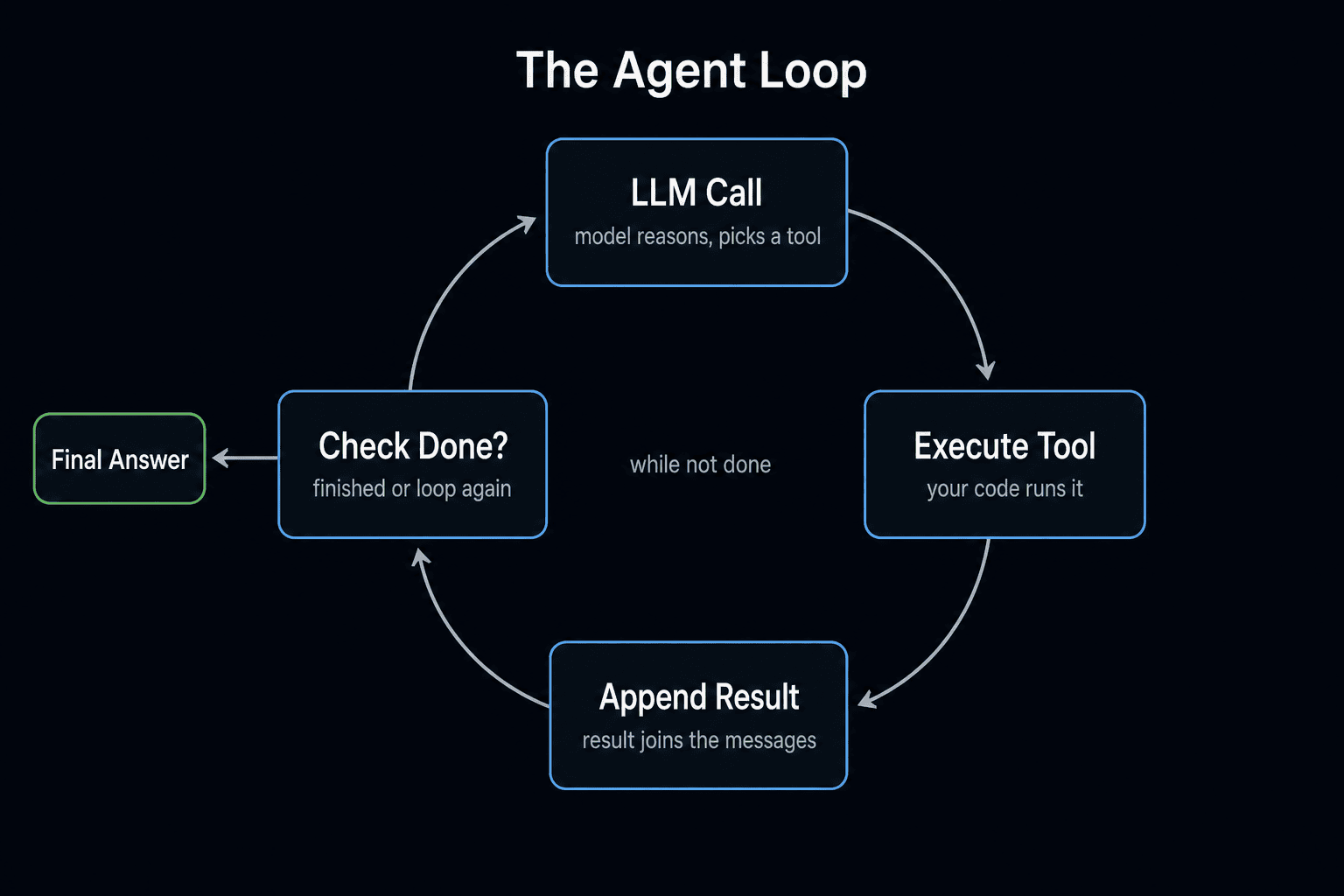
An AI agent is a software loop that uses a language model to decide what to do next, then does it, then checks the result, then decides again - until the goal is achieved.
Four things are happening:
- A goal exists - some task the agent is trying to accomplish
- The LLM decides - it looks at the current state and picks an action
- Something happens - the agent executes that action in the real world
- The loop continues - results come back, the LLM reassesses, decides again
That's it. The loop is the agent. Everything else - frameworks, memory systems, tool registries - is infrastructure around the loop.
Agent vs. Chatbot: The Crucial Difference
This is where most people get confused:
A chatbot takes input, generates output, stops. One turn. ChatGPT in basic mode is a chatbot.
An AI agent takes a goal, decides on a sequence of actions, executes them, observes what happened, and keeps going until the goal is complete.
The difference isn't the model - it's the loop. The same Claude or GPT-4o that powers a chatbot can power an agent if you wrap it in the right architecture.
Here's a concrete example:
- Chatbot task: "Write me a Python script that reads a CSV." → Generates code. Done.
- Agent task: "Read my CSV, find all rows where revenue dropped more than 20%, and email me a summary." → Reads the file, runs analysis, formats results, sends the email, confirms success. Four steps, four tool calls, one goal.
The 2026 Agent Landscape (What's Changed Since You Started Reading Tutorials)
The agent space moves fast. Here's what matters right now:
Claude Code now runs dynamic workflows. Anthropic shipped a feature in May 2026 that lets Claude Code spawn tens to hundreds of parallel subagents in a single session, orchestrated by auto-generated scripts saved to your repo. This is the agent loop from this article, scaled up and version-controlled. You can trigger it with the ultracode effort setting.
Cursor 3 shipped parallel agents. The /multitask command lets you run multiple agents in the IDE sidebar simultaneously. Per-agent MCP server scoping means each agent only sees the tools it needs.
Gemini Managed Agents deploy with one API call. Google's I/O 2026 announcement: a fully sandboxed agent with built-in web search, code execution, and file management - no Docker, no tool wiring. Configuration happens via markdown skill files (SKILL.md), not code.
The AGENTS.md/CLAUDE.md pattern is becoming a cross-platform standard. Claude Code, Gemini Managed Agents, and several open-source tools now use markdown files to configure agent behavior. If you learn this pattern once, it works everywhere.
The frameworks keep shipping too - LangGraph leads for complex Python orchestration, CrewAI for quick role-based prototyping, and the provider SDKs (Anthropic Agent SDK, OpenAI Agents SDK, Google ADK) for tightest model integration. But the mental model in this article - the loop, the tools, the memory, the orchestrator - hasn't changed. Products come and go. The architecture stays.
The Four Components Every Agent Needs
Every agent, from the simplest script to Claude Code itself, has exactly four components:
1. The Brain (Language Model)
This is what decides. Given the goal, history, and available tools, the LLM picks the next action. Claude, GPT-4o, Gemma 4 - the brain is swappable. The architecture is not.
Key insight: the LLM doesn't execute anything. It only decides. This separation keeps the system safe and auditable.
2. Tools (Actions)
These are the things the agent can actually do. Read a file. Search the web. Send an email. Each tool is a Python function with a clear input/output contract.
The security principle: a tool that can delete files is dangerous; a tool that can only read them is safe. Your tool selection is your security model.
3. Memory (Context)
The LLM is stateless by default. Every call is a blank slate. Memory gives the agent continuity:
- In-context memory: Everything in the current prompt. Simple, limited by context window.
- External memory: A database or file the agent can read/write. Persistent, scalable.
- Semantic memory: Vector embeddings. The agent "remembers" by meaning, not exact text.
For your first agent, in-context memory is all you need. We cover the rest in Part 3.
Free AI Builder Newsletter
Weekly guides on AI tools & builder strategies.
4. The Loop (Orchestrator)
This is the code that makes it an agent instead of a one-shot call:
- Send the current state to the LLM
- Receive the LLM's decision
- Execute the chosen tool
- Add the result back to context
- Repeat until the LLM says it's done
That's the entire orchestrator. Let's build it.
Build Your First Agent: Copy, Paste, Run
No LangChain. No AutoGen. Just Python and an API key. This agent can list files and read their contents - simple, but it demonstrates every component.
Create a file called agent.py and paste the entire thing below.
Part A: Define Your Tools
import os
import json

def list_files(directory: str) -> str:
    """List files in a directory."""
    try:
        files = os.listdir(directory)
        return json.dumps({"files": files, "directory": directory})
    except Exception as e:
        return json.dumps({"error": str(e)})

def read_file(filepath: str) -> str:
    """Read the contents of a file."""
    try:
        with open(filepath, 'r') as f:
            content = f.read()
        return json.dumps({"content": content, "filepath": filepath})
    except Exception as e:
        return json.dumps({"error": str(e)})

TOOLS = {
    "list_files": {
        "function": list_files,
        "description": "List files in a directory",
        "parameters": {
            "type": "object",
            "properties": {
                "directory": {"type": "string", "description": "Directory path to list"}
            },
            "required": ["directory"]
        }
    },
    "read_file": {
        "function": read_file,
        "description": "Read the contents of a file",
        "parameters": {
            "type": "object",
            "properties": {
                "filepath": {"type": "string", "description": "Full path to the file"}
            },
            "required": ["filepath"]
        }
    }
}
Notice the pattern: each tool is a plain Python function, and the TOOLS dict maps names to functions + JSON schemas. The LLM never calls your functions directly - it returns a tool name and parameters, and your loop does the calling.
Part B: The Agent Loop (This Is the Whole Thing)
from anthropic import Anthropic

client = Anthropic()

def run_agent(goal: str, max_steps: int = 10) -> str:
    tool_schemas = [
        {"name": name, "description": t["description"], "input_schema": t["parameters"]}
        for name, t in TOOLS.items()
    ]
    messages = [{"role": "user", "content": goal}]

    for step in range(max_steps):
        print(f"\n--- Step {step + 1} ---")

        response = client.messages.create(
            model="claude-sonnet-4-5",
            max_tokens=4096,
            tools=tool_schemas,
            messages=messages
        )

        # If Claude is done, return the final answer
        if response.stop_reason == "end_turn":
            for block in response.content:
                if hasattr(block, 'text'):
                    return block.text
            return "Task complete."

        # Otherwise, execute whatever tools Claude requested
        tool_results = []
        for block in response.content:
            if block.type == "tool_use":
                tool_name = block.name
                tool_input = block.input
                print(f"  Tool call: {tool_name}({tool_input})")

                if tool_name in TOOLS:
                    result = TOOLS[tool_name]["function"](**tool_input)
                else:
                    result = json.dumps({"error": f"Unknown tool: {tool_name}"})

                tool_results.append({
                    "type": "tool_result",
                    "tool_use_id": block.id,
                    "content": result
                })

        # Feed the results back so Claude can decide what to do next
        messages.append({"role": "assistant", "content": response.content})
        messages.append({"role": "user", "content": tool_results})

    return "Max steps reached."
Part C: Run It
if __name__ == "__main__":
    result = run_agent(
        "List the files in the current directory, "
        "then read the contents of README.md if it exists."
    )
    print(f"\nFinal answer:\n{result}")
Now run it:
python agent.pyYou'll see something like:
--- Step 1 ---
  Tool call: list_files({'directory': '.'})

--- Step 2 ---
  Tool call: read_file({'filepath': './README.md'})

--- Step 3 ---

Final answer:
I found 12 files in your directory. The README.md contains:
[content of README.md]...
That's a working AI agent. The loop, the tools, the context management - it's all visible. Nothing is hidden.
Using OpenAI Instead? Here's What Changes
If you prefer GPT-4o, swap Part B with this. The only differences are the tool schema format and how tool results are sent back:
from openai import OpenAI

client = OpenAI()

def run_agent_openai(goal: str, max_steps: int = 10) -> str:
    openai_tools = [
        {"type": "function", "function": {"name": n, "description": t["description"], "parameters": t["parameters"]}}
        for n, t in TOOLS.items()
    ]
    messages = [{"role": "user", "content": goal}]

    for step in range(max_steps):
        response = client.chat.completions.create(model="gpt-4o", tools=openai_tools, messages=messages)
        message = response.choices[0].message

        if not message.tool_calls:
            return message.content or "Task complete."

        messages.append(message)
        for tc in message.tool_calls:
            name = tc.function.name
            args = json.loads(tc.function.arguments)
            result = TOOLS[name]["function"](**args) if name in TOOLS else json.dumps({"error": "Unknown"})
            messages.append({"role": "tool", "tool_call_id": tc.id, "content": result})

    return "Max steps reached."
Same pattern, different API shape. The mental model is identical.
Five Principles (With Examples)
1. One tool, one job
Bad: A tool called do_research(topic, method, depth, format) that does 4 things. The LLM will misuse parameters, and you can't debug which part failed.
Good: search_web(query), read_url(url), summarize_text(text) - three separate tools. The LLM chains them naturally, and when something fails, you know exactly which step broke.
2. Always return tool results to the LLM
If your loop calls a tool but doesn't feed the result back into the messages, the agent is flying blind. It made a decision, something happened, and it has no idea what. This is the #1 bug in first-time agent code.
Test it: Remove the two message.append() lines at the bottom of the loop. Watch the agent repeat the same tool call forever. Now you understand why those two lines matter.
3. Always set max_steps
Claude and GPT-4o are good at knowing when they're done. But production agents need a hard ceiling. Without one, a confused agent can loop 500 times, burning $50 in API costs before you notice.
Rule of thumb: Start with max_steps=10. If your agent legitimately needs more, increase it. Never remove it.
4. Log every tool call
When your agent does something unexpected, the only way to debug it is to replay the decision sequence. Print or log: what tool was called, with what inputs, what it returned, and what the LLM decided next.
The print statements in our loop aren't just for debugging. They're the foundation of your observability system.
5. Start simple, add complexity when you hit real limits
Don't add a vector database "just in case." Don't add multi-agent orchestration because it sounds cool. Build the simplest agent that solves your problem. When it breaks, the way it breaks tells you what to add next.
6. Use the model's native tool-calling, not string parsing
Every major LLM API (Anthropic, OpenAI, Google) now has structured tool-calling built in. The model returns a JSON object with the tool name and parameters - not a string you have to regex-parse. If a tutorial shows you parsing tool calls out of plain text, it's outdated. The code in this article uses the native API, which is why it's reliable.
Try These Now (3 Exercises)
You have a working agent. Here's how to make it yours:
Exercise 1 - Add a tool (15 min): Add a write_file(filepath, content) tool. Update the TOOLS dict with the function and schema. Then ask the agent: "List files in the current directory, read README.md, and write a summary to SUMMARY.md." This teaches you the tool registration pattern.
Exercise 2 - Add a system prompt (5 min): Right now, the agent has no personality or constraints. Add a system parameter to the API call: "You are a cautious file explorer. Before reading any file, explain why you want to read it. Never write or delete files." Run the same goal and see how the behavior changes. This teaches you how system prompts shape agent behavior without changing the code.
Exercise 3 - Break it on purpose (10 min): Remove the max_steps guard (set it to 1000). Give the agent an impossible task: "Find a file called secret_treasure.txt somewhere on my computer." Watch what happens. Then add the guard back and observe the difference. This teaches you why guardrails matter.
What's Next
Here's what you have after Part 1:
- The loop pattern - the actual definition of an agent
- The four components: brain, tools, memory, orchestrator
- A working agent in Python (both Anthropic and OpenAI)
- Six principles that prevent the most common bugs
- Three exercises to build muscle memory
Continue the series:
- Part 2: Give Your Agent Real Tools - web search, code execution, file writing, and error recovery
- Part 3: Memory - persistence across sessions with files and vector databases
- Part 4: Multi-Agent Systems - pipeline, supervisor/worker, and fan-out patterns
- Part 5: Deploying to Production - Docker, VPS, logging, health checks, cost controls
Go deeper with our courses:
- AI Agent 101 Course - build and deploy research agents with tool use, web scraping, and deep search
- MCP 101 Course - build and deploy Model Context Protocols with fastMCP, auth, and Stripe
If you're building agents and want to learn alongside other builders - not just watch tutorials - join AI Builder Club. We build real things, compare what works, and share what doesn't.
Frequently Asked Questions
What is an AI agent vs a chatbot?
A chatbot takes input, generates one response, and stops. An AI agent takes a goal, decides on a sequence of actions, executes them, observes what happened, and keeps going until the goal is complete. The difference is the loop - the same LLM that powers a chatbot can power an agent when wrapped in a think-act-observe cycle.
What programming language do I need to build AI agents?
Python is the most common choice and what this series uses. The Anthropic and OpenAI SDKs are Python-first, and most agent frameworks (LangGraph, CrewAI) are Python. TypeScript works too - Mastra and Vercel AI SDK are strong options if you prefer it.
Do I need a framework like LangChain to build an AI agent?
No. This series builds agents from scratch with just the Anthropic or OpenAI SDK. Frameworks add abstractions that hide the loop, tools, and memory patterns you need to understand first. Learn the fundamentals, then evaluate frameworks through the lens of what they actually do for you.
How much does it cost to run an AI agent?
A typical agent run with 5-10 tool calls costs $0.02-0.10 on Claude Sonnet or GPT-4o. The free tiers from Anthropic and OpenAI are enough to build and test everything in this series. Production costs depend on volume - Part 5 covers cost controls that keep agents under $50/month.
Sources & Verification
This guide is written from hands-on testing, then cross-checked against primary sources - official documentation and first-party announcements. Field results and opinions are labeled as such. See our editorial standards.
Join AI Builder Club


$37/mo
Get the free newsletter
Weekly deep-dives on AI tools, automation workflows, and builder strategies. Join 5,000+ readers.
No spam. Unsubscribe anytime.