AI Agent Tools in Python (AI Agents 101, Part 2)
Part 2 of AI Agents 101: give your agent real tools - web search, code execution, file writing - plus error recovery. No frameworks needed.
Join AI Builder Club for courses, community, and weekly workshops.
30-day money-back guarantee. $37/mo.
Course outline · Build AI Agents (1.4)
Where We Left Off
In Part 1, you built a working agent from 45 lines of Python. It could list and read files. It ran a loop: call the LLM, execute tools, feed results back in. No frameworks, no magic.
That agent proved the core loop works. But it only interacted with your local filesystem - not the actual world.
Real agents need real tools. Tools that fetch live data, execute code, and write outputs. And crucially: real tools fail. Web requests time out. APIs rate-limit. Code throws exceptions. Part 1's simple loop has no recovery - one failure and it crashes.
Part 2 fixes that. We'll add three tools that matter, and we'll build them with proper error handling so your agent degrades gracefully instead of dying silently.
What You'll Build
By the end of this article, your agent will be able to:
- Search the web for current information using the Tavily API
- Execute Python code and capture the output
- Write files to disk (safely, without path traversal risks)
- Recover from tool failures - timeouts, rate limits, bad inputs - without crashing
Every code block below is copy-paste runnable. No framework dependencies beyond anthropic and requests.
Setup (2 minutes)
If you completed Part 1, you already have anthropic installed. Add requests:
pip install requests
For web search, get a free Tavily API key at tavily.com - the free tier gives you 1,000 searches per month. Then:
export TAVILY_API_KEY="tvly-..."
export ANTHROPIC_API_KEY="sk-ant-..."
That's it. No other accounts or setup required.
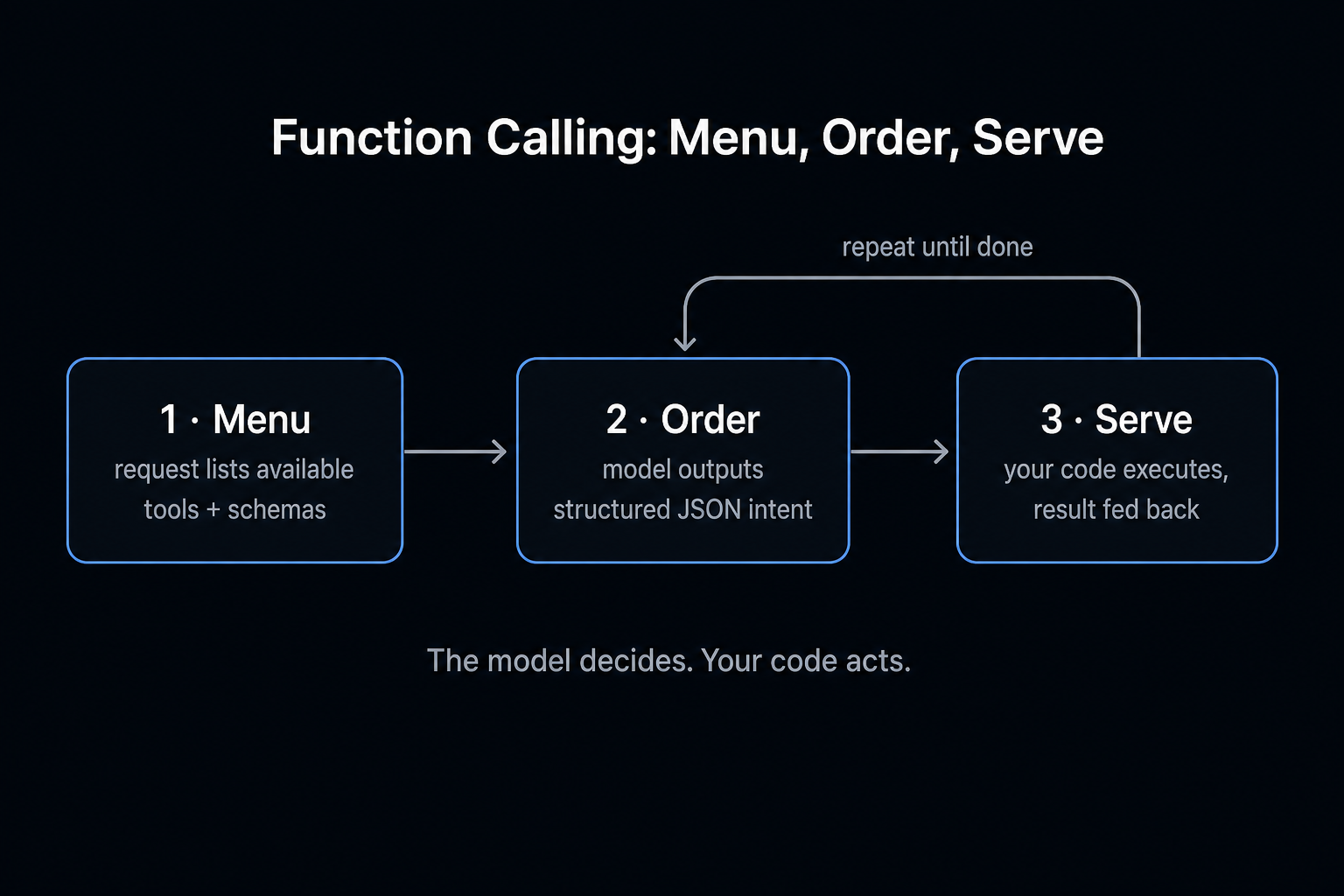
Tool 1: Web Search
The first tool every agent needs is web access. Without it, your agent is frozen in its training data - it can't tell you what happened last week, what a current API rate is, or what the latest version of a library is.
Here's a clean, production-ready web search tool:
import requests
import os
import json

def web_search(query: str, num_results: int = 5) -> str:
    """Search the web and return relevant results as JSON."""
    api_key = os.environ.get("TAVILY_API_KEY")
    if not api_key:
        return json.dumps({"error": "TAVILY_API_KEY not set", "retry": False})

    try:
        response = requests.post(
            "https://api.tavily.com/search",
            json={
                "query": query,
                "num_results": num_results,
                "api_key": api_key
            },
            timeout=10  # Always set a timeout
        )
        response.raise_for_status()
        results = response.json().get("results", [])
        return json.dumps([
            {
                "title": r["title"],
                "url": r["url"],
                "snippet": r["content"][:300]  # Cap length - every token costs
            }
            for r in results
        ])
    except requests.Timeout:
        return json.dumps({
            "error": "Search timed out after 10s",
            "retry": True,
            "suggestion": "Try a more specific query or reduce num_results"
        })
    except requests.HTTPError as e:
        return json.dumps({
            "error": f"HTTP {e.response.status_code}",
            "retry": e.response.status_code == 429  # Rate limit = retry; other errors = don't
        })
    except Exception as e:
        return json.dumps({"error": str(e), "retry": False})
Three things to notice here that most tutorials skip:
The timeout. timeout=10 is not optional. Without it, a slow or hung API request blocks your entire agent indefinitely. Set a timeout on every external call. Always.
Structured errors with retry hints. Don't return plain error strings. Return JSON with retry: True or retry: False so the LLM can decide whether to try again or give up. A 429 (rate limit) is retriable - try again in a second. A malformed query is not - rephrasing is needed.
Capped output length. Raw web content can be thousands of tokens. We cap each snippet at 300 characters. Every token in a tool result goes back into the LLM's context window and adds to your cost. Keep tool outputs tight.
Tool 2: Code Execution
An agent that can run code is a different class of tool than one that can't. Instead of hallucinating what a calculation might produce, it can run the actual code and return the real answer. Instead of guessing what a regular expression matches, it can test it.
import subprocess
import tempfile
import os
import json

def execute_code(code: str, timeout_seconds: int = 30) -> str:
    """Execute Python code and return stdout/stderr as JSON."""
    # Write to a temp file — never eval() or exec() a raw string directly
    with tempfile.NamedTemporaryFile(
        mode='w', suffix='.py', delete=False
    ) as f:
        f.write(code)
        tmp_path = f.name

    try:
        result = subprocess.run(
            ["python3", tmp_path],
            capture_output=True,
            text=True,
            timeout=timeout_seconds
        )
        return json.dumps({
            "output": result.stdout[:2000],    # Cap stdout
            "error": result.stderr[:500] if result.returncode != 0 else None,
            "exit_code": result.returncode,
            "success": result.returncode == 0
        })
    except subprocess.TimeoutExpired:
        return json.dumps({
            "error": f"Code execution timed out after {timeout_seconds}s",
            "exit_code": -1,
            "success": False
        })
    except Exception as e:
        return json.dumps({"error": str(e), "exit_code": -1, "success": False})
    finally:
        os.unlink(tmp_path)  # Always clean up temp files
The security note you need to read. subprocess.run executes real code on your real machine. For local development, this is fine - you're running code you've reviewed. For production, you must sandbox this. Anthropic's computer use sandboxes, E2B, or a Docker container with restricted permissions are the right approaches. We'll cover production hardening in Part 5.
The finally: os.unlink(tmp_path) line matters. Always clean up temp files. Leaked temp files accumulate across agent runs and will eventually fill your disk.
Tool 3: Write File (With Path Safety)
Agents that can persist output are dramatically more useful. They can save research results, write reports, create files for later processing. But write access requires one safety check that almost no tutorial mentions:
import json
import pathlib

def write_file(filepath: str, content: str) -> str:
    """Write content to a file. Restricted to current directory tree."""
    # Prevent path traversal attacks
    safe_root = pathlib.Path(".").resolve()
    target = (safe_root / filepath).resolve()

    if not target.is_relative_to(safe_root):
        return json.dumps({
            "error": "Path traversal blocked",
            "filepath": filepath,
            "detail": "File paths must be within the current directory"
        })

    try:
        target.parent.mkdir(parents=True, exist_ok=True)
        target.write_text(content, encoding="utf-8")
        return json.dumps({
            "success": True,
            "filepath": str(target),
            "bytes_written": len(content.encode("utf-8"))
        })
    except PermissionError:
        return json.dumps({"error": "Permission denied", "filepath": filepath})
    except OSError as e:
        return json.dumps({"error": str(e), "filepath": filepath})
The path traversal check - (safe_root / filepath).resolve() then is_relative_to(safe_root) - prevents a class of bugs where a confused or adversarially-prompted agent tries to write to ../../etc/crontab or ../config/.env. This is not theoretical. It happens. (Don't use str(target).startswith(str(safe_root)) - it has a subtle bug where /project-evil passes the check for a root of /project. is_relative_to() is the right approach, available since Python 3.9.)
What's Changed in the Tool Landscape (June 2026)
The tools in this article work. But the ecosystem has matured since we first published this. Here's what to know:
Web search alternatives to Tavily. Firecrawl now combines search, scraping, and browser automation in one API - it scored higher than Tavily in the AIMultiple agent benchmarks. Brave Search has the fastest independent index. Exa does semantic search with neural indexing. All three publish official MCP servers, so you can plug them into any MCP-compatible agent with zero custom code. Tavily still works fine. Pick whichever has the free tier that fits your volume.
Code execution should be sandboxed in production. The subprocess.run approach in this article is correct for local development. For production, the options have gotten much better:
- E2B: microVM-based sandboxes (Firecracker), ~150ms cold start, 24-hour sessions
- Modal: Python-first, massive autoscaling, great for ML workloads
- Gemini Managed Agents: Google's zero-infrastructure option - one API call gets you a sandboxed agent with code execution, web search, and file management built in
- Microsandbox: Rust-based, fine-grained network control, Apache 2.0 license
The pattern stays the same - write code to a temp file, execute in isolation, capture output. The isolation boundary just moves from "same machine" to "dedicated microVM."
MCP is becoming the standard for tool integration. Instead of writing custom tool functions, you can connect to MCP servers that expose tools through a standard protocol. Tavily, Firecrawl, GitHub, databases - all have MCP servers. Our MCP 101 guide covers this in depth.
Free AI Builder Newsletter
Weekly guides on AI tools & builder strategies.
The Full Tool Registry
Combine Part 1's tools with the new ones:
TOOLS = {
    # From Part 1
    "list_files": {
        "function": list_files,
        "schema": {
            "name": "list_files",
            "description": "List files in a directory",
            "input_schema": {
                "type": "object",
                "properties": {
                    "directory": {"type": "string", "description": "Directory path to list"}
                },
                "required": ["directory"]
            }
        }
    },
    "read_file": {
        "function": read_file,
        "schema": {
            "name": "read_file",
            "description": "Read the contents of a file",
            "input_schema": {
                "type": "object",
                "properties": {
                    "filepath": {"type": "string", "description": "Path to the file to read"}
                },
                "required": ["filepath"]
            }
        }
    },
    # New in Part 2
    "web_search": {
        "function": web_search,
        "schema": {
            "name": "web_search",
            "description": "Search the web for current information. Returns titles, URLs, and snippets.",
            "input_schema": {
                "type": "object",
                "properties": {
                    "query": {"type": "string", "description": "The search query"},
                    "num_results": {
                        "type": "integer",
                        "description": "Number of results to return (1-10)",
                        "default": 5
                    }
                },
                "required": ["query"]
            }
        }
    },
    "execute_code": {
        "function": execute_code,
        "schema": {
            "name": "execute_code",
            "description": "Execute Python code and return stdout/stderr. Use for calculations, data processing, and verification.",
            "input_schema": {
                "type": "object",
                "properties": {
                    "code": {"type": "string", "description": "Python code to execute"}
                },
                "required": ["code"]
            }
        }
    },
    "write_file": {
        "function": write_file,
        "schema": {
            "name": "write_file",
            "description": "Write content to a file. Path must be relative to current directory.",
            "input_schema": {
                "type": "object",
                "properties": {
                    "filepath": {"type": "string", "description": "Relative file path (e.g., 'output/report.txt')"},
                    "content": {"type": "string", "description": "Content to write to the file"}
                },
                "required": ["filepath", "content"]
            }
        }
    }
}

# Build the tools list for the API call
tool_schemas = [t["schema"] for t in TOOLS.values()]
Error Recovery: The Part Most Tutorials Skip
Here's a task that will break a naive agent loop:
"Search for the current Python version, write a script that prints the version info, execute it, and save both the script and its output to a report."
What can go wrong:
- The web search times out on the first attempt
- The code execution fails because
python3isn't in PATH on some systems - The file write fails because the
output/directory doesn't exist - The agent tries to write a path starting with
/and hits the traversal check
With Part 1's basic loop, any of these is fatal. Here's how to make your agent resilient:
Pattern 1: Structured errors with actionable context
We already built this into the tools above. The key principle: don't return an opaque error string. Return structured JSON with enough context for the LLM to decide what to do next.
# Weak error return — LLM guesses what went wrong
return "Error: connection failed"

# Strong error return — LLM can decide to retry, rephrase, or report
return json.dumps({
    "error": "Connection timed out after 10s",
    "retry": True,
    "suggestion": "Try a simpler query or check if the API key is valid"
})
The LLM reads every tool result. If you give it actionable context, it adapts. If you give it an error string with no context, it has to guess - and often guesses wrong.
Pattern 2: Retry with exponential backoff for transient failures
Some failures are transient: a brief network hiccup, a momentary rate limit. Add a thin retry wrapper:
import time

def web_search_with_retry(query: str, num_results: int = 5, max_retries: int = 2) -> str:
    """Web search with automatic retry on transient failures."""
    for attempt in range(max_retries + 1):
        raw = web_search(query, num_results)
        result = json.loads(raw)

        # Success or non-retriable error — return immediately
        if "error" not in result or not result.get("retry"):
            return raw

        # Retriable error — wait with exponential backoff before retrying
        if attempt < max_retries:
            wait_seconds = 2 ** attempt  # 1s, 2s
            time.sleep(wait_seconds)

    return raw  # Return last error after exhausting retries
Use this wrapper in your TOOLS registry instead of the bare web_search function. The agent doesn't need to know retries happened - it just gets results.
Note: If you use this wrapper and tell the LLM to retry on errors (Pattern 3 below), you get two retry layers. That's usually fine - the wrapper handles transient blips silently, and the LLM handles persistent failures with reasoning. Just be aware the combination exists so you don't accidentally burn through API rate limits.
Pattern 3: Tool fallback in the system prompt
If you have two tools that do similar things, tell the agent about the relationship:
SYSTEM_PROMPT = """You are a research and coding assistant.

Tool guidance:
- Use web_search for current information. If it returns an error with retry: true, try once more with a shorter query.
- Use execute_code to verify calculations — never guess at math results.
- Use write_file with relative paths only (e.g., 'output/report.txt', not '/output/report.txt').
- If a tool fails twice in a row on the same task, report the failure clearly instead of looping.
"""
This guidance prevents the most common failure mode: the agent retrying the same failing call in an infinite loop, burning tokens and hitting rate limits.
The Updated Agent Loop
The agent loop from Part 1 needs one addition: handling tool errors so they don't silently fail.
import anthropic

client = anthropic.Anthropic()

def run_agent(task: str, max_turns: int = 10):
    messages = [{"role": "user", "content": task}]
    turn = 0

    while turn < max_turns:
        turn += 1

        response = client.messages.create(
            model="claude-sonnet-4-5",  # Sonnet handles tool use well and costs ~10x less than Opus
            max_tokens=4096,
            system=SYSTEM_PROMPT,
            tools=tool_schemas,
            messages=messages
        )

        # Agent is done — no more tool calls
        if response.stop_reason == "end_turn":
            final_text = next(
                (b.text for b in response.content if hasattr(b, "text")), ""
            )
            print(f"Agent complete:\n{final_text}")
            return final_text

        # Process tool calls
        if response.stop_reason == "tool_use":
            messages.append({"role": "assistant", "content": response.content})
            tool_results = []

            for block in response.content:
                if block.type != "tool_use":
                    continue

                tool_name = block.name
                tool_input = block.input

                if tool_name not in TOOLS:
                    result = json.dumps({"error": f"Unknown tool: {tool_name}"})
                else:
                    print(f"  -> {tool_name}({tool_input})")
                    try:
                        result = TOOLS[tool_name]["function"](**tool_input)
                    except Exception as e:
                        # Catch any unexpected errors from tool execution
                        result = json.dumps({
                            "error": f"Tool execution error: {str(e)}",
                            "retry": False
                        })

                tool_results.append({
                    "type": "tool_result",
                    "tool_use_id": block.id,
                    "content": result
                })

            messages.append({"role": "user", "content": tool_results})
        else:
            # Unexpected stop reason
            print(f"Unexpected stop_reason: {response.stop_reason}")
            break

    print(f"Reached max turns ({max_turns})")
The key addition: the try/except around TOOLS[tool_name]["function"](**tool_input). Even if you've handled errors inside each tool, unexpected inputs (wrong argument types, missing required args) can still raise exceptions at the call site. Wrap the call and return a structured error - never let an exception bubble up and crash the loop.
Try These Now
Three exercises that build real intuition:
Exercise 1 - Research and persist (20 min): Ask your agent: "Search for today's top AI news stories, summarize the three most interesting ones, and write the summaries to ai-news-today.txt." This tests web search + multi-result synthesis + file write in one flow.
Exercise 2 - Verify with code (15 min): Ask your agent: "Calculate the compound interest on $10,000 at 6.5% annual rate over 20 years - write the Python code, run it, and explain the result." Watch how it uses execute_code to verify instead of hallucinating the math.
Exercise 3 - Intentional failure (10 min): Temporarily set your TAVILY_API_KEY to an invalid value. Ask the agent to search for something. Does it handle the error gracefully? Does it report the failure clearly? Does it loop forever or stop after a reasonable number of retries? This is how you audit your error handling before it matters.
What to Watch For
A few things that surprise people when they first run this:
Token usage grows with tool results. Every tool result gets appended to the message history. A 10-turn conversation with verbose tool outputs can easily hit 50,000 tokens. The output capping we built in ([:300] for snippets, [:2000] for code output) makes a real difference. Monitor your token usage on early runs.
The agent will sometimes call the same tool twice. This is usually the right decision - first search to map the territory, second search to go deeper. If you're seeing tight loops, check your system prompt guidance and make sure errors include enough context for the agent to decide to stop.
Code execution is slow. Subprocess startup adds 200-400ms per call. For interactive tasks this is fine; for high-frequency loops, consider caching or batching code execution steps.
What's Next
You now have an agent that can search the web, run code, write files, and recover from failures. That's genuinely useful for real tasks.
Continue the series:
- Part 3: Memory - how to make agents remember across sessions, with three patterns from simple files to vector databases
- Part 4: Multi-Agent Systems - pipeline, supervisor/worker, and fan-out orchestration patterns
- Part 5: Deploying to Production - Docker, VPS, logging, health checks, and cost controls
Related guides:
- MCP 101: Build MCP Servers - connect your agent to any API through the standard protocol
- 5 Levels of Coding Agents - see how these tools power progressively autonomous systems
Go deeper with our courses:
- AI Agent 101 Course - full hands-on build: agentic workflows, tool calling, web scraping, and deploying agents as APIs
- MCP 101 Course - build and deploy MCPs with fastMCP, Cloudflare, auth, and Stripe
If you want to build these systems alongside a community of practitioners who are pushing the same tools in real projects - join AI Builder Club.
Frequently Asked Questions
What is the best web search API for AI agents in 2026?
Firecrawl, Brave Search, and Tavily are the top three. Firecrawl combines search, scraping, and browser automation in one API. Brave has the fastest independent index. Tavily is agent-focused with good framework integrations. All three publish MCP servers for zero-code integration. Start with whichever has the free tier that matches your volume.
Is it safe to let an AI agent execute code?
For local development, subprocess execution with timeouts (as shown in this article) is fine - you are reviewing the code before it runs. For production, always sandbox code execution. E2B (microVM isolation), Modal (Python-first autoscaling), and Gemini Managed Agents (zero-infrastructure) are the leading options in 2026. Never run untrusted code directly on your production host.
How do I handle errors in AI agent tool calls?
Return structured JSON errors with a retry hint (retry: true/false) so the LLM can decide whether to try again or pivot. Add timeouts on every external call. Wrap tool execution in try/except to catch unexpected errors. Tell the agent in the system prompt to stop after two consecutive failures instead of looping. These four patterns handle 95% of production failures.
How many tools can an AI agent handle effectively?
Up to about 10 tools, models pick the right one over 95% of the time. At 30 tools, accuracy drops to around 85%. Beyond 50, you need special handling like deferred tool loading (Claude Code loads full schemas on demand) or keeping tools atomic and under 20 total (the Manus approach). Start with fewer tools and add only when you hit a real limit.
Sources & Verification
This guide is written from hands-on testing, then cross-checked against primary sources - official documentation and first-party announcements. Field results and opinions are labeled as such. See our editorial standards.
Join AI Builder Club


$37/mo
Get the free newsletter
Weekly deep-dives on AI tools, automation workflows, and builder strategies. Join 5,000+ readers.
No spam. Unsubscribe anytime.