How to Build an AI Agent from Scratch in Python (2026)
Build an AI agent from scratch in Python with no framework: the Anthropic SDK, a tool-use loop, and ~60 lines of code you fully control.
Course outline · Build AI Agents (2.1)
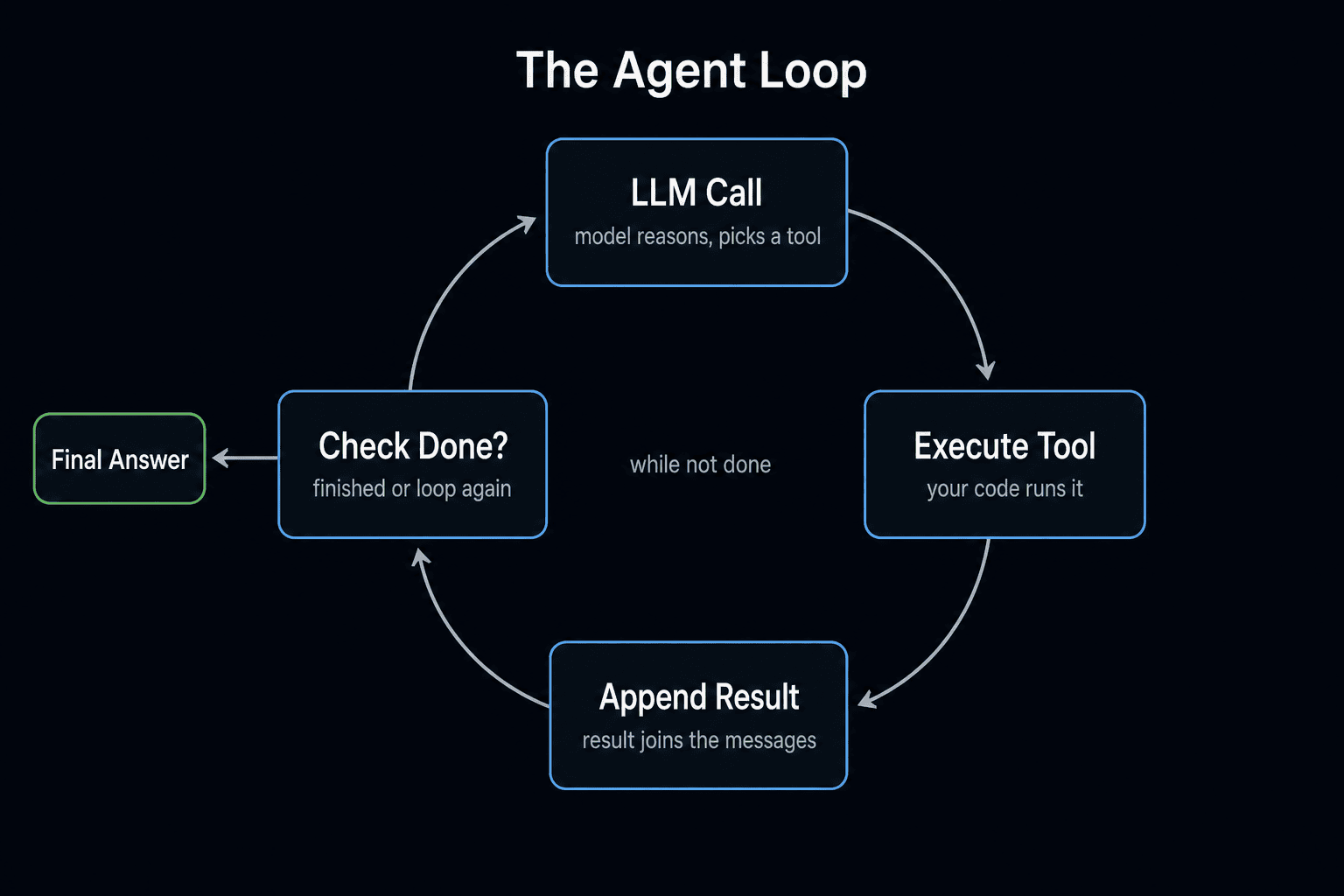
An AI agent is a Python program that loops between calling an LLM and executing tools the LLM picks, until a goal is reached. The whole pattern fits in ~60 lines. No LangChain, no CrewAI, no framework — just the Anthropic SDK, a few Python functions, and a while loop.
This is the version we wish someone had handed us before we wasted three weeks on framework-shaped problems.
What an AI Agent Actually Is
An agent is three things plus a loop:
- An LLM that supports tool use — Claude (Sonnet/Haiku/Opus), GPT-4o, Gemini 2.0+. The model can return "I want to call function X with args Y" instead of just text.
- A set of tools — Python functions you write (read_file, search_web, query_db).
- A loop — send a user message, receive either text or tool calls, execute tool calls, append results, send back, repeat.
That's it. Memory, planning, reflection, multi-agent orchestration — all of it is built on top of these three primitives. Master the primitives first.
The framework debate is a distraction. Frameworks add convenience for some patterns and complexity for others. Building from scratch first gives you the muscle memory to evaluate frameworks honestly later.
Step 1: Install the SDK (1 minute)
pip install anthropic
Set your API key:
export ANTHROPIC_API_KEY="sk-ant-..."
Get one at console.anthropic.com. You get $5 free credit on signup, which is enough to build and debug 50+ agent runs.
Step 2: Define Your Tools (10 minutes)
Tools are just Python functions. Write them like you'd write any utility code, then describe them to the model.
import os

def list_files(directory: str) -> str:
    """List files in a directory."""
    try:
        files = os.listdir(directory)
        return "\n".join(files)
    except Exception as e:
        return f"Error: {e}"

def read_file(path: str) -> str:
    """Read the contents of a file."""
    try:
        with open(path, 'r') as f:
            return f.read()
    except Exception as e:
        return f"Error: {e}"

# Tool registry: maps tool names to functions
TOOLS = {
    "list_files": list_files,
    "read_file": read_file,
}
Two real tools is enough to start. Add more after the loop is working.
Step 3: Describe Tools to the Model (5 minutes)
The Anthropic API needs JSON Schema descriptions of each tool so the model knows what's available.
TOOL_DEFINITIONS = [
    {
        "name": "list_files",
        "description": "List the files in a directory. Returns a newline-separated list.",
        "input_schema": {
            "type": "object",
            "properties": {
                "directory": {
                    "type": "string",
                    "description": "Absolute or relative path to the directory."
                }
            },
            "required": ["directory"]
        }
    },
    {
        "name": "read_file",
        "description": "Read the contents of a file. Returns the file contents as a string.",
        "input_schema": {
            "type": "object",
            "properties": {
                "path": {
                    "type": "string",
                    "description": "Path to the file."
                }
            },
            "required": ["path"]
        }
    }
]
The descriptions matter — the model decides which tool to call based on them. Keep them factual and specific. "Read a file" is fine. "Read a file using advanced parsing" is misleading and will confuse the model.
Free AI Builder Newsletter
Weekly guides on AI tools & builder strategies.
Step 4: Implement the Agent Loop (15 minutes)
Here's the core. Read it twice — this is the entire agent pattern.
from anthropic import Anthropic

client = Anthropic()

def run_agent(goal: str, max_steps: int = 10) -> str:
    """Run an agent loop until the goal is reached or max_steps exceeded."""

    messages = [{"role": "user", "content": goal}]

    for step in range(max_steps):
        response = client.messages.create(
            model="claude-sonnet-4-5",
            max_tokens=4096,
            tools=TOOL_DEFINITIONS,
            messages=messages
        )

        # Append the assistant's response to the message history
        messages.append({"role": "assistant", "content": response.content})

        # Check if the agent is done
        if response.stop_reason == "end_turn":
            # Extract the final text response
            for block in response.content:
                if hasattr(block, "text"):
                    return block.text
            return "Agent finished with no text output."

        # If the agent called tools, execute them
        if response.stop_reason == "tool_use":
            tool_results = []
            for block in response.content:
                if block.type == "tool_use":
                    tool_name = block.name
                    tool_input = block.input

                    # Execute the tool
                    if tool_name in TOOLS:
                        result = TOOLS[tool_name](**tool_input)
                    else:
                        result = f"Error: tool '{tool_name}' not found"

                    tool_results.append({
                        "type": "tool_result",
                        "tool_use_id": block.id,
                        "content": str(result)
                    })

            # Send tool results back as a user message
            messages.append({"role": "user", "content": tool_results})

    return "Max steps reached without completion."
That's 35 lines for the full loop. Read each part:
- Line 7:
messagesis the conversation history. We append to it as we go. - Line 9: The for loop is the agent loop — bounded by
max_stepsto prevent runaway. - Lines 11–16: Call the LLM with our tools. The model returns either text or tool calls.
- Line 19: Always append the assistant's response to history (otherwise the model loses track).
- Lines 22–27: If
stop_reason == "end_turn", the model is done. Extract the final text. - Lines 30–46: If
stop_reason == "tool_use", execute every tool call and append the results. - Line 48: Loop back to step 1.
Step 5: Run It (5 minutes)
if __name__ == "__main__":
    result = run_agent("List the Python files in the current directory and summarize what the largest one does.")
    print(result)
Run it. The agent will:
- Call
list_fileswith directory=. - See the file list, pick the largest .py
- Call
read_fileon that file - Read the contents
- Return a summary
You'll see two tool calls and one text response. That's an agent.
Step 6: Add Error Handling
Real agents need to handle tool failures gracefully. The trick: return errors as strings to the model so it can self-correct.
if tool_name in TOOLS:
    try:
        result = TOOLS[tool_name](**tool_input)
    except Exception as e:
        result = f"Tool '{tool_name}' raised an error: {e}. Try a different approach."
else:
    result = f"Error: tool '{tool_name}' not found. Available tools: {list(TOOLS.keys())}"
Now if a tool fails (file not found, network error, bad input), the agent sees the error and tries something else. This is huge for reliability.
Step 7: Add a System Prompt
A system prompt scopes the agent. Without it, the model defaults to general-purpose behavior. With one, you can specialize.
SYSTEM_PROMPT = """You are a code analysis agent. Given a goal, use the available tools to inspect files and return concise, factual answers. Always cite the file paths you read. Never invent file contents."""

response = client.messages.create(
    model="claude-sonnet-4-5",
    max_tokens=4096,
    system=SYSTEM_PROMPT,
    tools=TOOL_DEFINITIONS,
    messages=messages
)
The system prompt is the most important thing in your agent. It sets the agent's purpose, constraints, and tone. Iterate on it like you'd iterate on a critical function.
What You Just Built vs. What LangChain Gives You
LangChain's AgentExecutor does exactly this loop, plus:
- More verbose logging
- Built-in retry policies
- Pre-built tools for common cases (search, calculator, SQL)
- Memory abstractions (ConversationBufferMemory, etc.)
- Multiple agent strategies (ReAct, OpenAI Functions, etc.)
Your version: 60 lines, fully understood, easy to debug.
LangChain's version: 60 lines you wrote + 5,000 lines of framework you didn't.
Both work. The from-scratch version teaches you the loop. After that, you can decide whether the framework's conveniences are worth the lock-in for your specific use case. See LangChain vs CrewAI vs raw API for the full comparison.
Common Mistakes Building Your First Agent
1. Forgetting to append the assistant message. If you skip messages.append({"role": "assistant", ...}), the model loses track of what it just did and re-calls the same tools. Always append.
2. Returning Python objects to the model. Tool results must be strings (or json-serializable structures the SDK serializes). Don't return a dict, list of objects, or anything custom — the model can't read it.
3. No max_steps cap. Without a step limit, a confused agent will loop forever and burn money. Always set max_steps (10–25 is usually plenty).
4. Vague goals. "Help me with my project" produces 30 tool calls and no useful output. "List Python files in /src and summarize the 5 largest" produces 6 tool calls and a clean answer.
5. Tool descriptions that lie. If read_file actually only reads UTF-8, say that in the description. Mismatched descriptions cause the model to call tools wrong.
6. Ignoring stop_reason. The API returns multiple stop_reasons (end_turn, tool_use, max_tokens, stop_sequence). Handle each explicitly. We've seen agents hang because they only checked end_turn and ignored max_tokens (which means truncated output).
What to Build Next
You have a working agent. Three high-value next steps:
- Add real tools. Web search (Tavily, SerpAPI), database queries, your own internal APIs. See MCP 101 for the standard protocol approach.
- Add memory. External file memory first (just write to JSON), vector DB only when scale demands it. The AI Agents 101 series covers this in depth.
- Add multi-agent coordination. When one agent isn't enough, you need a coordinator pattern. See multi-agent system Python tutorial.
The Bottom Line
A working agent is 60 lines of Python. The agent loop is the only thing that matters; everything else is decoration. Build the loop yourself once, and frameworks become a tool you reach for when convenient — not a black box you depend on. Most production agents at companies we work with run on hand-written loops, not frameworks. There's a reason.
If you want to go deeper into agent patterns alongside other builders, join AI Builder Club.
Frequently Asked Questions
What is an AI agent, exactly?
An AI agent is a program that loops between calling an LLM and executing tools the LLM chooses, until a goal is reached. The "agent" part is the loop, not the model. Three components: (1) an LLM that supports tool use, (2) a set of tools (Python functions), (3) a loop that runs LLM → tool call → tool result → LLM until the model says it is done. Everything else (memory, planning, reflection) is built on top of these three.
Why build an agent from scratch instead of using LangChain?
Three reasons: (1) You learn how it works. Frameworks hide the loop; understanding the loop is the foundational skill. (2) You debug faster. When something breaks, 60 lines of your own code is faster to fix than 60K lines of someone else's. (3) You ship lighter. Production agents don't need most of what frameworks pull in. See our LangChain vs CrewAI vs raw API breakdown for the full tradeoff analysis.
How long does it take to build a working agent from scratch?
About 45 minutes for the first one — install the SDK, write 2–3 tools, copy the loop pattern, run it. Adding new tools after that is ~10 minutes each. Compared to LangChain (1–2 hours of docs reading + framework debugging), the from-scratch path is faster for the first agent and much faster for the second.
Do I need a vector database for an agent?
No, not to start. Vector databases solve "long-term memory across many sessions". Most agents don't need that yet. Start with: (1) in-context memory (just append to messages), (2) external file memory if persistence matters (write a JSON file), (3) vector DB only when you have hundreds of facts to recall semantically. Adding ChromaDB or Pinecone day-one is premature optimization.
Which model should I use for agent development?
Claude Sonnet 4.5 for most agent work — best balance of tool-use reliability, speed, and cost ($3/M input, $15/M output). Haiku 4 for simple agents (file ops, classification) at ~3x cheaper. Opus 4.5 only if Sonnet visibly struggles. For learning, Sonnet 4.5 is the right default. GPT-4o and Gemini 2.0 Flash also support tool use; the patterns transfer almost exactly.
How do I prevent agent infinite loops?
Two safeguards. (1) Hard step limit: wrap your loop in for step in range(max_steps) (10–25 is usually enough) and break out if exceeded. (2) Cost cap: track token usage per session and abort if it exceeds a threshold. Also: log every tool call so you can spot loops early. A well-prompted agent rarely loops; a vague-goal agent often does.
What is the difference between this and Claude Code?
Claude Code is a finished agent (with filesystem, shell, git tools) wrapped in a CLI. Building an agent from scratch teaches you what Claude Code is doing under the hood — and lets you build your own agent for tasks Claude Code doesn't do (e.g. a customer-support agent, a data-pipeline agent, an internal tool agent). Both are useful; understanding the loop is what unlocks the latter.
Sources & Verification
This guide is written from hands-on testing, then cross-checked against primary sources - official documentation and first-party announcements. Field results and opinions are labeled as such. See our editorial standards.
Join AI Builder Club


$37/mo
Get the free newsletter
Weekly deep-dives on AI tools, automation workflows, and builder strategies. Join 5,000+ readers.
No spam. Unsubscribe anytime.