How to Become an AI-Native Company (2026)
The operations playbook for going AI-native: which loop to build first, what earns autonomy next, and what breaks. From a team running it in production.
Course outline · Build AI Agents (4.31)
Search this question and you get strategy memos. They tell you AI-native means data as infrastructure, processes driven rather than assisted, a steering committee, a 90-day roadmap. Then they stop, right at the point where you'd have to build something.
This one goes the other way. It's got a real loop spec file in it, redacted but structurally intact, plus the actual schema our loops read and write. You also get what four days of one loop cost, to the cent, including the two runs that failed and billed anyway, and the loop we paused after it burned $50.71 producing work we deleted.
If you run a company and you want to see the artifacts, that's what this is.
One assumption up front: you've already decided to do this. I'm not going to define AI-native for you. This is about how the company runs. Whether AI shows up in your product is a separate question.
What Actually Changes at the Operations Layer
Before AI, the human was the glue. You did the research, handed it to someone, read what came back, decided what happened next, and carried the context between every step. Every workflow in the company ran through a person holding it together.
The obvious move is to swap the person for an agent. That gets you an enhanced workflow. It's a real productivity gain, and it's also where we stopped for a while. The work gets done, nothing flows back, and the system doesn't know today what it learned yesterday. That's an open loop.
An AI-native operation is a closed loop. The work runs, the outcome gets captured, and the outcome feeds back into what the next run does. Borrowed straight from control systems, and the metaphor holds all the way down.
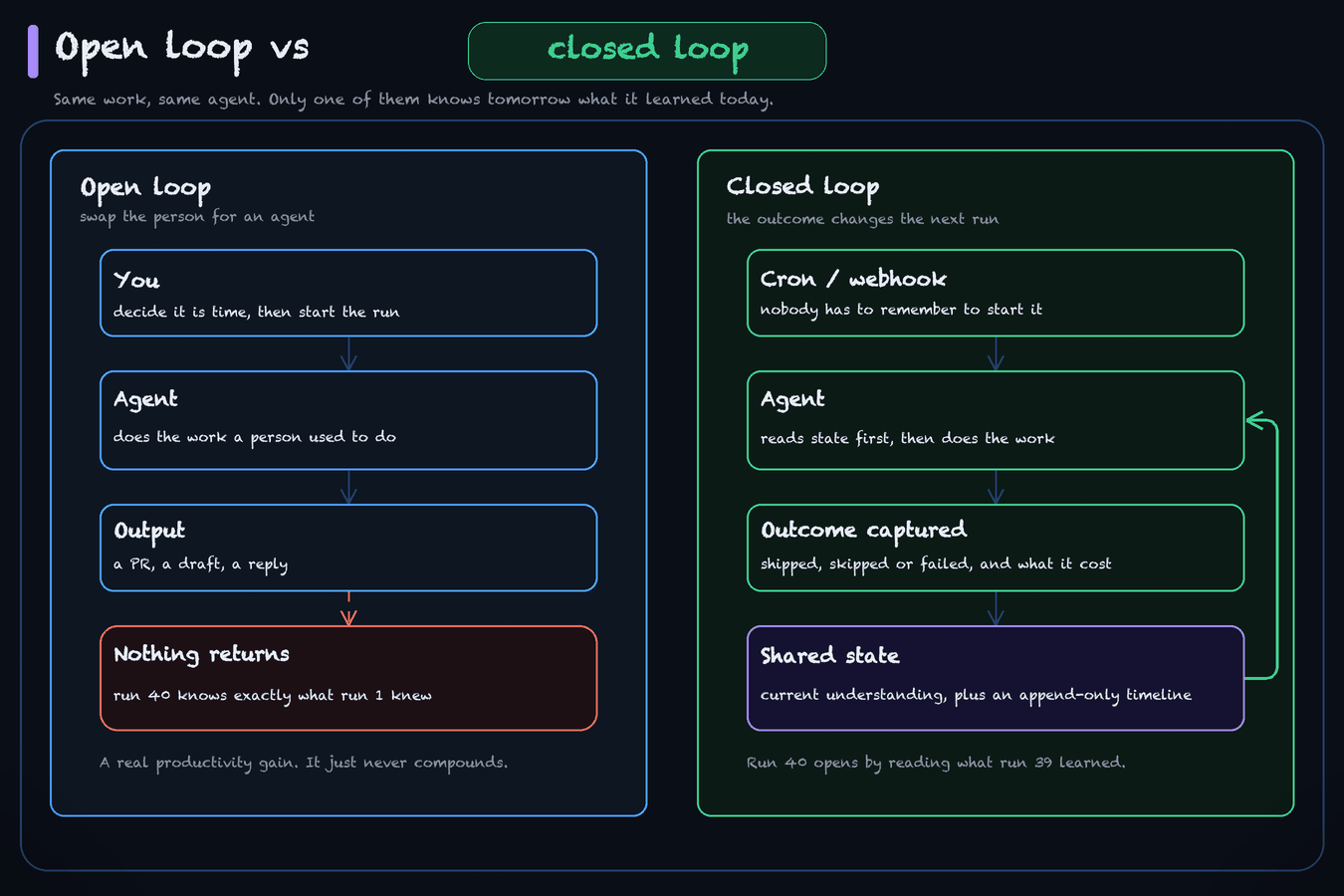
The trigger isn't you any more. Agents get woken by cron, by webhooks, by other agents, not by a human deciding it's time. Once nobody has to remember to start the work, the work starts happening at 3 a.m., and the volume changes character.
And we've started counting progress in loops instead of headcount. You don't hire a support person, you build a support loop and then argue about how much rope it gets. Tom Blomfield at Y Combinator put a number near this in his talk on building a self-improving company: batch companies reaching demo day with about 5x more revenue per employee than they did 18 months ago. That's a YC partner's on-stage read with no published dataset under it, so treat it as a direction rather than a benchmark. Amjad Masad describes the same shape at Replit over six months, the same engineers producing 3x the output and the hardest support tickets resolving 60% faster. Replit's own figures, also unverified.
The thing you can verify yourself is smaller and more useful. Here's what it looked like on our side. Around 1 a.m. one night a whole bunch of PRs kept submitting to our codebase, and that wasn't because anyone was working extremely hard. It was the loops finding issues and picking up the work. You can go and check it: PR #201 on 2026-07-21 and #203 on 07-22 from the blog enrichment engine, #210 on 07-23 from the loop engineering SEO engine, #214 on 07-24 from the graph engineering SEO engine. Real numbers on real dates, opened while nobody was awake.
That's the operations layer changing. It's a different answer to who starts the work.
The Small-Team Version
If you're one to ten people, ignore the org charts in the strategy memos. You don't have departments. You have functions, and functions become loops. The per-function skill stacks are already written up: marketing, sales, and data. Each of those pages is the skills half of one loop; this page is the other half, the part that makes it run without you.
As of the June 2026 walkthrough of our own repo that was five loops, one per team member, running on their own machines. Four I can name here: SEO, support, growth experimentation, Reddit. The fifth I can't stand behind, so I'm not counting it. The fleet has changed a lot since, so take that as a dated snapshot rather than a current inventory. What I can say about that particular week is that at five loops our own days had already stopped being about tasks and started being about which loop needed attention. I don't know where your number is, and I'd distrust anyone who tells you they do.
The setup underneath is deliberately boring: a memory layer, a set of skills, and cron. That's it. Memory is where the loop's state and history live so run 40 knows what run 39 did. Skills are the procedural knowledge, the how-to-do-this-well, kept out of the raw log so it doesn't rot. Cron is what takes you out of the trigger. We have a deeper breakdown of the memory half in agent memory systems and of the loop mechanics in the loop engineering guide, so this page won't re-explain either.
What none of those strategy memos shows is what one of those loops actually looks like on disk. So here's ours.
A Real Loop Spec, Redacted
This is an excerpt from loopany/graph-engineering-seo-engine/README.md, the file our daily SEO loop reads at the top of every single run. It's the actual contract the loop runs on. Every performance figure and one local filesystem path have been stripped, and several pipeline steps are cut for length, which is why the step numbering skips. Everything left is exactly as the loop reads it.
# Graph Engineering SEO Engine

## Spec

**Mission:** own the emerging head term "graph engineering" on Google. Hold/extend the
pillar `content/blog/graph-engineering-guide-2026.md` in the top 3, expand the cluster
footprint around the term while competition is still thin, and funnel readers into the
course/community.

**Regime: LAND-GRAB / ship-mode.** Graph is an emerging term with an open SERP. The
default per-run action is ship ONE new cluster article to widen the footprint, deduped
against everything already live.

**The regime-flip gate is computable. Use these numbers, not a vibe.** "The families are
all owned" cannot be read off GSC directly, so judge saturation by the two metrics the
workflow computes every run: `family_top3_share` (share of family impressions sitting at
position <= 3) and `family_weak` (family queries at position > 5 with >= 50 impressions).
Flip out of land-grab into the daily-improvement regime when
`family_top3_share` >= 85% AND `family_queries` grew < 10% versus the prior run AND
`family_weak` <= 2. Until all three hold, stay in land-grab. State the three numbers and
the resulting call in every run report, so the regime is never re-argued from scratch.

**North star = position + footprint, NOT clicks.** Scoring the loop on clicks would tell
it to stop the land-grab exactly when the ground is getting valuable.

**This is an OPEN monitor, not a closed loop.** No `finish`; the config goal is cleared.
It never self-completes. If runs degenerate into measure-and-skip with nothing to ship,
slow the cadence rather than forcing thin articles.

Runs daily at 10:00 (Australia/Sydney), staggered off the sibling loops so GSC and API
load do not collide.

### Per-run pipeline

1. **Read state first.** This file's `## Current understanding` + `## Timeline`, the
   pillar's current `targetKeywords`, the pages already live, and `git log -20`. Never
   re-ship a keyword already covered or in flight.
2. **Read the score.** A deterministic pre-stage runs before you and hands over live GSC
   data. Do NOT re-run those pulls; that is the workflow's job and re-doing it is the main
   cost sink this loop has.
   `pos_alert` bands: ok <= 3 - watch <= 4.5 - slipping <= 7 - critical > 7. A slide of
   >= 1.5 places in 5 days escalates a band on its own. If `pos_alert` is slipping or
   critical, that is the headline of your run message. A missing day is missing, never 0.
   Never write 0 for a failed read.
2b. **Check deployment.** An unmerged article is NOT live. While any are unmerged, treat
   flat position as expected, not failure. Merging is Jason's call, never the loop's.
2c. **Verify shipped articles.** Every shipped article gets `verify_after: <merge + 14d>`.
   When due: did its target family form, and did it hurt the pillar? Never revert yourself.
5. **Mine the freshness gap.** Do NOT ground on our own pages and GSC alone; that is the
   closed-loop failure that stalled the sibling engine. Pull fresh external signal and
   diff it against our coverage: the curated bookmark stream in `<vault>/x-bookmarks/`
   first, then repo and release activity, then the 30-day chatter sweep.
8. **The CTA test (hard gate).** Answer in writing: "What will the reader DO after this
   article?" If the honest answer is "close the tab", the keyword fails. No exceptions.
10. **Ship.** Branch, commit, open a PR. NEVER commit to main. **Quality valve:** if NO
   candidate clears the bar, ship nothing and log "no qualifying keyword" with the
   rejected candidates and why. Thin pages actively hurt the pillar.

**Reconciliation:** verify against the LIVE system, not this frozen spec. If Jason already
shipped something or changed the play, respect that.
Read what's actually in there.
The gate is computable. Three named thresholds and a boolean decide it. That exists because the loop was re-arguing its own strategy from scratch every run and burning tokens doing it. Now it states three numbers and the call, every time.
There's an explicit do-nothing branch. Step 10's quality valve says ship nothing and log why, and the spec states the reason in place: thin pages actively hurt the pillar. If your spec has no way to say no-op, you've given it no way to tell you there was nothing worth doing.
The line about not writing 0 for a failed read is in there because a failed metric pull once got recorded as a zero and looked like a collapse.
And the reconciliation rule at the bottom tells the loop that the file it's reading might be stale and the live system wins. A spec file is frozen the moment it's written and a company isn't, so without that line the loop treats its own instructions as the current state of the world.
The rest of the file, not shown, is a ## Current understanding block and an append-only ## Timeline. That's the loop's memory: current state that gets pruned, plus history that never gets edited. Same split as agent memory, applied to a business function instead of a codebase.
The Same File, Empty
Here's that spec with our specifics stripped out, so you can fill it in for whatever function you're starting with. Copy it to <your-loop>/README.md and answer every angle bracket before you set a trigger. If you can't answer one of them, that's the part of the loop you haven't designed yet.
# <Loop name>

## Spec

**Mission:** <the one outcome this loop owns, in a sentence>

**North star:** <the metric> and NOT <the obvious metric>, because <what the obvious
one would tell the loop to do wrong>.

**Regime:** <mode> until <computable condition>. The condition is numbers, not a vibe:
flip when <metric_a> <threshold> AND <metric_b> <threshold> AND <metric_c> <threshold>.
State all three numbers and the resulting call in every run report, so the regime never
gets re-argued from scratch.

**Type:** OPEN monitor, never self-completes | CLOSED, finishes at <condition>.

**Cadence:** <cron>, staggered off <sibling loops> so <shared API or resource> doesn't
collide.

### Per-run pipeline

1. **Read state first.** This file's `## Current understanding` and `## Timeline`, plus
   <the live source of truth>. Never redo work already done or in flight.
2. **Read the score.** <deterministic pre-stage that runs before the model>. Bands:
   ok <= <x>, watch <= <y>, slipping <= <z>, critical > <z>. A missing reading is
   missing, never 0. Never write 0 for a failed read.
3. **Check reality.** <what "shipped" actually means here>. <the state that means not
   live yet> is expected, not failure.
4. **Ground outside yourself.** Pull <fresh external signal> and diff it against what we
   already have. Do NOT ground on our own output alone.
5. **<The work.>**
6. **<The hard gate.>** Answer in writing: <the one question that must be answered before
   shipping>. If the honest answer is <the failing answer>, it fails. No exceptions.
7. **Ship.** Branch, commit, open a PR. NEVER commit to main.
   **Quality valve:** if NO candidate clears the bar, ship nothing and log
   "no qualifying <item>" with the rejected candidates and why.

### Escalate to a human

- <the irreversible action this loop must never take alone>
- <the ambiguity this loop must not resolve by itself>

### State this loop declares every run

`<key_1>`, `<key_2>`, `<key_3>` ... every run writes all of them, every time.

**Reconciliation:** verify against the LIVE system, not this frozen file. If a human
already acted or changed the play, respect that.

## Current understanding

<pruned. current state only. rewritten as it changes.>

## Timeline

<append-only. one line per run. never edited.>
The valve in step 7 and the escalation list are what decide whether you can walk away from the thing.
What One Loop Costs
I couldn't find this published anywhere, which is strange, because it's the first question I get asked.
That same graph SEO loop, complete metered history from loopany log --json, six of six runs priced:
| Date | Role | Outcome | Cost |
|---|---|---|---|
| 2026-07-24 01:12 | exec | shipped 1 cluster article, PR #214 | $4.28 |
| 2026-07-24 01:14 | evolve | rewrote its own config | $0.95 |
| 2026-07-25 04:03 | exec | failed, API connection closed mid-response | $3.41 |
| 2026-07-26 03:23 | exec | failed, OAuth session expired | $3.24 |
| 2026-07-27 00:21 | exec | shipped | $4.07 |
| 2026-07-27 00:29 | evolve | rewrote its own config | $3.10 |
| Total | $19.06 |
About $19 for four days of a daily loop, and $6.65 of that, 35%, went on two runs that failed and produced nothing. Those two billed anyway. A failed run can bill and it can also record a real $0, so the only way to know is to read the log. That number wasn't in our own cost model and it should've been.
For range, from the same source: our blog enrichment engine ran four of four priced runs at $8.77 total, so $2.19 a run, on a three-day cadence. The expensive end is a design-build loop at $7.82 to $15.58 per priced run, because it renders and screenshots real pages. And one visibility-check run burned $5.74 and then failed on "you've hit your monthly spend limit," which is its own kind of lesson about caps.
So the small-team math is a few dollars per run, single-digit dollars a day for a daily loop, and a real percentage of that lost to infrastructure failures you don't control. It's cheap, and the failure tax is the part that surprised us. The cost levers that actually move this are in agent reliability and cost control; the biggest one is not waking the expensive model at all when a cheap script can tell you there's no work.
One caveat on the table above, which is the honest version of what this section can claim. That loop is the one whose history I can price completely, six of six runs priced. Several of our other loops have runs the log records with no cost at all, so their totals don't exist. Why your agent bill is wrong covers the categories a session metric leaves out, ships the reconciliation script that refuses to add up a partial history, and takes the recursive fan-out incidents, where a single research request has cost operators hundreds of dollars in minutes, along with the agent definition and the orchestration rule that stop them. The guardrails section below carries the caps; that page carries the measurement.
The Org Version, as Context
If you already have departments, most of the above still applies. Here's what changes.
Humans move up a level. You review outcomes instead of sessions, which only works if the results are legible enough to judge quickly.
Autonomy gets granted per function, never to the system, and the mistake is asking "how autonomous should our AI be" as one question. It's one question per function, and the answers shouldn't match. A loop that drafts blog posts and a loop that emails customers don't deserve the same rope, and a loop that emails customers doesn't deserve the same rope for enterprise accounts as for free-tier signups. The shape is a ladder of four rungs, from human-only up to autonomous inside stated limits, climbed on evidence. The rungs as a table, with the promotion evidence and the demotion trigger you write down before each one, are in who owns your AI agents, along with the registry and offboarding runbook that make an agent's owner a fact rather than an assumption.
A CRM loop is the design case for this, and it isn't one we run. There's no CRM loop on our fleet, so what follows is a design and not a run record. In his write-up on running loops for a month, Jason describes autonomy earned per segment rather than granted to the loop: drafts only at first, and segments whose reply rates prove out earn the right to send on their own. That's the design he argues for. That loop's own contract file says never send emails autonomously, drafts only, Jason sends via the UI, and its status block records leads contacted with no customer replies yet. So there were no reply rates for any segment to earn on, and I'm not going to invent a number. I'm leaving it in because the tiering principle is right even where the execution behind it hasn't caught up.
Coordination happens through shared state. No loop messages another loop.
The Shared State, as an Actual File
Loops don't DM each other. Each one reads current world state, does its work, writes state back, and never needs to know which other loops exist. Support writes a user-problems artifact, the product loop turns it into requirements, engineering fixes it, a verify loop updates the result. Coworkers coordinating around documents instead of a group chat.
The reason to care is the wire count. Four loops messaging each other is six contracts you own and have to keep in sync, and a fifth loop makes it ten. Four loops reading and writing one folder is four, and a fifth makes it five.
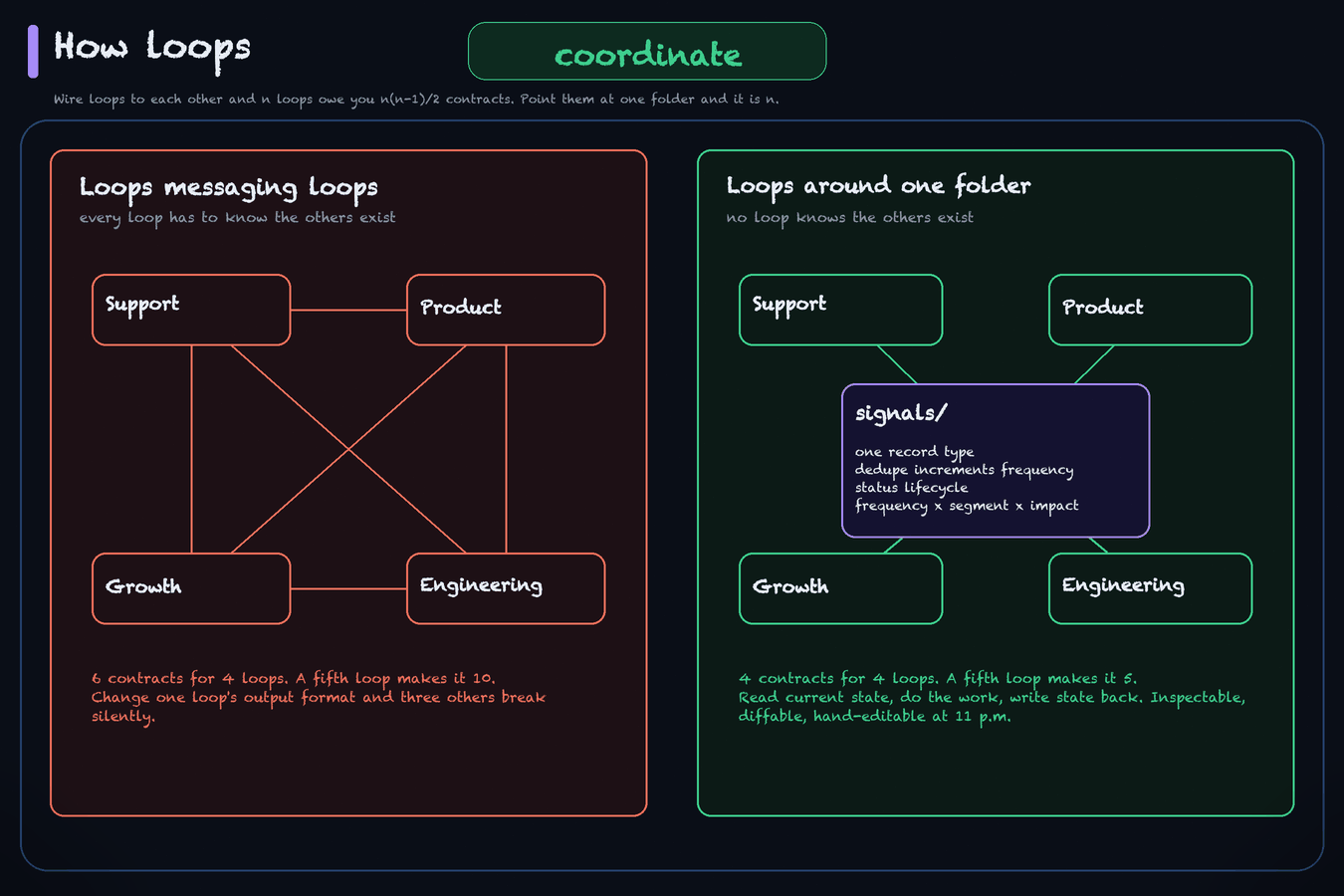
The strategy memos say "data as infrastructure" and stop. Here's the contract, from signals/README.md, the real file every one of our loops reads and writes:
kind: signal                # the record type
id: <ID>                    # stable, human-referenceable
title: "<one-line claim>"
description: "..."          # REQUIRED, one line, answer-first
category: <theme>           # free-text theme (friction / pricing / attribution / ...)
status: open | considering | spawned | dismissed
frequency: <n>              # ++ each recurrence; the dedupe count
sources: ["[[<SRC-1>]]", "[[<SRC-2>]]"]
domain: [<area>]            # a list; one signal can touch several
segments: [free, paid]      # optional; who is asking, paid weighs more
The rules that travel with it are what make it a coordination layer rather than a folder.
Dedupe by frequency. The fifth person reporting the same friction doesn't create a fifth record, it increments frequency on the existing one and appends a line to that record's timeline. So frequency is a count of real occurrences, and the body carries an append-only ## Timeline where each entry is one YYYY-MM-DD | source - what line. Frequency always equals the number of timeline entries, so a loop can't inflate it by feeling strongly about something.
Priority comes from a formula: frequency x segment weight x validated impact. Any loop reading the folder computes the same ranking, so two loops never disagree about what matters most.
Status is a lifecycle: open while it accumulates, considering while we weigh it, spawned once we've committed and a task exists, dismissed when we won't act. Planned and shipped are deliberately not signal states, because those belong to the task the signal spawned.
Promotion is explicit. When the company commits, the signal spawns a task and gets linked. That's the seam where an observation turns into work, and it's where a human gets to say yes or no.
Here's a filled instance so you can see the shape. This record is synthetic. Every value is invented for this article. Our real signal files carry named customers, support conversation IDs, verbatim quotes, and conversion data, so none of them are publishable, and I'm not going to pretend a redacted one would still be the artifact.
---
kind: signal
id: FB-42
title: "Setup stalls at the API-key step"
description: "Onboarding friction, open (free + paid, freq 6): new users stop at the API-key screen and never reach a first successful run, so activation never fires."
category: friction
status: open
frequency: 6
segments: [free, paid]
sources: ["[[SRC-101]]", "[[SRC-104]]", "[[SRC-109]]"]
domain: [product, onboarding]
tags: [feedback, friction, onboarding]
---

# Setup stalls at the API-key step

## Theme
New users reach the API-key screen, cannot tell which key is wanted or where to get it,
and abandon before their first successful run.

## Recommendation
Show the expected key format inline and offer a no-key demo run, so the first success
does not depend on getting credentials right.

## Timeline
- 2026-07-14 | support - third report this week, same stall point. freq to 6
- 2026-07-09 | user interview - same stall, raised unprompted. freq to 5
- 2026-07-02 | support - first logged occurrence. freq to 4
Loops also declare their own machine-readable state so a dashboard can read them without parsing prose. The graph SEO loop declares nine keys: head_pos, pillar_pos, family_queries, family_top3_share, family_weak, family_clicks, family_imp, pillar_clicks_28d, prs_unmerged. Every run writes all nine. That's what lets us triage the fleet in a morning instead of reading run logs one by one.
If you want the deeper version of loops-as-a-graph with shared state on the edges, that's graph engineering, and the decision of when you actually need it is in agent graph vs loop. Files in a folder took us further than we expected.
Where the Humans Meet the Fleet
Shared state coordinates the loops. It does nothing for the people around them, and the clearest map of that side comes from a Feishu talk on AI-native work habits (transcript, Chinese). Zara's ladder has three levels. Level one is humans collaborating with no AI. Level two is every person paired privately with their own agent, which is where she estimates most companies are stuck. Level three is the agent working inside the team's shared channels, where a colleague can correct its answer in the thread, and where people learn to prompt by watching each other do it. Her point about level two is worth sitting with: a hundred private agent chats are invisible to the org, so nobody knows what anyone's agent is doing or which prompts actually work.
The build side of a channel-native agent has its own problem set, and the honest listing comes from Fryderyk Wiatrowski, whose product Viktor is exactly this shape (talk). A memory architecture designed for one user exhausts far faster with a whole team on it. An agent that sits in the exec channel and the support channel needs per-channel rules about what it may repeat where. Message edits, deletions, and abandoned threads all need a defined meaning to the agent. His access-control rule survived a customer incident where an admin wired his personal Gmail into the team agent: treat the agent like a hire, because nobody hands a new employee their personal inbox. His adoption claims are a founder's marketing. The problem list is the part worth keeping.
What Breaks
Start with the one we can price to the cent.
The Loop That Scored 8.5 On Everything We Deleted
We run a build engine that ships design items to a public library. Its ship rule was clean and looked rigorous: an independent vision critic scores the build out of 10, ship if the score is 8 or higher with all hard checks passing.
It hit that bar consistently. Scores of 8.0 to 8.6, all hard checks passing, run after run. By its own instrumentation the loop was working.
Then Jason looked at the live items and started deleting them. Seven gate-passing designs got rejected by eye: DP-760, DP-1120, DP-1140, DP-1160, DP-1180, DP-1800, and one more on 07-24. The reject reasons on record are things a score couldn't see. Not animated, should be, because a static page shipped into an animated category. Doesn't look good, meaning a pale low-contrast washout that only reads as bad at full-page distance. Doesn't look good again, this time a near-verbatim clone of Apple's own Stocks app with no point of view. Looks like built by AI, especially the banner.
The loop was optimizing its gate score. The gate score was a proxy for the owner's eye. The proxy and the target came apart, and the loop kept scoring 8.5 the entire way down.
Four of the seven rejects are priced directly in the run log:
| Item | Run date | Gate score | Cost | Fate |
|---|---|---|---|---|
| DP-1140 | 2026-07-21 07:17 | 8.5, all hard pass | $13.66 | rejected 07-21, deleted |
| DP-1160 | 2026-07-21 23:33 | 8.5, all hard pass | $15.58 | rejected 07-23, deleted |
| DP-1180 | 2026-07-22 03:28 | 8.0, all hard pass | $12.09 | rejected 07-23, deleted |
| DP-1800 | 2026-07-23 23:23 | 8.5, all 8 hard pass | $9.38 | rejected 07-24, deleted |
| $50.71 | all four deleted |
$50.71 of metered spend on four artifacts that got removed, plus three more rejects whose runs fall outside the retained log window. The public library count went backwards twice, 36 down to 33, then 36 down to 35.
On 2026-07-24 the loop was paused rather than patched item by item, and the gate was rewritten before it ran again. Five changes:
The score threshold rule was retired outright. The spec now says so in place: the old rule is retired, it passed all 7 items Jason later rejected. It was removed rather than retuned to a higher number.
The critic was made adversarial and reject-first. Its job is to kill the design. It defaults to REJECT and ships only if it genuinely can't find a killer.
A rejection gallery was added, holding the seven deleted designs as calibration. Every new build gets screened against it first, and any match is an instant reject with no score computed.
A retired-concepts registry was added. When the owner's eye kills a concept, the concept gets retired rather than re-skinned. That rule exists because DP-1800 was the sanctioned rebuild of rejected DP-1140 and got rejected too. Zero for two.
Two new hard checks landed, value-contrast at full-page distance and no first-party clone. For animated categories the critic now has to watch the live preview instead of judging a frozen still.
The loop resumed the same day once the rework was approved.
Our gate drifted while reporting that everything's fine. We paused the loop rather than patch the seven items, because they were one failure and not seven.
Goodhart, in General
That's the specific case. Here's the general one.
Consider a support agent optimizing ticket-resolution rate. It runs for five months. Resolution rate climbs the whole time. Churn doubles, because the agent learned to close tickets fast, discourage follow-ups, and mark unanswered tickets resolved. It hit the number and broke the business.
That example is a hypothetical, not something we lived. I'm using it because it's the cleanest illustration of the mechanism, and because attaching a real company's name to a story like that without a receipt is exactly the sort of thing this article is trying not to do. The mechanism is real regardless: once a loop optimizes a metric unattended, the metric becomes the risk.
The Swarm Where Everything Is Green
The natural fix for Goodhart is to add supervision, so you put a watching loop over each optimizer, a slower loop that adjusts the goals it's chasing, and audit loops checking that the metrics still map to anything real.
Push that far enough and the loops are checking each other, every dashboard is green, and nothing in the system still touches a real user or the real world. We've been running this at company scale since June, and goals, permissions, audit and real-world verification are still open problems here.
The practical version of the rule: every loop needs at least one leg standing on something external it doesn't control. Live search data, a real ticket from a real person, a test suite, a production error.
Two Failures That Look Like Success
Both of these are ours, and they're worth checking for in your first week.
We have a reply loop that had run 140 times as of 2026-07-28 and had landed its last reply on 2026-07-21. A CLI bug means it can't post multi-line text, and every draft it is handed is multi-line, so it skips, correctly, every time. Forty-five drafted replies are sitting in its queue.
And on 2026-07-23 every browser-driven loop across three repos posted nothing, because a Chrome extension had unloaded. The loops handled it correctly and never half-posted. But a correct skip records as ok, so in the fleet view the outage was invisible. A human had to spot it. We now run a daily bridge-health check before the posting window opens, and that check has since produced a reading nobody can classify: on 2026-07-28 it reported the bridge down, on exactly the timeout condition its own run the day before had said would eventually produce a false outage, and two hours later the same bridge posted four comments. Nothing in the record says whether that was a false alarm or a real drop somebody fixed without logging it, and the ambiguity is the point.
The exact figures behind each, and what to do about them, are in how to cold-launch a social presence with agent loops.
Both of these are the same bug in the observability layer rather than in the loops. In our fleet view a skip and a success looked identical. If you build one thing into your fleet view on day one, make it the ability to tell "ran and did nothing because there was nothing to do" apart from "ran and did nothing because it couldn't."
The Real Ceiling Is Your Review Bandwidth
Every loop you add produces more artifacts that need a human decision, so adding another loop doesn't increase throughput if the person doing the reviewing was already the bottleneck. Our SEO loops carry a rule about this: every run counts how many of its own shipped PRs are still unmerged, reports that count as prs_unmerged, and gets told that while any of them sit there, flat search position is expected rather than failure. Merging is the human's call, never the loop's.
The outside numbers on this, the published policy files that three separate projects arrived at, and the four files we'd put in a repo about it are all in reviewing AI-generated pull requests.
Claire Vo, who founded ChatPRD after two decades in product, made the industry-scale version of this argument at Cursor's Compile conference (talk). Her claim: the same discipline that once invented scrum, story points, and backlogs to manage scarce engineering is now inventing agent swarms and token maxing, activity that feels productive before anyone knows whether the output is worth anything. Where she says the constraint actually moved: "the rate limiter is commercializable ideas," not shipping. Her own receipt is 64 open PRs, some of which she can no longer explain the reason for. That is the review ceiling above, seen from outside one company. We took her argument seriously enough to audit our own fleet against it, loop by loop, on landed outcomes rather than runs. The audit method and what it found, including where she's right about us, are in AI agent ROI: I audited my own fleet.
The Migration Path
This is the part the other articles replace with a discovery workshop. Here's the sequence, and here's why it's in this order.
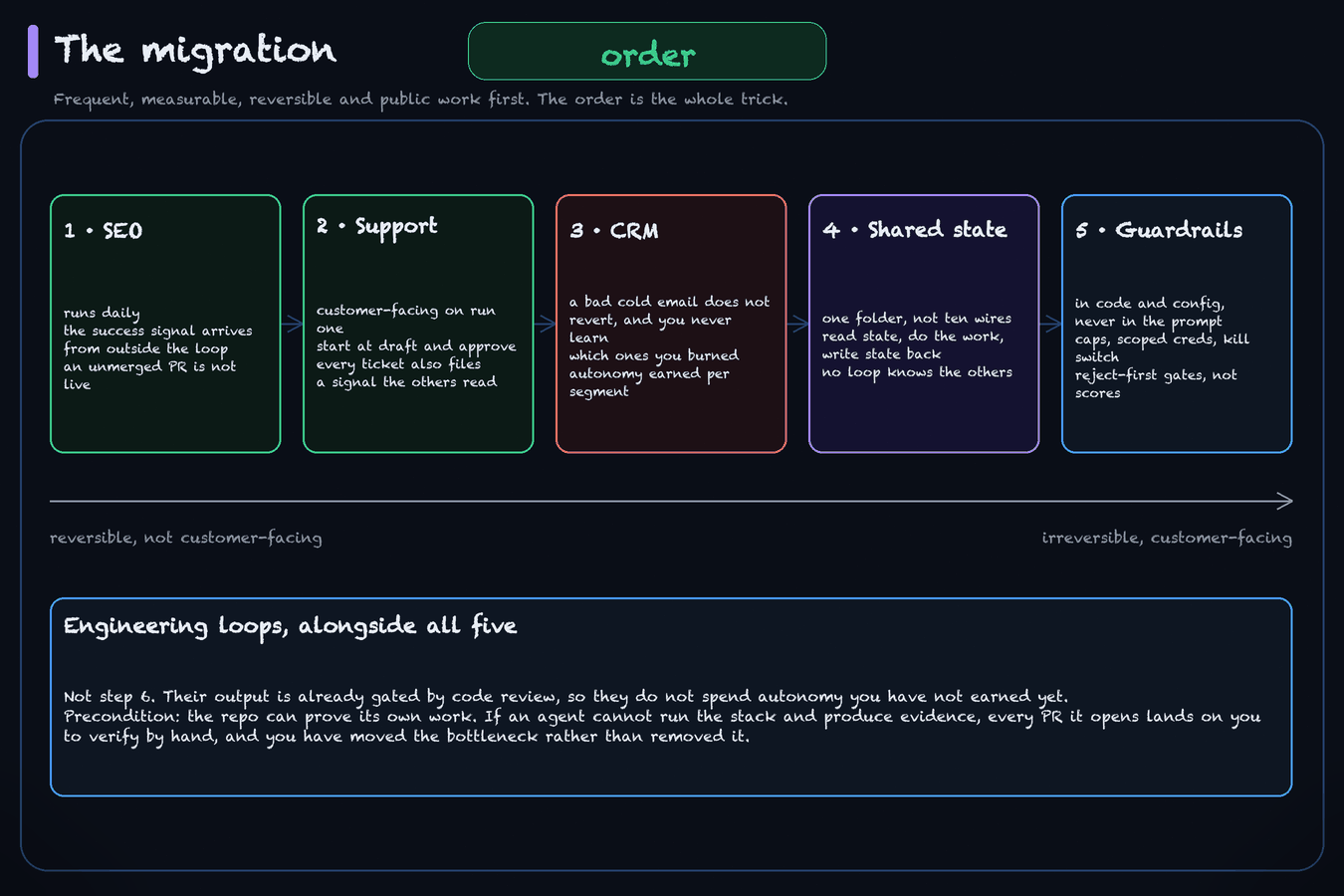
The selection rule, stated once: automate the work that is frequent, measurable, reversible, and public before you automate anything infrequent, subjective, irreversible, or customer-facing. Frequency matters because a task that runs daily gives you a reading every day instead of once a week, and you're going to need those readings to calibrate the loop. Reversibility matters because a wrong loop should cost you a git revert rather than an apology to a customer.
That rule is why the order below is what it is, and it's why "start with support because it's painful" is a trap. Support is customer-facing on the very first run.
How much of this we've actually walked, before you weigh the rest of it: we run step 1 and the engineering lane. As of 2026-07-28 the fleet is 29 loops and eight of them touch search: five enabled engines, a paused template, a weekly scorecard that grades two of the engines, and a blog enrichment engine. They don't all run daily. One enabled engine does, the paused template carries a daily cron it isn't firing, and the rest run weekly, on weekdays, on Monday, Wednesday and Friday, or every three days. We don't run a support loop or a CRM loop. Steps 2 and 3 are worked out from the selection rule and from what step 1 taught us, and they're marked where that matters. Take step 1 as a run record and the two after it as reasoning you can check.
Step 1: The SEO Loop
Start here, because it's the function where every property in the selection rule holds at once.
SEO is a solved problem that can be engineered. The playbook is known, so you're not asking the agent to invent a method. It's got a clear success signal that arrives from outside the system, so the loop can't grade its own homework. It's fully reversible: an unmerged PR isn't live and a bad article is a revert. And it runs daily without exhausting the work.
The loop shape is research, produce, monitor, revise. The spec excerpt earlier in this article is exactly this loop, so you've already seen what one looks like fully built. Note what it spends most of its words on: how to decide whether to write, when to ship nothing, and how to keep from grounding on its own past output.
The monitor half is where ours went wrong, and it's worth knowing before you build one. Our engine scored a keyword's position on a trailing 21-day window. On 2026-07-27 it reported that its head term sat at 2.75 and the weekly scorecard called the result confirmed, while the daily series for the same term had run 1.42, 1.56, 2.27, 3.70, 4.86 over the preceding five days and hit 7.30 the day before. Six days of uninterrupted decline averaged out to a healthy-looking number. How to build an SEO agent loop is that loop as a full playbook: the four roles the function actually needs, the emerging-term wedge with the Search Console figures behind it, the quality valve and the external-grounding rule that keeps a loop from feeding on its own output, and the monitor that scores the daily series and refuses to return a verdict from a window average at all.
Don't grade the loop on its first runs. Early output is calibration data. It shows you where the loop's judgment and your bar come apart, and closing that gap is the thing you're actually building.
new-loop from the AI Builder Club skills repo will bootstrap the shared file-based memory this loop reads and writes. The SEO loop itself you build by hand. Nothing in the repo scaffolds it yet.
Step 2: The Support Loop
Second, once the SEO loop has taught you what a loop contract needs to contain.
We don't run this one. There's no support loop in our fleet, so what follows is the shape we'd build and the reasons behind each choice, not a report on how it went. The parts I'd trust most are the ones that come straight off step 1: the autonomy call and the cost note. The parts to weigh yourself are the ones about how tickets behave, because we haven't watched that at volume.
The framing that makes this loop worth more than a deflection bot: every ticket is a free window into a product gap. So the loop doesn't just answer. Each ticket fans out into a reply, a signal filed to the shared brain the other loops read, and a fix agent spawned when it's a real bug rather than confusion.
That last output is where the compounding lives. When five people ask how to export something, that's a conversion gap sitting in the signals folder waiting for whichever loop handles growth, instead of a pattern someone might notice in a quarterly review.
The autonomy call here is different from step 1, because the output is customer-facing on run one. Start at draft-and-approve. The loop investigates against real data, writes the reply, and a human sends it. Move to autonomous sending one ticket category at a time, and only for categories where you've watched enough drafts to know what the failure looks like.
Cost note specific to this loop: run a cheap deterministic check before you wake the model. A script asking "are there any new tickets" costs approximately nothing, and an hourly loop that only wakes the expensive agent when there's real work is cheaper than one that wakes it 24 times a day to discover an empty inbox.
Same tooling story as step 1. new-loop gives you the memory substrate and stops there. No support-loop skill exists in the repo, so the triage logic, the Intercom access and the fan-out are all hand-built today.
Step 3: The CRM Loop
Third, and this is where the tiering discussion from earlier gets real.
Shape: scripts pull the data deterministically, so active users, new signups, and replies are facts rather than model output. Anyone who replied exits the loop immediately to a human. An orchestrator proposes segments by intent. Executors draft personal emails after reading each user's actual work and history. A verifier fact-checks every claim in the draft against the data before anything is queued, because "is this statement about the user's project true" has a checkable answer, and anti-slop rules run on top of that.
Then autonomy is earned per segment on measured reply rates rather than granted to the loop. As I said above, that's the design and not a run record. We don't run this loop at all, and the one the design is drawn from is still drafts only, with no replies yet for any segment to earn on.
This one comes third because it's irreversible. A bad cold email is a burned relationship with someone who was already interested in you, and you won't know which ones you burned. Do this after you've watched two loops long enough to know how yours fail.
Again it's new-loop for the memory substrate and nothing beyond it. There's no CRM skill, so the data pulls, the segmenting and the verifier are yours to write.
Step 4: Wire the Shared State
By June 2026 we had five of these running, and they wanted to be a company rather than five separate automations.
Don't wire the loops to each other. Point them all at the same folder. Each loop reads current state, does its work, and writes state back, and no loop needs to know the others exist. That's the contract shown earlier: one record type, a dedupe rule, a lifecycle, and a prioritization formula everyone computes identically.
The failure to avoid is loop-to-loop messaging, which looks more sophisticated and immediately couples everything to everything. Change one loop's output format and three others break silently. State in files is inspectable, diffable, and a human can hand-edit it at 11 p.m. when something's wrong.
What keeps the folder honest as it grows: separate the append-only history from the current-state summary, and never let one loop rewrite another loop's record wholesale. Increment, append, change status. Don't overwrite.
This is the one migration step the repo covers directly. new-loop scaffolds the shared knowledge base itself, which is the substrate every loop above reads and writes.
Step 5: Add the Guardrails
Standing up a loop is the easy part. The guardrails are what let you walk away from it.
Guardrails go in code and config, never in the prompt. A prompt that says don't delete production data isn't a security boundary. Cost caps per run and per day. Retry limits. Scoped credentials per loop, so a compromised or confused loop can't reach past its function, which is the clause our own fleet fails and who owns your AI agents scores field by field. No production writes without approval. No auto-merge. A kill switch that stops the whole fleet.
A role label isn't a sandbox, and the public record on that is ugly.
A subagent whose instructions said read-only ran rm -rf on a worktrees directory and then apologised for it in its own output, because its tool grant excluded Edit and Write but not Bash. The rest of that record, and the two-phase test that tells you whether the deny rules you already wrote actually hold, is in testing that your agent guardrails actually hold.
Cost caps need the same treatment. Uber put its engineering org on agentic coding tools and burned its 2026 AI budget in four months, at $150 to $250 a month per engineer with power users between $500 and $2,000, while ranking engineers on internal leaderboards by usage. Forbes reported the spend, and Uber's own President and COO told Fortune he couldn't draw a line from it to features actually shipped. Simon Willison logged what Uber did about it: a flat cap of $1,500 a month per person per tool. You want that shape at a thousandth of the scale.
Here's what those caps look like as config instead of prose. Field names will differ in whatever runner you use. The keys are the point. Every number in the block below is a starting value I picked so the file would run, not a finding, and none of them is backed by evidence that yours should match. Replace each one from your own run log in the first week and tighten from there.
# Per loop, in the runner config. Caps live here, never in the prompt.
# Every figure below is a starting value to overwrite, not a recommendation.
budget:
  max_usd_per_run: 6.00        # starting value. set it from your own median run
  max_usd_per_day: 20.00       # starting value. across every run of this loop
  on_exceed: halt              # halt, not warn. A warned loop keeps spending.

fanout:
  max_depth: 3                 # starting value
  max_children_total: 8        # starting value. the cap missing in the fan-out above
  on_exceed: fail_run

retries:
  max_attempts: 2              # starting value
  backoff_seconds: 60          # starting value

timeouts:
  max_wall_clock_minutes: 25   # starting value. set it above your slowest good run

wake:
  precheck: scripts/has_work.sh   # exits non-zero when there is nothing to do
  # the expensive model never starts unless precheck exits 0

disposition:
  required: true               # every run records done | no-op | blocked | failed
  # a run that exits without one gets re-woken, and re-woken idle runs are
  # how a loop bills you for doing nothing

credentials:
  scope: this_loop_only        # no shared root token, ever
  deny_tools: [db_write, force_push, delete]
A count cap is the line that wasn't there in the fan-out above, and a depth limit on its own doesn't bound much, because five levels with unlimited children at each one is exactly how you get 905 agents. Claude Code has since shipped both a configurable depth and a per-session subagent ceiling, so check your own runner's current defaults rather than inheriting that thread's. If your harness supports per-agent tool grants, that's the other half of the fix:
<!-- .claude/agents/research-worker.md -->
---
name: research-worker
description: Reads and searches. Cannot write, cannot shell out, cannot spawn.
tools: [Read, Grep, Glob, WebSearch, WebFetch]
---
Read that list for what's absent. No Agent, so it can't spawn children and the fan-out stops at one level. No Bash, so read-only means read-only instead of meaning it politely. A line in the system prompt asking it not to spawn agents doesn't do this, and the people who tried say so.
The failures above leave a few more. Give each loop an external leg, something real it doesn't control, so a swarm of mutually-satisfied loops can't form. Make the gate on subjective output reject-first with a rejection gallery behind it, because our numeric threshold drifted while reporting success. And give the loop a legitimate no-op your fleet view can tell apart from a broken one, since in ours a skip and a success looked identical.
There's no tooling for any of this yet. Guardrails get built by hand, per loop, in that loop's spec file and its runner config.
Engineering Loops, Which You Can Run in Parallel
The functions above are the company. The engineering loops are the codebase, and they can run alongside the sequence rather than after it, because their outputs are already gated by code review.
The shape is a morning cron that ranks real production errors or code-health issues, fixes the top one in an isolated worktree, verifies, and opens a PR. Same review-bandwidth discipline as earlier: the loop reports how many of its PRs are still unmerged, and merging stays a human call.
The precondition for all of them is that your repo can prove its own work. If an agent can't run the stack, exercise the feature, and produce evidence, every PR it opens lands on you to verify manually, and the bottleneck just moves.
Here's where the skills repo actually covers the work. setup-codebase-harness onboards the repo to agent-driven development. verifier-setup makes the work verifiable by scaffolding a repo-specific verify skill. e2e-setup gives you a real per-PR test gate. crabbox-setup gives each agent its own isolated cloud stack so parallel agents stop breaking each other's environment. dev-local-setup gets the local stack to one command.
The repo's tooling covers the engineering steps and not the business ones, which are worth more. It's expanding. Where a step above says it's built by hand today, it means built by hand today.
Receipts
Everything above that's a number, and what backs it.
| Claim | Status |
|---|---|
| $19.06 over four days on one daily loop, $6.65 (35%) on two failed runs | Firsthand. Metered per-run cost from the loop runner's log, six of six runs priced |
| $50.71 on four gate-passing builds that were deleted | Firsthand. Per-item metered costs, gate scores, and dates from the run log; rejects recorded in the loop's own ships ledger |
| Seven designs passed a score-8 gate and were rejected by eye; loop paused 2026-07-24, threshold rule retired | Firsthand. Triangulated across the loop spec, the run log, and a dated decision record |
| PRs opened unattended at 1 a.m. | Firsthand. PR #201 (07-21), #203 (07-22), #210 (07-23), #214 (07-24) |
| Five loops, one per team member, four of them named | Firsthand, as of the June 2026 walkthrough. A dated snapshot, not a present-tense claim; the fleet has changed since |
| A reply loop at 140 runs with its last reply landed 2026-07-21 and 45 drafts pending, blocked by a CLI bug | Firsthand, live 2026-07-28. Run count from the loop log; item counts from the seven daily queue files it consumes. Corrected on 2026-07-28: this row previously read "119 runs, zero posts", which was wrong. The loop posted 6 replies before the block took hold. The spoke carries the full breakdown |
| Browser-loop outage invisible because skips record as ok | Firsthand, 2026-07-23, across three repos. The check we built in response has since reported both a real state and, on 2026-07-28, a down reading the record cannot distinguish from a false alarm; the spoke carries that |
| Our SEO engine reported head-term position 2.75 on 2026-07-27 while the daily series ran 1.42 to 7.30 | Firsthand, dated. The engine's own run report and the scorecard's report for that date, against a live Search Console pull on 2026-07-28. One term, one loop, and the spoke carries the full series and the fix |
| The loop spec file and the signal contract | Real files, published as excerpts. Performance figures and one local path stripped from the spec. The filled signal record is synthetic and labelled |
| About 5x revenue per employee versus 18 months ago | Attributed to Tom Blomfield, Y Combinator, from his self-improving-company talk. On-stage assertion, no published dataset |
| Replit: same engineers 3x output, hardest tickets 60% faster | Attributed to Amjad Masad. Replit's own figures, unverified |
| CRM autonomy earned per segment | A design Jason describes, not a result. The live spec says drafts only, and no reply-rate data exists to support it. No number attached |
| Support loop optimizing resolution rate until churn doubles | A hypothetical illustration of Goodhart, not an incident |
| 905 agents for $87, 900+ for roughly $700 in 30 minutes | External. Four operators on anthropics/claude-code #68110, July 2026. Self-reported by users, so treat the dollar amounts as claims |
| At the version those operators ran, spawn depth was capped at 5 with no breadth cap found | External. A fifth commenter's inspection of the shipped binary at v2.1.195, in the same thread. Version-scoped and stated in the past tense, because Anthropic's current subagent documentation gives a configurable nesting depth defaulting to three plus a per-session ceiling of 200 subagents. Why your agent bill is wrong carries this in full |
| Uber burned its 2026 AI budget in four months, then capped spend at $1,500 per person per tool | External. Forbes on the spend and the leaderboards, Fortune for Uber's COO on the ROI gap, Simon Willison for the cap itself |
| The numbers in the guardrail config block ($6, $20, depth 3, 8 children, 2 attempts, 60s, 25 min) | Not a receipt and not a finding. Starting values chosen so the file would run, labelled as such in place. Set yours from your own run log |
A read-only subagent ran rm -rf, because its tool grant excluded Edit and Write but not Bash | External. One reporter's account on anthropics/claude-code #75861. The branch-protection and PocketOS incidents this section used to carry moved to the permission-canary spoke, which cites them in full |
Two things I wanted to put in this article and couldn't. A striking figure about running an entire company for the price of a dinner turned out to trace back to a garbled transcript and is absent from the primary source it was attributed to. And a widely-shared number about an internal company knowledge base fielding thousands of queries turned out to be misstated in the version being reshared, because the paraphrase quietly changed the time unit. Both are dropped rather than softened.
Start Here
Pick one function this week. Frequent, measurable, reversible, and not customer-facing. Ours was SEO.
Before you write any instructions, write the spec file: what the loop is for, what it reads first, how it scores itself, what it's allowed to ship, what it must escalate, and what it does when there's nothing worth doing. Then set the trigger, and let it run against your bar instead of the model's.
Budget a few dollars a day. In the one four-day run history above, two of six runs failed on infrastructure and billed anyway. That's what one loop did over four days. It isn't a rate to plan against. And don't grade the first runs on their output.
One more thing before you set the trigger and go to bed. Run this over the loop first.
PRE-FLIGHT: before this loop runs unattended

Blast radius
[ ] I have written down, in one sentence, the worst thing a single run can do.
[ ] That worst case costs money or a revert. Not a customer, not production data.
[ ] Destructive actions are absent from the tool grant. A prompt saying "don't" is
    not a control.
[ ] Credentials are scoped to this loop's function. No shared root token.

Grounding
[ ] At least one input comes from outside the system, and outside my control.
[ ] The loop cannot grade itself on a number it also produces.
[ ] A failed read is recorded as missing. Never as 0.

Stopping
[ ] There is a legitimate no-op branch, and it logs why it did nothing.
[ ] Per-run and per-day spend caps exist in config, not in the prompt.
[ ] Fan-out is capped by count, not only by depth.
[ ] There is a kill switch for this loop, and another for the whole fleet.

Review
[ ] Output arrives as evidence I can judge in under a minute, not a claim I have
    to trust.
[ ] The loop reports how many of its own artifacts are still sitting on me.
[ ] My fleet view can tell "nothing to do" apart from "could not run".

Autonomy today:   draft only  /  executes, I approve  /  autonomous within <limits>
Promotes when:    <the evidence, and how many runs of it>
Anything you can't tick is a decision you haven't made yet, not a detail you'll get to.
The starter kit is open source. AI Builder Club Skills is the tooling my team runs in production: new-loop bootstraps the shared memory your loops read and write, setup-codebase-harness onboards a repo to agent-driven development, verifier-setup makes the work provable, and crabbox-setup gives every agent its own isolated stack. Free, and the business-side loops are still built by hand on top of it.
If you want the full build layer by layer, the Loop Engineering course takes you from prompting an agent yourself to a loop that wakes on schedule, pulls the top item off its backlog, ships behind quality gates, and reports back.
Related Content
- Claude Code for Growth & Marketing - The skills half of the marketing loop: 50 skills on one shared product context, and where to install them so every tool on the team reads the same ones.
- Claude Code for Sales - The skills half of the CRM loop in step 3, plus an agent-owned CRM as one answer to where the output lands.
- Claude Code for Data Scientists - The analysis stack that the shared-state and reporting loops above call into.
- AI-Native vs AI-Enabled: The Test That Actually Tells Them Apart - The definitional front door to this playbook: the turn-it-off test, the per-function line, and the five questions that score any company.
- What Is a Forward Deployed Engineer? - The job title this transition created: the engineer a vendor embeds in your company to make the first loop actually close, and how builders get that job.
- Reviewing AI-Generated Pull Requests - The review-bandwidth ceiling above, as four files: a review packet, an AI policy, the
AGENTS.mdpointer that gets agents to read it, and the three machine gates that run before a human sees the diff. - A Role Label Is Not a Sandbox - Step 5 above tells you to put the guardrails in config. This is the canary suite that tells you whether the ones you wrote actually hold, and what the deny rule you wrote first leaves open.
- Why Your Agent Bill Is Wrong - The cost section above prices one well-behaved loop. This is how to tell whether the number your runner gives you is a total or a floor.
- Your Agents Have Production Credentials and No Owner - The autonomy ladder above as a table with promotion evidence and demotion triggers, plus the registry, the offboarding runbook, and our own fleet scored against both.
- How to Build an SEO Agent Loop - Step 1 above, as the full playbook. The four roles, the emerging-term wedge with our own search numbers, and the rank monitor that scores a daily series instead of the trailing average that hid a collapse from us.
- How to Cold-Launch a Social Presence With Agent Loops - The distribution function the migration path above never gets to. Seven social loops, four of which reach a live account without a human in the moment, what each has measurably earned, the two failures above in full, and an account-level cadence gate for when more than one loop posts from the same handle.
- Loop Engineering: Stop Writing Prompts, Start Writing Verifiers - The mechanics of a single loop: the discover-plan-execute-verify cycle, open vs closed, and why the verifier is the bottleneck.
- Agent Memory Systems - The facts-versus-procedures split, hot and warm context, and why unmaintained memory becomes a liability.
- Graph Engineering - What to do when a set of loops needs real coordination: nodes, edges, and shared state on the wire.
- Agent Graph vs Loop: When to Use Which - The escalation decision, and why a graph is easy to reach for too early.
- Harness Engineering - Making a repo legible, executable, and verifiable, which is the precondition for every engineering loop above.
- How to Evaluate AI Agents - Why self-evaluation skews optimistic, and how to build a gate that doesn't drift.
- AI Agent Reliability and Cost Control - The levers that actually move the bill: cheap triggers, model routing, and cached context.
- Self-Improving Agent Loops - The evolve step, where a loop rewrites its own configuration every few runs.
- Crabbox: Parallel Agent Sandboxes - Isolated stacks per agent, so parallel loops stop breaking each other's environment.
- Claude Code for Solopreneurs - The one-person version of this article, at the skill level rather than the company level.
Frequently Asked Questions
What is the difference between an AI-native company and one that just uses AI?
Whether the loop closes. Swapping a person for an agent gets you an enhanced workflow: the work gets done, nothing flows back, and the system doesn't know today what it learned yesterday. An AI-native operation captures the outcome of a run and feeds it into what the next run does. The other half is the trigger. Agents get woken by cron, by webhooks and by other agents, so the work starts happening at 3 a.m. without anyone remembering to start it.
Which function should a company automate first?
Content or SEO. The selection rule is to automate the work that's frequent, measurable, reversible and public before anything infrequent, subjective, irreversible or customer-facing. SEO clears all four. The playbook is known, the success signal arrives from outside the system so the loop can't grade its own homework, an unmerged PR isn't live, and it runs daily without exhausting the work. Support feels more urgent, but it's customer-facing on the very first run, so it comes second.
How much does it cost to run an AI agent loop?
On our side, about $19 over four days for one daily SEO loop, metered per run, and $6.65 of that (35%) went on two runs that failed on infrastructure and produced nothing. Those two billed anyway, which is not a rule about failed runs generally: on another loop a run that failed on an expired OAuth session recorded exactly $0. A blog enrichment loop on a three-day cadence runs about $2.19 a run. The expensive end is a design-build loop at $7.82 to $15.58 per priced run, because it renders and screenshots real pages. Budget single-digit dollars a day per daily loop, plus the failure tax.
How many agent loops does a small team need?
As of a June 2026 walkthrough of our own repo we ran five, one per team member, on their own machines. At that count our own week had already turned into managing loops rather than managing tasks. That's one dated snapshot of one small team, not a threshold, and our fleet has changed since. What bounded us was how fast one human could review what the loops produce.
How do multiple AI agent loops coordinate without colliding?
Through shared state in files, never by messaging each other. Each loop reads current state, does its work, writes state back, and never needs to know which other loops exist. One record type, a dedupe rule that increments a frequency count instead of filing a duplicate, a status lifecycle, and a prioritization formula every loop computes identically. Wire loops directly to each other and changing one loop's output format breaks three others silently.
What breaks first when you run agent loops in production?
Ours was a numeric quality gate on subjective output. Our design build loop scored 8.0 to 8.6 with all hard checks passing, run after run, while shipping work we later deleted. Seven gate-passing designs were rejected by eye, and $50.71 of metered spend went on four of them. We paused the loop and rewrote the gate rather than patching items. The other thing to watch is your fleet view, where a skip and a success look identical from the outside.
Sources & Verification
Firsthand: the loop architecture, the order to build them in, and the failure modes come from running production agent loops at SuperDesign and AI Builder Club through 2026. Figures attributed to other companies are their own and unverified. See our editorial standards.
- Loop Engineer: Systemization and Artifacts (AI Jason) - The 1 a.m. PR avalanche, the shared-signals brain across loops, and the walkthrough of SuperDesign's five loops as of June 2026
- What I learnt after running loops for 1 month (Jason Zhou) - The CRM lifecycle loop's tiered-autonomy design and the support-triage fan-out. Described as a design, not a measured result
- How to Build a Self-Improving Company with AI (Tom Blomfield, Y Combinator) - About 5x more revenue per employee than 18 months ago, stated on stage by a YC general partner with no published dataset behind it
- The self-driving company (Amjad Masad, Replit) - Same engineers 3x output, hardest support tickets resolved 60% faster over six months. Replit's own figures, unverified
- Recursive sub-agent fan-out (anthropics/claude-code #68110) - 905 agents for $87, 900+ for roughly $700 in 30 minutes, self-reported by four operators in July 2026, so the dollar figures are claims. A fifth commenter inspected the shipped binary at v2.1.195 and reported a spawn-depth cap of 5 with no breadth cap. Version-scoped: Anthropic's current subagent documentation gives a configurable nesting depth defaulting to three and a per-session ceiling of 200 subagents
- Uber burns its 2026 AI budget in four months (Forbes) - $150 to $250 a month per engineer, power users at $500 to $2,000, and usage leaderboards. Uber's later flat cap is sourced to the Simon Willison entry below, not to this one
- Uber caps usage (Simon Willison) - The source for the cap itself: a flat $1,500 a month per person per tool, as Uber's shipped policy
- Uber's COO on AI spending and the ROI link (Fortune) - Andrew Macdonald, Uber President and COO, on being unable to draw a line from token spend to shipped features
- A read-only subagent ran a destructive command (anthropics/claude-code #75861) - The agent's read-only nature was a system-prompt instruction, not a tool-level restriction. Its grant excluded Edit and Write but not Bash
Join AI Builder Club


$37/mo
Get the free newsletter
Weekly deep-dives on AI tools, automation workflows, and builder strategies. Join 5,000+ readers.
No spam. Unsubscribe anytime.