Agent Sandboxes: OS-Level Security for AI Agents (2026)
A hijacked agent has your permissions. How sandboxes enforce filesystem and network walls - Seatbelt, bwrap, gVisor, Firecracker - and when you need each.
Course outline · Build AI Agents (4.2)
Your agent runs a script for you. Inside it: rm -rf ~/ - or quieter, a line that POSTs ~/.ssh/id_rsa to a server you'll never identify. Not paranoia; mechanics. An agent's entire job is executing actions with your permissions. The moment a prompt injection hijacks it - a poisoned comment in a repo, a malicious MCP description - the attacker has your permissions. The model can't tell the difference. Something underneath it has to.
That something is the sandbox. Here's the architecture - what it walls off, what enforces the wall, and where the wall needs upgrading.
Why "Just Approve Each Command" Failed
The first answer was permission dialogs. Per-command approval. And it collapsed exactly the way approval fatigue predicts: ten dialogs in, you're clicking yes on muscle memory. Anthropic's docs concede the point - repeated prompts degrade attention until the human checkpoint is theater. Meanwhile the agent waits on your click for every ls, and autonomy - the thing you bought an agent for - is gone.
The sandbox inverts the model: draw the safe territory once, then stop asking. Fence the yard; let the dog run. Inside: free movement, full speed, no dialogs. The fence does the supervising.
The Two Walls (You Need Both)
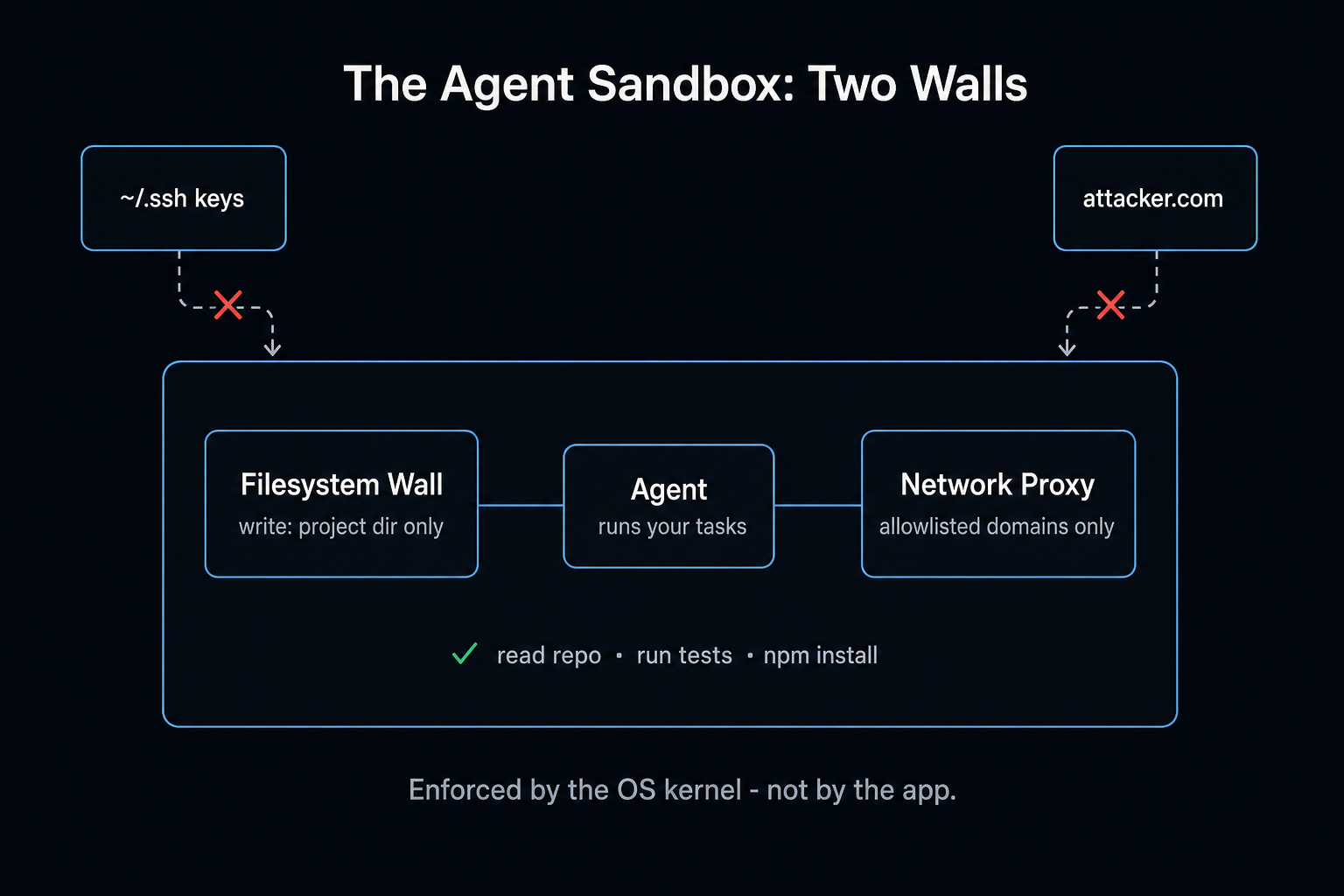
A real sandbox isolates two things, and skipping either voids the warranty:
Filesystem isolation - what the agent can read and write. Claude Code's defaults: write access to the working directory and below, read access broad but with sensitive paths excluded, extra grants via explicit config (sandbox.filesystem.allowWrite for your ~/.kube, your build dirs).
Network isolation - where it can connect. All traffic routes through a proxy outside the sandbox enforcing a domain allowlist; unknown domains prompt or, with allowManagedDomainsOnly, die silently. Domain-level beats port-level - "npm registry yes, attacker.com no" is exactly the granularity port blocking can't express. And the proxy binds all child processes: npm's spawned helpers inherit the same rules.
Why both, always: filesystem-only lets a compromised agent read secrets and ship them out over the network. Network-only lets it plant a reverse shell in your .bashrc and wait for you to open a terminal. Each wall alone has a door in it shaped exactly like the other wall.
Who Enforces It: The OS, Not the App
The part that makes a sandbox real: enforcement lives in the operating system kernel, not in Claude Code's process. An app-level check is a door policy the agent might talk its way past; a kernel rule is concrete. The agent can spawn whatever processes it likes - the syscalls still hit the same wall.
- macOS: Seatbelt. Apple's built-in sandbox framework. Claude Code generates a profile at runtime - read broadly, write narrowly, network per config - and the kernel enforces it. (Apple has deprecated
sandbox-exec, so its future has an asterisk; its present works.) - Linux: bubblewrap (bwrap). Built for Flatpak, no root required, and stricter than Seatbelt: it builds a shrunken filesystem view where
~/.sshand~/.awsaren't forbidden - they don't exist. Can't exfiltrate what was never mounted. It can also delete the network namespace outright: no external hosts, no localhost, no DNS. A reverse-shell payload dies at name resolution - the attack chain's first link, snapped. - WSL2: same as Linux (real kernel). WSL1: no - the namespace machinery isn't there.
The runtime is open source - @anthropic-ai/sandbox-runtime - so the same walls can wrap your own agents and, notably, your MCP servers.
What It Actually Stops
Run the standard attacks against the walls:
| Attack | Outcome |
|---|---|
Injection says: append to ~/.bashrc | Write denied - outside project dir |
| Injection says: POST the env vars to evil.com | Proxy rejects - domain not allowlisted |
Injection says: read ~/.ssh/id_rsa | Under bwrap, path doesn't exist |
npm package with malicious postinstall | Runs - confined to project dir + allowlisted domains |
| "Try this cool script" social engineering | Damage capped at the fence line |
The pattern: the sandbox doesn't detect attacks - it makes their payloads unexecutable. Detection can be fooled; a missing mount point can't.
The Escalation Ladder: When Namespaces Aren't Enough
Honest caveat: bwrap and Seatbelt share the host kernel. Namespaces control what a process sees, but its syscalls still land in the same kernel - and kernels have history (Dirty COW, io_uring use-after-free). For a personal agent, acceptable risk. For multi-tenant - strangers' agents on shared hardware - kernel-sharing is the vulnerability. Two stronger rungs:
- gVisor (Google): a userspace "kernel" (Sentry) intercepts every syscall; the host kernel sees almost none of them. Attack surface collapses. Cost: 10-30% I/O overhead. The CI/CD and multi-tenant SaaS sweet spot.
- Firecracker (AWS): every sandbox is a microVM with its own kernel on KVM. Escape requires beating guest kernel then hypervisor. ~125ms boot, <5MB per VM - hardware-grade isolation at near-container ergonomics. What Lambda runs on.
| Isolation | Overhead | Use when | |
|---|---|---|---|
| Docker | Process (shared kernel) | ~0 | Trusted code, reproducibility |
| bwrap / Seatbelt | Process (shared kernel) | ~0 | Personal agents - the default |
| gVisor | Syscall interception | 10-30% I/O | Multi-tenant, CI/CD |
| Firecracker | Hardware virtualization | ~125ms boot | Untrusted code as a service |
Your laptop: row two. Your agent-running-customer-code startup: rows three and four, non-negotiably.
The Knobs and the Traps
Two settings worth knowing cold. The escape hatch: some commands legitimately can't run sandboxed (Docker needs kernel privileges), so dangerouslyDisableSandbox exists per-command, gated behind full approval - and allowUnsandboxedCommands: false welds the hatch shut for hardened setups. The fail-mode switch: sandbox.failIfUnavailable: true makes sandbox-startup failure fatal instead of silent - because the worst configuration is believing you're sandboxed while running naked.
And the five classic self-sabotages:
- One wall built, other skipped - see above; this is the perennial #1
- Wildcard allowlists -
*.github.comincludes every GitHub Pages site an attacker can publish to; allowlist services, not TLDs - Writable
$PATHdirectories - plant a malicious binary named like a common command, wait - Silent degradation - sandbox fails to start, session continues unprotected (set the flag)
- Unix socket pass-through - granting
/var/run/docker.sockhands over the Docker engine, which is root in a trench coat; the wall is now decorative
Where This Sits in Your Stack
Layers, not alternatives: permission modes calibrate trust, hooks encode your specific rules, the sandbox is the floor under both - the layer that holds when judgment is fooled and a rule has a gap. Judgment, rules, walls.
The system-design takeaway travels beyond agents: capability and permission are different axes, and the gap between them is where incidents live. Without a sandbox, agent permissions = your permissions. With one, they're a perimeter you drew deliberately, enforced by something that can't be sweet-talked. Agents are only getting more capable - draw the line now, while the stakes are still a laptop and not a fleet.
The codebase harness that makes a repo agent-ready and sandboxed is open-source. /setup-codebase-harness gives your agents a place to run and test that can't touch the rest of your machine.
View on GitHub →Sources & Verification
This guide is written from hands-on testing, then cross-checked against primary sources - official documentation and first-party announcements. Field results and opinions are labeled as such. See our editorial standards.
- gVisor Documentation - Official docs for the gVisor application kernel sandbox
- Firecracker microVM - Official site for the Firecracker microVM isolation technology
Join AI Builder Club


$37/mo
Get the free newsletter
Weekly deep-dives on AI tools, automation workflows, and builder strategies. Join 5,000+ readers.
No spam. Unsubscribe anytime.
Continue Learning
Mastering AI Agents
The builder's deep dive into agent loops, tools, context engineering & memory. Go from using AI to building it.
AI Agent 101
Build autonomous research agents with tool use, API access, web scraping, and deep search.
Claude Code 101
You've read the theory. The course is where you ship: 3 guided Labs (live website, full-stack app with payments, business automation) plus the Template Vault starter kit. Rebuilt June 2026.