WebMCP Tutorial: How Agents Use Websites as Tools
WebMCP lets your website expose functions as MCP-style tools to in-browser agents. The API, Chrome 149 origin trial, security risks, and how to try it.
Course outline · Build AI Agents (3.5)
Every AI agent browsing the web today is doing it wrong, and everyone building browsers knows it. Agents read raw HTML and guess which button is "Checkout." They take screenshots and hunt for pixels. One CSS refactor and the automation shatters. WebMCP is the fix with actual weight behind it: a proposed W3C standard, co-edited by Google and Microsoft engineers, that lets your website hand agents a menu of typed, callable functions instead of making them reverse-engineer your UI.
I walk through the whole thing, why it matters and how to use it, in this video:
Below: the problem WebMCP solves, the exact API as it ships in Chrome's origin trial, how it relates to the MCP you already run, how to try it this week, and what it means if you own a website.
What Problem Does WebMCP Solve?
An agent interacting with a website today has two options, and both are workarounds:
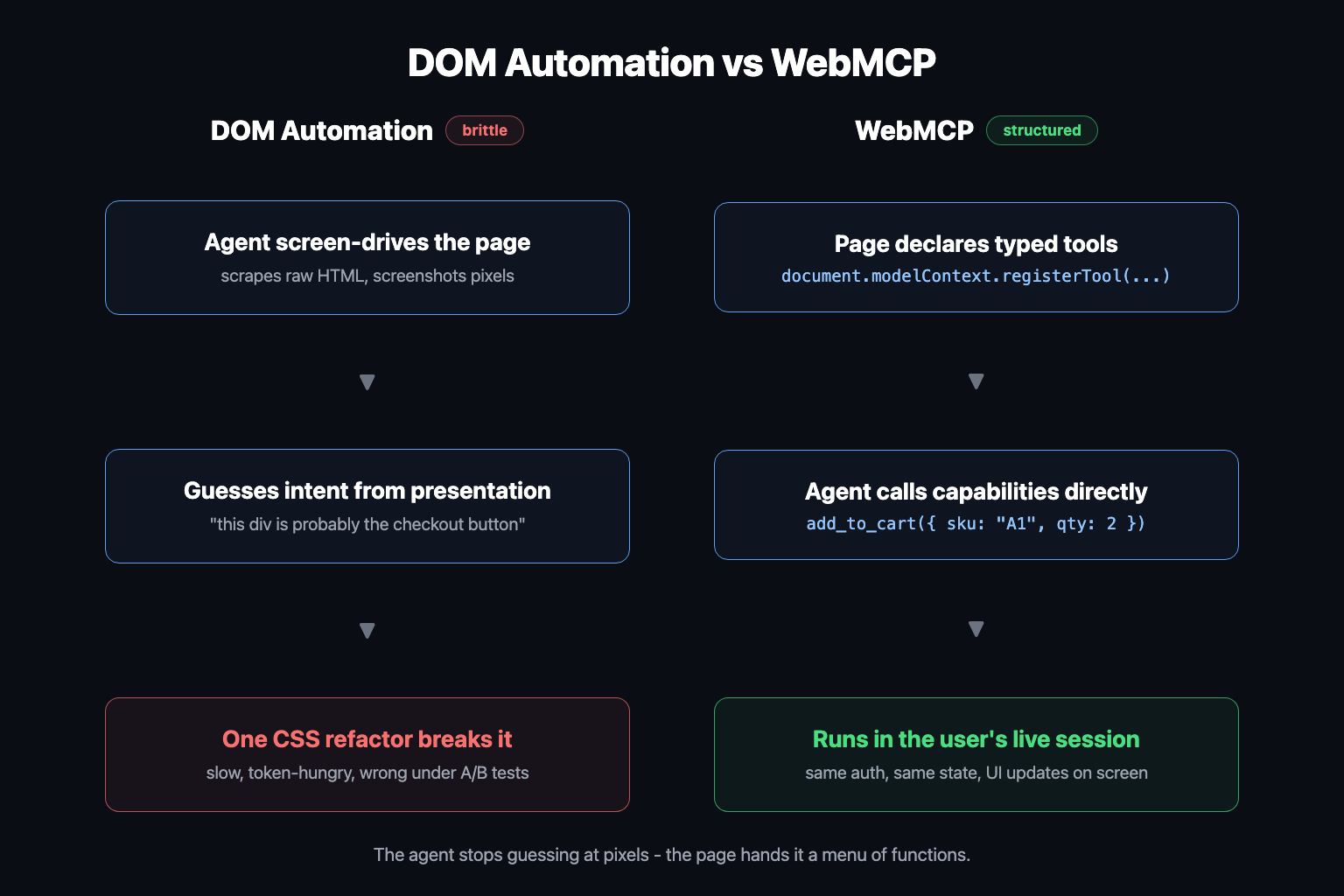
DOM automation. Parse the HTML, find selectors, synthesize clicks and keystrokes. Brittle by construction: the page was built for human eyes, not programmatic intent. Rename a class, A/B test a layout, lazy-load a component, and the agent's mental model is wrong. The agent also burns enormous context ingesting markup that is 95% presentation noise (the same attention tax that degrades every long-context task).
Computer use. Screenshot the page, have a vision model locate the button, move a virtual cursor. More robust to markup changes, but slow, expensive, and still guessing. The model infers "this looks like a date picker" instead of knowing "this function books a table."
Both approaches share one root flaw: the agent has to infer intent from presentation. WebMCP removes the inference. The page declares, in code, "here are my capabilities, here are their input schemas, call them directly." Same shift that function calling brought to LLM APIs - structure replaces guessing - now applied to the open web.
There is a second, sneakier problem it solves: UI disintermediation. The obvious alternative is "just build a classic MCP server for your site." But a backend MCP server lives outside the user's browser session. It needs its own auth, its own state replication, its own view of the cart the user half-filled by hand. WebMCP tools run in the page, in the user's logged-in session, with the UI updating live as the agent works. The human and the agent share one screen and one source of truth.
How Does WebMCP Work?
WebMCP is a JavaScript API. The current spec (a Draft Community Group Report from the W3C Web Machine Learning Community Group, last published June 24, 2026, edited by Brandon Walderman of Microsoft and Khushal Sagar and Dominic Farolino of Google) hangs it off document.modelContext.
Naming has churned, which tells you how young this is: the proposal started as window.agent, shipped in early Chrome builds as navigator.modelContext, and Chrome 150 deprecated that in favor of document.modelContext. Same API, migrating namespace.
Registering a tool looks like this (adapted from the official explainer):
const controller = new AbortController();

await document.modelContext.registerTool({
  name: "add-todo",
  description: "Add a new item to the user's active todo list",
  inputSchema: {
    type: "object",
    properties: {
      text: { type: "string" }
    },
    required: ["text"]
  },
  async execute({ text }) {
    await addTodoItemToCollection(text);
    return { content: [{ type: "text", text: `Added: "${text}"` }] };
  }
}, { signal: controller.signal });
If you have written an MCP server, every field is familiar: a name, a natural-language description the model reads, a JSON Schema inputSchema, an execute callback, and a return shape of content blocks. That is deliberate - WebMCP shares MCP's tool vocabulary on purpose.
The parts that are web-native:
signal- anAbortSignalthat unregisters the tool. Single-page apps register and tear down tools as views change; the checkout tools exist only on the checkout page.exposedTo- an origin allowlist controlling which embedding contexts can see the tool, backed by permissions policy for cross-origin iframe cases.annotations- hints likereadOnlyHint(this tool mutates nothing) anduntrustedContentHint(this tool's output contains user-generated content; do not treat it as instructions).
The runtime loop mirrors the six-step MCP loop exactly, minus the process spawning: the in-browser agent collects registered tools into its catalog, the model picks one and emits structured arguments, the browser runs your execute callback in the page, and the result goes back into the model's context. The page is the server. The browser is the transport. You never touch JSON-RPC.
Chrome also ships a second, declarative path: annotate a standard HTML form and the browser derives a tool from it - the form fields become the input schema. Zero JavaScript for the most common case, which is exactly the kind of low floor that made the web win last time.
Free AI Builder Newsletter
Weekly guides on AI tools & builder strategies.
WebMCP vs Classic MCP: What's the Difference?
Both expose tools to models. The deployment model is the whole difference:
| Classic MCP server | WebMCP | |
|---|---|---|
| Where tools run | Separate process or remote endpoint | Inside the web page's JavaScript |
| Transport | STDIO or HTTP/SSE, JSON-RPC 2.0 | Browser-internal; no protocol code for you |
| Auth and state | Server implements its own; state replicated | Reuses the user's live, logged-in session |
| User visibility | Headless; user sees nothing | UI updates on screen as the agent acts |
| Who builds it | Backend or tooling engineers | Frontend devs, reusing existing functions |
| Discovery | Client config lists servers upfront | Agent introspects the page it is on |
| Best for | Databases, APIs, filesystems, CI | The interactive layer of any website |
The cleanest mental model, courtesy of Microsoft's Patrick Brosset: WebMCP exposes MCP's tool layer only, while the browser absorbs the data and transport layers. Your page becomes a model context provider without running a server. If you want the full protocol picture underneath, that is MCP internals; if you want to build the backend kind, start with MCP 101.
The two compose, not compete. An agent might use a classic MCP server to query your product database and WebMCP to drive the checkout the user is looking at.
How Do You Try WebMCP Today?
Status as of July 2026, no hype filter:
- Spec: Draft Community Group Report. Real W3C group, real multi-vendor editing, not yet a standards-track document.
- Chrome: public origin trial running from Chrome 149 through Chrome 156. For local dev, flip
chrome://flags/#enable-webmcp-testingto Enabled - no trial token needed. - Other browsers: Microsoft co-edits the spec (expect Edge to follow); no shipped support elsewhere yet.
- Agents: here is the honest part - as of mid-2026, the mainstream agents (Claude, ChatGPT's agent, Gemini, Perplexity) do not call WebMCP tools on arbitrary sites yet. They still scrape and screenshot. The consumer of these tools today is Chrome's own experimental agentic surface plus test harnesses.
A practical first session:
- Enable the flag in Chrome 149+.
- Install Google's Model Context Tool Inspector extension, which lists a page's registered tools and lets you invoke them with agent-style prompts.
- Poke at Google's demo apps (Pizza Maker, a travel planner, the "Le Petit Bistro" restaurant demo) linked from the Chrome WebMCP docs.
- Register one tool on your own site behind a feature flag and watch the inspector call it.
An afternoon, end to end.
What About Security?
Everything in MCP's attack surface applies, plus a twist that makes it spicier: WebMCP tools execute inside an authenticated session. A classic MCP server has whatever permissions you configured. A WebMCP tool has whatever the logged-in user has.
The spec's own security section names the failure modes:
- Prompt injection, three ways in. Tool names and descriptions are model-read text, so a malicious page can embed instructions there. Tool outputs are also model-read text, so a benign page returning user-generated content (reviews, comments, emails) can smuggle in third-party instructions. The
untrustedContentHintannotation exists precisely so agents can firewall that output. - Intent misrepresentation. Nothing verifies that a tool does what its description claims. A tool described as "check gift card balance" can do anything its JavaScript can do. Agents have to treat descriptions as claims from an untrusted party, not facts.
- Data exfiltration by over-parameterization. A hostile tool can declare "helpful" input parameters (email, address, the user's current task) and let a cooperative agent volunteer sensitive context. The spec discusses input length limits and shared attack evaluation datasets as mitigations.
- Cross-origin leakage. Guarded by
exposedToallowlists and permissions policy, so an embedded iframe's tools do not silently join the page's toolset.
The emerging norm on top of the spec: agents confirm with the human before consequential actions (the proposal grew a requestUserInteraction() mechanism for exactly this), and sites mark read-only tools honestly with readOnlyHint. If you ship tools, write descriptions like security documentation, validate inputs server-side as always, and never expose a tool whose worst case you have not priced.
What Does WebMCP Mean for Builders?
The strategic read: the website is becoming an API again, and this time the interface contract is written for models.
For twenty years, "integrate with my site" meant REST endpoints for developers, while the UI stayed human-only territory that bots accessed by scraping. WebMCP collapses that split. The same page serves humans through the rendered UI and agents through registered tools, sharing one session, one state, one set of client-side functions you already wrote.
Concrete moves, in order:
- Inventory your actions. Not pages - actions. Search, filter, add to cart, book, subscribe, check status. The 3 to 10 verbs your site exists for. Those are your tools.
- Write descriptions as prompts. The
descriptionfield is read by an LLM deciding whether and how to call your tool. Treat it with the same care as tool definitions in your own agents. Vague descriptions get your tools ignored or misused; you can evaluate this the same way you evaluate any tool-calling behavior. - Reuse, don't rebuild. The whole economic argument for WebMCP is that
executecalls the validation, state management, and API code your frontend already has. If your site's logic is locked inside event handlers, refactoring it into callable functions is the real work, and it improves your codebase regardless. - Don't wait for full agent adoption to think about it. Adoption is the open question - agents have to actually call these tools for any of this to pay off, and today they mostly don't. But the cost of readiness is low, the spec has both major browser vendors editing it, and if the market view flips from a browsing target to a tool provider, the sites that declared their capabilities early are the ones agents will use rather than scrape.
Screen-scraping was always a workaround. WebMCP is the first serious attempt to make the web itself agent-native, and it is concrete enough to build against today: one flag, one API call, one afternoon.
Frequently Asked Questions
What is WebMCP?
WebMCP (Web Model Context Protocol) is a proposed web standard from the W3C Web Machine Learning Community Group, edited by engineers from Microsoft and Google. It gives websites a JavaScript API to expose page functionality as structured, MCP-style tools that AI agents running in the browser can discover and call, instead of scraping the DOM or driving the UI by screenshot.
Is WebMCP the same as MCP?
No, but they are closely related. Classic MCP connects an AI client to a separate server process over STDIO or HTTP, with the server handling its own auth and state. WebMCP borrows MCP's tools vocabulary and adapts it to the web platform: the page itself registers tools in JavaScript, the browser handles discovery and transport, and calls run in the user's existing logged-in session.
Which browsers support WebMCP in 2026?
As of mid-2026, WebMCP is a Chrome origin trial running from Chrome 149 through Chrome 156, with a local testing flag at chrome://flags/#enable-webmcp-testing. It is a Draft Community Group Report, not yet a W3C standard, and mainstream agents like Claude and ChatGPT do not call WebMCP tools yet. Microsoft and Google are co-developing the spec.
How do I make my website agent-ready with WebMCP?
Identify the 3 to 10 core actions on your site (search, add to cart, book, filter), then register each as a tool with document.modelContext.registerTool, giving it a clear name, a description written for an LLM, a JSON Schema for inputs, and an execute callback that reuses your existing client-side functions. Chrome also offers a declarative path that annotates standard HTML forms.
Is WebMCP safe? What are the security risks?
The spec itself flags the big ones: prompt injection through tool names, descriptions, and outputs; tools that misrepresent what they actually do; and over-parameterized tools that coax agents into leaking user data. Because tools run in the user's authenticated session, a hijacked agent acts as the user. Mitigations include untrustedContentHint annotations, origin scoping via exposedTo, and keeping humans in the loop for sensitive actions.
Sources & Verification
This guide is written from hands-on testing, then cross-checked against primary sources - official documentation and first-party announcements. Field results and opinions are labeled as such. See our editorial standards.
- WebMCP Specification (W3C Web Machine Learning Community Group) - Draft Community Group Report (June 24, 2026): API shape, tool descriptor fields, security considerations
- WebMCP explainer repo (webmachinelearning/webmcp) - Motivation, code examples, relationship to MCP, open questions
- Join the WebMCP origin trial (Chrome for Developers) - Chrome 149 origin trial announcement and developer guidance
- WebMCP docs, AI on Chrome (Chrome for Developers) - Imperative and declarative APIs, testing flags, demos, tool security guidance
- WebMCP updates, clarifications, and next steps (Patrick Brosset, Microsoft Edge) - Clarifies what WebMCP is and is not; API evolution from window.agent
Join AI Builder Club


$37/mo
Get the free newsletter
Weekly deep-dives on AI tools, automation workflows, and builder strategies. Join 5,000+ readers.
No spam. Unsubscribe anytime.
Continue Learning
MCP 101
Build and deploy Model Context Protocols using fastMCP, Claude, Cloudflare, and Stripe.
Mastering AI Agents
The builder's deep dive into agent loops, tools, context engineering & memory. Go from using AI to building it.
AI Agent 101
Build autonomous research agents with tool use, API access, web scraping, and deep search.