MCP Internals: STDIO, SSE, and JSON-RPC Explained
What actually happens between MCP client and server: transport, message format, and the 6-step loop behind every tool call. Plus how to build a toy client.
Course outline · Build AI Agents (3.2)
You've pasted this config a dozen times. Can you explain what it does?
{
  "mcpServers": {
    "filesystem": {
      "command": "npx",
      "args": ["-y", "@modelcontextprotocol/server-filesystem", "~/Downloads"]
    }
  }
}
Most builders run MCP servers daily without being able to answer. That's fine until something breaks - a server won't start on Windows, tools mysteriously don't appear, or you want to build your own client and realize the magic was never magic. This is the wire-level tour: transport, message format, and the exact six-step loop behind every MCP tool call.
What That Config Actually Is
It's a command line, disassembled into JSON. The client reassembles and runs it:
npx -y @modelcontextprotocol/server-filesystem ~/Downloads
npx- Node's run-a-package-without-installing tool (uvxis the Python twin)-y- skip the "install this package?" prompt, because no human is present to answer- the package name - an ordinary npm package that speaks MCP
~/Downloads- an argument the server itself defined (here: the directory it's allowed to touch)
That's the entire trick. An MCP server is a process your client spawns, no different in kind from anything else you'd launch from a shell. Which means you can skip npx entirely and run a local copy - "command": "node", "args": ["/path/to/server.js"] - fully offline, immune to upstream version changes, and (per the security article) the safest way to run anything important.
The Windows gotcha that bites everyone once: Windows' default shell can't exec Unix-style commands directly, so the config needs wrapping - "command": "cmd", "args": ["/c", "npx", ...]. If your server "just doesn't start" on Windows, it's this.
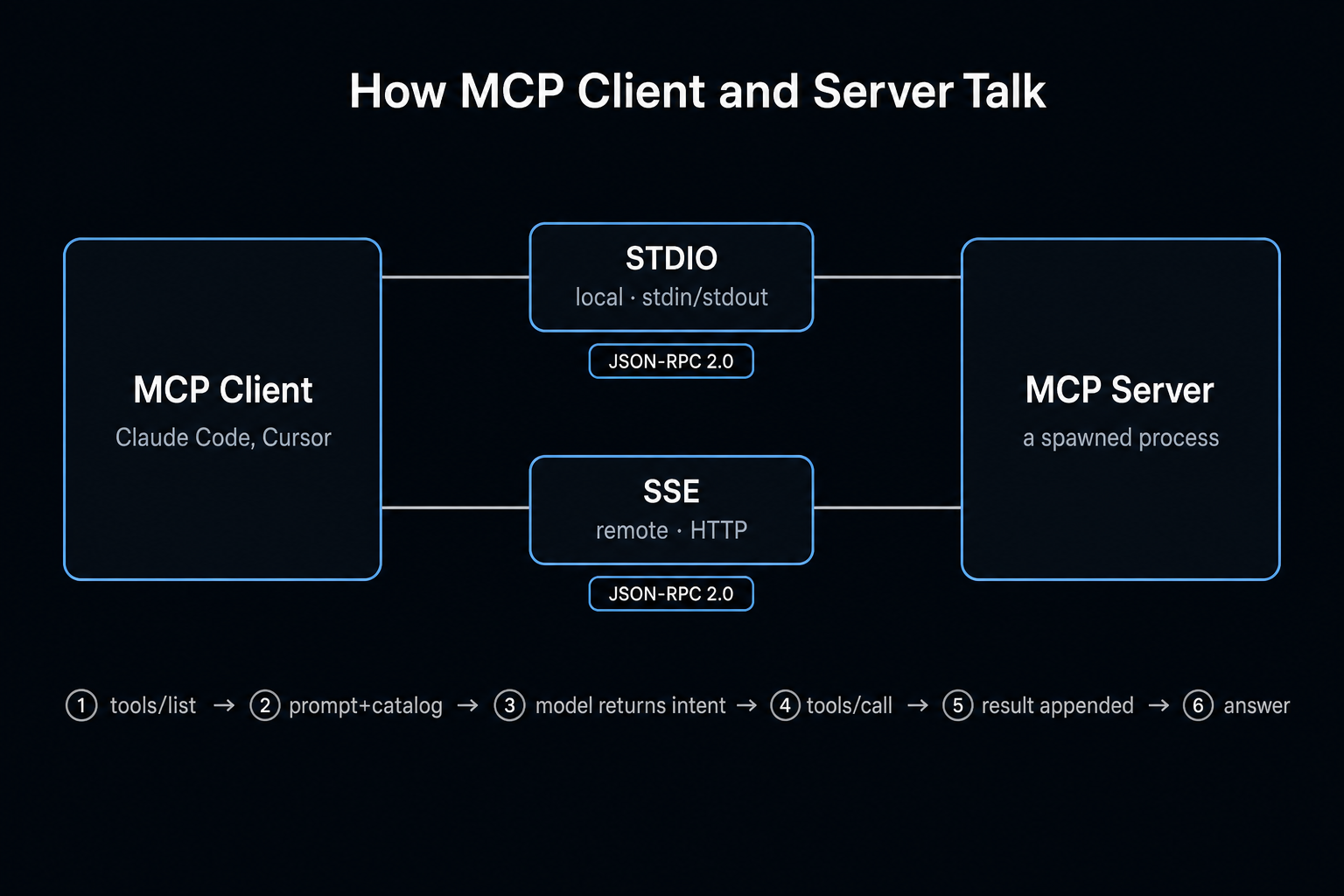
Transport: STDIO and SSE
MCP defines what messages say, not how they travel. Two transports:
STDIO - for local servers. The client writes JSON to the child process's stdin; the server answers on stdout. The same plumbing as cat or any Unix pipe - you can literally drive a server from your terminal:
npx -y @modelcontextprotocol/server-filesystem ~/Downloads \
  <<< '{"method":"tools/call","params":{"name":"list_directory","arguments":{"path":"~/Downloads"}},"jsonrpc":"2.0","id":1}'
A directory listing comes back as JSON. No network stack, no ports, no auth handshake - process isolation is the security model. This is why local MCP servers feel instant.
SSE - for remote servers. Client connects over HTTP; the server pushes via Server-Sent Events:
{ "mcpServers": { "browser": { "url": "http://localhost:8000/sse" } } }
Use it when the server lives elsewhere - a shared team service, a SaaS endpoint, anything not on your machine. Trade-offs are the usual networked ones: latency, availability, and a real authentication story to care about.
Free AI Builder Newsletter
Weekly guides on AI tools & builder strategies.
The Message Format: JSON-RPC 2.0
Every MCP message is JSON-RPC - a request/response convention from long before LLMs:
// request
{ "jsonrpc": "2.0", "id": 1, "method": "tools/call",
  "params": { "name": "query_db", "arguments": { "table": "users" } } }

// response (id matches)
{ "jsonrpc": "2.0", "id": 1,
  "result": { "content": [{ "type": "text", "text": "..." }] } }
id pairs responses to requests so multiple calls can be in flight. Errors come back in a structured error field with codes. The methods you'll see constantly: tools/list (what can you do?) and tools/call (do it). The protocol also specs resources, prompts, and sampling - but tools are ~90% of real-world traffic today.
The Full Loop, Six Steps
Here's a complete trace of "which courses does teacher Zhang teach?" against a database server (two tables: teachers, courses - so two tool calls). This pattern is identical across every client:
- Init. Client spawns/connects to each configured server, calls
tools/list, collects every tool's name + description + parameter schema into a catalog. - Prompt assembly. Your question + the tool catalog go to the LLM.
- Model decides. Returns a structured tool call:
search_teachers({ name: "Zhang" }). Crucially - the model returns intent, JSON describing a wish. It has no hands. - Client executes. Translates the wish into an actual
tools/callto the right server, gets the teacher's ID back. - Loop. Result is appended to the conversation; model sees it, requests call #2:
search_courses({ teacherId: ... }). Steps 3-4 repeat until the model has enough. - Synthesis. Model writes the human answer: "Zhang teaches Advanced Mathematics."
A two-hop question = 13 log entries in a typical client: one tools/list, four LLM round trips, two tool executions, plus bookkeeping. Multi-step "agentic" behavior is this loop, repeated. Nothing else is happening. (If you've read the agent loop, you've recognized it - MCP just standardizes the tool side.)
How the Model Knows About Tools: Two Schools
Packet-capture different MCP clients and a fault line appears - there are two ways to teach a model its tools:
School 1: native Function Calling. The client passes the tool catalog through the API's tools parameter. The model emits structured tool_calls, reliability backed by constrained decoding. Clean, robust - but only works with models fine-tuned for tool use, which is why some clients gray out MCP for certain models.
School 2: system-prompt convention. The client writes the entire tool protocol into a giant system prompt - tool list, XML-ish call format, usage rules - and parses the model's text output for tool invocations. Measured in the wild at ~42,000 characters of system prompt before you've said a word. Burns tokens, fragile to format drift - but works with any model that can follow instructions, no tool-use fine-tuning required.
Same protocol underneath; the difference is purely how the client talks to its LLM. This single distinction explains both why some tools support every model and why those tools cost more per request.
Build a Toy Client - It's One Loop
Nothing demystifies MCP faster. The whole thing in pseudocode:
1. spawn configured servers, collect tools/list into a catalog
2. loop:
   - send messages + catalog to LLM
   - if response is text → print, await user
   - if response is tool call →
       route to owning server via tools/call,
       append result to messages,
       continue
An afternoon's work against the official SDK (the MCP 101 guide covers the server side). Log every message as JSON while you're at it - watching your own client's traffic teaches more than any diagram, and it doubles as the security audit habit of knowing exactly what your servers send and receive.
What to Keep
Four load-bearing facts:
- A server is a spawned process (or an HTTP endpoint). The JSON config is a disassembled command line.
- Transport is STDIO locally, SSE remotely. Messages are JSON-RPC 2.0 either way.
- The model only ever outputs intent. The client executes. Every "AI did something" is this handoff.
- Tool awareness comes via Function Calling or via system prompt - which one your client uses determines model compatibility and token cost.
The protocol's genius was never sophistication - it's that it standardized something dumb enough for everyone to implement. USB-C for AI tools: boring on the wire, transformative in the ecosystem.
Sources & Verification
This guide is written from hands-on testing, then cross-checked against primary sources - official documentation and first-party announcements. Field results and opinions are labeled as such. See our editorial standards.
- What is the Model Context Protocol (MCP)? (modelcontextprotocol.io) - Official MCP intro: hosts, clients, servers, and core concepts
- MCP Specification (modelcontextprotocol.io) - Authoritative protocol spec: JSON-RPC 2.0 messages, transports, capability negotiation
- Introducing the Model Context Protocol (Anthropic) - Anthropic's original MCP announcement and architecture overview
Join AI Builder Club


$37/mo
Get the free newsletter
Weekly deep-dives on AI tools, automation workflows, and builder strategies. Join 5,000+ readers.
No spam. Unsubscribe anytime.
Continue Learning
MCP 101
Build and deploy Model Context Protocols using fastMCP, Claude, Cloudflare, and Stripe.
Mastering AI Agents
The builder's deep dive into agent loops, tools, context engineering & memory. Go from using AI to building it.
AI Agent 101
Build autonomous research agents with tool use, API access, web scraping, and deep search.