Codebase Memory MCP: Give Your Coding Agent a Map (2026)
Codebase Memory MCP turns your repo into a code graph agents can follow: 158 languages, sub-ms queries, half the tokens per task. Setup + measured numbers.
Course outline · Build AI Agents (3.13)
Codebase Memory MCP: Stop Making Your Coding Agent Read Your Repo as Flat Text
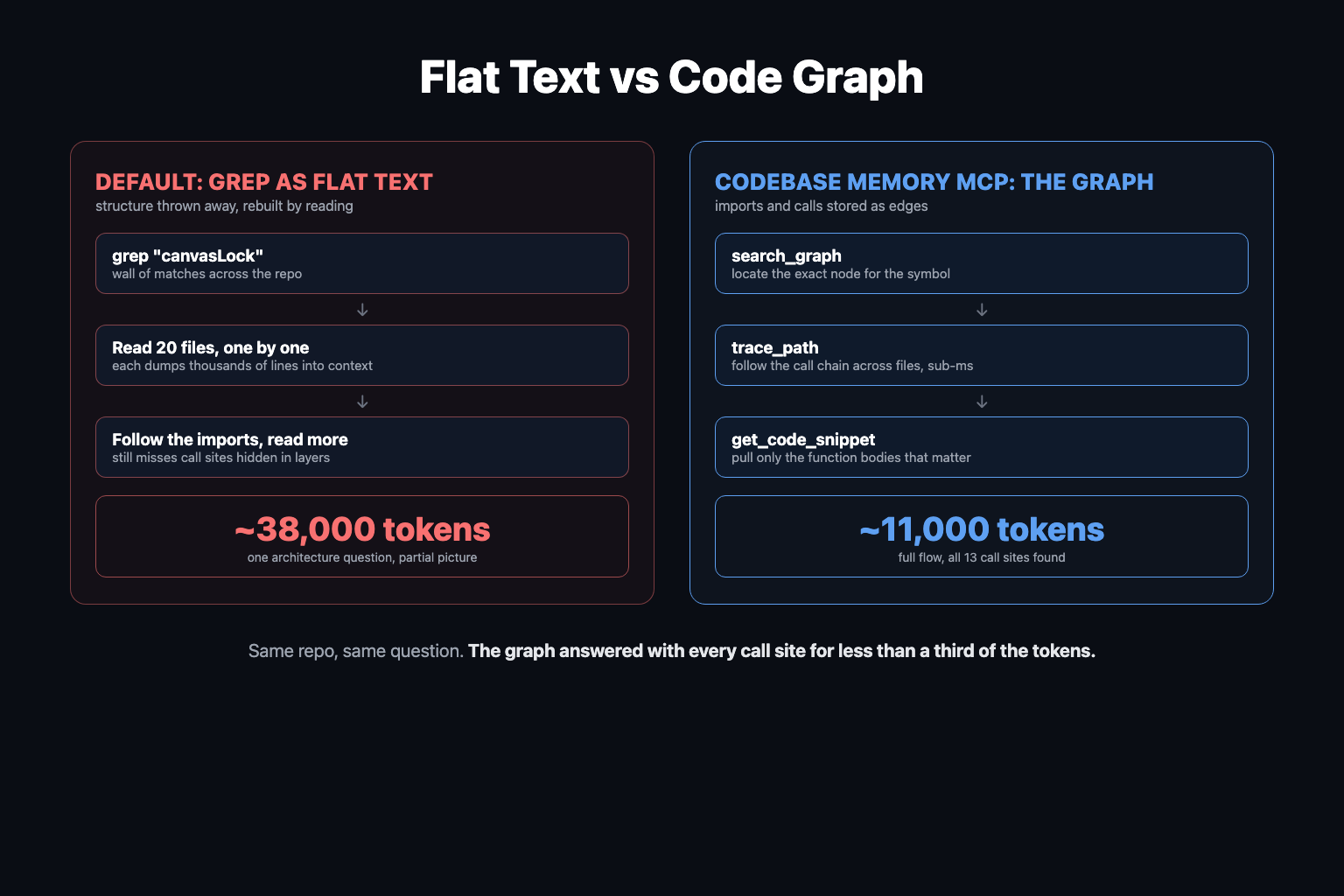
Ask a coding agent to change something in a big codebase and you know what happens. It greps, gets a wall of matches, opens 20 files one by one, and still misses half the places that might break.
Here is the thing though: your codebase is already a map. Every import is an edge. Every function call is an edge. Your agent throws that structure away and reads the whole thing as flat text.
Codebase Memory MCP fixes this by indexing your repo into a persistent code graph - functions, classes, call chains, routes, cross-file and cross-service links - that the agent queries instead of grepping. It is written in C, parses 158 languages via tree-sitter, indexes most repos in seconds, and answers structural queries in under a millisecond. When I ran the same architecture question with and without it on my own monorepo, token consumption dropped from ~38,000 to ~11,000. Over a two-question session: 64,000 vs 33,000. About half.
Prefer to watch? Here is the full walkthrough:
Why grep burns your context window
The default exploration loop every coding agent runs on a structural question looks like this:
- Grep for the identifier. Get matches across dozens of files.
- Read the files one by one. Each read dumps hundreds or thousands of lines into context.
- Follow the imports. More reads.
- Try to hold the reconstructed structure in the context window while doing the actual work.
Every step pays full price because grep returns text, not structure. The agent has to rebuild the relationships between symbols from scratch, on every task, by reading source. Claude Code has subagents to contain this (the search runs in a separate context), which helps with pollution but is slow, and the cost still gets paid somewhere.
This is context engineering's ugliest corner: in production agents, roughly 100 input tokens are consumed for every output token, and on large-repo tasks a huge share of those inputs is just re-discovering how the code fits together. The project's arXiv evaluation across 31 real-world repositories puts numbers on it: graph-based exploration answered structural questions with 10x fewer tokens and 2.1x fewer tool calls than file-by-file exploration, at 83% answer quality. The README's extreme benchmark: five structural queries cost ~3,400 tokens via the graph versus ~412,000 via grep-and-read.
What Codebase Memory MCP actually is
Codebase Memory MCP is an open-source (MIT) MCP server that extracts every function, class, method, route, and import from your code and builds a relationship graph out of them. Cross-file, cross-package, even cross-repo: if service A calls an HTTP route in service B, that edge is in the graph.
Two design decisions make it different from the pile of codebase-index tools you have already seen and forgotten:
1. No LLM in the indexing pipeline. Earlier projects ran a language-model pass to write a "knowledge map" of your repo. Those maps cost money to build, took minutes to hours, and went stale the moment the code changed. Codebase Memory MCP parses with tree-sitter grammars in pure C. Indexing is purely programmatic: an average repo indexes in seconds, and the Linux kernel - 28 million lines across 75,000 files - indexes in about 3 minutes. Rebuilding on change is cheap enough that the graph just stays current.
2. It meets the agent where it already works. More on the hook pattern below, because it is the most copyable idea in the project.
The agent gets a toolset that replaces the grep-read-repeat loop:
| Tool | What the agent uses it for |
|---|---|
get_architecture | Quick overview: languages, packages, routes, hotspots, clusters |
search_graph | Locate the node for a symbol by name, label, or file pattern |
trace_path | Follow the call chain: who calls this, what does it touch |
detect_changes | Map a git diff to affected symbols, with risk classification |
query_graph | Cypher-like queries, e.g. "callers of handle_order with no test coverage" |
get_code_snippet | Pull just the source of one function by qualified name |
That last pairing is the token win in miniature: instead of reading a 2,000-line file to see one function, the agent asks the graph where the function is and pulls only its body.
detect_changes is the sleeper feature for teams. Point it at a PR diff and it returns the blast radius - every symbol the change can reach - which turns agent code review from "read everything and hope" into a graph query.
The hook pattern: why this MCP works when others get ignored
Here is the failure mode that killed most code-search MCPs: the agent forgets to use them. You install a beautiful semantic search tool, and the agent... greps anyway. Claude Code and Codex are heavily optimized around their built-in search tools, and no system prompt reliably overrides that habit.
Codebase Memory MCP acknowledges this instead of fighting it. On Claude Code it registers a PreToolUse hook: when the agent calls its normal Grep or Glob tool, the hook intercepts the call, runs the graph lookup for matching symbols, and injects the structured context - call chains, relationships, definitions - alongside the ordinary grep results. The grep still runs. The agent just gets the map with the matches, whether or not it remembered the MCP exists.
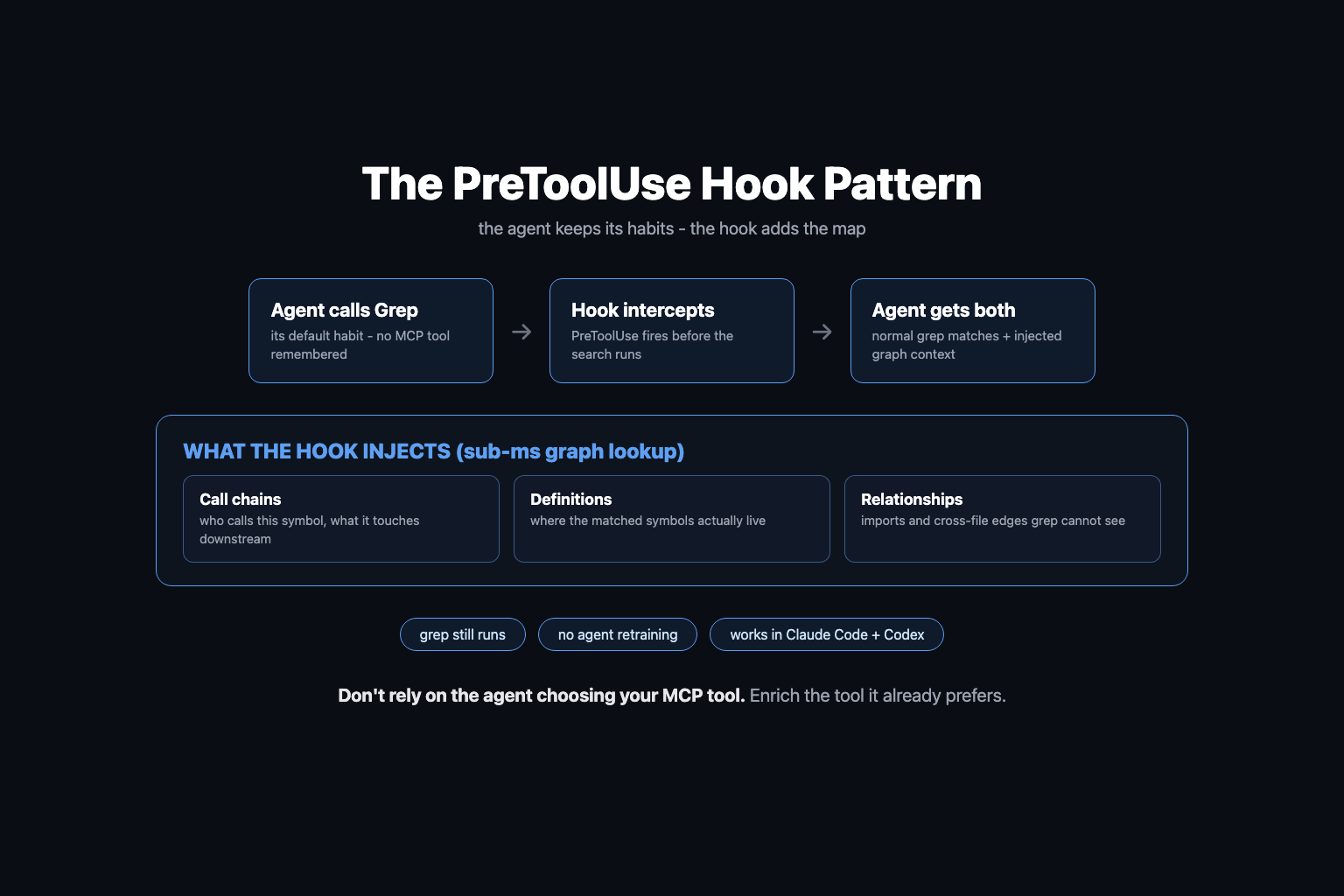
If you are building MCP tools yourself, steal this. Do not rely on the model choosing your tool over its built-ins; use hooks to enrich the tools it already prefers. It is the difference between shipping a tool and shipping a behavior.
The real test: tracing a hidden lock through a monorepo
I indexed the codebase for Superdesign, our vibe-design platform. It has a backend function called createDesignDraftNode - the tool an agent calls to add a design to the infinite canvas. Because multiple agents can generate designs on the same canvas at once, everything flows through a queue guarded by a canvas lock.
The catch: the lock is invisible from where the work starts. createDesignDraftNode never calls it directly; the protection is delegated down through layers. Grep that file for "lock" and you get nothing. Any agent (or human) reading the entry point would conclude the protection does not exist.
So I asked two questions, in two sessions - one with the graph, one with MCP explicitly disabled:
| Question | With Codebase Memory MCP | Without (default grep) |
|---|---|---|
| "Trace the createDesignDraftNode and canvas lock flow" | ~11,000 tokens, full flow returned in seconds | ~38,000 tokens |
| "What breaks if I change the lock?" (cumulative) | ~33,000 tokens, all 13 call sites identified | ~64,000 tokens |
Same model, same repo, same questions. Half the tokens, and the graph version found every call site - which matters more than the cost, because the expensive failure is the new engineer (or agent) who decides the lock "slows things down," tweaks it, and ships a race condition. Ask "what will break if I change this?" and the graph answers with the actual dependency list instead of a best-effort sample.
Those are my numbers on one repo, measured from Claude Code's context inspector; your ratio will move with repo size and question type. The pattern held across every structural question I threw at it: the bigger and more cross-cutting the question, the wider the gap.
How to set it up (2 commands, ~10 minutes)
1. Install. One command on macOS/Linux:
curl -fsSL https://raw.githubusercontent.com/DeusData/codebase-memory-mcp/main/install.sh | bash
Want the graph visualization UI too:
curl -fsSL https://raw.githubusercontent.com/DeusData/codebase-memory-mcp/main/install.sh | bash -s -- --ui
The installer auto-detects your installed agents (Claude Code, Codex CLI, Gemini CLI, Zed, OpenCode, Antigravity, Aider, KiloCode, VS Code, OpenClaw, Kiro) and configures the MCP entries and hooks for each. Single static binary, zero runtime dependencies.
2. Index. Open your coding agent in the repo and tell it: "Help me use codebase memory MCP." It will run the indexing, and if your repo already has decent documentation it applies ignore filters on its own - mine correctly skipped the legacy folders. My semi-complex monorepo indexed in a few seconds.
3. Verify. Ask it to trace a function you know is load-bearing. You should see search_graph and trace_path calls come back with the full chain, no file-by-file reading.
4. (Optional) Look at your graph. With the UI install: codebase-memory-mcp --ui=true plus a port gives you a web view of the whole graph. Is it useful? Honestly not sure. It does look really cool.
Where this fits: the codebase harness
A code graph is one ingredient, not the whole meal. The repos where agents ship reliably have a full harness: a way to run the app locally in one command, end-to-end tests that gate PRs, isolated sandboxes for parallel work, and now a structural map of the code.
That is why we added Codebase Memory MCP to /setup-codebase-harness in the open-source AI Builder Club skills repo. Run the skill in your repo and it sets up the MCP and index alongside the rest: e2e test gates, the script toolkit that gets your local server running, and Crabbox for parallel agent testing in remote sandboxes. One command, and your codebase goes from flat text to something an agent can actually navigate, run, and verify against.
If you are optimizing agent costs more broadly, the graph attacks the input side; reducing Claude Code API costs covers the rest of the bill.
Related Content
- Context Engineering: The 100:1 Ratio - Why input tokens dominate agent costs and the four strategies for managing them.
- Claude Code Hooks: The Complete Guide - The mechanism behind the PreToolUse pattern this project uses so well.
- Crabbox: Cloud Sandboxes for Parallel Agents - The runtime-isolation half of the same codebase harness.
- MCP 101: Build Your First MCP Server - If the hook-enrichment pattern made you want to build your own.
- Loop Engineering Guide - The bigger system this plugs into: agents that trigger, work, and verify on their own.
Start Here
Install Codebase Memory MCP in the repo where your agent does real work, index it, and ask one question you already know the answer to: "what breaks if I change X?" Compare what comes back against what you know. That single test tells you whether your agent has been navigating your codebase or guessing at it.
Then make it part of the harness: run /setup-codebase-harness from the AI Builder Club skills repo so every agent session starts with the map.
For the step-by-step build alongside a team running this in production, join the AI Builder Club.
Frequently Asked Questions
What is Codebase Memory MCP?
Codebase Memory MCP is an open-source MCP server that indexes your codebase into a persistent knowledge graph of functions, classes, call chains, routes, and cross-file relationships. Instead of grepping flat text and reading whole files, a coding agent queries the graph: search_graph to locate a symbol, trace_path to follow a call chain, detect_changes to map a git diff to affected symbols. It is written in C, supports 158 languages via tree-sitter, and indexes most repos in seconds.
How is it different from grep or embedding-based code search?
Grep matches text, so the agent gets a wall of matches and has to read whole files to reconstruct structure, burning context on every task. Embedding search finds semantically similar code but still returns chunks, not relationships. A code graph stores the actual parsed structure: who calls what, who imports what. The agent asks a structural question and gets a structural answer in a few hundred tokens instead of tens of thousands.
Does it use an LLM to build the index?
No. The graph is built programmatically with tree-sitter parsers, which is why indexing takes seconds instead of minutes, costs nothing per run, and does not drift out of date the way LLM-generated codebase summaries do. Earlier tools in this category ran an LLM pipeline to write a knowledge map, and those maps went stale almost immediately. A parse-based graph can simply be rebuilt on every change.
Which coding agents does it support?
The installer auto-detects and configures 11 agents: Claude Code, Codex CLI, Gemini CLI, Zed, OpenCode, Antigravity, Aider, KiloCode, VS Code, OpenClaw, and Kiro. For Claude Code it also wires up a PreToolUse hook so graph context is injected even when the agent uses its normal Grep tool instead of the MCP tools.
How much does it reduce token usage?
In our measured test on the Superdesign monorepo, the same architecture question consumed about 11,000 tokens with the graph versus about 38,000 without; after a second impact-analysis question the totals were roughly 33,000 versus 64,000, about half. The project's arXiv evaluation across 31 repositories reports 10x fewer tokens and 2.1x fewer tool calls on structural queries, and the README's extreme case measures ~3,400 tokens via the graph versus ~412,000 via file-by-file exploration for five structural queries.
Does it work on monorepos and across multiple repositories?
Yes. The graph links symbols across files, packages, and services, including HTTP routes between services, so it can answer cross-repo questions like which services call this endpoint. That is exactly where grep-driven exploration is weakest, because no single file contains the relationship.
Sources & Verification
Based on AI Jason's July 2026 walkthrough video (embedded below), hands-on testing against the Superdesign monorepo with measured token counts from Claude Code's context inspector, the DeusData/codebase-memory-mcp README, and the project's arXiv evaluation preprint. Tool names and flags verified against the repo on 2026-07-05; the project moves fast, so re-check before relying on exact commands. See our editorial standards.
- codebase-memory-mcp (GitHub, DeusData) - The project: pure-C MCP server, 158 languages, tool list, install commands, hook integration
- I was giving my coding agent context the wrong way... (AI Jason, YouTube) - The walkthrough this article is based on, including the Superdesign canvas-lock trace and token measurements
- Codebase-Memory: Tree-Sitter-Based Knowledge Graphs for LLM Code Exploration via MCP (arXiv) - Evaluation across 31 real-world repositories: 83% answer quality, 10x fewer tokens, 2.1x fewer tool calls vs file-by-file exploration
- AI Builder Club - Skills (GitHub) - Open-source Claude Code plugin: /setup-codebase-harness now installs and indexes codebase-memory-mcp as part of the harness
Join AI Builder Club


$37/mo
Get the free newsletter
Weekly deep-dives on AI tools, automation workflows, and builder strategies. Join 5,000+ readers.
No spam. Unsubscribe anytime.
Continue Learning
Mastering AI Agents
The builder's deep dive into agent loops, tools, context engineering & memory. Go from using AI to building it.
AI Agent 101
Build autonomous research agents with tool use, API access, web scraping, and deep search.
MCP 101
Build and deploy Model Context Protocols using fastMCP, Claude, Cloudflare, and Stripe.