Multi-Agent Orchestration Patterns (Agents 101, Part 4)
Part 4 of AI Agents 101: three orchestration patterns that scale agents - pipeline, supervisor/worker, and fan-out - with Python code for each.
Join AI Builder Club for courses, community, and weekly workshops.
30-day money-back guarantee. $37/mo.
Course outline · Build AI Agents (1.7)
Where We Left Off
In Part 1, you built the agent loop — the core pattern that lets an LLM call tools, get results, and keep going until the job is done. In Part 2, you gave your agent real tools: web search, code execution, file writing. In Part 3, you gave it memory — so it could remember things across sessions instead of starting from zero each time.
You now have a capable solo agent. It can browse the web, run code, write files, and remember what it did last week.
But it has a ceiling.
A single agent with a single context window can only do so much. It gets confused when given a massive task. It can't run two things in parallel. It doesn't have the depth of a specialist — it's a generalist trying to do everything at once.
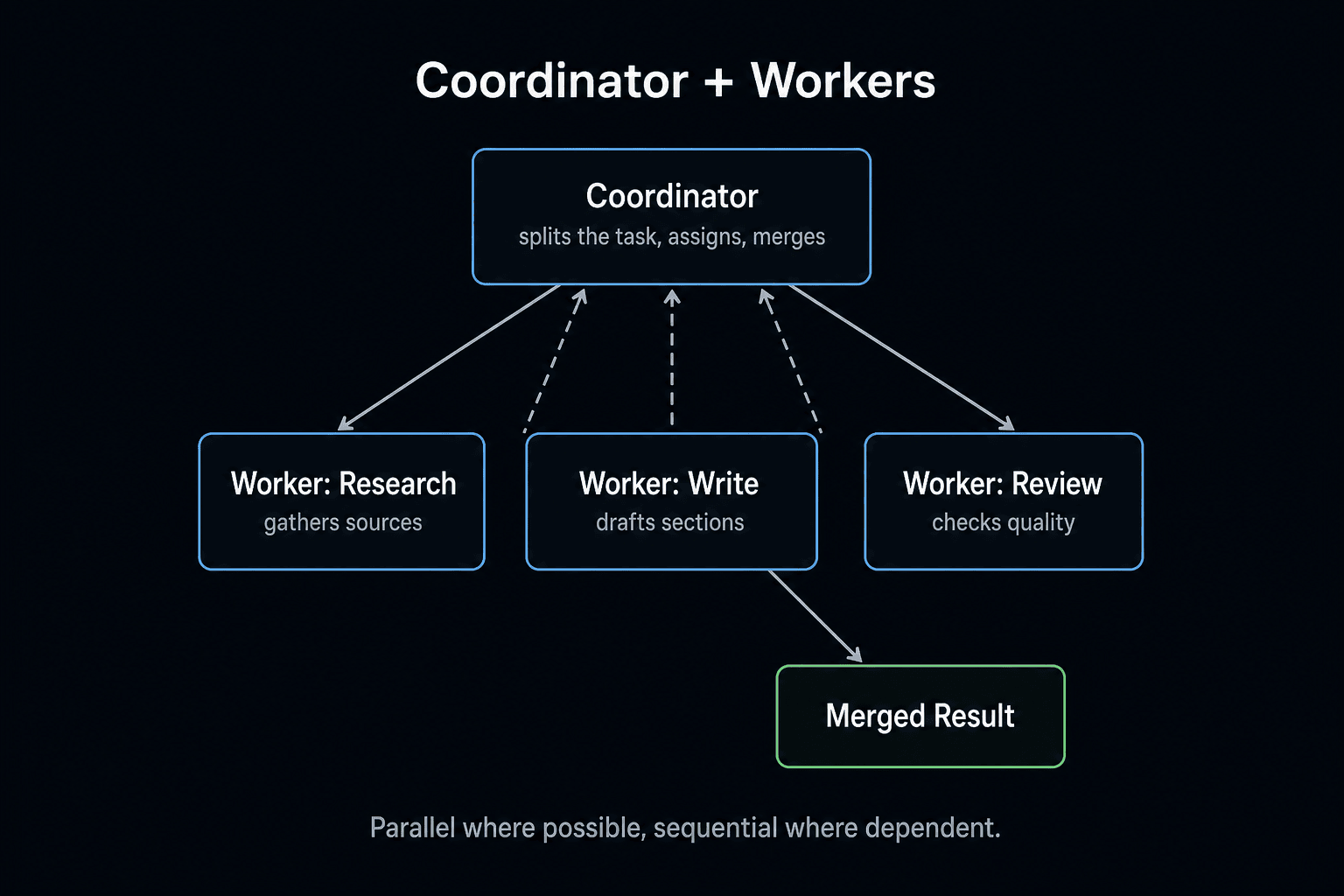
The solution is multi-agent systems: networks of agents where each one has a defined role, and a coordinator makes sure the right agent works on the right task at the right time.
This is what's actually running inside Claude Code, Devin, and any serious AI product you see in 2026. By the end of this guide, you'll have built all three foundational patterns yourself, in Python, from scratch.
This lesson focuses on the orchestration patterns and when to use each. If you want one complete, end-to-end build instead, the Multi-Agent System Python Tutorial walks through a full coordinator + workers system in 200 lines.
Why One Agent Isn't Enough
Here's a task that breaks a solo agent: "Research the top 5 competitors in the AI coding assistant space, write a comparison table, and then draft a blog post analyzing each one."
Give this to a single agent and watch what happens:
- The context window fills up partway through the research.
- The agent loses track of earlier research by the time it's writing.
- It can't research competitors in parallel — it has to do them one by one.
- The quality degrades as the task gets longer.
Now imagine splitting this into three agents:
- Research agent: Searches the web, pulls data on each competitor, returns structured summaries.
- Analysis agent: Takes those summaries and builds the comparison table.
- Writer agent: Takes the table and drafts the blog post with a clear angle.
Each agent has a focused context. Each one is good at its job. The coordinator stitches the results together. The total output is dramatically better.
This is the intuition behind every multi-agent pattern: decompose the task, specialize the agents, and coordinate the results.
The Three Patterns You Need
Most production multi-agent systems are built on three patterns. They compose — you'll often use all three in a single system.
- Pipeline: Agent A feeds into Agent B feeds into Agent C. Linear flow, each step transforms the output.
- Supervisor / Worker: One orchestrator agent breaks the task into sub-tasks and assigns them to specialist workers.
- Fan-out: One task splits into N parallel tasks that all run at the same time, then the results are merged.
Let's build each one.
Pattern 1: Pipeline
The pipeline is the simplest pattern. The output of one agent becomes the input of the next. Use it when your task has a clear sequence of transformations.
When to use it
- Transcription → summarisation → action item extraction
- Raw data → cleaning → analysis → report
- User query → search → answer synthesis
The code
from openai import OpenAI

client = OpenAI()

def run_agent(system_prompt: str, user_input: str) -> str:
    """Run a single agent step and return the output."""
    response = client.chat.completions.create(
        model="gpt-4o",
        messages=[
            {"role": "system", "content": system_prompt},
            {"role": "user", "content": user_input},
        ]
    )
    return response.choices[0].message.content

def pipeline(input_text: str) -> str:
    # Step 1: Research agent extracts key facts
    facts = run_agent(
        system_prompt="""You are a research agent. Given raw content, extract the
        5-10 most important factual claims. Return them as a numbered list.
        Be concise — each fact should be one sentence.""",
        user_input=input_text
    )
    print(f"[Research agent output]\n{facts}\n")

    # Step 2: Analysis agent identifies the angle
    angle = run_agent(
        system_prompt="""You are a content strategist. Given a list of facts,
        identify the single most interesting or counterintuitive angle for a
        blog post. Return: (1) the angle in one sentence, (2) why it's
        interesting, (3) the target audience.""",
        user_input=facts
    )
    print(f"[Analysis agent output]\n{angle}\n")

    # Step 3: Writer agent produces the article intro
    article = run_agent(
        system_prompt="""You are a technical writer for AI builders. Given a
        content angle, write a compelling 200-word introduction for a blog post.
        Hook the reader in the first sentence. Be direct, not generic.""",
        user_input=angle
    )
    print(f"[Writer agent output]\n{article}\n")

    return article

# Run it
raw_content = """
Claude Code is an AI coding assistant built by Anthropic. It runs in the
terminal and can write, edit, and debug code across an entire codebase.
Unlike Cursor (which is a full IDE), Claude Code operates entirely in the
command line. Karpathy recently shared that he runs 5-10 parallel Claude
Code sessions at once, each working on a different part of the codebase.
The tool has a $200/month limit on the Max plan.
"""

result = pipeline(raw_content)
This is the full pipeline pattern. Three agents, each with a tight role, chained in sequence. The key insight: each agent only sees the output of the previous one — not the entire conversation history. This keeps each context window clean and focused.
Common mistakes with pipelines
- Passing too much data between steps. Each agent should receive only what it needs. If your research agent returns 5,000 words, your analysis agent will struggle. Trim aggressively between steps.
- Not validating intermediate outputs. Add a simple check between steps — if the output is empty or malformed, retry before passing it downstream.
- Making the pipeline too long. Beyond 4-5 steps, errors compound. Each step introduces noise. Keep pipelines short and precise.
Pattern 2: Supervisor / Worker
The supervisor pattern introduces a coordinator that doesn't do the work itself — it figures out who should do it. The supervisor breaks a complex task into sub-tasks and routes each one to a specialist worker agent.
When to use it
- Tasks with unpredictable structure (you don't know how many steps there are in advance)
- Systems where different tasks require genuinely different expertise
- Customer support, coding assistants, research agents that handle varied inputs
The code
import json
from openai import OpenAI

client = OpenAI()

# --- Worker agents ---

def web_search_agent(query: str) -> str:
    """Specialist agent: searches the web and returns a summary."""
    response = client.chat.completions.create(
        model="gpt-4o",
        messages=[
            {"role": "system", "content": """You are a web search specialist.
            Given a query, provide a realistic search result summary as if you
            had searched the web. Include key facts, URLs (make them realistic),
            and a 2-3 sentence summary of findings."""},
            {"role": "user", "content": f"Search for: {query}"}
        ]
    )
    return response.choices[0].message.content

def code_agent(task: str) -> str:
    """Specialist agent: writes code."""
    response = client.chat.completions.create(
        model="gpt-4o",
        messages=[
            {"role": "system", "content": """You are a Python expert. Write
            clean, working Python code for the given task. Return only the code
            with brief inline comments. No explanations outside the code."""},
            {"role": "user", "content": task}
        ]
    )
    return response.choices[0].message.content

def analysis_agent(data: str) -> str:
    """Specialist agent: analyses data and draws conclusions."""
    response = client.chat.completions.create(
        model="gpt-4o",
        messages=[
            {"role": "system", "content": """You are a data analyst. Given
            information, produce a clear, structured analysis with: key findings,
            what this means, and recommended next steps."""},
            {"role": "user", "content": data}
        ]
    )
    return response.choices[0].message.content
Free AI Builder Newsletter
Weekly guides on AI tools & builder strategies.
Map worker names to functions
WORKERS = { "web_search": web_search_agent, "code": code_agent, "analysis": analysis_agent, }
--- Supervisor ---
def supervisor(task: str) -> str: """Orchestrates the task by routing to specialist workers."""
# Step 1: Supervisor decomposes the task
plan_response = client.chat.completions.create(
    model="gpt-4o",
    messages=[
        {"role": "system", "content": f"""You are a task orchestrator.
        You have access to these specialist agents: {list(WORKERS.keys())}.

        Given a task, break it into sequential sub-tasks and assign each
        to the right agent. Return a JSON array like:
        [
          {{"agent": "web_search", "input": "what to search for"}},
          {{"agent": "analysis", "input": "what to analyse"}}
        ]

        Return ONLY the JSON array. No other text."""},
        {"role": "user", "content": f"Task: {task}"}
    ]
)

plan_text = plan_response.choices[0].message.content.strip()
if plan_text.startswith("```"):
    plan_text = plan_text.split("```")[1]
    if plan_text.startswith("json"):
        plan_text = plan_text[4:]

plan = json.loads(plan_text)
print(f"[Supervisor plan]\n{json.dumps(plan, indent=2)}\n")

# Step 2: Execute each sub-task in sequence, passing results forward
results = []
context = ""

for step in plan:
    agent_name = step["agent"]
    agent_input = step["input"]

    # Inject previous results into the input if available
    if context:
        agent_input = f"{agent_input}\n\nContext from previous steps:\n{context}"

    print(f"[Running {agent_name} agent]")
    result = WORKERS[agent_name](agent_input)
    results.append({"agent": agent_name, "result": result})
    context += f"\n{agent_name} result: {result[:500]}..."
    print(f"Done.\n")

# Step 3: Supervisor synthesises final output
synthesis = client.chat.completions.create(
    model="gpt-4o",
    messages=[
        {"role": "system", "content": """You are a task coordinator
        synthesising results from specialist agents. Given the original
        task and all agent outputs, produce a coherent, well-structured
        final response that directly addresses the user's original request."""},
        {"role": "user", "content": f"""Original task: {task}
Agent results: {json.dumps(results, indent=2)}"""} ] )
return synthesis.choices[0].message.content
Run it
result = supervisor( "Research the current state of AI coding assistants and write a brief " "analysis of which one offers the best value for a solo developer in 2026" ) print(f"[Final output]\n{result}")
Notice the key design choices:
- The supervisor doesn't execute — it plans and synthesises.
- Workers are completely isolated from each other. They don't know about the other agents.
- Context passes forward through the orchestrator, not between workers directly.
- The final synthesis step is where the supervisor brings it all together.
Making the supervisor smarter
The simple version above plans once upfront. A smarter supervisor can adapt its plan based on what it gets back from each worker — this is called reactive orchestration:
def adaptive_supervisor(task: str, max_steps: int = 8) -> str:
    """Supervisor that adapts its plan based on worker results."""
    history = []

    for step_num in range(max_steps):
        decision_response = client.chat.completions.create(
            model="gpt-4o",
            messages=[
                {"role": "system", "content": f"""You are a task orchestrator.
                Available agents: {list(WORKERS.keys())}.

                Each turn, choose the NEXT single action to take, or return
                DONE if the task is complete.

                Return JSON: {{"action": "agent_name", "input": "..."}}
                or {{"action": "DONE", "final_answer": "..."}}"""},
                {"role": "user", "content": f"""Original task: {task}

Steps completed so far:
{json.dumps(history, indent=2)}

What is the next step?"""}
            ]
        )

        decision_text = decision_response.choices[0].message.content.strip()
        if decision_text.startswith("```"):
            decision_text = decision_text.split("```")[1]
            if decision_text.startswith("json"):
                decision_text = decision_text[4:]

        decision = json.loads(decision_text)

        if decision["action"] == "DONE":
            return decision["final_answer"]

        agent_name = decision["action"]
        result = WORKERS[agent_name](decision["input"])

        history.append({
            "step": step_num + 1,
            "agent": agent_name,
            "input": decision["input"],
            "result": result[:300]
        })

        print(f"[Step {step_num + 1}] {agent_name} done.")

    return "Max steps reached. Partial result: " + history[-1]["result"]
This is essentially the agent loop from Part 1 — but the "tool calls" are now entire sub-agents instead of simple functions. This is how Claude Code and most production agents actually work.
Pattern 3: Fan-Out (Parallel Agents)
Fan-out is for tasks where you need to do the same thing across multiple inputs at the same time. Instead of doing them sequentially, you launch N agents in parallel and collect all results.
When to use it
- Researching 5 competitors simultaneously
- Processing 100 documents in parallel
- Running the same analysis across multiple datasets
- Generating multiple creative variants at once (for A/B testing)
The code
import asyncio
from openai import AsyncOpenAI

async_client = AsyncOpenAI()

async def research_one_competitor(competitor: str) -> dict:
    """Single worker: researches one competitor and returns structured data."""
    response = await async_client.chat.completions.create(
        model="gpt-4o",
        messages=[
            {"role": "system", "content": """You are a competitive researcher.
            Return a JSON object with these fields:
            - name: company name
            - pricing: monthly price for main plan (e.g. "$20/month")
            - main_feature: the one thing they do best (1 sentence)
            - weakness: their biggest limitation (1 sentence)
            - best_for: who should use this tool (1 sentence)"""},
            {"role": "user", "content": f"Research this AI coding tool: {competitor}"}
        ]
    )

    text = response.choices[0].message.content.strip()
    if text.startswith("```"):
        text = text.split("```")[1]
        if text.startswith("json"):
            text = text[4:]

    result = json.loads(text)
    print(f"[Researched {competitor}]")
    return result

async def fan_out_research(competitors: list[str]) -> list[dict]:
    """Fan out: research all competitors in parallel."""
    tasks = [research_one_competitor(c) for c in competitors]
    results = await asyncio.gather(*tasks, return_exceptions=True)

    successful = []
    for i, result in enumerate(results):
        if isinstance(result, Exception):
            print(f"[Error researching {competitors[i]}]: {result}")
        else:
            successful.append(result)

    return successful

async def competitive_analysis(competitors: list[str]) -> str:
    """Full pipeline: fan-out research, then synthesis."""
    print(f"Researching {len(competitors)} competitors in parallel...\n")

    research_results = await fan_out_research(competitors)

    synthesis_response = await async_client.chat.completions.create(
        model="gpt-4o",
        messages=[
            {"role": "system", "content": """You are a product analyst.
            Given research on multiple competitors, write a clear comparison
            that helps a developer choose the right tool. Include:
            a comparison table (markdown), key trade-offs, and a recommendation
            for different use cases."""},
            {"role": "user", "content": f"""Here is the research data:

{json.dumps(research_results, indent=2)}

Write the competitive analysis."""}
        ]
    )

    return synthesis_response.choices[0].message.content

# Run it
competitors = [
    "Claude Code",
    "Cursor IDE",
    "GitHub Copilot",
    "Windsurf",
    "Google Antigravity"
]


analysis = asyncio.run(competitive_analysis(competitors))
print(f"\n[Final Competitive Analysis]\n{analysis}")
The critical piece: asyncio.gather(*tasks). This launches all the research agents at the same time. Instead of waiting 5-10 seconds per competitor sequentially (25-50 seconds total), all 5 run simultaneously. Total time: 5-10 seconds regardless of how many competitors you add (up to API rate limits).
Handling failures in fan-out
One worker failing shouldn't crash the whole operation. Notice the return_exceptions=True flag in asyncio.gather — this means a failing task returns an Exception object instead of raising it, so you can handle it gracefully. Add retry logic for critical workers:
async def research_with_retry(competitor: str, max_retries: int = 2) -> dict:
    """Research a competitor with automatic retry on failure."""
    for attempt in range(max_retries + 1):
        try:
            return await research_one_competitor(competitor)
        except Exception as e:
            if attempt == max_retries:
                print(f"[Failed after {max_retries + 1} attempts: {competitor}]")
                return {"name": competitor, "error": str(e)}

            wait = 2 ** attempt  # Exponential backoff: 1s, 2s, 4s...
            print(f"[Retrying {competitor} in {wait}s...]")
            await asyncio.sleep(wait)
Putting It All Together: A Real Workflow
In practice you'll combine all three patterns. Here's how a real competitive intelligence system might use all three:
async def full_intel_workflow(topic: str, num_competitors: int = 5) -> str:
    """
    Real workflow combining all three patterns:
    1. Supervisor: decides what competitors to research
    2. Fan-out: researches all competitors in parallel
    3. Pipeline: analysis -> formatting -> final report
    """

    # Stage 1: Supervisor identifies the competitors
    print("[Stage 1] Identifying competitors...")
    competitor_list_raw = await async_client.chat.completions.create(
        model="gpt-4o",
        messages=[
            {"role": "system", "content": f"""Return a JSON array of exactly
            {num_competitors} competitor names in the space.
            Return ONLY the JSON array of strings."""},
            {"role": "user", "content": f"Top competitors in: {topic}"}
        ]
    )

    text = competitor_list_raw.choices[0].message.content.strip()
    if text.startswith("```"):
        text = text.split("```")[1]
        if text.startswith("json"):
            text = text[4:]
    competitors = json.loads(text)

    # Stage 2: Fan-out research on all competitors
    print(f"[Stage 2] Researching {len(competitors)} competitors in parallel...")
    research = await fan_out_research(competitors)

    # Stage 3: Pipeline — analysis agent then report agent
    print("[Stage 3] Running analysis pipeline...")

    analysis = await async_client.chat.completions.create(
        model="gpt-4o",
        messages=[
            {"role": "system", "content": """You are a market analyst.
            Identify the 3 most important patterns and insights from this
            competitive research. Be specific, not generic."""},
            {"role": "user", "content": json.dumps(research, indent=2)}
        ]
    )
    analysis_text = analysis.choices[0].message.content

    report = await async_client.chat.completions.create(
        model="gpt-4o",
        messages=[
            {"role": "system", "content": """You are a technical writer.
            Given competitive research and analysis, write a crisp executive
            brief (400 words max). Structure: situation, key findings,
            implications, recommendation."""},
            {"role": "user", "content": f"""Research: {json.dumps(research, indent=2)}

Analysis insights: {analysis_text}

Write the brief."""}
        ]
    )

    return report.choices[0].message.content

result = asyncio.run(full_intel_workflow("AI coding assistants"))
print(result)
Five Rules for Multi-Agent Systems That Actually Work
After the code, here's what separates the multi-agent systems that work in production from the ones that break:
1. Give each agent one job
The moment an agent's system prompt has two distinct responsibilities, quality drops. A "research and write" agent is worse than a "research" agent followed by a "write" agent. Every agent should have a single, clear role that fits on a sticky note.
2. Never let agents talk directly to each other
In the patterns above, all coordination goes through the orchestrator or is structured (pipeline output = next input). Direct agent-to-agent communication creates unpredictable state. Keep the communication topology simple and explicit.
3. Trim context aggressively between steps
If your research agent returns 3,000 words, don't pass all 3,000 to the next agent. Summarise. Each inter-agent handoff should pass only what the next agent needs — not the full output of the previous one. This is where most multi-agent systems get slow and expensive.
4. Design for partial failure
In a fan-out with 10 workers, assume 1-2 will fail. Always use return_exceptions=True. Always have a fallback for missing data. A system that fails hard when one worker errors is not production-ready.
5. Make the supervisor dumb about execution
The supervisor should only plan and synthesise — never do the actual domain work. The moment your orchestrator is doing research or writing code directly, you've broken the pattern. If you catch yourself adding domain-specific knowledge to the supervisor, extract it into a new worker agent instead.
Choosing the Right Pattern
| Pattern | Use when... | Key advantage | Watch out for... |
|---|---|---|---|
| Pipeline | Task has a fixed sequence of transformations | Simple, predictable, easy to debug | Errors compound — one bad step ruins all downstream output |
| Supervisor / Worker | Task structure is complex or varies by input | Flexible, handles edge cases, adapts to different inputs | Supervisor can make bad routing decisions; hard to debug the plan |
| Fan-out | Same task needs to run across many inputs simultaneously | Dramatically faster; scales linearly with API capacity | Rate limits; cost multiplies with worker count |
In practice: start with a pipeline for any new system. It's the easiest to debug and reason about. Add supervisor routing when your inputs become too varied for a fixed sequence. Add fan-out when you identify a bottleneck caused by sequential processing of parallel-able work.
What's Next
You now have three production-grade orchestration patterns. You can build systems where agents collaborate, specialise, and run in parallel.
But there's one more problem: where does all of this run? Your laptop is fine for experiments. For real work — agents that run on a schedule, handle production traffic, recover from crashes, and cost less than $50/month — you need to deploy.
That's Part 5: Deploying Agents to Production — the final part of the series. We'll cover containerising your agents with Docker, deploying to a VPS or serverless platform, adding proper logging, and setting up the monitoring that tells you when something breaks at 3am before your users do.
If you're building multi-agent systems and want to share what's working (or not working) — join AI Builder Club. We're a community of developers building real systems with these patterns, not just reading about them.
Sources & Verification
This guide is written from hands-on testing, then cross-checked against primary sources - official documentation and first-party announcements. Field results and opinions are labeled as such. See our editorial standards.
Join AI Builder Club


$37/mo
Get the free newsletter
Weekly deep-dives on AI tools, automation workflows, and builder strategies. Join 5,000+ readers.
No spam. Unsubscribe anytime.