Claude Code Hooks: Complete Guide with 7 Recipes (2026)
Make formatting, security, and quality gates fire 100% of the time. Lifecycle events, matchers, handler types, and 7 copy-paste Claude Code hook recipes.
Course outline · Claude Code Fundamentals (2.2)
You told Claude Code to run Prettier after every file edit. It did - twice. Then it forgot. You reminded it. It complied. Next session, forgot again. By the fourth reminder you are not pair programming anymore, you are babysitting.
The fix is not a better prompt. The fix is a hook: a rule wired into Claude Code's execution pipeline that fires every single time, no matter what the model thinks. One user ran a force-push blocker for nine months. It fired 8 times - every one was Claude deciding "cleaning up git history seems like a good idea."
This guide covers the full hooks system: lifecycle events, matchers, handler types, and the 7 hooks worth installing first.
What Are Claude Code Hooks?
A hook is an external command that runs automatically at a specific moment in the agent's lifecycle. File about to be written? Your hook fires first. Command finished? Your hook post-processes the result.
The key property: hooks are deterministic. Instructions in CLAUDE.md are suggestions the model usually follows. Hooks are pipeline machinery the model cannot skip. The difference matters most for the things you can never let slip:
| Need | CLAUDE.md instruction | Hook |
|---|---|---|
| "Prefer English comments" | Fine - occasional misses are harmless | Overkill |
| "Format after every edit" | Misses 1 in 10 times | Fires 100% |
| "Never force-push to main" | One miss = disaster | The only safe option |
| "Log every bash command for audit" | Will drift over a long session | Guaranteed complete |
Rule of thumb: if a miss costs you real money, real data, or real trust, it belongs in a hook, not a prompt.
The Lifecycle Events: Where Hooks Attach
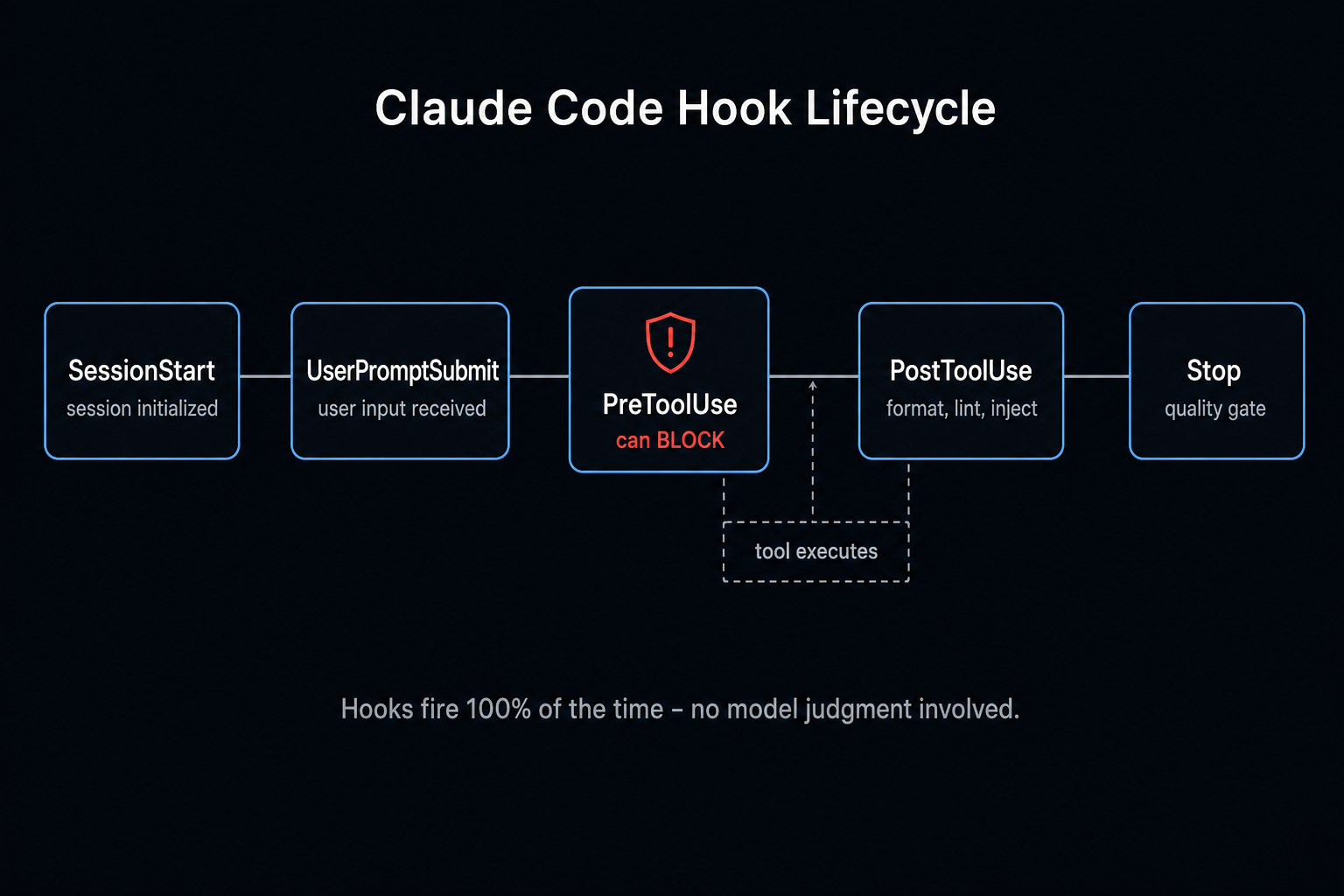
Claude Code exposes events covering every key moment in a session. The six you'll actually use:
| Event | When it fires | What it's for |
|---|---|---|
PreToolUse | Before any tool call executes | The only event that can block an action |
PostToolUse | After a tool call completes | Post-processing: format, lint, test |
Stop | When Claude is about to finish responding | Quality gates: don't let it stop with failing tests |
Notification | When Claude needs your attention | Forward to desktop/Slack so you can context-switch |
SessionStart | New session begins | Inject env vars, check dependencies, start logging |
UserPromptSubmit | You send a message | Attach extra context before the model sees it |
There are more (SubagentStart/SubagentStop, PreCompact, WorktreeCreate/WorktreeRemove) but the six above cover 90% of real usage.
The Three Things a Hook Can Do
Every hook returns one of three decisions:
- Allow - do nothing, let the pipeline continue. Pure logging hooks live here.
- Block - stop the action. Only available in
PreToolUse. Claude receives an error explaining the action was rejected by an external rule. - Inject - add information into the conversation. Example: your linter found 3 warnings after a file write, inject them so Claude sees and fixes them.
That's the whole API surface. Three verbs, composed across lifecycle events, cover almost every automation you'll want.
Matchers: Scoping When Hooks Fire
You rarely want a hook on every tool call. Matchers filter by tool name using regex:
{
  "matcher": "Bash"           // only shell commands
}
{
  "matcher": "Write|Edit"     // only file modifications
}
{
  "matcher": ""               // everything (audit logs)
}
Typical scoping: security rules match Bash, formatting matches Write|Edit, audit logging matches everything.
The Four Handler Types
| Type | What runs | When to use |
|---|---|---|
| Command | A shell command or script. Receives event JSON via stdin, returns decision via stdout. | 90% of hooks. Fast, deterministic, free. |
| HTTP | A request to a URL | Push events to audit systems or internal APIs |
| Prompt | A Claude model evaluates the event | Grey areas a regex can't judge ("is this code security-sensitive?"). Costs tokens. |
| Agent | A full agent instance investigates | Heavyweight checks needing multi-step reasoning. Rare. |
Start with Command. Reach for Prompt only when the rule genuinely can't be expressed as a regex or script - and accept that you've traded determinism for judgment.
Where Configuration Lives
Hooks go in settings.json at three levels, all additive:
| File | Scope | Use for |
|---|---|---|
~/.claude/settings.json | All your projects | Security rules, audit logs, notifications |
.claude/settings.json | This project, committed to git | Team-shared rules: this repo formats with Prettier |
.claude/settings.local.json | This project, gitignored | Personal preferences, machine-specific paths |
Multiple hooks on one event all run in order. Type /hooks inside Claude Code to see everything currently registered - useful when a hook misbehaves and you forgot where you defined it.
7 Hooks Worth Installing First
1. Auto-format after every edit
PostToolUse, matcher Write|Edit. Extract the file path from the event JSON, run your formatter on it:
{
  "hooks": {
    "PostToolUse": [
      {
        "matcher": "Write|Edit",
        "hooks": [
          {
            "type": "command",
            "command": "jq -r '.tool_input.file_path' | xargs npx prettier --write --ignore-unknown"
          }
        ]
      }
    ]
  }
}
You never mention formatting again. Neither does Claude.
2. Block force-push to main
PreToolUse, matcher Bash. Script checks the command string for push --force or push -f targeting main/master, returns block:
#!/bin/bash
cmd=$(jq -r '.tool_input.command')
if echo "$cmd" | grep -qE 'push\s+(--force|-f).*(main|master)'; then
  echo '{"decision": "block", "reason": "Force push to main is not allowed. Use a feature branch."}'
  exit 0
fi
echo '{"decision": "allow"}'
3. Protect secret files
PreToolUse, matcher Write|Edit. Block writes to .env, credentials.json, anything matching your secrets patterns. Even if you ask Claude to "update the .env", the hook says no - which is exactly the point. Secrets get edited by humans.
4. Quality gate on Stop
Stop event. Run your linter and test suite when Claude tries to finish. Errors found? Inject them back: "ESLint reports 2 errors in src/api/checkout.ts." Claude sees the failures and keeps working instead of handing you broken code. This single hook changes the default from "looks done" to "verified done."
5. Desktop notification when input needed
Notification event. On macOS:
osascript -e 'display notification "Claude Code needs your approval" with title "Claude Code"'
Stop staring at the terminal while long tasks run. Go do something else; the notification pulls you back.
6. Full audit log
PreToolUse or PostToolUse, no matcher. Append tool name, input, and timestamp to a JSONL file. After any session you have a complete record of what was read, written, and executed. Costs nothing until the day you really need it.
7. Supabase migration guard
PreToolUse, matcher Bash. If the command contains supabase db reset or a destructive migration against your production project ref, block it. Agents are enthusiastic about "fixing" databases. Production is not the place to learn this.
Hooks vs the Permission System
Claude Code already has permissions (allow/ask/deny per tool). Where's the line?
Permissions are a gate: an action passes or it doesn't. Hooks are programmable machinery: they can block, but also transform, inject context, trigger external systems, and post-process results.
Use permissions for coarse access control ("always ask before bash"). Use hooks for everything with logic in it ("block bash only when it touches main"). They stack: permissions filter first, hooks refine.
Practical Rules From the Field
TIP
Start with three: one security hook (force-push blocker), one automation (formatter), one notification. Live with them a week. Add more only when you hit a real pain. The 95-hook setups you see on X were accumulated over months of actual incidents, not designed upfront.
Keep hooks dumb. Check a path, match a regex, read an exit code. A hook's value is certainty - a "smart" hook that calls an LLM gives that certainty back. Sometimes worth it, but know the trade.
Watch latency. A 3-second hook on PreToolUse means every tool call waits 3 seconds. Claude Code makes dozens of tool calls per task. Keep synchronous hooks under ~200ms; push slow work (remote logging) to async.
Test the blocker hooks. A formatting hook that silently fails costs you nothing. A force-push blocker that silently fails costs you a main branch. Trigger each blocking hook deliberately once and confirm it actually blocks.
The Bigger Picture
Hooks compose with everything else in the Claude Code stack: give sub-agents a test-runner hook, give Agent Teams a quality gate on task completion, auto-initialize environments when a worktree is created.
The model handles judgment. Hooks handle certainty. Agents are probabilistic - they do the right thing most of the time. Hooks exist for the things where "most of the time" is not good enough.
Start with one: the auto-formatter. Five minutes of setup, and you will never type "can you format that" again.
The hooks and harness setup I run are packaged in our open-source plugin. /setup-codebase-harness installs them alongside the rest.
View on GitHub →Sources & Verification
This guide is written from hands-on testing, then cross-checked against primary sources - official documentation and first-party announcements. Field results and opinions are labeled as such. See our editorial standards.
- Hooks reference (Claude Code Docs) - Official reference: hook events, configuration schema, JSON I/O, exit codes, async/HTTP/MCP hooks
- Automate actions with hooks (Claude Code Docs) - Official getting-started guide with common use cases and the /hooks menu
Join AI Builder Club


$37/mo
Get the free newsletter
Weekly deep-dives on AI tools, automation workflows, and builder strategies. Join 5,000+ readers.
No spam. Unsubscribe anytime.