Claude Code Dynamic Workflows: Orchestrate 1,000 Subagents
Dynamic Workflows turn Claude Code's plan into a script running up to 1,000 subagents without flooding the lead's context. Setup and costs.
Course outline · Claude Code Fundamentals (2.6)
Spawn ten subagents by hand and your lead agent drowns. Every result they return lands back in the lead's context window - ten summaries, ten tool dumps, ten half-finished files. By agent six the orchestrator is reasoning through a swamp of its own making, and the quality falls off a cliff.
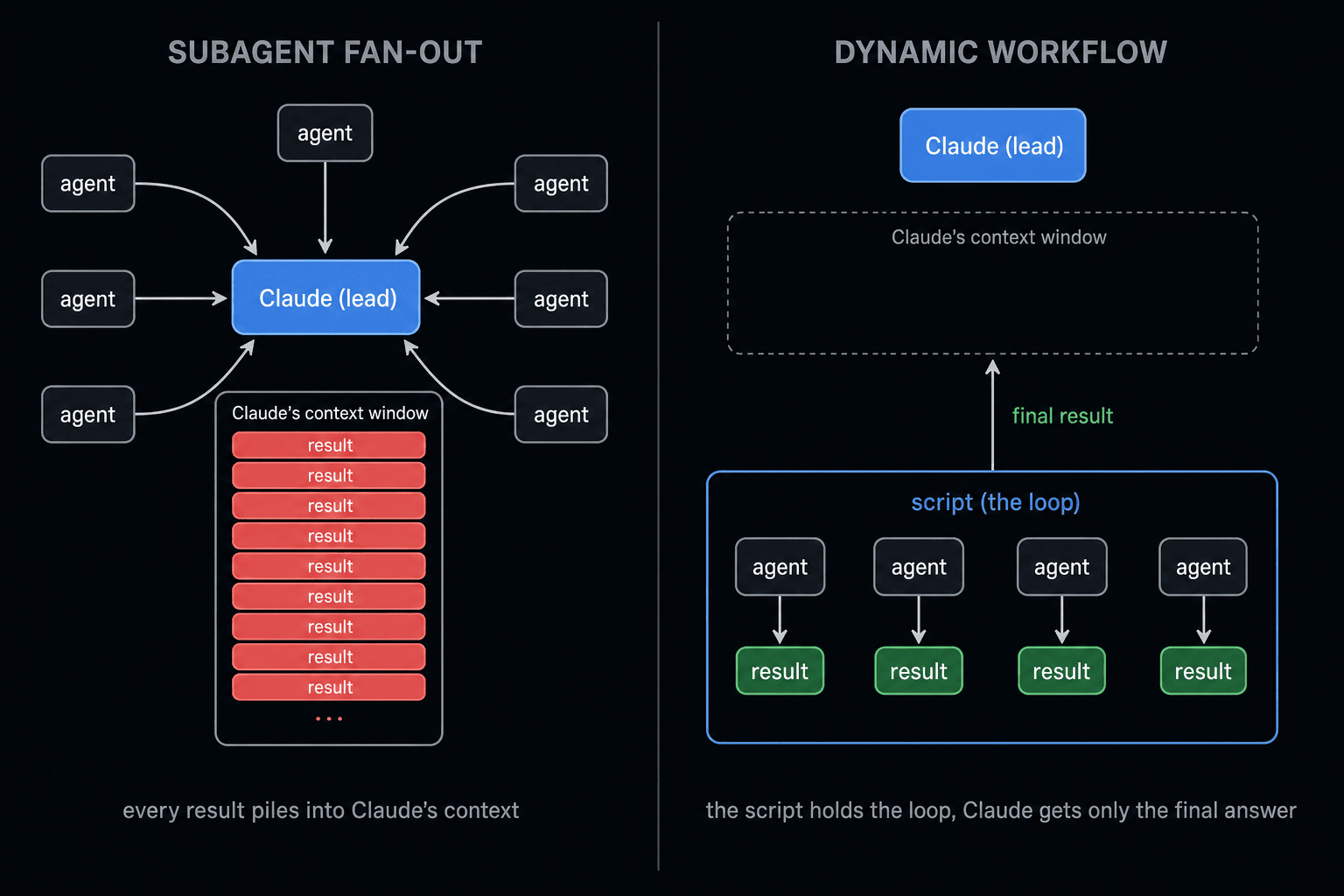
Dynamic Workflows fix the swamp. Claude writes a JavaScript script that runs the agents, holds the loop, and keeps the intermediate results. The lead's context only ever sees the final answer. Same subagents, none of the context tax - and the ceiling jumps from "a handful" to 1,000 agents per run.
It shipped in v2.1.154 and almost nobody has written it up properly. Here's the mental model, how to turn it on, the limits that bite, and when it actually beats Agent Teams or a plain subagent fan-out.
What Dynamic Workflows Actually Is
A Dynamic Workflow is a script Claude writes to orchestrate subagents. You describe the goal. Claude plans it, then emits a JavaScript orchestration script that spawns agents, branches on their results, loops, and collects output. A runtime runs that script in the background while your session stays responsive - you keep working and get one report at the end instead of a turn-by-turn transcript. You can watch it run, rerun it, and save it for next time.
The shift is who holds the loop.
In a normal subagent fan-out, Claude is the orchestrator. It decides turn by turn what to spawn next, and every result piles back into its context. In a workflow, the script is the orchestrator. Claude writes it once and gets back only the final result. The loop, the branching, and all the intermediate state live in the script's runtime - not the model's window.
Subagents vs Skills vs Workflows: Who Holds the Loop
| Who decides the next step | Where results land | Best for | |
|---|---|---|---|
| Subagents | Claude, turn by turn | Claude's context | A handful of parallel tasks |
| Skills | Claude (follows SKILL.md) | Claude's context | Reusable know-how and procedure |
| Workflows | The script | The script's runtime | Tens to hundreds of agents, repeatable |
Subagents and Skills keep Claude in the driver's seat every turn. Workflows hand the steering wheel to code so Claude's window stays clean. That single move is what unlocks the scale.
The Real Win Is Context, Not Just Scale
The agent count is the headline. The context saving is the actual reason to use it.
MANUAL FAN-OUT
"Run these 40 benchmark combos as subagents." Forty results stream back into the lead. The context fills, reasoning degrades, and cost climbs every time those tokens get re-read.
WORKFLOW
The script runs the 40 combos, holds each result in a variable, and returns one ranked table. The lead reasons over the table, not 40 transcripts.
This is the same lesson from context engineering, applied to orchestration: the cheapest token is the one you never load.
Turn It On
Dynamic Workflows require Claude Code v2.1.154 or later. They run on all paid plans, the Anthropic API, Amazon Bedrock, Google Cloud Vertex AI, and Microsoft Foundry.
On Pro, flip the Dynamic workflows row in /config. Then describe the job in plain English:
Write a workflow that migrates every component in src/ from
styled-components to Tailwind, one agent per file, then runs the
test suite and reports which files still fail.
That's it for setup. The fastest way to feel what a workflow does is to run one that already ships with Claude Code.
Run Your First Workflow (No Setup)
/deep-research is a bundled workflow, so it's the zero-risk on-ramp - no script to write, nothing to enable beyond the /config toggle. It needs the WebSearch tool available.
/deep-research What changed in the Node.js permission model between v20 and v22?
It fans web searches across several angles, fetches and cross-checks the sources, votes on each claim, and drops the ones that don't survive. You get one cited report at the end - not a turn-by-turn transcript.
While it runs, open the live view and drive it:
/workflows
Arrow keys select a phase or agent, Enter drills in to read what each agent found, p pauses or resumes, x stops an agent or the whole run, and s saves the run (more on that below). The same one-line progress summary also shows up in the task panel under your input box.
Two Ways to Trigger a Workflow
1. The keyword. Drop ultracode into your prompt - or just ask in plain words ("use a workflow"). Claude writes an orchestration script for that one task instead of working through it turn by turn. The keyword gets highlighted in the input box; if you didn't mean it, Option+W (macOS) or Alt+W (Windows/Linux) dismisses it for that prompt. (Before v2.1.160 the trigger word was workflow; natural-language requests work in both versions.)
ultracode: audit every API endpoint under src/routes/ for missing auth checks
2. /effort ultracode. Turn it on once and it pairs xhigh reasoning with automatic workflow orchestration - Claude plans a workflow for every substantial task in the session, without you asking. It lasts for the session and resets on the next one; drop back with /effort high for routine work.
WARNING
ultracode is the heavy setting. A single request can spawn several workflows back to back - one to understand the code, one to make the change, one to verify it. More tokens, longer runs. Reach for it on genuinely hard, fan-out-heavy work, not your daily edits.
Save It as a Reusable Command
This is the payoff: a workflow you liked once becomes a command you run forever. After a run does what you wanted, open /workflows, select it, and press s. Pick where it lives:
.claude/workflows/- in the repo, shared with everyone who clones it~/.claude/workflows/- in your home dir, available in every project, just you
It now shows up in / autocomplete like any built-in command. A review you run on every branch, a triage pass you run on every bug report - same orchestration, one command.
Saved workflows take input through an args global, so you parameterize them at call time instead of editing the script:
Run /triage-issues on issues 1024, 1025, and 1030
Claude passes the list as structured data, so the script reads args directly. If a project workflow and a personal one share a name, the project version wins.
The Limits That Bite
KNOW BEFORE YOU RUN
- 16 concurrent, 1,000 total per run. Concurrency drops on machines with fewer CPU cores. The cap is what stops a runaway loop from forking forever.
- No user input mid-run. You can't steer a run once it starts - only an agent permission prompt pauses it. Need sign-off between stages? Split each stage into its own workflow.
- The script can't touch your files or shell directly. Agents do the reading, writing, and command running. The script only coordinates them - which is also a safety property: the orchestration layer has no direct disk access.
- Every agent uses your session's model by default. Tell Claude to route cheap stages to a smaller model, or you'll pay Opus rates for grep-tier work.
Keep the Cost Sane
A workflow can spawn hundreds of agents, so one run can burn far more tokens than doing the task in conversation. Three habits keep it from hurting:
- Run it on a slice first. Point it at one directory instead of the whole repo, or a narrow question instead of a broad one. Watch the per-agent token usage in
/workflows, and stop the run withxthe moment the spend looks wrong - completed agents keep their results. - Route cheap stages to a cheap model. Every agent uses your session's model by default, so name the exception in the prompt: "use a smaller model for the file-by-file scan, keep the strongest model for the final synthesis." Check
/modelbefore a big run if you usually sit on a small one. - Set the allowlist before a long run. Shell, web, and MCP calls outside your allowlist pause the run waiting for approval. Add the commands the agents need upfront so an unattended run doesn't stall on prompt #3.
When to Use It (and When Not)
Use a workflow when:
- The work fans out wide and repeats - a benchmark matrix (say 80 model-prompt combos), a codemod across hundreds of files, a large migration, or multi-source deep research (
/deep-researchis itself a workflow). - You'd otherwise hand-spawn the same subagent over and over.
- The intermediate results are noise to the lead and you only want the final synthesis.
Skip it when:
- The job is 3-5 parallel tasks. A plain subagent fan-out is simpler and the context cost is fine.
- Workers need to talk to each other mid-task. That's Agent Teams, not a workflow - workflow agents don't message each other.
- You need to approve things mid-flight. The no-input rule makes interactive work painful.
One question settles it: does this fan out wide and run the same shape many times? Yes means workflow. No means a subagent or a team.
Bake In a Quality Pass
A workflow isn't just more agents - it can codify a repeatable quality pattern. The script can have independent agents adversarially review each other's findings before anything gets reported, or draft a plan from several angles and weigh them against each other. /deep-research does exactly this: it votes on each claim and drops the ones that don't survive cross-checking.
Anthropic's separate Outcomes grader takes it further. You hand it a rubric - "all tests pass, no new TODOs, no public API changes" - and a grader scores each result in its own context window, then sends failures back to revise until they pass. Totalum's teardown reports this revise loop lifted task-success by up to 10 points on Anthropic's hardest internal benchmarks; treat that figure as directional. Either way the point is the same: generate, check, retry, with no human in the loop. That rubric is the verifier - and loop engineering is the whole argument for why it, not the model, is what makes a workflow ship. New to rubric grading? Start with how to evaluate AI agents.
Where It Fits
The progression is clean once you've used all four:
Single session → subagents (context isolation) → agent teams (coordination) → dynamic workflows (orchestration at scale).
Most days a solo session or a subagent fan-out is all you need. But the first time you describe a 200-file migration, walk away, and come back to a ranked report instead of a context window full of half-finished diffs, you'll get why Anthropic moved the loop into code. The plan stops being something Claude re-derives every turn. It becomes a script you can run again tomorrow.
The orchestration skills behind patterns like this are open-source. Install the plugin and run them in your own repo.
View on GitHub →Sources & Verification
This guide is written from hands-on testing, then cross-checked against primary sources - official documentation and first-party announcements. Field results and opinions are labeled as such. See our editorial standards.
- Orchestrate subagents at scale with dynamic workflows (Claude Code Docs) - Official docs for dynamic workflows - running many subagents from a script
- Create custom subagents (Claude Code Docs) - Subagent definitions and the built-in Explore/Plan/general-purpose agents
Join AI Builder Club


$37/mo
Get the free newsletter
Weekly deep-dives on AI tools, automation workflows, and builder strategies. Join 5,000+ readers.
No spam. Unsubscribe anytime.