Claude Code Agent Teams: Setup, Costs, Workflows (2026)
Run multiple Claude Code agents with messaging and a shared task list. Setup, the 3 scenarios where teams beat solo agents, and token cost control.
Course outline · Claude Code Fundamentals (2.4)
SubAgents have a ceiling: they can't talk to each other. A sub-agent runs its task, returns a summary, and dies. If your frontend agent changes an API shape, your backend agent finds out never. For tasks where workers need to coordinate mid-flight, you need something else.
Agent Teams is that something. Multiple full Claude Code instances, a shared task board, and direct messaging between teammates. I ran a 3-agent team on a feature that takes me 45 minutes solo - it shipped in 19, including the time one agent spent telling another "the API contract changed, here's the new shape."
Here's the architecture, when it actually beats a single agent, and the management habits that keep it from burning tokens for nothing.
Watch the full install-and-first-team walkthrough:
What Agent Teams Is
Agent Teams is Claude Code's multi-instance collaboration mode. One instance acts as Team Lead: it splits the work, spawns teammates, assigns tasks, and assembles the final result. Each Teammate is a complete, independent Claude Code session - own context window, own tools, own terminal.
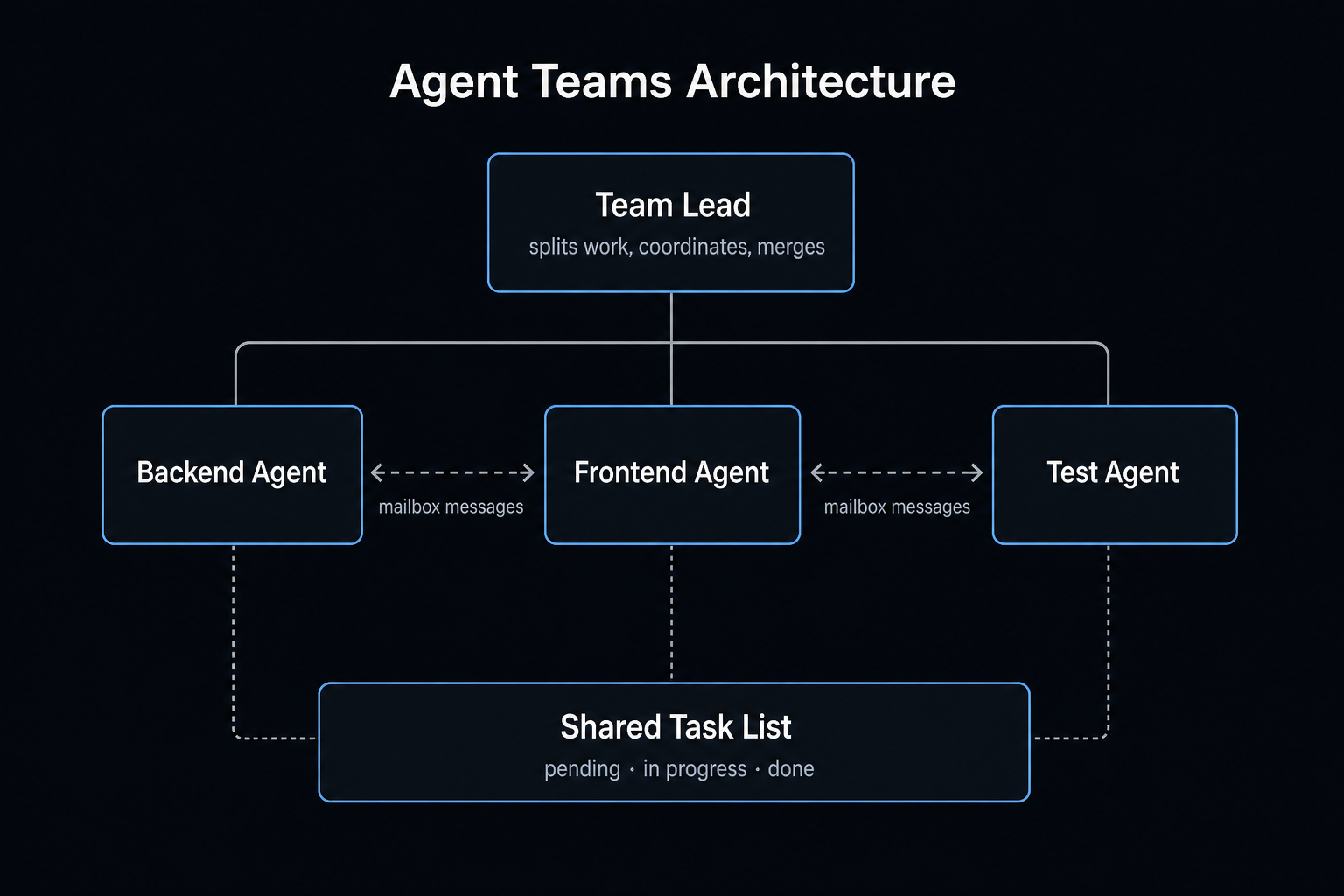
Four pieces make it work:
| Component | What it does |
|---|---|
| Team Lead | The session you talk to. Splits work, creates teammates, coordinates, merges results |
| Teammates | Full Claude Code instances. Read files, run commands, write code - everything a normal session does |
| Shared Task List | A board everyone sees. Tasks have states (pending, in progress, done) and dependencies. Teammates claim work from it |
| Mailbox | Direct messages between teammates. Agent A appends to Agent B's inbox; B reads it before its next action |
The mailbox is the differentiator. SubAgents are star-topology - everything routes through the parent. Teams are mesh - the backend agent can tell the frontend agent directly: "Interface changed. New fields: { teamName, billingEmail, notificationPrefs }. Types in src/types/team.ts." No human relay required.
Agent Teams vs SubAgents: Which One?
| Dimension | SubAgent | Agent Teams |
|---|---|---|
| Communication | Reports to parent only | Teammates message each other |
| Lifecycle | One task, then gone | Persistent, keeps claiming work |
| Coordination | Parent manages everything | Shared task list + self-serve claiming |
| Token cost | Moderate | High - every teammate is a full instance |
| Best for | Self-contained research/exec tasks | Multi-role work with cross-dependencies |
One question decides it: do the workers need to talk to each other mid-task? No: SubAgents (cheaper, simpler - they cover roughly 90% of parallel work). Yes: Teams.
The 3 Scenarios Where Teams Win
1. Multi-perspective code review
Three teammates review the same PR: one hunts security issues, one profiles performance, one checks test coverage. Why not one agent doing three passes? Anchoring. Once a single agent finds a security bug, its attention stays in security-land and the performance review gets shallow. Three isolated contexts produce three genuinely independent reports.
2. Competing-hypothesis debugging
Production bug, five plausible causes. Spawn five teammates, one hypothesis each, and instruct them to attack each other's conclusions. Single-agent debugging suffers from confirmation bias - first plausible theory wins. Adversarial teammates force every theory to survive scrutiny. The one left standing is usually the real root cause.
3. Cross-layer feature development
Backend (Supabase schema + API routes), frontend (React components), tests (unit + E2E) - three teammates, parallel, coordinating through messages. The backend agent finishes the API and immediately tells the frontend agent the real contract. Nobody waits, and nobody builds against a stale spec.
When NOT to use Teams: strictly sequential tasks (A blocks B blocks C), anything where two agents would edit the same file, anything one agent finishes in 10 minutes, or any day you're watching token spend. Coordination overhead is real. And when the work fans out wide and repeats - dozens of files, a benchmark matrix - reach for Dynamic Workflows instead, which orchestrate up to 1,000 subagents from a script without flooding the lead's context.
Setup
Requirements: Claude Code v2.1.32 or later (check with claude --version) and an Opus 4.6 model on a paid plan. Agent Teams is experimental and off by default. Enable in ~/.claude/settings.json:
{
  "env": {
    "CLAUDE_CODE_EXPERIMENTAL_AGENT_TEAMS": "1"
  }
}
Restart Claude Code (the flag is read at startup - skipping the restart is the #1 reason the feature "doesn't appear"). Verify with echo $CLAUDE_CODE_EXPERIMENTAL_AGENT_TEAMS (should print 1) and that you're on Opus 4.6 (/model opus). Then describe the team in plain English:
"Build a team for the team-settings feature: one backend agent for the Supabase CRUD API, one frontend agent for the React settings page using our component library, one test agent for unit + E2E."
The lead splits tasks, spawns teammates, and starts. Two display modes:
- In-process (default): all teammates in one terminal,
Shift+Down/Shift+Upto cycle between them. Works everywhere. - Split-pane: every teammate gets its own pane. Needs tmux or iTerm2 (
brew install tmux). Watching three agents write code simultaneously is also just good fun.
Useful controls: Ctrl+T opens the shared task list (states, assignments, dependencies). You can talk to any teammate directly - switch to its session and type. When done: "Clean up the team."
Management Rules That Actually Matter
Your role shifts from "chatting with an AI" to "running a small team." The habits transfer from human management almost 1:1.
1. Brief teammates like new hires. Teammates do NOT inherit the lead's conversation history. They get CLAUDE.md, MCP config, and your creation description - nothing else. "Handle the backend" produces garbage. "Implement JWT auth under /api/auth using the existing Supabase schema, export TypeScript types" produces work.
2. Draw file boundaries. Two teammates editing one file = conflict, full stop. Partition ownership upfront: frontend owns src/pages/, backend owns src/api/, tests own tests/. If clean partitioning is impossible, add Worktree isolation so each teammate works in its own copy.
3. Cap the team at 3-5. Past five teammates, coordination overhead grows faster than output. 5-6 tasks per teammate is the sweet spot - fewer wastes the instance, more loses focus.
4. Check in every few minutes. A teammate drifting off-spec for 20 unsupervised minutes is tokens you don't get back. Skim panes, redirect early.
5. Plan first for high-stakes work. Have teammates draft an approach in read-only mode; lead approves before any code gets written. Review the plan, not the diff.
The Cost Conversation
WARNING
Every teammate is a full Claude instance with its own context window. A 3-agent team burns roughly 3-4x the tokens of a solo session - and Anthropic's docs flag up to 15x for large teams. Check your plan before you spawn five teammates on a whim.
Three ways to keep it sane:
- Match models to tasks. Lead and architecture work on Opus; mechanical implementation on Sonnet. Sonnet is dramatically cheaper and entirely capable of "write the CRUD endpoints per this spec."
- No teams for small jobs. Solo agent finishes in 10 minutes? A team finishes in 12 and bills 4x.
- Research read-only first. Planning phases have zero file-conflict risk and lower token burn. Spend tokens on parallel implementation only after direction is locked.
Current Limitations
Experimental means experimental:
- No session resume. Claude Code crashes, team's gone.
/resumewon't recover teammates. - One team at a time. Clean up before starting the next.
- No nesting. Teammates can't spawn their own teams.
- Permissions inherit at spawn. Teammates start with the lead's permissions; adjustable after, not during, creation.
- Stale task states. Occasionally a teammate finishes but forgets to mark done, blocking dependents. Nudge it manually.
- Split-pane needs tmux/iTerm2. VS Code's terminal isn't supported yet.
Ramp Up in Four Steps
- Parallel read-only review. Three teammates, three lenses (security/performance/tests), one PR. Zero write conflicts, instant feel for the coordination model.
- Multi-hypothesis debug. Next weird bug, fan out the theories.
- Cross-layer feature. Real parallel development with file ownership boundaries. First write-heavy run.
- Add quality gates. Wire hooks so lint and tests run automatically when a teammate marks a task complete - the lead stops being the only quality check.
Most days, a solo session or a SubAgent fan-out is all you need. But the first time you watch a backend agent message a frontend agent about a contract change - while you're reviewing a third agent's test plan - you understand what the next couple of years of building software is going to feel like.
The Open Agent Teams skill that runs this coordination across Claude Code, Codex, Grok and Pi is open and free. Install it and drive a team with one prompt.
View on GitHub →Sources & Verification
Firsthand: the workflow and timings above come from running real 3-agent teams (a team-settings feature and multi-lens PR reviews) on Claude Code in mid-2026, not synthetic benchmarks - treat the numbers as one builder's results, not guarantees. Product behavior (the version requirement, the experimental flag, display modes, and known limitations) is verified against Anthropic's official docs below. Agent Teams is experimental and changes fast, so check the source for the current spec. See our editorial standards.
- Orchestrate teams of Claude Code sessions (Claude Code Docs) - Official Agent Teams docs: requirements (v2.1.32+, Opus 4.6), the CLAUDE_CODE_EXPERIMENTAL_AGENT_TEAMS flag, and current limitations
- Claude Code documentation - SubAgents, hooks, and the broader feature set referenced throughout this guide
Join AI Builder Club


$37/mo
Get the free newsletter
Weekly deep-dives on AI tools, automation workflows, and builder strategies. Join 5,000+ readers.
No spam. Unsubscribe anytime.