TodoWrite vs Task in Claude Code: Which to Use When
Agents skip steps in long tasks. TodoWrite fixes it in-session; Task adds disk persistence, dependencies, and multi-session work. The decision rule.
Course outline · Claude Code Fundamentals (2.8)
Ask Claude Code to run an 18-step workflow and watch it silently skip step 5. No error. No "I skipped this." Just... missing. This isn't a bug to report - it's structural. Long tasks inflate the context window, early instructions drift to the edges, attention dilutes. Surgeons use checklists for the same reason: complex procedures leak steps, no matter how skilled the operator.
Claude Code ships two checklist mechanisms: TodoWrite (in-session, ephemeral) and the Task system (on-disk, persistent, multi-session). Picking wrong costs you either lost state or pointless overhead. Here's the actual decision logic.
Why Agents Need Externalized Task State
Three jobs, one mechanism:
- Anti-forgetting. A visible list lets the agent re-anchor every turn: where am I, what's next. Claude Code reinforces this - every TodoWrite call returns a reminder nudging the agent toward the next pending item. A tap on the shoulder, every single step.
- Progress visibility for you. Long autonomous runs are a black box otherwise. A live task list shows what's done, what's running, what's left - so you know when to intervene and when to walk away.
- Structure for orchestration. Multi-step work with ordering constraints can't run on vibes. Lists give decomposition, sequence, and state something to live in.
TodoWrite: The Sticky Note
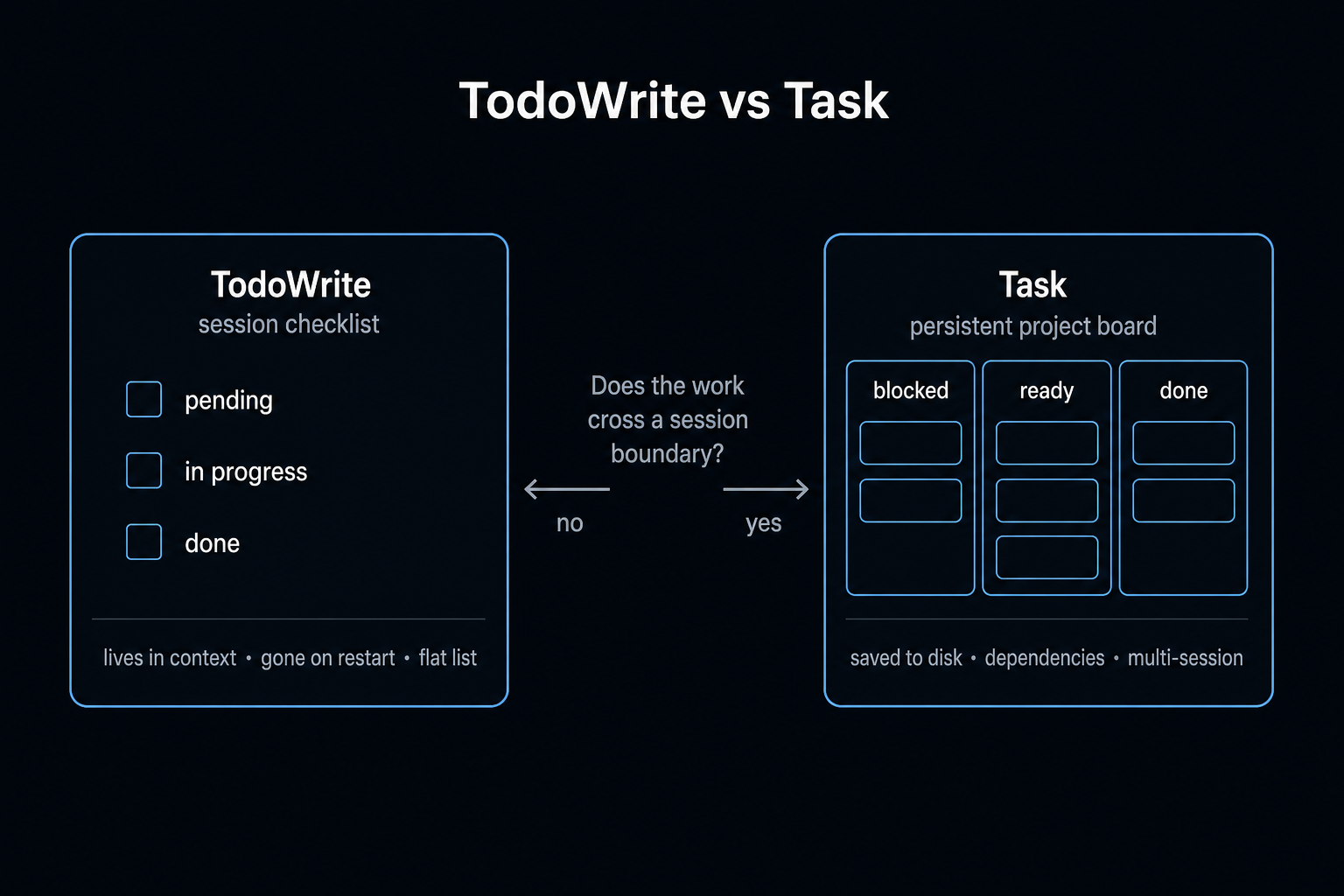
TodoWrite is the lightweight, original mechanism. The agent creates a checklist; items move through pending → in_progress → completed.
Its four defining properties:
- Session-scoped. Lives in the context window. Close the terminal, restart, compact the context - gone. Nothing touches disk.
- Flat. A list with priorities, but no "B depends on A" relationships.
- Full rewrites. Updating item 3 resends the whole list. Longer list, costlier updates.
- Single-agent. Sub-agents and parallel sessions can't see it.
The pattern that proves it works: a builder running an 18-step /daily-brief command (calendar, email, git activity, trend analysis...) noticed Claude quietly dropping two steps. The fix: a mandatory Step 0 - "create a TodoWrite checklist of all 18 steps before starting." Skipped steps after the change: zero. That's the entire trick. Force list creation first, then execution tracks the list instead of the model's fading memory.
Where TodoWrite hits its ceiling:
- Resume tomorrow? List's gone; re-explain everything
- Two sessions on one project? Invisible to each other
- "Don't start B until A passes"? Not expressible
Task: The Project Board
Shipped in Claude Code v2.1.16, the Task system is four tools:
| Tool | Does |
|---|---|
TaskCreate | New task: title, description, status |
TaskGet | Fetch one task's full detail |
TaskUpdate | Change status, add dependencies |
TaskList | All tasks + current states |
Four upgrades over TodoWrite:
1. Disk persistence. Tasks live in ~/.claude/tasks/. Terminal closed, machine rebooted, context compacted - tasks survive. Resume a three-day-old project and the agent reads exactly where things stand. No more "let me re-explain where we were."
2. Dependency graphs. Real blocking semantics:
Task 1: Design Supabase schema
Task 2: Build API endpoints        (blocked by 1)
Task 3: Build frontend components  (blocked by 2)
Task 4: Integration tests          (blocked by 1, 2, 3)
Mark Task 1 done and Task 2 unblocks automatically. With TodoWrite you'd be re-prompting the ordering every session and praying.
3. Multi-session collaboration. The headline feature. Set CLAUDE_CODE_TASK_LIST_ID in multiple terminals and they share one board. Terminal A completes a task; terminal B sees it immediately. Backend session in one pane, frontend session in another, coordinating through shared state with zero copy-paste between them. (Pair with worktrees if they'll touch the same files.)
4. Hierarchy. Parent tasks contain subtasks, recursively. An epic decomposes into phases into tasks - expressible in a way flat lists can't touch.
Head to Head
| TodoWrite | Task | |
|---|---|---|
| Storage | Context (RAM) | Disk (~/.claude/tasks/) |
| Survives restart | No | Yes |
| Dependencies | No | Yes (addBlockedBy) |
| Multi-session | No | Yes (shared list ID) |
| Structure | Flat | Tree |
| Update cost | Full-list rewrite | Per-task increment |
| Setup friction | Zero | Slight |
The Decision Rule
One question: does this work cross a session boundary?
No → TodoWrite. Bug fixes, one-shot generations, batch edits, any "open terminal, do thing, close terminal" job under ~10 steps. Zero setup, does the one job.
Yes → Task. Multi-day features, refactors with phase ordering, anything parallel-session, anything you might abandon Friday and resume Monday.
Both → the actual power pattern. Task manages the project level (features, phases, dependencies); within each task's execution, TodoWrite tracks the step-by-step. Big structure persists on disk; small structure stays cheap in context. Task for the map, TodoWrite for the turn-by-turn.
Failure Modes to Expect
- Agent skips list creation entirely. Defeats the whole mechanism. For recurring workflows, bake "Step 0: create the checklist" into the command or skill definition - don't rely on the model remembering to remember.
- Stale task states. A session finishes work but doesn't mark the task complete; dependents stay blocked. Check
TaskListwhen progress stalls and nudge manually. - Task for everything. Persistent task graphs for 5-minute jobs is pure ceremony. Match the tool to the timespan.
Where This Fits
Task state is one leg of the agent-reliability stool. Hooks make rules deterministic. Worktrees make parallel file edits safe. Task lists make long work resumable and ordered. None of it makes the model smarter - all of it makes the system around the model harder to derail.
Cheapest place to start: add "create a TodoWrite checklist before executing" to your longest recurring prompt. One line. It's the difference between hoping all 18 steps happen and watching them get checked off.
The skills and workflow rules behind this are open-source. Install the plugin and use them in your own repo.
View on GitHub →Sources & Verification
This guide is written from hands-on testing, then cross-checked against primary sources - official documentation and first-party announcements. Field results and opinions are labeled as such. See our editorial standards.
- Run agents in parallel (Claude Code Docs) - Official overview of Claude Code's task system (/tasks) and parallel execution
- Create custom subagents (Claude Code Docs) - How subagents delegate and coordinate work, referenced for task management
Join AI Builder Club


$37/mo
Get the free newsletter
Weekly deep-dives on AI tools, automation workflows, and builder strategies. Join 5,000+ readers.
No spam. Unsubscribe anytime.