Vibe Design: The AI UI Workflow That Replaces Figma-First
Vibe design swaps Figma-first for prompt-first: Nano Banana mockups, v0 in Cursor, Claude Designer, and vibe versioning in one end-to-end AI UI workflow.
The fastest UI designers right now are not opening Figma. They are opening a terminal. Vibe design is the workflow behind that shift: describe the interface you want in natural language, let a model generate it as a real, running artifact, then iterate by steering instead of pixel-pushing. Nielsen Norman Group describes the core move as natural language to rendered UI - describe an interface, get an interface, refine through description rather than direct manipulation. The wireframe-to-mockup-to-handoff pipeline collapses into one loop.
This guide assembles the full end-to-end version of that loop from five AI Jason videos, each covering one stage: the vibe design practice itself, Nano Banana + Gemini 3 for concept mockups, v0 inside Cursor for generation in your codebase, Claude Designer for building the real app, and vibe versioning for iterating without fear. By the end you have a complete concept-to-shipped-UI pipeline with zero Figma files in it.
What Is Vibe Design, Actually?
Vibe design is to UI what vibe coding is to software: you supply intent and taste, the model supplies production. Instead of specifying every component in a wireframe, you describe a business goal, a feeling, or a reference ("linear.app calm, but warmer") and evaluate what comes back. The skill that matters stops being tool proficiency and becomes direction - knowing what good looks like and articulating why a generation misses.
That reframing matters because it changes where the work happens. In the Figma-first world, design happens in a picture of the product and engineering happens in the product. In vibe design, both happen in the same place: real code, really running. Every iteration is automatically buildable, responsive by inspection, and one commit away from production.
Here is the video that makes the practice concrete - what vibe design looks like when you actually sit down and do it:
The rest of this guide is the workflow, stage by stage. Here's the whole thing in one picture:
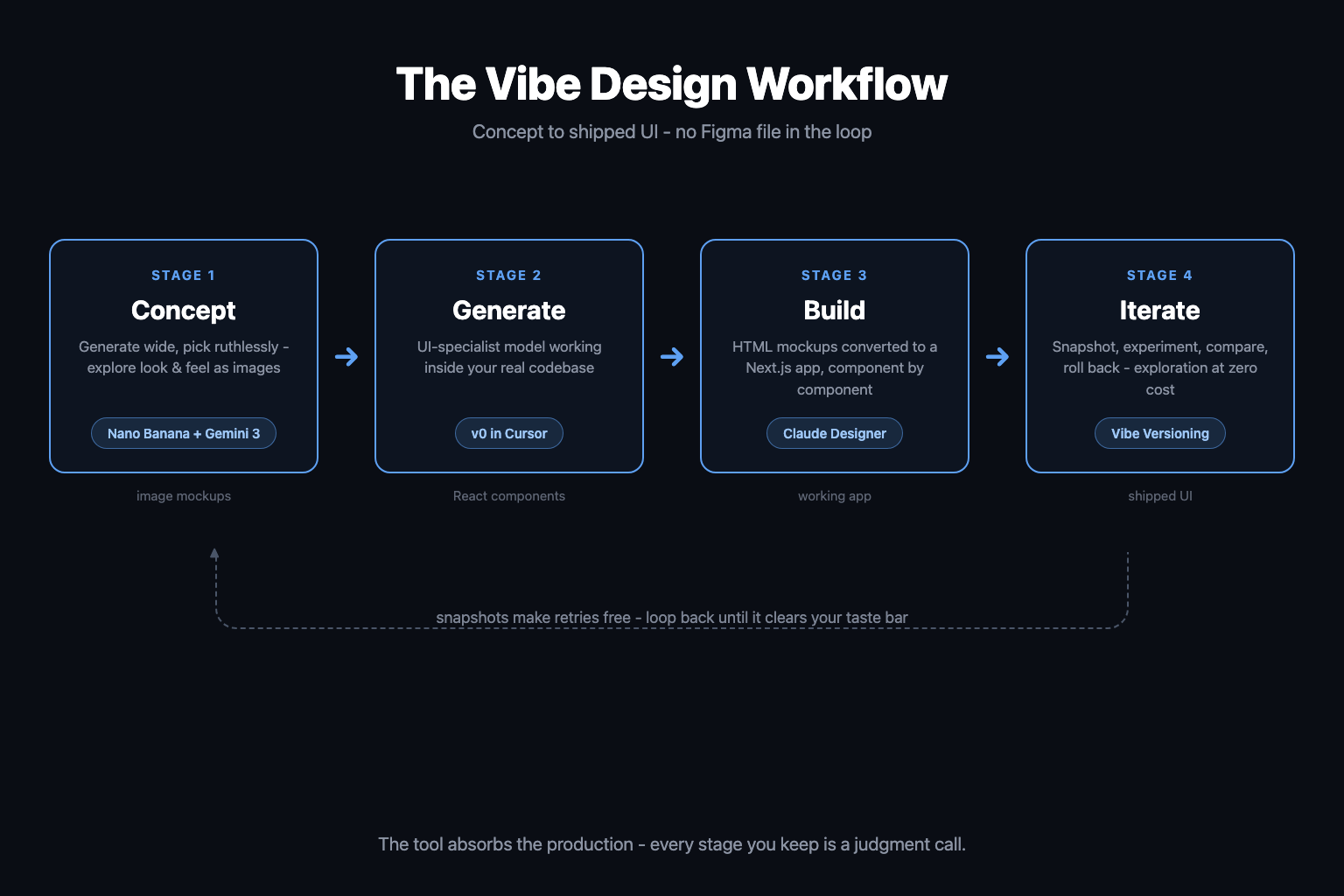
| Stage | Job | Tool | Output |
|---|---|---|---|
| 1. Concept | Explore look and feel fast | Nano Banana Pro + Gemini 3 | Image mockups |
| 2. Generate | Turn direction into components | v0 inside Cursor | React/Tailwind code |
| 3. Build | Assemble the real product | Claude Designer workflow | Working Next.js app |
| 4. Iterate | Branch, compare, roll back | Vibe versioning (Yoyo) | Shipped UI |
Stage 1: Concept Mockups With Nano Banana + Gemini 3
Before you generate any code, you want to converge on a direction cheaply. This is the stage Figma used to own, and it is the stage image models just took.
Nano Banana Pro is Google's image generation and editing model built on Gemini 3 Pro, and two of its announced capabilities are precisely the ones UI mockups have always needed. First, text rendering: Google positions it as the best model for producing correctly rendered, legible text inside images - which means your generated dashboard has real labels, real nav items, and real button copy instead of alien squiggles. Second, resolution: native 1K output with built-in upscaling to 2K and 4K, so a concept frame is crisp enough to present. It can also blend up to 14 input images while keeping elements consistent, which turns "here are three references and our logo" into a coherent mockup.
The pairing matters as much as the model. Gemini 3 does the design reasoning - layout hierarchy, what goes above the fold, how the empty state should read - and Nano Banana renders it. Google is already wiring this pattern into its own tooling: in Antigravity, coding agents generate UI mockups for review before implementing them in code. That is vibe design stage 1, productized.
Here's the video on pushing that combination until it behaves like a senior visual designer:
The discipline at this stage: generate wide, pick ruthlessly. Ten directions in ten minutes costs almost nothing. What you carry into stage 2 is not the image itself but the decisions the image forced - palette, density, typography attitude, layout skeleton.
Stage 2: Why Run v0 Directly Inside Cursor?
v0 is Vercel's generative UI system, and its model is trained specifically on web development - React, Next.js, Tailwind, shadcn/ui conventions. The problem with using it on v0.dev is context: it generates beautiful components that know nothing about your codebase. The fix is that Vercel released the v0 model itself with an OpenAI-compatible API, explicitly so you can run it inside tools like Cursor.
The official setup takes about two minutes:
- Open Cursor settings, go to the Models tab
- Paste your v0 API key into the OpenAI API Key field
- Override the OpenAI base URL to
https://api.v0.dev/v1 - Add
v0-1.5-mdand/orv0-1.5-lgas custom models - Select the v0 model in Agent mode and prompt
Now the division of labor gets interesting. Your general model (Cursor's default agent) handles logic, data, and refactors. The v0 model handles anything that renders - and because it runs inside Cursor, it generates against your actual files, your existing components, your Tailwind config. UI-specialist model, codebase-native context. That is the 10x claim in the video title, and the mechanism behind it is just specialization plus context.
Here's the walkthrough of wiring v0 into Cursor and putting it to work on real UI tasks:
Free AI Builder Newsletter
Weekly guides on AI tools & builder strategies.
Stage 3: The Claude Designer Workflow for Building the Real App
"Claude Designer" is not a product you install. It is AI Jason's name for a two-phase workflow that turns Claude into your UI production engine, and it is the strongest pattern I know for going from direction to working application.
Phase one: static mockups in HTML. Instead of asking for a finished app, you prompt Claude for standalone HTML mockups with your full design direction baked into the prompt - style references, typography, spacing rules, animation notes. HTML mockups beat image mockups here because they are already made of the same material as the final product: real CSS, real hover states, real responsive behavior. Generate several, screenshot them, pick the winner.
Phase two: componentized conversion. Break the winning mockup into a component checklist, then have Claude implement it as a Next.js app piece by piece - Tailwind for styling, shadcn/ui for the primitives. The checklist is the load-bearing detail: converting one component at a time keeps every generation reviewable and stops the model from redesigning things you already approved. Feed screenshots back in when something drifts.
The video demonstrates the full run - single prompt to polished static design to functional app:
One naming note so you don't get lost searching: Anthropic now ships an official product called Claude Design, a conversational design surface that syncs with Claude Code and hands finished designs off to it instead of restarting from a screenshot. Different thing, same thesis - the design artifact and the code artifact are converging. If you work primarily in Claude Code rather than Cursor, our Claude Code for designers guide covers that side of the fence.
Stage 4: Vibe Versioning - Iterate Without Fear
Here is where vibe design workflows quietly die: iteration ten looks worse than iteration six, and you have no way back. Git technically solves this, but nobody exploring visual directions wants to write commit messages every ninety seconds, and an AI agent rewriting files can trash an hour of taste-driven progress in one response.
Vibe versioning is the fix: treat UI states like Figma frames you duplicate before experimenting. The video builds this around Yoyo, an open-source plugin for Cursor that does lightweight, snapshot-based versioning designed for design iteration rather than code collaboration. The loop becomes:
- Snapshot the current UI state the moment it works
- Prompt the next experiment as aggressively as you like
- Compare versions side by side, with notes on each
- Roll back instantly when a direction fails - no git archaeology
This changes behavior, not just safety. When rollback is free, you stop prompting cautiously. You try the weird layout, the bold palette, the full restructure - because the cost of a failed experiment just dropped to zero. Exploration breadth is exactly what separates AI-generated UI that looks generic from AI-generated UI that looks designed.
Here's the video on making UI iteration in Cursor feel like duplicating frames instead of managing branches:
Does This Actually Replace Figma?
Precision matters here: vibe design replaces Figma-first, not Figma. The parts of the old workflow that were production labor - high-fidelity mocking, redlines, the design-to-dev handoff - collapse, because generating and refining the real interface is now faster than drawing a picture of it and translating the picture. NN/g's analysis lands on the same point from the research side: the question is no longer whether AI generates the UI, it's where human design judgment enters the loop.
What survives: design systems work, brand identity, multi-team coordination, and any artifact whose audience is people rather than a build pipeline. What moves to vibe design: essentially all product UI production for small teams and solo builders.
The stage-by-stage honest version:
| Old workflow step | Vibe design replacement | What you still own |
|---|---|---|
| Moodboards, explorations | Nano Banana + Gemini 3 generations | Picking the direction |
| Hi-fi mockups | HTML mockups via Claude Designer | The taste bar |
| Design-to-dev handoff | Gone - it was already code | Nothing, good riddance |
| Component production | v0 inside Cursor | Review and integration |
| Version history in frames | Vibe versioning snapshots | Deciding what "better" means |
Notice the right column. Every row is judgment, zero rows are production. That is the trade vibe design offers, and it's the same trade vibe coding offered engineers: the tool absorbs the labor, you keep the decisions. Designers who treat taste as their product will get faster. Designers whose product was Figma proficiency have a harder conversation coming.
Related Content
- Claude Code for Designers - The Claude Code side of this workflow: skills, screenshots, and design iteration in the terminal.
- Cursor AI: Ship Code Faster - The Cursor fundamentals that stages 2-4 build on.
- Vibe Coding for Non-Engineers - The same intent-over-production shift, applied to building the whole app.
- Google Antigravity CLI Guide - The agentic platform where Google wired Nano Banana mockups directly into the coding loop.
Start Here
Pick one screen you have been meaning to redesign. Generate five directions with Nano Banana, pick one, have Claude build it as an HTML mockup, convert the winner with v0 in Cursor, and snapshot before every experiment. One evening, zero Figma files, and you will understand vibe design better than any definition can teach you.
For the full prompt templates, design-direction checklists, and teardowns of vibe-designed UIs that shipped, join the AI Builder Club - come ship something real.
Frequently Asked Questions
What is vibe design?
Vibe design is UI design by natural language: you describe the intent, mood, or reference you want, an AI model generates the interface, and you curate and steer instead of pushing pixels. It replaces the wireframe-first Figma workflow with a prompt-generate-refine loop, and the designer's job shifts from production to direction and taste.
Can you use v0 directly inside Cursor?
Yes. Vercel's v0 model ships with an OpenAI-compatible API, so you add your v0 API key in Cursor's model settings, override the OpenAI base URL to https://api.v0.dev/v1, and register v0-1.5-md or v0-1.5-lg as custom models. You then pick v0 in Cursor's Agent mode and get its specialized web-dev and UI knowledge inside your actual codebase.
What is Nano Banana and can it design UI?
Nano Banana Pro is Google's image generation and editing model built on Gemini 3 Pro. It is unusually good at rendering legible text inside images, which is exactly what UI mockups need, and it outputs at 1K natively with upscaling to 2K and 4K. Paired with Gemini 3 for the reasoning, it works as a fast concept artist for screens before any code exists.
What is Claude Designer?
Claude Designer is a vibe-coding UI workflow popularized by AI Jason: prompt Claude to generate polished static HTML mockups with your design direction, then convert the winning mockup into a real Next.js app component by component with Tailwind and shadcn/ui. It is a workflow pattern, not a product - though Anthropic now also ships an official Claude Design tool that hands designs off to Claude Code.
Does vibe design replace Figma?
It replaces Figma-first, not Figma. High-fidelity mocking and pixel production move to AI generation in code, because iterating on a real running interface is faster than iterating on a picture of one. Figma still earns its place for design systems, team handoff, and brand work - but for shipping product UI, the canvas is increasingly the codebase itself.
Sources & Verification
This guide is written from hands-on testing, then cross-checked against primary sources - official documentation and first-party announcements. Field results and opinions are labeled as such. See our editorial standards.
- GenUI vs. Vibe Coding: Who's Designing? (Nielsen Norman Group) - NN/g's framing of natural-language-to-rendered-UI and where the designer's judgment moves in AI-generated interfaces
- Nano Banana Pro: Gemini 3 Pro Image model (Google) - Official announcement: text rendering quality, 1K native output with 2K/4K upscaling, blending up to 14 images, consistency controls
- Using v0 models in Cursor (v0 docs) - Official setup: v0 API key as OpenAI override, api.v0.dev/v1 base URL, adding v0-1.5-md / v0-1.5-lg as custom models, Agent-mode usage
- v0's AI model announcement (Vercel v0 on X) - Vercel releasing the v0 model with specialized web-dev knowledge and an OpenAI-compatible API for use in Cursor and other tools
- Get started with Claude Design (Claude Help Center) - Anthropic's official Claude Design product - conversational design that hands off to Claude Code; distinct from the Claude Designer workflow
Join AI Builder Club


$37/mo
Get the free newsletter
Weekly deep-dives on AI tools, automation workflows, and builder strategies. Join 5,000+ readers.
No spam. Unsubscribe anytime.