B2B Lead Generation in Claude Code: A Real Run (2026)
How to build a B2B lead list in Claude Code: the setup, the exact prompt, a real 20-company run with per-step providers and prices ($0.36 total), the funnel from 20 companies to 3 catch-all addresses the verifier could not confirm, what leaked and why, and how to turn the run into a reusable skill.
Claude Code cannot find leads. It can run the whole lead-generation pipeline, which is a different and much more useful thing. Give it a data source it can call, describe who you want in plain English, and it will turn that into provider queries, filter the results, find the right person at each company, get a work email, verify it, and hand you a CSV with every miss labeled. We ran exactly that this morning for a real ICP and kept every number. This page is the setup, the prompt, the run, the funnel, and where it leaked.
Two things up front. First, the run cost $0.36 in data calls for 20 companies and produced 3 addresses that verification could not confirm, which is a worse result than the vendor tutorials show and a more honest one. Second, we used our own team's tool registry for the data layer, so the same run through Clay, Apify, or Prospector would look slightly different; the shape and the leaks would not.
What Claude Code does and does not do in lead generation
Every walkthrough we could find agrees on the division of labor, including a vendor who says it bluntly: "Claude sucks at finding leads. It gets rate-limited fast, returns inaccurate data, and doesn't scale. But give Claude access to high-quality data and it becomes a lead-gen machine."
| Job | Claude Code | The data layer |
|---|---|---|
| Turn "US AI dev-tool startups, 8 to 60 people" into filters | Yes | |
| Return companies that match | Yes: Apollo, Clay, Exa, LeadMagic, Icypeas, Crustdata | |
| Decide which rows fit and why | Yes | |
| Find the growth lead at each company | Yes: people-search providers | |
| Find and verify the email | Yes: Findymail, Tomba, Hunter, TryKitt, LeadMagic | |
| Write the reasoning column, dedup, sort, produce the CSV | Yes | |
| Write the first line of the email | Yes, with context files; badly without | |
| Send it | No. Instantly, Smartlead, Clay campaigns, or a sequencer |
Eric Nowoslawski, who runs a cold-email agency, put the reusable part in one line in his April walkthrough: "All a skill file is is literally a text file that you can plug into Claude Code." The list-building logic, the ICP rules, and the copy grader all live in text files Claude reads. The data comes from somewhere else.
Setup: one coding agent, one data layer
You need Claude Code and one way for it to reach data providers. Four working options, in the order we would suggest them:
- A per-call registry. One token in front of many providers, priced per call. We use treg, which our team built; it is source-available and self-hostable, and any registry with a catalog the agent can search works the same way. On a fresh machine:
curl -fsSL https://treg.to/install.sh | sh   # the CLI
treg login                                   # GitHub sign-in (or --email)
treg mcp install                             # registers the tools with Claude Code
# restart Claude Code; until then the same calls work through the CLI
- Clay's plugin and MCP. Nate Herk's July walkthrough, made in coordination with Clay, shows the install:
/plugin, add Clay's marketplace, reload, ask Claude to authenticate, approve the OAuth link. Two gotchas he hit: it only installs from the terminal, not the desktop app or the VS Code extension, and the terminal wraps the OAuth link, so copy it by hand. - Apify's MCP for scraping-based lists (Google Maps, directories, LinkedIn-adjacent actors). Charlie Automates' July video uses it for 100 "online coaches" and reports $0.80 in Apify spend, with no verification step shown.
- A single provider's API in a skill. Nowoslawski's repo wraps Prospector.io's search and enrich endpoints, plus a Google Maps scraper and a domain-setup skill.
Whichever you pick, write a CLAUDE.md in the project with the rules the agent must obey. Ours for this run was six lines: price every call before making it and stop for approval above $2 total; never guess an email or a title, write "unknown"; keep every row including misses and say why each missed; verification status goes in the CSV and anything not plainly valid is marked do-not-send; do not contact anyone; produce a CSV and a ledger of every call with provider and cost.
The prompt
We gave Claude Code one paragraph:
Build a lead list for this ICP: B2B SaaS startups building AI agents or developer tools for software teams, 8 to 60 employees, headquartered in the United States, that raised a seed or Series A in 2026. Target 20 companies. For each, find the head of growth or marketing, or a founder if there is none, find a work email, verify it, and return a CSV with the company, domain, headcount, HQ country, the person's title, the email, its verification status, the providers used, and a reason column for every row that did not make it. Price each step from the catalog first.
That is the whole spec. What follows is what it did, with the ledger.
The run, step by step
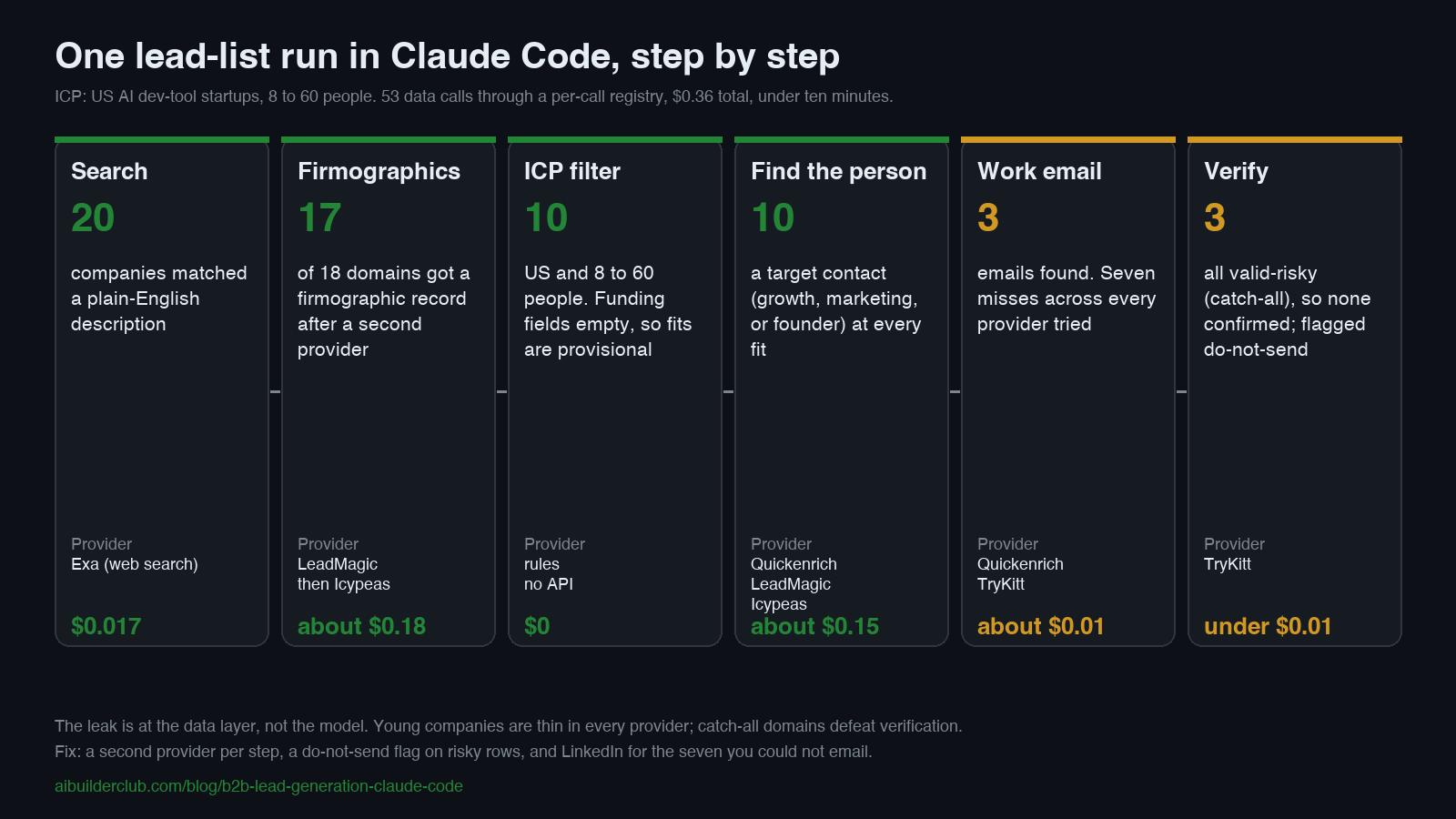
Step 1: companies (20 rows, $0.017)
The agent searched the catalog for "find companies by description" and called the routed company-search capability with the ICP as free text and a US country filter. The registry routes to the cheapest provider that can answer a free-text query, which was Exa, a web search index. Twenty rows came back in three seconds: real, current AI dev-tool startups, most with a Y Combinator batch in the name, each with a URL and a date.
What it did not return: headcount, HQ, or funding. A free-text search gives you names; the firmographics are a separate step. Two of the 20 rows also had no usable domain because the URL was a GitHub repo or a YC listing page, and the rules said not to guess, so those two were carried as misses.
Step 2: firmographics (17 of 18 domains, two providers, about $0.18)
For each domain the script called a company-lookup provider directly, one that returns headcount, HQ, founding year, and funding fields. LeadMagic answered for 7 of 18 at $0.025 per hit. The other 11 came back empty: companies that are one to two years old and under 20 people are thin in most indexes.
This is where the tutorials that show a single provider hide the real problem, and where the waterfall pattern from the GTM engineering guide earns its keep. The script sent the 11 misses to a second provider, Icypeas, at $0.00038 per row. Ten of the eleven answered with headcount and an address. One company (an open-source project with a foundation-style site) had no record anywhere and stayed a miss.
Coverage went from 7 of 18 to 17 of 18 for under a cent. Order matters here: the cheap provider with high coverage on tiny companies should have run first. The script tried the higher-ranked provider first, and a rule in CLAUDE.md ("for companies under 50 people, try Icypeas first") would fix that on the next run. That rule is the kind of thing a skill file is for.
Step 3: the ICP filter (10 of 17)
No API call. The agent applied two of the ICP rules to the firmographic rows: HQ in the US, 8 to 60 people. Ten passed. Seven did not: three were too small (2, 5, and 7 people), three were headquartered outside the US, and one had a headcount but no HQ country from either provider. Every rejection carries its reason in the CSV, which is what lets you loosen one rule later without re-running everything.
One rule in the prompt was not checked at all: the seed or Series A round. Both providers returned empty funding fields for every company, so the ten are provisional fits on country and size, and confirming the round would take a third source, a funding database or a per-company news lookup, which we did not run. We call them provisional throughout, and the diagram says so.
Step 4: the person (10 of 10, about $0.15)
For each fit company the agent called the people-search capability with the domain and a title, trying "growth" first, then "marketing", then "founder". It found a target contact at all ten: two "Head of Growth" titles, one "Growth and Partnership" role, and marketing leads or founders for the rest. Four providers served across the ten calls (Quickenrich, LeadMagic's role finder, LeadMagic's people search, Icypeas), because this step used the registry's routed people-search capability, which its catalog entry documents as trying the cheapest provider that accepts a domain-plus-title query and falling through on a miss. Our earlier published run called providers one at a time and chose fallbacks in the script; both work, and the routed form is less code. This step was the second-biggest share of the bill.
Step 5: the email (3 of 10)
For each person the agent called the email-finder capability with the domain and the name. Three came back with an address (from Quickenrich and TryKitt). Seven did not, across every provider the registry tried, and misses on per-success providers cost nothing.
Seven misses out of ten is the number the vendor demos do not show. Very small companies have few contacts in any index, founders often use personal domains, and a company that has existed for a year has not left an email pattern anywhere. The honest options for the seven: a LinkedIn touch instead of email, or waiting a quarter for the indexes to catch up. The run's rules forbid guessing an address and we would keep that rule; a guessed pattern that bounces costs more than the lead is worth.
Step 6: verification (3 of 3 risky, under a cent)
All three addresses went to the verification capability and all three came back valid-risky. That status means the domain is catch-all: the mail server accepts any address, so the verifier cannot prove the specific mailbox exists. Small startups on Google Workspace are frequently catch-all. Per the run's rules, all three rows carry a do-not-send flag in the CSV, and the run produced zero confirmed-deliverable addresses. What you do with flagged rows afterwards is an outreach decision, separate from the list: some teams send catch-all addresses from a secondary domain they can afford to lose, after warming; the safer move is a LinkedIn touch.
The receipt
| Step | Calls | Hits | Providers served | Data spend |
|---|---|---|---|---|
| Company search | 1 | 20 | Exa | $0.017 |
| Firmographics, pass 1 | 18 | 7 | LeadMagic | about $0.18 |
| Firmographics, pass 2 | 11 | 10 | Icypeas | under $0.01 |
| People search | 10 | 10 | Quickenrich, LeadMagic, Icypeas | about $0.15 |
| Email find | 10 | 3 | Quickenrich, TryKitt | about $0.01 |
| Email verify | 3 | 3 (all risky) | TryKitt | under $0.01 |
| Total | 53 | $0.36 (balance read before and after) |
Wall clock: under ten minutes for both passes, most of it the agent waiting on providers. Pass one measured $0.33 for 30 calls and pass two $0.01 for 22 calls, from the registry balance read before and after each; the per-step split inside a pass is reconstructed from catalog prices. Names and addresses are not published.
For comparison, the run our team published on August 26 on a different ICP (US software companies with 51 to 200 staff that raised a Series A) found emails for 31 of 47 and verified 27 of them for $3.62. That run reached 27 confirmed-deliverable addresses; this one reached none. The two runs also differ in providers and steps, so the gap cannot be attributed precisely. The most likely driver is company size (51 to 200 staff there, 8 to 60 here), because coverage in every contact index tracks headcount, and any tutorial that does not tell you its ICP's headcount is not telling you its hit rate.
What the other setups cost, from their own numbers
| Setup | List | Data spend | Verification shown | Source |
|---|---|---|---|---|
| Claude Code + Clay plugin | 50 HVAC decision makers with emails, hooks, and drafts | 172 credits, about $12 | Yes, an email-status column | Herk, coordinated with Clay |
| Claude Code + Apify MCP | 100 "online coaches" | $0.80 | No column shown | Charlie Automates |
| Claude Code + Prospector skill | 1,000 marketing leaders, 10 to 100 staff, raised in 180 days | inside a $200/month Claude plan plus Prospector | Requested in the filter, not shown | Nowoslawski |
| Claude Code + per-call registry (ours) | 20 companies, 10 provisional fits, 3 unconfirmed catch-all emails | $0.36 | Yes, all three risky | This page |
| Seats | Clay Launch from $185/month, or about $167/month billed annually | Clay pricing page, 2026-09-17 |
Herk's own caveat is the one to remember: "Even if Clay gives you the best possible data, that doesn't mean you're going to get clients." The list is the cheap part now.
Turning the run into a system
The run above was a one-off prompt. Three changes make it something you run every Monday.
Save the steps as a skill. Ask Claude Code to write what it just did into a SKILL.md: the capability names, the provider order (Icypeas first under 50 people), the ICP rules, the CSV columns, the do-not-send rule. Nowoslawski's repo is four such files. The Agent Skills 101 course covers the format and how to test one.
Build from signals, not from a static ICP. Namanyay Goel's September playbook replaces the static list with companies that posted a job for your pain point in the last 72 hours; Cody Schneider described the same engine the same week: an agent watching job boards daily, an ICP filter, org mapping, waterfall enrichment, then the sequencer. Both are the run above with a trigger in front of it. The hiring-signal version may also ease the email problem: a company that is hiring is usually larger and more active than the two-year-old startups in our run, so its contacts tend to appear in more indexes. That is a hypothesis from one run, not a measured result.
Schedule it and gate it. A loop that wakes on a schedule, runs the skill, and stops for approval above a spend cap is the shape the Loop Engineering course builds. Nowoslawski's "auto research" loop goes one step further: it reads yesterday's campaign results, changes the list filter and the copy, relaunches through SmartLead, and logs the experiment. He reports it running on 10% of volume for two customers, with one "starting to outperform the human-written campaigns." One anecdote, from someone who sells the service, but it is the right direction.
Personalization and sending: the two steps that are not data
Do not let the agent write the whole email from nothing. Charlie Automates' first drafts were, in his words, "kind of shitty. It didn't do any research." Herk's fix was context files: a business profile, case studies, the offer, and a transcript of someone whose copy he wanted to imitate, all read before the first draft. Nowoslawski's fix was structural: a Sonnet sub-agent per batch that classifies each company and writes one reasoning line, and a copy grader trained on more than a thousand of his campaigns. The GTM engineers in our GTM engineering guide go further: a human writes the template, roughly half the copy is static, and the agent fills the variables.
Send from a sequencer, never from Claude Code, and never from your main domain. Every tutorial ends at the same wall: Clay's MCP could not manage campaigns when Herk recorded, so the last mile was Clay's UI; Charlie drafted into Gmail and recommended Instantly; Nowoslawski runs SmartLead. The rules that keep the list from burning your domain are in the GTM guide's execution section: secondary domains, 15 to 20 sends a day per inbox, three inboxes per domain, risky addresses only from a domain you can lose.
What goes wrong
- The goal-mode spiral. Herk's
/goalrun took an hour, most of it re-verifying and rewriting; a plain "find 50 HVAC leads" prompt took five minutes. Give the agent a spend cap and a row target, not an open-ended quality goal. - Search results mistaken for firmographics. Our step 1 returned names, not headcounts. If you filter on fields the search did not return, the agent will either guess or silently pass everything. The rule "never guess, write unknown" is what made the leak visible.
- One provider, one hit rate. 7 of 18 became 17 of 18 with a second provider that cost under a cent. If your setup cannot fall through to a second provider, it is not a waterfall, it is a lottery.
- Verified is not a boolean.
valid,valid-risky,invalid, andunknownare four different sending decisions. A CSV with a single "verified" column and no status is hiding one of them. - Cheap lists that skip the expensive step. $0.80 for 100 leads is real only until you count the bounces. Budget for verification, and for the LinkedIn touch on the rows that fail it.
- Rate limits on the free path. Claude Code's own web fetch will get you a handful of companies and then a wall. It is a research tool, not a list source.
The shape underneath
Strip the tools and the run is a pipeline with a reasoning step between each stage: search, enrich, filter, find, verify, and a labeled miss at every step instead of a silent drop. That is the data and orchestration half of GTM engineering, described in full in the GTM engineering guide, and it is the same shape whether the agent is Claude Code, Codex, or a Grok Bot routine. The sales-specific skills, including outreach and CRM ones, are in the Claude Code sales skills guide. If you would rather start from a packaged set, the open-source AI sales team for Claude Code ships 14 skills and 5 parallel agents for research, BANT and MEDDIC scoring, and outreach; it still needs a data layer underneath.
Next in this series: running paid ads from Claude Code, and doing SEO from Claude Code, each with a real run and the bill.
Related Content
- GTM Engineering Guide - The four systems this run is two of, and the deliverability rules for the sending half.
- Claude Code Sales Skills - 60+ agent skills for outreach, CRM automation, and pipeline work.
- Claude Code for Sales Teams - Pre-call research, post-call CRM updates, and the other rep workflows.
- Grok Bot for GTM - The draft-only outreach rules and the complaint-search lead loop.
- How to Build an AI Team - When to split the pipeline into specialist agents.
Frequently Asked Questions
Can Claude Code generate B2B leads by itself?
No. Claude Code has no contact database, and web search gets rate-limited and returns stale or wrong details at any real volume. What it does well is orchestrate: turn your ICP into filters, call a data provider for companies, call another for people, another for emails, another for verification, keep the rows that pass, and write the CSV. Every working setup we found, including ours, plugs in a data layer (Clay, Apify, Prospector, a per-call registry like treg) and lets Claude Code drive it.
Is Claude Code cheaper than Apollo or Clay for lead generation?
For the data layer, in the runs we can point to, yes: our 20-company run cost $0.36 in data calls, one published Clay run cost about $12 for 50 leads, and an Apify run was claimed at $0.80 for 100, against Clay's Launch plan from $185 a month, or about $167 a month billed annually, as of September 2026. These runs differ in ICP and in what they verified, so treat the gap as indicative. And the data bill is not the whole bill. You still pay for the Claude plan, the sequencer, and any CRM, and the cheapest lists are also the leakiest: our run found emails for 3 of 10 target people, and a $0.80 list with no verification column is not a verified list.
How do you verify emails that Claude Code finds?
Send each address to a verification endpoint, keep the status in the CSV, and flag anything that is not a clean 'valid' as do-not-send. In our run all three found addresses came back 'valid-risky', which means the domain accepts mail to any address (catch-all), so the verifier could not confirm the mailbox exists. In our run all three carry a do-not-send flag and the run produced zero confirmed-deliverable addresses. If you later decide to use catch-all addresses, that is an outreach decision: send only from a secondary domain you can afford to lose, after warming, or switch that prospect to LinkedIn.
Do you need Clay to do lead generation in Claude Code?
No, but you need what Clay bundles: many data providers behind one bill and a way to fall through them when one misses. In Claude Code you get that from Clay's own plugin and MCP, from a per-call registry, or from wiring providers yourself. Clay's advantage is the table UI, the sending campaigns, and hundreds of thousands of rows at once; the code-first route wins on cost per row and on being scriptable.
How many leads can Claude Code produce in a day?
Data-wise, thousands; the constraint is what you can send. One published Clay setup sends 30 emails a day per mailbox with 5 mailboxes per domain, and the deliverability rules in the GTM engineering guide say 15 to 20 a day per inbox and at most three inboxes per domain. So a single domain supports roughly 50 to 150 sends a day. Build the list to match the sending capacity, not the other way around.
Is it legal to email the leads Claude Code finds?
It depends on where the recipient is, and the rules differ by jurisdiction. In the US, CAN-SPAM permits unsolicited commercial email if you identify yourself, do not use a misleading subject line, include a physical postal address, and honor opt-outs promptly. In the UK, the ICO's guidance says the PECR electronic-mail rule does not apply to corporate subscribers (limited companies, LLPs, public bodies), so you may email them if you do not disguise your identity and give a valid opt-out address; sole traders and some partnerships count as individual subscribers and need consent or the soft opt-in; and because a named work address identifies a person, UK GDPR still applies, so you need a lawful basis and must honor an objection. EU member states implement the ePrivacy rules differently, and several require prior consent for individuals. Keep a suppression list, record the source of every contact, and never scrape personal addresses. This is not legal advice; check the rules for each country you sell into.
Sources & Verification
The run in this article was executed by us on 2026-09-17 from Claude Code with the treg CLI and MCP (treg is our team's tool registry, disclosed wherever it appears): one routed company search, then a script that made 52 further calls across two enrichment passes. Every count, provider, and price is taken from the run's ledger and from the registry balance read before and after; people's names and email addresses are withheld. The tutorial comparisons come from three YouTube walkthroughs (Nowoslawski 2026-04-26, Herk 2026-07-12, Charlie Automates 2026-07-02) watched from auto-captions, with sponsorship noted, and from X posts dated 2026-09-10 to 2026-09-16, each linked where used. Pricing is quoted from Clay's pricing page and the UK marketing rules from the ICO's B2B guidance, both read on 2026-09-17. Search-demand figures are Google Ads data for the United States pulled through DataForSEO on 2026-09-17. See our editorial standards.
- Claude Code Just Changed Lead Generation Forever (Eric Nowoslawski, 2026-04-26) - Skills as text files, Prospector search then enrich, Sonnet sub-agents for ICP classification, the auto-research loop on SmartLead. He runs a cold-email agency
- Claude Code + Clay Makes Lead Generation Actually Fun (Nate Herk, 2026-07-12) - Clay plugin install, 50 HVAC leads for 172 credits (about $12), the one-hour goal run, and the manual last mile. Made in coordination with Clay
- Claude Code Just Killed Apollo & Clay (Charlie Automates, 2026-07-02) - Apify MCP, 100 leads for $0.80 with no verification column shown, first drafts 'kind of shitty' without research
- Claude sucks at finding leads (Roman, X, 2026-09-11) - Rate-limited, inaccurate, does not scale without a data source. A vendor's post
- Give your Claude Code all the tools it needs to do marketing (Cody Schneider, X, 2026-09-15) - Waterfall email enrichment with Findymail, LeadMagic, Apollo; Serper for research; Apify for scraping
- AI sales team for Claude Code (zubair-trabzada, GitHub) - 14 skills and 5 parallel agents for research, BANT and MEDDIC qualification, contact mapping, outreach. 1,356 stars on 2026-09-17
- 4-step hiring-signal playbook (Namanyay Goel, X, 2026-09-10) - Companies that posted an opening for your pain point in the last 72 hours; a vendor's self-reported numbers
- AI lead generation workflow: find and verify a lead list (treg.to, run dated 2026-08-26) - Our team's earlier published run: 50 companies, 27 deliverable leads, $3.62
- AI Lead Generation: Tools, Workflows and B2B Guide (Clay) - The vendor guide ranking for the head term; waterfall enrichment 'from 30% to 80%+' coverage
- Clay pricing - Launch plan from $185 a month (actions plus data credits), or about $167 a month billed annually, as read on 2026-09-17
- Business-to-business marketing (ICO, UK) - PECR: the electronic-mail rule does not apply to corporate subscribers; sole traders and some partnerships need consent or the soft opt-in; UK GDPR applies to named business contacts
- Claude Code for Lead Generation (Salesforge, 2026-07-19) - A conceptual 7-step workflow with a 100-point score and a 25-contact approval cap; no run shown
Join AI Builder Club


$37/mo
Get the free newsletter
Weekly deep-dives on AI tools, automation workflows, and builder strategies. Join 5,000+ readers.
No spam. Unsubscribe anytime.
Continue Learning
Claude Code 101
You've read the theory. The course is where you ship: 3 guided Labs (live website, full-stack app with payments, business automation) plus the Template Vault starter kit. Rebuilt June 2026.
Mastering AI Agents
The builder's deep dive into agent loops, tools, context engineering & memory. Go from using AI to building it.
AI Agent 101
Build autonomous research agents with tool use, API access, web scraping, and deep search.