Grok Bot Pricing 2026: Plans, Usage Limits, Free Trial, Platforms
Every plan that includes Grok Bot after the August 26 expansion (from 20 dollars a month), how the weekly usage meter and on-demand billing work, the free trial's catch, which platforms exist (no Android yet), and the documented tactics for stretching your limits.
Grok Bot's price is the most searched question about it, and the honest answer changed three times in its first fortnight. It launched on August 11, 2026 behind the most expensive plans SpaceXAI and Cursor sell. By August 26 it was bundled into a 20-dollar-a-month plan. What did not change is the part that decides your real bill: a weekly usage allowance with no published size, on-demand overage with no product-specific cap, and a model you do not get to choose.
This page is the plan-by-plan answer as of August 30, 2026, checked against the official pages, plus the documented reasons people burn through their limits and the tactics they use to stretch them. For what the product does and how to set it up, start with our Grok Bot guide.
The short answer: every plan that includes Grok Bot
There is no standalone Grok Bot subscription. You get it through a SpaceXAI plan or a Cursor plan, and each tier comes with a different weekly Grok Bot allowance.
| Plan | Price | Grok Bot usage tier | Source |
|---|---|---|---|
| Cursor Pro | 20 dollars a month | Weekly usage, below Pro+ | x.ai/bot, Cursor help |
| SuperGrok | 30 dollars a month | Linked usage, below Plus | x.ai/pricing, Cursor help |
| Cursor Teams Standard | 40 dollars per user a month | Follows the Teams seat allowance | x.ai/bot, Cursor docs |
| Cursor Pro+ | 60 dollars a month | "Generous weekly usage, below Ultra" | Cursor docs, Cursor help |
| SuperGrok Plus | 100 dollars a month | "Generous linked usage, below Heavy" | x.ai/pricing |
| Cursor Teams Premium | 120 dollars per user a month | Higher Grok Bot limits than Standard | Cursor docs |
| Cursor Ultra | 200 dollars a month | "Highest weekly usage" | Cursor docs |
| SuperGrok Heavy | Not printed on x.ai's public pricing page when we checked | "Highest linked usage" | Cursor help |
One note on that table. SuperGrok Heavy is eligible per Cursor's help page, but x.ai's public pricing page listed only Free, SuperGrok, SuperGrok Plus, and Enterprise when we checked on August 30, so we do not print a Heavy price here; check the plan screen in the Grok app for the current figure.
Not included: SuperGrok Lite, SuperGrok Team, and SuperGrok Enterprise. Cursor's help page says Lite users must upgrade, and team or enterprise SuperGrok accounts cannot be linked at all. Cursor Enterprise customers go through their account executive, and SpaceXAI's expansion post says larger rollouts sit on a waitlist.
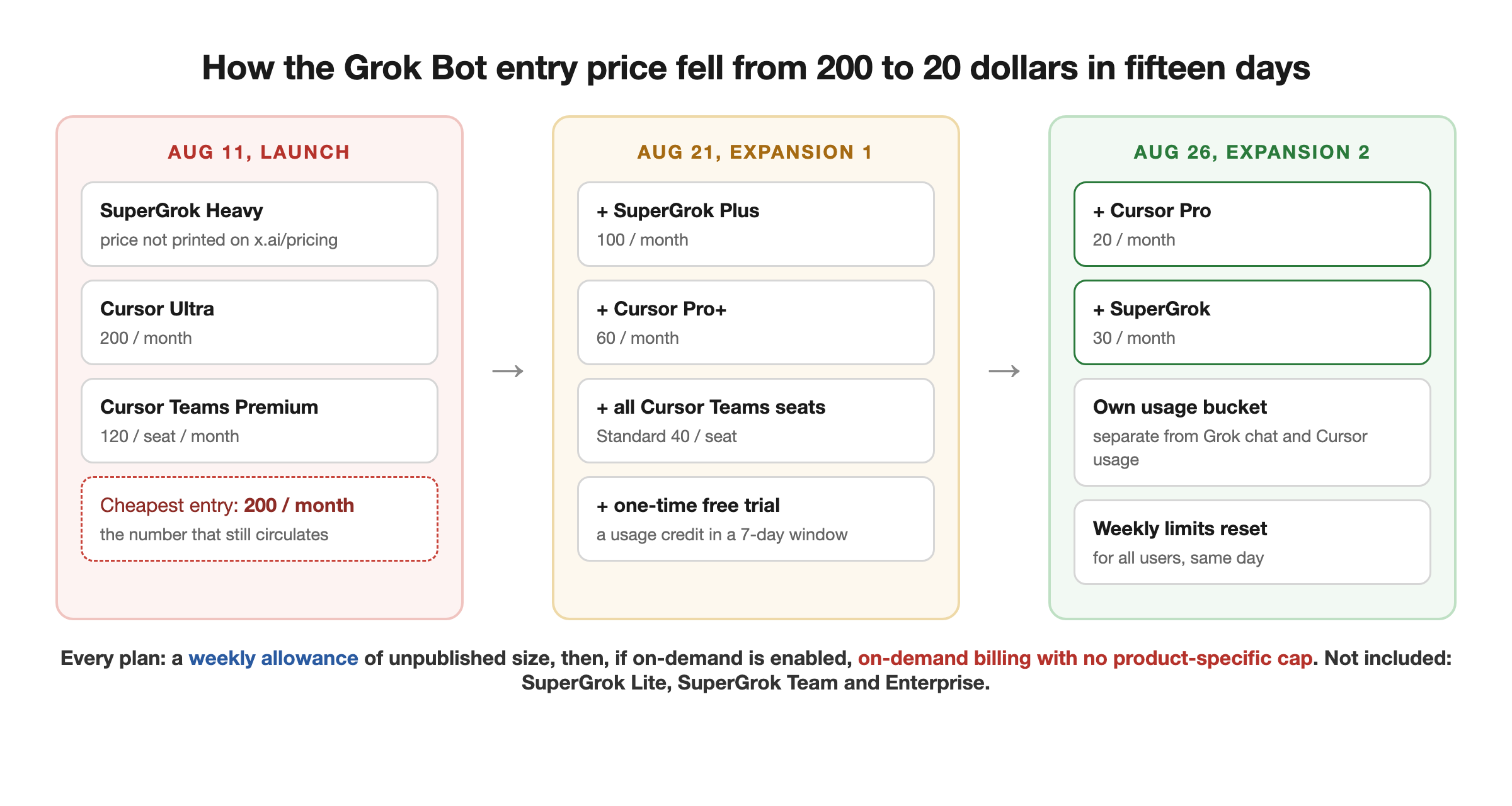
How the price got here in fifteen days
- August 11, launch. As reported at the time (the live product page has since been rewritten, so this is contemporaneous coverage rather than a page you can still load): beta access for SuperGrok Heavy, Cursor Ultra, and Cursor Teams Premium, with the entry price summarized as 200 dollars a month, which is why that number still circulates.
- August 21. The official @bot post added SuperGrok Plus, Cursor Pro+, and all Cursor Teams seats, plus a limited free trial for everyone else.
- August 26. The expansion post added base SuperGrok and base Cursor Pro, and the official account said weekly limits were being reset for all users. That is the state today.
One consequence of the speed: the documentation lags. The Grok Bot FAQ and the iOS page on docs.x.ai still list the August 21 eligibility (Plus, Heavy, Pro+, Ultra, Teams). Cursor's plans page and SpaceXAI's news post are newer and include Pro and base SuperGrok. When two official pages disagree, the August 26 post wins.
What the meter actually is
Your bill has more than one layer, and the pricing page only shows the first.
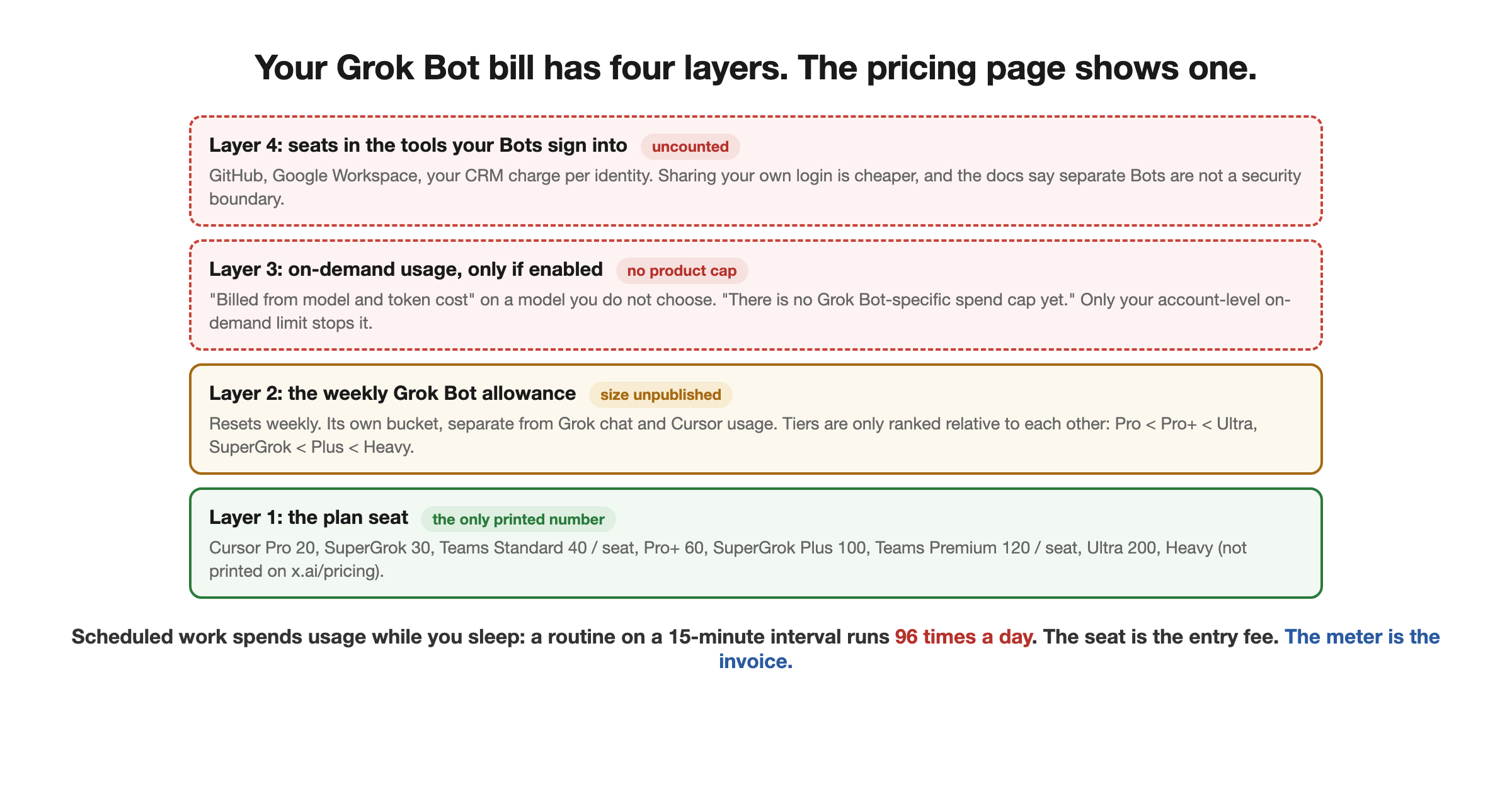
Layer 1, the seat. The plan price above. Fixed.
Layer 2, the weekly allowance. Every paid plan "includes usage that resets weekly", per Cursor's help page. SpaceXAI's expansion post adds that Grok Bot "comes with its own usage, separate from your Grok and Cursor plans, so anything you hand off to a Bot won't count against your existing usage." Nobody publishes the size of the allowance in tokens or dollars; the tiers are only described relative to each other (Pro below Pro+ below Ultra; SuperGrok below Plus below Heavy). If you hold both a Cursor plan and a linked SuperGrok subscription, "Grok Bot uses whichever has more usage."
Layer 3, on-demand. When the weekly allowance is gone, "extra Grok Bot usage can continue on your account's shared on-demand spend if on-demand is enabled." It is "billed from model and token cost", and the teams documentation is blunt about the ceiling: "There is no Grok Bot-specific spend cap yet. Account-level on-demand controls still apply." So the only brake is the on-demand limit you set on your Cursor account as a whole. The same documentation says "Grok Bot has no model picker, for members or admins" and that "billing follows the actual serving model", including failovers. You cannot pick a cheaper model to lower this layer.
Layer 4, the seats your Bots need elsewhere. A Bot works by signing into your real tools. If you want each Bot tracked as its own identity in GitHub, Google Workspace, or your CRM, those products charge per seat too. The alternative, sharing your own login, is cheaper and the documentation warns it is not a security boundary: all of one member's Bots share one cloud computer, and "secrets, sign-in sessions, and local-computer permissions apply to the member as a whole, not to a single Bot."
Where to watch the meter: the Cursor dashboard usage page, broken down by product. Grok Bot usage is "metered on your Cursor account, not on Grok", even when your access comes from SuperGrok.
The SuperGrok link: a grant, not a plan
If you subscribe to SuperGrok rather than Cursor, you link the Grok account from the Grok Bot plan screen. Three rules from Cursor's help page matter before you click:
- Linking "is a usage grant, not a Cursor plan." Your Cursor plan, if any, stays as it is.
- "A SuperGrok link is permanent once created. You can't unlink or move it to a different Cursor account." Sign in with the right Cursor account first.
- Only individual SuperGrok, Plus, and Heavy can link. Lite, Team, and Enterprise cannot.
macOS and iOS share one usage bucket tied to the signed-in account, so switching devices does not buy a second allowance.
Free AI Builder Newsletter
Weekly guides on AI tools & builder strategies.
The free trial, and its catch
The trial exists, and it is not a clean "seven days free". Cursor's help page describes it as "a usage credit rather than a set number of days, though a 7-day window also applies." The credit is drawn down "by agent steps and tokens rather than the number of messages you send", and "a large or long-running agent task can use most or all of it at once. This is expected, and used trial credit is not restored or topped up."
The practical rule: do not open your trial with a vague, hours-long job. Give the first Bot a small, bounded task, check the plan screen, then scale. Cancellation is on the plan screen ("Cancel Trial"), or through Apple's subscription management if you started through the App Store.
Which platforms you can actually run it on
This is the second most common access question we see in search after price, so, plainly: as of the FAQ checked on August 30, Grok Bot ships for
- macOS on Apple silicon and Intel,
- Windows on x64 and Arm64,
- iPhone on iOS 18 or later.
"Linux desktop, Android, and iPad are not supported at initial launch." That includes there being no Android app despite the Grok chat app existing on Android; the Grok Bot iOS page says it is "designed for iOS on iPhone, not iPad or Android." The cloud computer your Bots use is a managed Linux virtual machine, but there is no Linux client to talk to it from. The iPhone app can do most of the day-to-day (message, dictate, watch the computer, approve), while editing routine schedules, viewing full run history, testing routines, and teach-by-demonstration stay desktop-only.
Why people burn through the limit, and the documented tactics
The limit complaint is the best-documented one in the product's first three weeks, and xAI has responded to it twice: an engineer acknowledged it on August 24 and said the team was working on efficiency, and on August 26 the company reset weekly limits for everyone alongside the plan expansion. User reports still cut both ways after the reset: one Heavy-plan user reported hitting the limit inside 24 hours, another on the same tier reported using only about ten percent of the weekly capacity before rollover. Neither is verifiable from outside. xAI has not published what drives consumption; Cursor's trial page says usage is "measured by agent steps and tokens rather than the number of messages you send," and the explanations users offer (polling frequency, long coordinator threads, large backlogs) are plausible reports, not documented billing behavior.
The tactics with a source behind them:
- Scope Routines to business hours, not always-on. Demonstrated in the tutorials our guide transcribed; a Routine on a 15-minute interval runs 96 times a day whether or not there is anything to do.
- Prefer event triggers to schedules. Cursor's own docs steer this way: a Slack message or GitHub event starts work only when something changed, and they warn that broad listeners "consume usage."
- Keep the coordinator thread short. A chief-of-staff Bot that carries a long, chatty conversation spends context on every turn. Start a fresh, focused Bot for each recurring job and reserve the long thread for planning.
- Do not point triage at years of backlog on day one. The first-person limit-exhaustion report our guide cites named a decade-old inbox as one of its own suspected causes.
- Route heavy work to CLI agents on the Bot's computer. A user-published workaround: install Codex, Cursor, Grok Build, or similar on the Bot's virtual machine, use a session manager to run them, and give the Bot one rule, use the CLI agents for anything more than conversational tasks. Grok Bot's allowance then pays for coordination and prompting, while the coding tasks draw on the other tools' limits. We have not tested this; it is the most concrete of the tricks circulating and it follows directly from the shared-computer design.
- Set your account-level on-demand limit before you need it. Since there is no Grok Bot-specific cap, the on-demand control on your Cursor account is the only ceiling. One early user's advice after seeing credits "go fast": if you let on-demand overflow, set a limit first.
Cursor door or SuperGrok door?
Same product, two entrances. The choice is about what else you want the subscription to do.
- Buy through Cursor if you code. Pro at 20 dollars is the cheapest entry, the usage meter and billing already live there, Teams gives every member access without a Premium seat, and the same account links a SuperGrok subscription later if you want a bigger allowance.
- Buy through SuperGrok if you want Grok chat, Imagine, and Voice alongside the Bots and do not use Cursor. Remember the link to a Cursor account is permanent.
- Teams: self-serve Cursor Teams Standard and Premium seats both include a weekly Grok Bot allowance, admins manage it from the Cursor dashboard, and the team's existing MCP allowlist, privacy mode, and team rules apply to Bots. Teams on Privacy Mode (Legacy) are blocked entirely until an admin changes the setting. An audit view of Bot actions is listed as "coming."
Is it worth the price?
The cost question is only simple in one case: if you already pay for an eligible plan, Grok Bot is included with no additional seat fee (usage beyond the weekly allowance can still bill on demand if you have enabled it), and the sensible move is to try it on internal, reversible work and watch the usage page daily for a week.
If you are adding a plan to get it, budget the seat and then budget the meter, because the seat is the entry fee and the meter is the invoice. The comparison that matters is not Grok Bot against a chatbot subscription; it is a hosted, always-on agent team with a fixed seat and an uncapped meter against the same shape built on your own infrastructure, where you choose the model and own the spend controls but do the setup work yourself. That trade is the whole of Grok Bot vs building your own AI employee, and the build path starts in the Loop Engineering course.
Related Content
- How to Use Grok Bot - Setup, the chief-of-staff pattern, use cases with a published source ledger, and the limits tactics in context.
- Grok Bot vs Building Your Own AI Employee - What the subscription buys against what building buys, including model choice and cost control.
- How to Build Your Own Grok Bot - The anatomy of the product mapped to buildable primitives, and the open-source route.
- How to Build an AI Team - The coordinator-and-specialists pattern the pricing tactics above assume.
- Who Owns Your AI Agents - The governance questions a team of Bots with real logins raises, whoever hosts them.
Frequently Asked Questions
How much does Grok Bot cost?
There is no standalone Grok Bot subscription. Since August 26, 2026 it is included with every individual SuperGrok plan (SuperGrok at 30, Plus at 100, and Heavy), every paid individual Cursor plan (Pro at 20 dollars a month, Pro+, and Ultra at 200), and Cursor Teams seats (Standard at 40 per user, Premium at 120). Each plan includes a weekly Grok Bot usage allowance, with higher tiers getting more; when it runs out you can continue on on-demand usage billed from model and token cost, if on-demand is enabled on your account.
What is the cheapest way to get Grok Bot?
Cursor Pro at 20 dollars a month is the cheapest plan that includes it, followed by SuperGrok at 30. Both sit at the bottom of their ladders for weekly Grok Bot usage (Cursor's help page ranks Pro below Pro+ below Ultra, and SuperGrok below Plus below Heavy). There is also a one-time free trial, which is a usage credit inside a seven-day window rather than a set number of days.
How do Grok Bot usage limits work?
Paid access includes usage that resets weekly, metered on your Cursor account even if your access comes from a linked SuperGrok subscription. SpaceXAI says the Grok Bot allowance is its own bucket, separate from your Grok chat and Cursor editor usage. When the weekly allowance is gone, work continues on your account's shared on-demand spend if you have enabled it. There is no Grok Bot-specific spend cap yet, so the only ceiling is your account-level on-demand control.
Is there a Grok Bot free trial?
Yes, a one-time trial. It is a usage credit, drawn down by agent steps and tokens rather than by messages, and it also expires after seven days. A single long task can consume all of it in one run, and used credit is not restored, so scope the first tasks tightly and check the plan screen before handing a Bot a large job.
Is there a Grok Bot Android app?
No. As of the FAQ we checked on August 30, 2026, Grok Bot runs on macOS (Apple silicon and Intel), Windows (x64 and Arm64), and iPhone on iOS 18 or later. Linux desktop, Android, and iPad are not supported at initial launch. The cloud computer your Bots use is Linux, but there is no Linux client.
Can I pick which model Grok Bot uses to save money?
No. The teams documentation says Grok Bot has no model picker, for members or admins, that SpaceXAI does not plan to add one, and that billing follows whichever model actually served each request, including automatic failovers. If model control matters to you, that is the main reason people keep a self-hosted harness alongside it.
Why does my Grok Bot limit run out so fast?
xAI has not published what drives consumption; Cursor says usage is measured by agent steps and tokens rather than messages. Users' own explanations are plausible but unverified: a Routine polling every 15 minutes runs 96 times a day, chatty chief-of-staff threads carry long context, and triage over a large inbox backlog is expensive. xAI acknowledged the complaint on August 24 and reset everyone's weekly limits on August 26. The tactics users and tutorials describe are to scope Routines to business hours, use event triggers instead of schedules, keep coordinator threads short, and route heavy coding work to CLI agents installed on the Bot's own computer.
Sources & Verification
Every current price and plan rule on this page was checked on 2026-08-30 against SpaceXAI's and Cursor's own pages (the August 11 launch matrix, which those pages no longer show, is taken from contemporaneous coverage and labeled as such): the Grok Bot product page (x.ai/bot), the August 26 access-expansion post (x.ai/news/grok-bot-more-plans), the Grok Bot FAQ and the teams-and-enterprises documentation on docs.x.ai, Cursor's Grok Bot plans-and-billing help page, Cursor's models-and-pricing documentation, and x.ai/pricing. Where two official pages disagree (the docs still list the pre-August-26 eligibility), we say which is newer. User reports about limits are attributed to the person who made them and labeled as reports, not verified by us. We have not run Grok Bot on a paid plan ourselves. See our editorial standards.
- Grok Bot is now included with more plans (SpaceXAI, 2026-08-26) - The August 26 expansion post: included with all SuperGrok, Cursor Pro, and Cursor Teams plans; own usage bucket separate from Grok and Cursor plans; enterprise waitlist
- Grok Bot product page (x.ai/bot) - The three plan cards shown on 2026-08-30: Cursor Pro at 20 dollars a month, SuperGrok at 30, Cursor Teams Standard at 40 per seat; the line 'Already on an eligible Cursor, SuperGrok, or Teams plan? Grok Bot is included'
- Plans and billing for Grok Bot (Cursor help) - The eligibility table (Pro, Pro+, Ultra, Teams, and individual SuperGrok, Plus, Heavy links), weekly reset, on-demand overflow, the SuperGrok link as a permanent usage grant, SuperGrok Lite and SuperGrok Team excluded, and the free-trial mechanics
- Grok Bot for teams and enterprises (docs.x.ai) - 'There is no Grok Bot-specific spend cap yet'; 'Grok Bot has no model picker, for members or admins'; 'Billing follows the actual serving model'; one Linux VM per member shared by all their Bots
- Grok Bot FAQ (docs.x.ai) - Supported platforms (macOS, Windows, iPhone on iOS 18+; 'Linux desktop, Android, and iPad are not supported at initial launch'); the pre-expansion eligible-plan list, dated 2026-08-22
- Cursor models and pricing - Pro+ at 60 and Ultra at 200 dollars a month; Teams Standard at 40 and Premium at 120 per user per month
- Grok Bot access expansion (official @bot post, 2026-08-21) - The August 21 step: SuperGrok Plus, Cursor Pro+, and Cursor Teams added, plus a limited free trial
- Grok Bot pricing: the 200-dollar plan and the uncapped meter (eesel, 2026-08-13) - Contemporaneous snapshot of the launch-day plan cards (Cursor Ultra, Cursor Premium Teams, SuperGrok Heavy); used only for the August 11 history, since the live product page has since changed
- SpaceXAI pricing page - SuperGrok at 30 dollars a month and SuperGrok Plus at 100, both listing Grok Bot access; SuperGrok Heavy was not on this page when we checked
- Free usage limit reset for Grok Bot users (Elon Musk, 2026-08-26) - Quoting the official @bot post: all SuperGrok and Cursor Pro subscribers now have access, and weekly usage limits were reset for all users. 29M views
- xAI on usage limits (Jediah Katz, 2026-08-24) - Official acknowledgment that some users burn limits faster than they would like, with efficiency work promised
- How to get more usage out of Grok Bot (Aaron, 2026-08-30) - User-published workaround: install coding agents on the Bot's VM and route non-conversational work to them so Grok Bot usage is spent on coordination only
- How to Use Grok Bot (AI Builder Club) - Our setup and use-case guide, including the documented tactics for keeping Routines from burning usage around the clock
Join AI Builder Club


$37/mo
Get the free newsletter
Weekly deep-dives on AI tools, automation workflows, and builder strategies. Join 5,000+ readers.
No spam. Unsubscribe anytime.