How to Use Grok Bot: The Practical Guide (2026)
Grok Bot setup, the chief-of-staff pattern, use cases with a published source ledger, and the documented tactics for managing its usage limits.
Grok Bot is SpaceXAI's swing at the AI employee: named Bots with their own cloud computer that sign into your actual tools, run on schedules, message each other, and ping you only for approvals. It launched in beta on August 11, 2026. Two weeks in, its tutorials converge on one usage pattern, and the reviewed users repeatedly report one complaint, which xAI has acknowledged.
This guide is the synthesis of that first fortnight: the launch materials, full transcripts of four of the most-viewed tutorials, and the individually linked usage posts in the ledger below, with the unverifiable hype filtered out (we found no verifiable receipt behind any crypto-desk earnings post included in our review). We have not run it on our own accounts yet, so this is documented usage, labeled as such, rather than a firsthand review.
What you are actually getting
The vocabulary, consistent across the product and every tutorial:
- Bots are named agents with a profile picture, a title, and a description; the description is effectively the Bot's system prompt.
- Each Bot works on a computer in the cloud with a real browser you can watch and take over; sessions persist, so logins stick. (The docs are specific: one computer per user, shared by all your Bots, and each Bot gets its own screen on it.)
- Routines are scheduled or event-triggered recurring tasks: intervals, Slack messages, Git events.
- Plugins are the integration surface, merging connectors, MCPs, and skills in one place. Gmail, Google Calendar, and X are the standard first three connections.
- Memory is automatic and split between per-Bot memory and shared memory across your team of Bots.
- Teach a task records your screen while you demonstrate something on the Bot's computer and turns the demonstration into a reusable skill.
- Bots message each other by default; the tutorials' onboarding pattern has your first Bot propose and set up the rest of the team.
The interface is deliberately iMessage-shaped: a sidebar of Bots you can pin and group, threads on messages, the same conversation continuing across desktop and phone. The launch post's pitch is that there is nothing to learn, and on the evidence of the tutorials, the setup half of that claim holds.
Setup, as the tutorials actually show it
- Download the app (macOS, Windows, or iPhone; no Android, iPad, or Linux desktop) and sign in on an eligible plan. At launch that meant top tiers, widely cited at 200 dollars a month; August 21 added SuperGrok Plus, Cursor Pro+, and Cursor Teams plus a limited free trial; and since August 26 it is included with every individual SuperGrok plan (SuperGrok, Plus, Heavy) and every paid individual Cursor plan, from 20 dollars a month. Plan by plan, with the meter explained: Grok Bot pricing and usage limits.
- Turn your first Bot into a chief of staff. This is the pattern three of the four transcribed tutorials (Finn, Berman, Herk) teach independently: one pinned Bot you actually talk to, which delegates to specialists it creates itself. The onboarding trick that recurs: brain-dump who you are and what your work looks like, then ask the Bot how it would set up Grok Bot for you, and approve its plan.
- Connect plugins as tasks demand them, starting with mail and calendar. Two third-party additions come up repeatedly: giving a Bot its own email identity (so it joins your tools as itself, not as you), and a connector bridge for the long tail of services without native plugins.
- Add Routines last, scoped tight. The tutorials that talk about cost all land on the same advice: business-hours schedules, not always-on. More on why below.
Free AI Builder Newsletter
Weekly guides on AI tools & builder strategies.
The use cases with receipts, ranked
Counting only the sources in the ledger below (the four transcribed tutorials plus individually linked posts), demonstrated unless marked relayed:
| Use case | Ledger sources | The shape of it |
|---|---|---|
| Multi-Bot org with a chief of staff | 9 | The defining pattern: one coordinator, specialists per lane, Bots messaging each other. |
| Research and monitoring | 8 | Competitor-pricing watches, price monitors, podcast summarization, GTM research, signal mining. |
| Email triage and management | 5 + 1 reported | Morning archive-and-label routines, lead scoring, sponsorship filtering, inbox triage, draft-only support triage. |
| Coding | 5 + 1 relayed | Unity experiments, a build Bot across devices, Grok Bot as the outer loop over Cursor cloud agents, a four-Bot engineering pipeline, and a relayed account of Cursor's team running a Bot per project, looping on PRs until CI is green. |
| Content and social production | 7 | Newsletter monitoring, short-form pipelines, video metadata, cross-posting routines, video-to-article, slides. |
| Browser errands | 4 + 1 relayed | Amazon orders and returns demonstrated, a taught screen-recorded task, a marketplace saved search, a cart-filling Bot, food ordering relayed. |
| Meetings and calendar | 3 | Transcript pipelines, calendar negotiation, daily meeting prep. |
| Ops and admin | 5 | Invoice processing, risk-tiered file cleanup, texting home robots through a Bot, a taught payouts export, a threshold-gated money watch. |
The ledger (links checked 2026-08-25, rows dated 08-18 and later added and checked 2026-08-30; d = demonstrated in the source, r = relayed secondhand, u = first-person user report):
| Source | Date | Buckets |
|---|---|---|
| Alex Finn tutorial | 08-17 | chief-of-staff (d), email (d), research (d), content (d), coding (d) |
| Matthew Berman use cases | 08-20 | chief-of-staff (d), email (d), errands (d), meetings (d), ops (d), coding (r, the Cursor-team account), food ordering (r) |
| Nate Herk lessons | 08-19 | chief-of-staff (d), research (d), content (d), errands via teach-a-task (d) |
| Brock Mesarich | 08-23 | chief-of-staff (d), email (d), research (d), content (d), meetings (d), ops (d) |
| Krista Letz, Grok Bot for GTM | 08-16 | chief-of-staff (d; insider, a roster of about ten Bots under a pinned chief of staff), research/GTM (d), email (d, inbox and post-call drafts), meetings (d, daily meeting prep from Salesforce, Gmail, Slack, Granola, Gong), content (d, a slides Bot in Figma) |
| Gavin Baker | 08-17 | research (d, podcast summarizer) |
| Craig Hewitt | 08-23 | email (u, first-person account inside a limits complaint) |
| @farzyness bot team | 08-12 | chief-of-staff (d, team screenshot) |
| Matt Shumer | 08-15 | coding (d, Unity) |
| Yun-Ta Tsai | 08-17 | ops/home robotics (d, texting his robots via a Chief Engineer Bot) |
| Matt Palmer, Chat is all you need | 08-18 | coding (d; Cursor and SpaceXAI staff; Grok Bot as the outer loop that fires Cursor cloud agents), errands (d, a daily Craigslist and Marketplace saved search), research (d, onboarding Q&A over codebase, Slack, Notion, Figma) |
| Nav, setup guide | 08-20 | chief-of-staff (d, Klaus, Scout, and Quill descriptions and three routines; docs-derived, no run output), research (d), content (d), ops (d, a taught Stripe-payouts task) |
| Teslaconomics, Amazon Cart Bot | 08-24 | errands (d, full Bot description and first message published; fills the cart from Buy Again, never checks out) |
| Akshay Pachaar, engineering team | 08-26 | chief-of-staff (d, Piper as sole board writer), coding (d, a four-Bot pipeline walked through a password-reset feature, including a Bot stopping on a missing contract) |
| Nevo Mashiach, cross-post everything | 08-26 | content (d, a 20-minute cross-post routine tested live and a video-to-X-article Bot; the one write-up in this set with a real run and a result: 83k video views to 201k article views) |
| Eric Zakariasson, multiple teams | 08-27 | chief-of-staff (d, a projects Manager Bot with a Project Ops skill, one channel and one Notion row per project; official guide) |
| Paul Klay, solo-founder team | 08-29 | email (d, Support Triage prompt), content (d, Scribe), research (d, Signal Miner), ops (d, Money Watch), coding (d, an Outer Loop Bot that never commits); six full prompts published |
What it adds up to is stated best by one of the platform's own advocates, Alex Finn, after a week of daily use: there is nothing Grok Bot can do that other agent stacks cannot; what it changes is that the user experience "unhobbles" those use cases. That matches the launch post's own bet: the product is packaging, persistence, and finish-the-swing reliability, not new capability.
The loudest lane on X, the crypto trading desk making thousands a week, produced zero verifiable receipts in our review: each version we checked was engagement-farm formatted, and one led to a memecoin address. Treat the genre as marketing: the author of the most-shared desk guide writes in his own article that the plus-13k posts "come from good weeks in a hot memecoin season, published by people who do not publish the other weeks."
What the builders' own write-ups add, three weeks in
Between August 16 and 29, the people running Grok Bot day to day, including staff at SpaceXAI and Cursor, published long-form articles rather than tweets. We read nineteen in full (the eight with a usable setup are in the ledger above; the rest are docs digests, marketing, or the trading genre). Only one contains a real end-to-end run with a result; most are designs, some are docs digests. But they converge on a handful of working patterns that no tutorial video teaches, and those are worth more than the numbers.
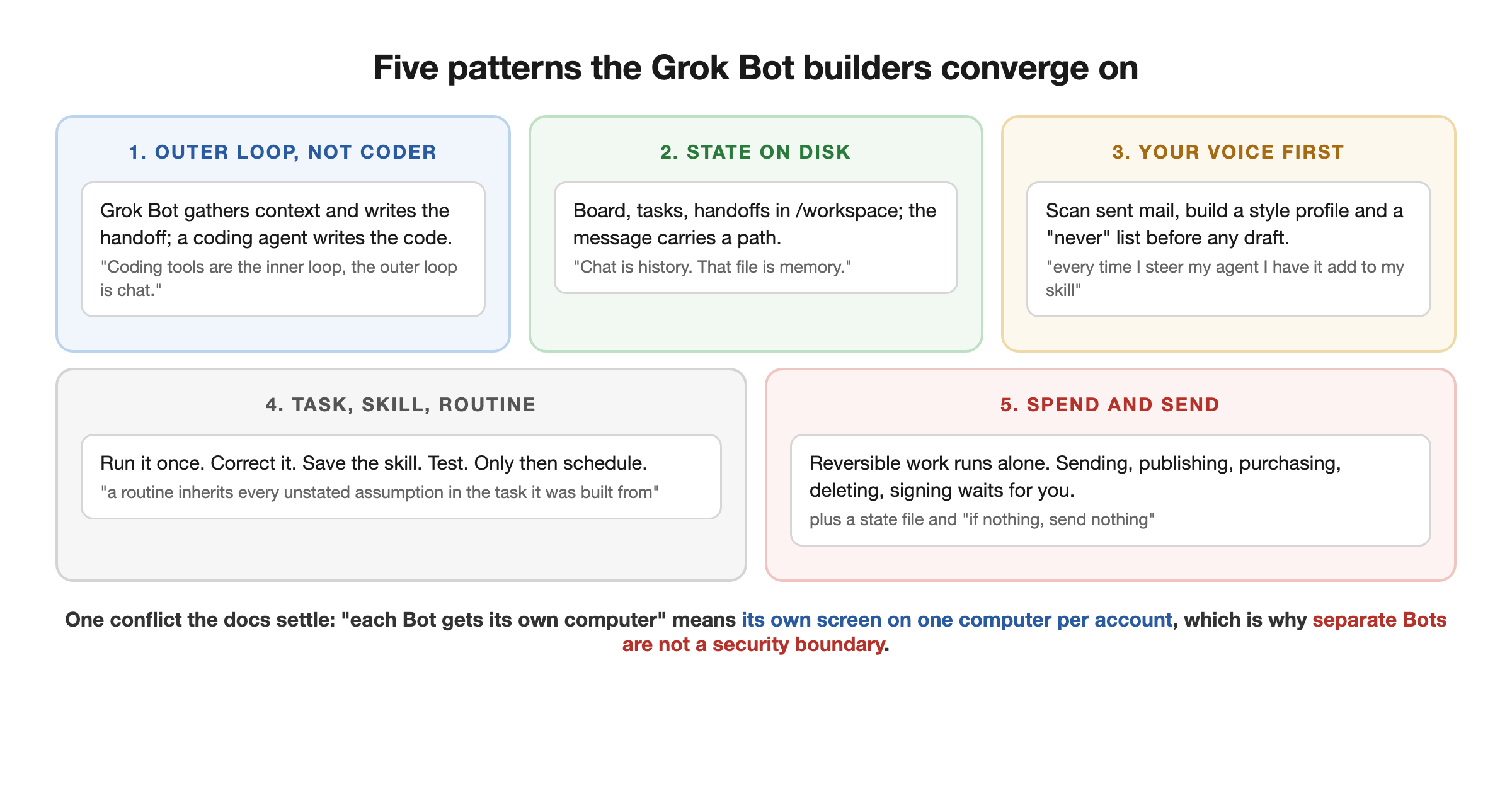
Grok Bot is the outer loop, not the coder. The clearest statement is from a Cursor and SpaceXAI staffer, Matt Palmer: "Coding tools are the inner loop, the outer loop is chat." His Bot gathers context and stages prompts to fire off Cursor cloud agents, which are then "waiting for me inside my Cursor app," so exploratory research never pollutes the coding agent's context. A paying user's solo-founder team has the same role as an Outer Loop Bot whose rule is "You do not commit, push, merge or deploy. Ever," next to the blunt line that "Grok Bot is definitely not the best choice for writing your production code." A circulating setup prompt installs Claude Code, Codex, or Cursor inside the Bot's computer for exactly this handoff.
State lives on disk, and the message carries a path. The docs say the shared workspace at /workspace is what survives computer updates and recovery, and every serious design uses it. The most disciplined, Akshay Pachaar's four-Bot engineering team, keeps a board file, one file per task, and a handoffs folder, with a single Bot allowed to write the board, because two Bots writing the same file "loses one of the edits with no error and no warning." His rule for the whole product: "Handoff quality is a file format problem, not a prompting problem." The shortest version, from a shopping Bot's published description: "Chat is history. That file is memory."
Feed it your own writing first. Two independent authors, an insider and a paying user, make the same first move before any drafting: have the Bot scan your sent mail and Slack and build a style profile, or pull 20 to 30 replies you actually sent and write down a "never" list (no emoji, no hype words). The insider's compounding trick: keep an anti-slop skill and "every time I steer my agent I have it add to my skill."
Task, then skill, then routine, with a test run in between. The docs prescribe it ("Start with a one-time task. Make it reliable, save the method as a skill, and only then automate it") and the builders explain why: "a routine inherits every unstated assumption in the task it was built from," and "your routine will run for 4 mornings before you notice the output is wrong." The one non-obvious refinement, from a trading-desk guide: when you teach a workflow by recording, record a second run where you reject the candidate halfway and say which check killed it, because otherwise you have taught the Bot what buying looks like "and nothing about what passing looks like."
Every description ends with a fence. The recurring rule, in one author's two words, is "spend and send": anything that sends, publishes, purchases, deletes, or signs waits for you; anything reversible runs alone. The docs' own recommendation is the same, as narrow Require Approval rules plus a standing boundary in the Bot description. The corollary for scheduled Bots, from the solo-founder prompts: keep a state file of what you already reported and add "if nothing, send nothing," because "without that line, a bot will invent relevance to justify running."
Two silent failure modes to design for. A Bot whose X credits run out reports "nothing new" rather than erroring, which is indistinguishable from a quiet day (reported by the solo-founder author; we have not reproduced it). And a browser scraper whose target site changes layout "starts reporting an empty scan every hour while sounding perfectly calm about it," a failure one author says can run for weeks. Both argue for a routine that reports its own inputs, not just its findings.
One conflict the write-ups introduced and the docs settle: several authors, including insiders, write that "each Bot gets its own computer." The documentation is specific that the computer is assigned per user, all of a member's Bots share it, and each Bot gets its own screen on it. Read "own computer" as loose wording for "own screen." The same fact is why the docs say not to use separate Bots as a security boundary.
The limits problem, and how users are managing it
The most documented complaint, from two independent directions, is that usage limits burn much faster than people expect: Craig Hewitt's first-person report of a weekly limit exhausted in one day on the 200-dollar tier, with a chatty chief-of-staff thread and triage over a ten-year-old inbox as what he himself calls working theories for the cause; and xAI's own engineer acknowledging the issue publicly on August 24, saying the team was working on efficiency improvements. Hewitt's account is a user report we can attribute but have not independently verified.
Two tactics are demonstrated in the transcripts (and our pricing page has the full list, including a user-published workaround that installs coding agents on the Bot's computer so Grok Bot's allowance is spent on coordination rather than code): Berman scopes Routines to business hours specifically so they are not burning tokens around the clock, and Brock routes heavy scraping through a purpose-built research connector instead of raw browser time. Finn's advice on tight per-Bot descriptions points the same way. Our own recommendations on top of those, labeled as such: keep coordinator conversations short, and do not point triage at years of backlog on day one (the pattern in Hewitt's report). Nobody has published real per-use-case token costs yet; until someone does, start narrow and watch the meter.
The other standing limitations: Grok-backed Bots with no model picker (the teams documentation says SpaceXAI does not plan to add one); no Android, iPad, or Linux desktop app; and the privacy trade of signing a hosted agent into your mail, files, and calendar, which you should weigh deliberately rather than by default.
If what attracts you to Grok Bot is the team-of-agents shape rather than this specific product, that shape is buildable, and the trade-offs cut differently: model choice, cost control, and your data staying on your infrastructure, in exchange for setup work. Grok Bot vs building your own AI employee is our sourced comparison of when each side wins, and the Loop Engineering course is the build path's starting point.
The pattern under the product
Grok Bot is a thesis shipping at consumer scale: agents should be persistent, should own a real computer, and should be organized like a small team with a coordinator, specialists, and messages between them. That is the same architecture this blog covers as agent graphs, productized; and the chief-of-staff convention its tutorials teach is the same pattern the AI-native company discussion reached from the operations side. Whether or not Grok Bot itself keeps its momentum, three separate communities landed on coordinator-plus-specialists independently, and that convergence is the durable takeaway.
Related Content
- Grok Bot vs Building Your Own AI Employee - The buy-vs-build sort: what the subscription buys, what building buys, and the open-source middle path.
- Grok Bot vs Claude Tag - The two message-an-AI-teammate products side by side: surfaces, computers, org models, and billing.
- How to Become an AI-Native Company - The operations playbook for the same goal: work handled by agents, people at the edges.
- Graph Engineering Guide (2026) - The architecture under the chief-of-staff pattern: nodes, edges, and who checks whom.
- Grok Bot Pricing and Usage Limits - Every plan that includes it after August 26, how the weekly meter works, and the limits tactics in full.
- Grok Bot Templates - Sharing shipped August 28: what travels, how to vet a third-party Bot, and the rosters people are sharing.
- Who Owns Your AI Agents - The governance questions a team of Bots with real logins raises, whoever hosts them.
Frequently Asked Questions
What is Grok Bot?
Grok Bot is SpaceXAI's always-on AI agent product, in beta since August 11, 2026. You create named Bots that share one computer in the cloud (per the docs, the computer is assigned per user, not per Bot), sign into your tools and websites like a person would (including platforms with no API), run scheduled Routines, message each other, and come back to you for approvals. You talk to them in an iMessage-style app on macOS, Windows, or iPhone, the way you would message a coworker.
How do I get access to Grok Bot and what does it cost?
At launch on August 11 it was gated to top-tier plans, widely cited at 200 dollars a month. On August 21 SpaceXAI added SuperGrok Plus, Cursor Pro+, and Cursor Teams, plus a limited free trial, and on August 26 it expanded again to every individual SuperGrok plan (SuperGrok, Plus, Heavy) and every paid individual Cursor plan, so the cheapest entry is now Cursor Pro at 20 dollars a month or SuperGrok at 30. Every plan includes a weekly Grok Bot usage allowance; if you have enabled on-demand usage on the account, work continues on it past the allowance, with no product-specific cap. Apps exist for macOS, Windows, and iPhone; there is no Android, iPad, or Linux desktop app, and enterprise is waitlisted. Every tier is on our pricing page.
What is the chief-of-staff pattern in Grok Bot?
The convention three of the four transcribed tutorials teach independently: make your first Bot a chief of staff, pin it, and talk mostly to it, letting it delegate to specialist Bots (inbox, research, content, coding, ops); in the tutorials' onboarding pattern, the first Bot proposes and sets up that team for you. A useful onboarding trick from the tutorials: brain-dump your situation to it, then ask it how it would set up Grok Bot for you, and let it build the team.
Why is Grok Bot eating my usage limits so fast?
Fast limit burn is the product's most documented complaint, and xAI has publicly acknowledged it and said the team was working on efficiency improvements. User reports include Castos founder Craig Hewitt describing a weekly limit exhausted in one day on the 200-dollar tier, naming a chatty chief-of-staff thread and triage over a decade-old inbox as his own working theories for the cause; we can attribute that report but have not independently verified it. Two tactics are demonstrated in tutorials: scope Routines to business hours instead of always-on, and put heavy scraping behind purpose-built research tools rather than raw browsing. Two more are our recommendations: keep the chief-of-staff conversation short, and avoid pointing triage at huge historical backlogs.
Can Grok Bot use models other than Grok?
The materials we reviewed show Grok-backed Bots and document no model picker, and when a viewer asked, Alex Finn said he was not sure the product is meant to swap models. That apparent lock-in is why Finn keeps a second, open harness alongside it for jobs that want cheap or local models, and it is a core trade in our comparison of buying Grok Bot versus building your own agent team.
Sources & Verification
Updated 2026-08-30 with the builders' own long-form write-ups (nineteen X Articles, read in full, from SpaceXAI and Cursor staff and from paying users) and the official docs on docs.x.ai, which resolved the shared-computer question and the plan eligibility. Original basis: product facts come from SpaceXAI's own launch materials (the Introducing Grok Bot post and the official @bot account's posts) and from the full transcripts of four of the most-viewed independent tutorials, all pulled and read on 2026-08-25: Alex Finn's setup video (57k views), Matthew Berman's use-case video (47k), Nate Herk's week-of-lessons video (25k), and Brock Mesarich's pricing video (23k). View counts were read via yt-dlp the same day. Use-case counts tally only sources named in the ledger table below: the four transcribed tutorials plus the individually linked X posts. Posts we read but cannot link, and sources we could not verify, are excluded from the counts. Where a claim inside a source is secondhand (relayed, not demonstrated), we say so. We deliberately excluded the viral crypto-trading-desk earnings posts: none carries a verifiable receipt. We have not run Grok Bot on our own accounts yet; this is a synthesis of documented usage, not a firsthand review. See our editorial standards.
- Introducing Grok Bot (SpaceXAI) - The launch post, 2026-08-11. Its own wording: your team of always-on agents that have their own computer, work inside tools and apps like you do, and keep working 24/7; Bots come back for approvals; internal use at SpaceXAI for sales, ops, and engineering
- Grok Bot access expansion (official @bot post, 2026-08-21) - All SuperGrok Plus, Cursor Pro+, and Cursor Teams subscribers get access, plus a limited free trial for everyone else. 24.4M views
- Grok Bot is the best AI agent ever. Here's how to set it up (Alex Finn) - 57k views, 2026-08-17. The setup walkthrough this guide's flow follows; source for the chief-of-staff convention, plugins, and the keep-other-harnesses advice
- 11 Grok Bot Use Cases That Feel Like Cheating (Matthew Berman) - 47k views, 2026-08-20. Source for the email-routine, browser-errand, and calendar use cases, and the business-hours routine tactic
- A Week of Grok Bot Lessons in 10 Mins (Nate Herk) - 25k views, 2026-08-19. Source for memory (individual vs shared), teach-a-task, and the shared-computer detail
- Grok Bot Just Got 70% Cheaper... (I Switched) (Brock Mesarich) - 23k views, 2026-08-23. Source for the post-expansion pricing framing and the monitoring workflows
- xAI on usage limits (Jediah Katz, 2026-08-24) - Official acknowledgment: 'aware some people are using up their @bot limits faster than they'd like. Working on efficiency improvements'
- Grok Bot is now included with more plans (SpaceXAI, 2026-08-26) - Access expanded to every individual SuperGrok plan (SuperGrok, Plus, Heavy) and every paid individual Cursor plan; Grok Bot gets its own usage bucket
- Grok Bot FAQ (docs.x.ai) - 'The computer is assigned per user, not per Bot. Do not use separate Bots as a security boundary'; platforms: macOS, Windows, iPhone; no Android, iPad, or Linux desktop
- Chat is all you need (Matt Palmer, Cursor and SpaceXAI, 2026-08-18) - Grok Bot as the outer loop over Cursor cloud agents; personal software as chat; a daily marketplace saved search
- Grok Bot for GTM (Krista Letz, SpaceXAI, 2026-08-16) - An insider's roster of about ten Bots under a pinned chief of staff; the sent-mail style profile and anti-slop skill; periodic routine cleanup
- Build an Engineering Team With Grok Bot (Akshay Pachaar, 2026-08-26) - Piper, Bay, Fin, Tess; the on-disk board with one writer; 'Handoff quality is a file format problem, not a prompting problem'
- How to Build the Best Team for Solo Founders in Grok Bot (Paul Klay, 2026-08-29) - Six full Bot prompts; interview-once, state-file, and send-nothing patterns; the silent 'nothing new' when X credits run out
- Grok Bot, cross-post everything for me (Nevo Mashiach, 2026-08-26) - The one write-up in the set with a live-tested routine and a result: 83k video views to 201k article views. Author is the Postiz founder
- How To Set Up Grokbot The Right Way (Nav, 2026-08-20) - Klaus, Scout, Quill descriptions and three routine prompts; docs-derived, no run output shown
- How I run multiple teams of Grok Bots (Eric Zakariasson, official guide, 2026-08-27) - One channel and one Notion row per project; a projects manager with a Project Ops skill; three staffing rules
- Amazon Cart Bot description (Teslaconomics, 2026-08-24) - A full published Bot description with preferences kept in /workspace: 'Chat is history. That file is memory'
- How to Become an AI-Native Company (AI Builder Club) - The build-side playbook for the same goal Grok Bot productizes: operations run by agents with people at the edges
Join AI Builder Club


$37/mo
Get the free newsletter
Weekly deep-dives on AI tools, automation workflows, and builder strategies. Join 5,000+ readers.
No spam. Unsubscribe anytime.