Grok Bot Templates (2026): How to Share, Install, and Vet Them
Grok Bot templates shipped August 28. What a template contains and what it leaves behind, how to publish one without leaking secrets, how to install a third-party Bot safely, the templates builders are sharing, and the prompt-style templates that predate the feature.
Grok Bot shipped template sharing on August 28, 2026, seventeen days after the product's beta launch. The idea is simple and the consequences are not: a Bot you have tuned for weeks becomes a link, and anyone who clicks it gets a copy of that Bot in their own account. Within a day there were curated lists, a marketplace site, and people pointing out that months of work in other agent harnesses could now ship as a Grok Bot template. This page is the mechanics from the documentation, the safety rules from the terms, the templates people are actually sharing, and the prompt-style templates that predate the feature and still do most of the work.
If you are new to the product, the Grok Bot guide covers setup and the chief-of-staff pattern that most of these templates assume.
What a template is, and what it is not
Grok Bot's own documentation calls the feature "Share a Bot," and documents three steps on the Create-and-manage-Bots page: copy the Bot's share link; the recipient opens a preview on x.ai and chooses Add to Grok Bot (they need the app to finish); adding creates a copy on their account. The steps in between come from the product-side walkthrough video and the launch post, not the docs, so we label them as reported:
- Open the Bot and choose "Share as template" in its settings; you can also ask the Bot to create a shareable copy of itself, which is how the launch post demonstrated it.
- Grok Bot prepares an unpublished draft from the Bot's configuration (reported: it tries to keep what another person needs and exclude personal memories). Nothing is public at this step.
- You inspect what was selected, then publish it for your team or make it public and copy the link.
- The recipient previews and adds, per the docs above.
What travels, per the documentation: the Bot's identity, description, skills, and routines. What stays behind, in the documentation's words: "It does not give them your computer, logins, or conversation history." Two further details come from the product-side walkthrough and the hands-on write-ups rather than the docs, so treat them as reported: selected memories and first-party integrations are included, while custom MCP servers, scripts, and code are not copied and need setup instructions. What is NOT automatically excluded is secrets: anything in the description, skills, or routines ships with the link unless you remove it, which is why the docs tell you to strip keys before sharing. The walkthrough's analogy holds: you share the recipe, not the prepared meal, and the recipient's Grok Bot cooks an independent Bot from it.
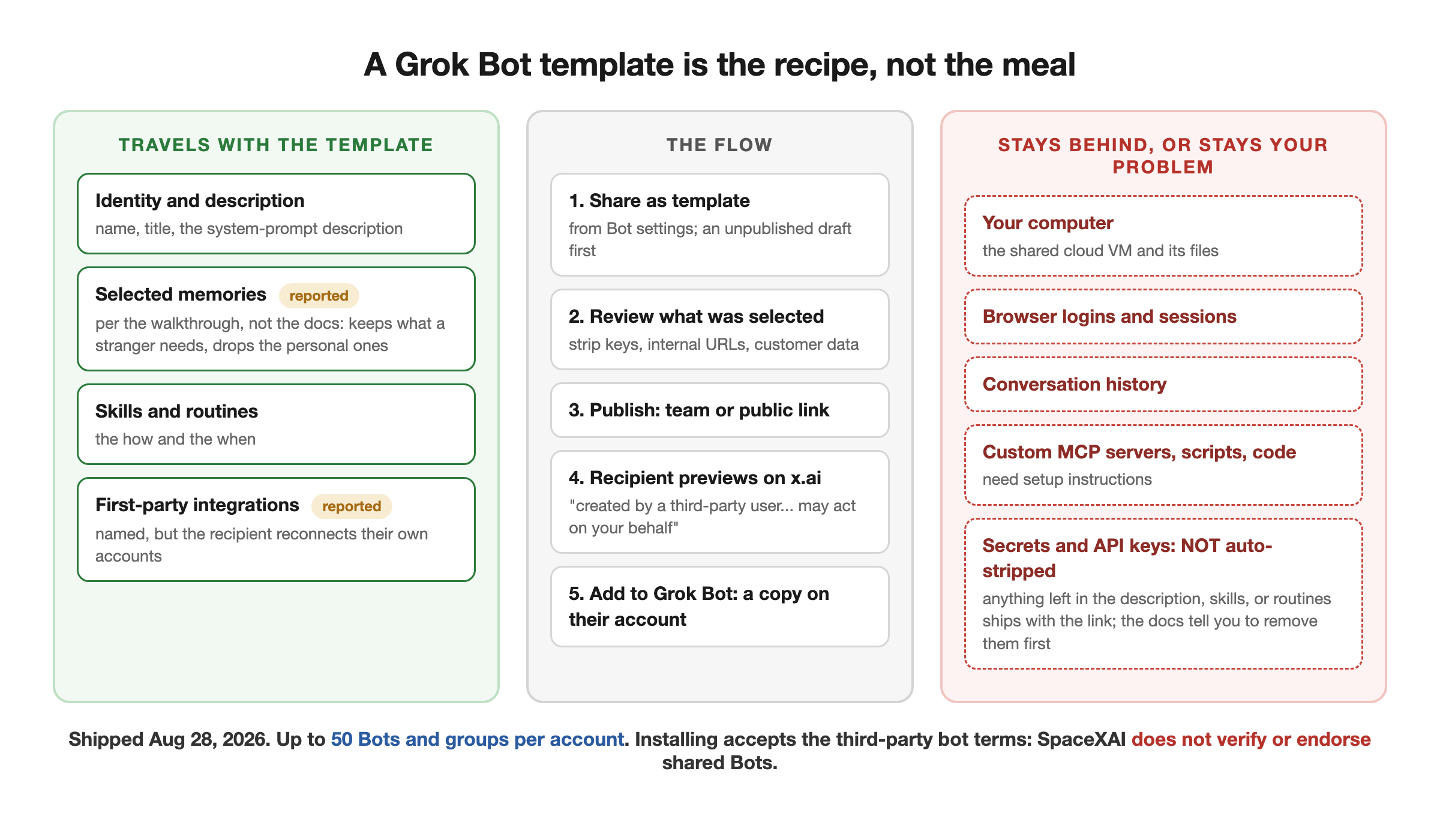
Two limits worth knowing before you build on it. First, per the docs, an account holds up to 50 Bots and group chats combined, so a spree of installs has a ceiling. Second, a template is a Grok Bot format: it is the easiest way to move a setup into the product and does nothing for moving one out.
Publishing one without leaking anything
The share link is public. The FAQ says it plainly: "The link exposes the Bot's configuration." The terms, effective August 22, make the creator responsible for "reviewing your bot's configuration for sensitive information (API keys, internal URLs, customer data, personal information) before sharing" and for "not including anything you need to keep confidential." Automatic filtering is a convenience, not a guarantee.
A pre-publish checklist that follows from the docs:
- Read every item Grok Bot included: instructions and memories, skills and routines, plugins and integrations, and any internal name, URL, or project detail. If you would not put a value in a public document, remove it.
- Write setup instructions for what cannot travel. A Bot that depends on a plugin, an account, an API key, an MCP server, a local file, or a command-line tool needs to tell the recipient what to connect, without containing the private value. The most practical trick we have seen is to ask the original Bot to review its own template and add those instructions itself, then to explain how the recipient can test the setup without touching an external system.
- Remember the redistribution clause: recipients "may not redistribute, re-share, or re-export this bot or its configuration without the creator's permission." Your template is licensed to them for their own use.
Installing one without getting burned
The install side carries the real risk, and the terms are unusually direct about it. By adding a third-party Bot you acknowledge that it "may perform actions on your behalf, including reading, writing, and sending data, executing tasks, and interacting with third-party services through your connected accounts," and that SpaceXAI "does not verify, endorse, or guarantee the functionality or safety of third-party bots." The preview page for every template repeats a version of this: "This AI bot was created by a third-party user, not by SpaceXAI. It may act on your behalf."
Treat a template as software you did not write:
- Read the preview's description, skills, and routines before adding it.
- After adding, review it again inside the app before confirming.
- Connect only the accounts it needs, and start with the smallest useful permissions.
- Run one safe, reversible task while watching the computer view before enabling any routine or consequential action.
- Put your own approval boundary in the Bot's description ("never send external messages or make purchases without my approval") even if the author did not.
One structural reason to be careful that the terms do not spell out: every Bot on your account shares one cloud computer and its logins. A template that runs a routine you did not read is running it with access to whatever sessions your other Bots have opened. Our guide covers that shared-computer design in detail.
The templates people are sharing
Links below go to public preview pages on x.ai as shared by their authors. We opened the first and confirmed how a preview renders; we have not installed any of them, and every one is third-party.
From the product side
- Loops by Matt Palmer, preview. Its own description: "Generalized engineering outer loop. Sits above coding agents... writes /goal-style prompts with testable proof, and runs gather, prompt, launch, review, merge. You name the repo; it never guesses." This is the outer-loop pattern that recurs across builder write-ups: Grok Bot gathers context and writes the handoff, a coding agent does the code.
A creator's six picks after reviewing roughly a hundred shared templates (Avid):
- Loops (Matt), above.
- Master (Farzad).
- Chief of Staff (Avid).
- Growth Desk (Avid).
- Forge (Robert).
- Grok Bot Coach (Amina).
His closing line is the right frame for all of them: "anyone can steal the bot now, but nobody can steal the vault, handoffs, and judgment you turned into a graph." A template gives you the role, not the context the author fed it.
A student's working set (Daniel Xu), shared with a demo of what each does: a chief of staff, a job finder that tracks internship applications, a campus forms Bot, and a PM. His summary of where the product shines, "aggregating information across a bunch of different sources and acting on it," is the most honest one-line use case in the set.
Others we saw but did not open: a shopper Bot that compares Amazon, Costco, Instacart, and Walmart and presents two or three options before buying; a set of twelve persona-named Bots from an early-access tester (shared as a screenshot, not links); and a home-robot controller mentioned in coverage of the launch.
Marketplaces: a template marketplace built with Grok Bot itself the day the feature shipped, and at least three other listing sites within 48 hours. TestingCatalog's pre-release report described a Templates tab inside Settings for browsing shared templates with preset roles for researchers, sales assistants, and operations agents, which would make the official directory the app itself. Read what a listing is actually offering: some entries are prompts or use-case descriptions, not installable templates.
Free AI Builder Newsletter
Weekly guides on AI tools & builder strategies.
The prompt-style templates that predate the feature
The best Bot designs published in Grok Bot's first three weeks were shared as text, because that was the only way. They still work: paste the description into Bot actions, then Edit Profile (if the Bot summarizes instead of saving your text, that is the workaround). Three sets are worth having, each quoted from the author's own article.
The solo-founder six
Paul Klay, who runs 18 Bots for his fund, published six complete prompts for a solo founder: Support Triage, The Scribe, Signal Miner, Launch Manager, Money Watch, and Outer Loop. All six share three patterns that make them better than the average template:
- Interview once. "Before your first run, ask me one round of questions... Save the answers and reuse them every run."
- Keep a state file. "Keep a state file of every post you have already reported. Check it before reporting anything. Never report the same thread twice." Without it, "scheduled bots repeat themselves. It is the number one reason people stop reading their own bots."
- If nothing, send nothing. "Without that line, a bot will invent relevance to justify running."
And one rule in every prompt: the Bot drafts, never sends. His Money Watch prompt is the compact example: "One short message a day, and only when something actually moved... Report figures exactly. Never estimate, never round to make a story. Never change anything in any billing tool." His advice on scale is the opposite of the org-chart posts: "Ten bots you skim is worse than two you trust."
The chief-of-staff trio
Nav's setup guide is a docs-derived walkthrough rather than a run log, but its three Bot descriptions are a clean starting roster. The chief of staff, Klaus: "You are my Chief of Staff. You are the single front door for all my work. Read my Slack, Gmail, and Calendar. Delegate specialized tasks to the right specialist bot. Never send external messages or make purchases without my approval. Every morning, prepare a brief with the 5 most important things needing my attention. Ask me a clarifying question before starting any task worth more than 30 minutes." Scout is the researcher (briefing memos to a Notion database), Quill the writer (drafts to Drive, never sends). His routines are equally explicit about time zone, source, destination, and failure: "If a source is unavailable, report the failure instead of reusing old information."
The engineering four
Akshay Pachaar's Piper, Bay, Fin, and Tess is the most disciplined multi-Bot design we read, and the only one whose walkthrough shows a Bot stopping on a missing contract and moving a task to Blocked rather than guessing. Its role text is designed around a shared on-disk board because, as he puts it, "Grok Bot has no board of its own." The tester's rule is the line to steal: "She never fixes what she finds. A Bot that patches its own findings stops reporting them." His thesis applies to every template on this page: "Handoff quality is a file format problem, not a prompting problem."
Why templates change the product
Three things happen when a working Bot becomes a link.
Distribution. As one builder put it, anyone who spent months iterating on agent setups in OpenClaw or Hermes can now ship them as a two-second install, and "given Grok Bot will be the product millions of everyday people actually use," a template in front of the right audience is distribution the author never had. A template moves a setup into Grok Bot in one click; nothing moves one out, so treat it as a one-way door.
A marketplace before a market. Sharing shipped with team and public scopes and no payments. Third parties immediately built listing sites and promised selling. Expect the official Templates tab, the third-party terms (which forbid redistribution without permission), and those sites to collide.
The same trust problem every plugin ecosystem has had. The terms put safety on you. The shared-computer design means an installed template inherits your logins. The right habit is the one the documentation already recommends for your own Bots: give it a narrow job, keep external actions behind approval, run it once while watching, and only then let it run on a schedule.
If what interests you is the shape of these templates rather than this product's version of them, that shape, a role, a state file, a schedule, and a gate before anything irreversible, is what we teach in the Loop Engineering course, and How to build an AI team is the pattern the rosters above share.
Related Content
- How to Use Grok Bot - Setup, the chief-of-staff pattern, the shared computer, and use cases with a source ledger.
- How to Build an AI Team - The coordinator-and-specialists pattern behind the template rosters.
- Grok Bot Pricing and Usage Limits - What an installed template's routines will cost you in weekly usage.
- How to Build Your Own Grok Bot - The primitives a template packages, and how to own them yourself.
Frequently Asked Questions
What is a Grok Bot template?
A shareable blueprint of a Bot. From the Bot's settings you choose Share as template, Grok Bot prepares an unpublished draft from the Bot's configuration, you review it, and then publish it for your team or make it public and copy a link. Anyone with the link sees a preview on x.ai and can add a copy of the Bot to their own account. Per the docs it carries the Bot's identity, description, skills, and routines (the product walkthrough adds selected memories and first-party integrations), and it does not carry your computer, your logins, or your conversation history. It does not strip secrets for you: anything left in the configuration ships with the link, so remove keys and internal URLs before publishing.
Is sharing a Bot safe?
The link is public and exposes the Bot's full configuration, including skills and routines, so strip API keys, internal URLs, customer data, and anything confidential before publishing. SpaceXAI's terms make the creator responsible for that review. Installing is the riskier side: a shared Bot 'may perform actions on your behalf' through your connected accounts, and SpaceXAI does not verify or endorse third-party Bots. Read the preview, connect only the accounts it needs, and run one safe task while watching before you enable its routines.
Where can I find Grok Bot templates?
Creators share preview links on X (the ones we list here open on x.ai), TestingCatalog reported a Templates tab in Settings for browsing shared templates before the feature shipped, and third-party listing sites appeared within a day of launch. Treat any listing as unverified: some entries are prompts or use-case descriptions rather than installable templates, and every installable one is third-party software.
What is the difference between a template and a prompt?
A prompt is text you paste into a Bot's description. A template is the packaged Bot: description, skills, and routines per the docs (plus selected memories and first-party integrations per the product walkthrough), installed in one click; the recipient reconnects their own accounts. Most of the best material published before August 28 is prompt-style, such as the six solo-founder Bot prompts or the chief-of-staff rosters we quote below, and those still work; you paste them into Edit Profile. The template feature is what turns a working setup into something a stranger can install.
Sources & Verification
Feature mechanics come from SpaceXAI's own materials read on 2026-08-30: the official @bot announcement of August 28, the Create-and-manage-Bots page and FAQ on docs.x.ai, the third-party bot terms (effective 2026-08-22), and one public template preview page we opened. The pre-release detail comes from TestingCatalog's August 24 report. Template links in the list below were shared by their authors on X; we opened the first (the Loops template) and confirmed the preview page, its description, and the third-party warning; we have not installed or run any template. The prompt-style templates are quoted from the builders' own published articles, attributed and trimmed. See our editorial standards.
- You can now share templates of your Bots with others (official @bot, 2026-08-28) - The launch post for template sharing
- Create and manage Bots: Share a Bot (docs.x.ai) - Public share link, preview on x.ai, Add to Grok Bot creates a copy; 'It does not give them your computer, logins, or conversation history'; strip API keys and internal URLs first
- Grok Bot FAQ: sharing (docs.x.ai) - 'The link exposes the Bot's configuration'; adding a shared Bot accepts the third-party bot terms
- Third-party bot terms (SpaceXAI, effective 2026-08-22) - A shared Bot 'may perform actions on your behalf'; SpaceXAI 'does not verify, endorse, or guarantee' third-party bots; creators are responsible for stripping sensitive configuration; no redistribution without the creator's permission
- Templates in Grok Bot walkthrough (Matt Palmer, 2026-08-28) - Seven-minute video from the product side: templates 101, sharing, publishing, installing, setup for complex templates, authoring tips, evaluating templates. 557k views
- Loops template preview page (Matt Palmer) - A public template page as it renders: description, 'created by a third-party user, not by SpaceXAI. It may act on your behalf', Add to Grok Bot button
- Grok Bot to get Templates and multi-account support soon (TestingCatalog, 2026-08-24) - Pre-release: a Templates tab in Settings for browsing shared templates, preset roles, plus multi-account, Chrome profile import, and desktop egress routing in development
- Six shared Bot templates worth stealing (Avid, 2026-08-29) - A creator's picks after going through 100 shared templates, with x.ai preview links
- Student use of Grok Bot with shareable Bots (Daniel Xu, 2026-08-28) - Four shared Bots with preview links: chief of staff, job finder, campus forms, PM
- How to Build the Best Team for Solo Founders in Grok Bot (Paul Klay, 2026-08-29) - Six full Bot prompts (support triage, scribe, signal miner, launch manager, money watch, outer loop) and the three patterns they share
- How To Set Up Grokbot The Right Way (Nav, 2026-08-20) - The Klaus, Scout, and Quill chief-of-staff roster with Bot descriptions and three routine prompts
- Build an Engineering Team With Grok Bot (Akshay Pachaar, 2026-08-26) - Piper, Bay, Fin, and Tess role descriptions, the on-disk board, and the context-folder spec
- Grok Bot template marketplace (Duyet, 2026-08-28) - A third-party listing site for templates, built the day the feature shipped
Join AI Builder Club


$37/mo
Get the free newsletter
Weekly deep-dives on AI tools, automation workflows, and builder strategies. Join 5,000+ readers.
No spam. Unsubscribe anytime.