How to Build Your Own Grok Bot (Open Source or DIY)
SpaceXAI documents no self-hosted Grok Bot, but its anatomy is buildable: OpenBot for the coworker surface, or agent loops for the working parts.
Grok Bot put a name and a slick surface on a set of mechanics that map to existing agent primitives: persistent agents with their own computer, schedules, memory, and a coordinator. SpaceXAI does not document a self-hosted option in the materials we reviewed. The thing it is, though, is buildable, and this article covers two routes: run OpenBot, the open-source analog that appeared within days of the launch, or assemble the anatomy from primitives you control. This page maps both.
The anatomy you are replicating
Each of Grok Bot's working parts has a buildable equivalent:
| Grok Bot feature | What it actually is | The primitive you build |
|---|---|---|
| A Bot with a description | An agent with a persistent identity and a system prompt | An agent with a written contract: its job, its bar, its escalation rules |
| A shared cloud computer for the Bot team | One managed Linux VM per user, shared by all their Bots, each Bot with its own screen; files, browser sessions, and logins are shared, and the docs say not to use separate Bots as a security boundary | The build-side design choice: an isolated container or VM per agent with its own browser profile (per-agent sandboxes) |
| Routines | Scheduled and event-triggered runs | A loop: cron or event trigger, cycle, stop condition |
| Memory (per-Bot and shared) | State that survives sessions, some private, some team-wide | Per-agent working files plus a shared artifact store the whole fleet reads (agent memory) |
| Bots messaging each other | Agent-to-agent handoffs with shared context | Edges in an agent graph: structured handoffs between clean contexts |
| The chief of staff | A coordinator that routes work and escalates to you | An orchestrator node, added only when several loops genuinely need routing |
| Teach a task | Demonstration converted into a reusable capability | A skill: the procedure written down where every future run reads it |
| Approvals | A human gate on consequential actions | A review gate in the loop: the agent queues, you approve, it ships |
The reviewed Grok Bot mechanics map to existing agent primitives, so this article treats the integrated surface and setup as the main differentiator, and that packaging is genuinely hard to replicate, which is why the comparison of buying versus building is primarily about who does the integration work, control, and convenience.
What to replicate first, from the people who built on the real thing
Three weeks of builders' write-ups on Grok Bot (we read nineteen; the guide has the ledger) point at the same components as the table above, and they are unusually specific about which ones carry the value. Build these before the chat surface.
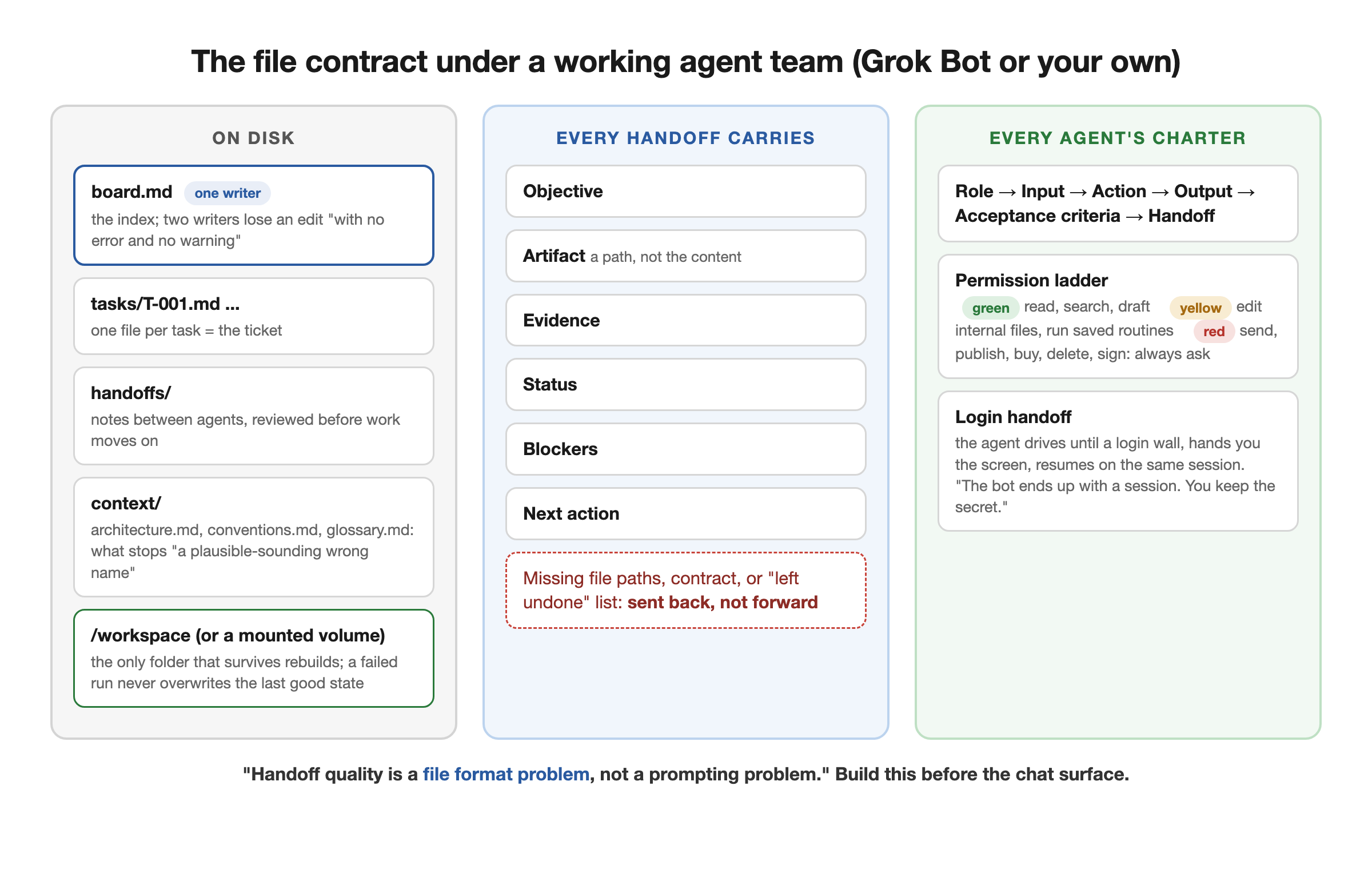
The file contract. Grok Bot has, in Akshay Pachaar's words, "no task object, status field, or dependency graph in the product" and "no board of its own," so every published multi-Bot design adds one on disk: a board file with a single writer, one file per task, a handoffs folder, and a context folder (architecture, conventions, glossary) that stops a Bot "inventing a plausible-sounding wrong name." Two Bots writing one file "loses one of the edits with no error and no warning," hence the single-writer rule. His thesis transfers to any harness: "state is saved on disk as files and the message carries a path." On the build side this is your shared artifact store, and it is the first thing to get right.
A handoff schema. The most complete published one, from the chief-plus-four playbook that circulates as "the SpaceXAI PDF" (it is not one), has six fields: Objective, Artifact, Evidence, Status, Blockers, Next Action. Akshay Pachaar's version adds the rule that a note missing file paths, an interface contract, or the list of what was left undone "gets sent back rather than passed forward." Pair it with a charter per agent (Role, Input, Action, Output, Acceptance Criteria, Handoff) and you have typed edges in a graph without a framework.
A permission ladder in code, not prose. The recurring rule across the write-ups is "spend and send" (one builder's two-word guardrail): reversible work runs alone, anything that sends, publishes, purchases, deletes, or signs waits for a human. The same playbook formalizes it as three tiers, green (search, read, summarize, draft), yellow (edit internal files, run saved routines), red (always ask). Grok Bot enforces this through model-based Auto Review plus your Require Approval rules; a built loop can enforce it as a gate that fails closed, which is the stronger version.
A durable workspace. The product's own contract is that /workspace survives computer updates and recovery while everything else on the VM may not, and builders discovered it the hard way (one desk guide: "cloud environments rebuild, reset, wipe packages"). Your equivalent is a mounted volume or a repo, with the rule that a failed run must never overwrite the last good state.
The login handoff. The trust model users praise is that the Bot drives its own browser until it hits a login wall or a two-factor prompt, hands you the screen, and resumes on the same session, in one desk guide's words: "The bot ends up with a session. You keep the secret." OpenBot reproduces this as human takeover at login walls; from primitives it is a persistent browser profile per agent plus a paused state that a human completes.
A blueprint for the files. If you want a self-hosted agent whose memory you can read, the open harnesses already define the layout, as Avi Chawla's masterclass lays out: Hermes keeps a soul file, a memory file, and a user file with hard character limits, sessions in SQLite, and skills as Markdown with frontmatter, with a curator that prunes unused skills. And if you are moving the other way, into Grok Bot, Miles Deutscher published a prompt for Claude Code or Codex that compiles every skill file, your memory and context files, and every recurring workflow into a single Markdown pack to paste into new Bots.
Free AI Builder Newsletter
Weekly guides on AI tools & builder strategies.
Route 1: OpenBot, the open-source analog
OpenBot (CopilotKit, MIT, repository created August 17 and announced August 19) reproduces the coworker surface for self-hosters: persistent bots with per-bot computers, a policy gateway that audits every action against written rules and refuses with the rule named, encrypted credential storage, an audit log, and human takeover at login walls and 2FA. Its defining design choice is the AG-UI protocol: a bot is any endpoint that speaks it, so your coworkers can be LangGraph, Mastra, CrewAI, Pydantic AI, or Google ADK agents, or hand-written ones, with your own model keys behind them.
Setup, at the level the README documents (we have not deployed it ourselves yet): Docker (the compose setup brings up PostgreSQL and the shipped Bots), Bun 1.3+, a model API key, and a CopilotKit Intelligence project with a license key for threads and memory, free plan available. Intelligence is self-hostable if you want to remove that hosted dependency, though hosted model or agent endpoints would still be hosted. It serves on localhost:3010 and ships three example coworkers defined in agents.yaml to copy from.
It is alpha, and its own materials say so. The default OPENBOT_SINGLE_USER=true dev mode admits every request as an admin, fine on a laptop and unsafe on a network; there are open questions about authorization checks being enforced on every surface; and fail-closed policy enforcement is the claim, not yet a proven guarantee. The right way to run it in August 2026 is on test accounts, watching the repo mature, treating it as an architecture to inspect and learn from rather than production software.
Route 2: assemble it from primitives
The from-scratch path skips the coworker chat surface and builds the working parts directly, which is the route we run in production. Its build order matters more than its parts:
- One agent, one job, one loop. Pick a recurring job, write its contract (what it does, what done means, when it must stop and ask), and put it on a schedule behind an executable verifier. This single unit is most of the value, and it is the whole discipline in miniature.
- Give it a place to remember. Working files for the job, plus a shared store future agents will read. This is the equivalent of Grok Bot's memory split, and it is what makes agent number two cheaper to add than agent number one.
- Isolate the environment once an agent touches logins or state that another agent could corrupt: one container or VM per agent, persistent browser profile, own credentials. Per-agent sandboxes is our writeup of exactly this.
- Add agents one at a time, and a coordinator last. The chief-of-staff node earns its place only when several loops genuinely need routing and shared context; wiring it first is the classic too-early graph mistake. When you do add it, you are building the pattern our AI team guide covers end to end.
What you give up against Grok Bot: the polished surface, the phone app, and the zero-setup on-ramp. What you get: model choice per job, schedules instead of always-on burn, a meter you can read, data and credentials wherever you decide they live, and a verifier in the loop, so output quality is enforced rather than noticed.
The single unit everything above is made of, an agent that wakes on schedule and ships behind a quality gate, is what the Loop Engineering course builds step by step. Start there; the team assembles from it.
Which Route Fits Which Builder
Run OpenBot if you want the coworker chat surface, you are comfortable in Docker, and you can give it test accounts while it hardens. Build from primitives if your jobs are operations with quality bars, if cost control is the point, or if you want each piece inspectable. Buy Grok Bot if the integration work is worth more to you than the control. The three implement related mechanics at different points on a control-versus-convenience line; the anatomy table shows where their implementations differ.
Related Content
- Grok Bot: How to Use It - The buy side: setup, the chief-of-staff pattern, use cases with a source ledger, and the limits problem.
- Grok Bot vs Building Your Own AI Employee - The decision this page implements: who does the integration work, who controls models and meter.
- How to Build an AI Team - The coordinator-and-specialists layer, from our production practice.
- Loop Engineering: Stop Writing Prompts, Start Writing Verifiers - The primitive under every route on this page.
- Crabbox: Parallel Agent Sandboxes - The own-computer feature, self-hosted: isolated stacks per agent.
- Grok Bot Templates - What the product packages when a Bot becomes a link, and what does not travel.
Frequently Asked Questions
Can you self-host Grok Bot?
SpaceXAI does not document a self-hosted Grok Bot option in the materials we reviewed, and those materials document no model picker either. If you want the same shape on your own infrastructure, the two routes are OpenBot, CopilotKit's MIT-licensed analog that you run yourself with your own model keys, or assembling the working parts from agent loops and a coordinator, which is the path this site documents.
What do I need to run OpenBot?
Per its README as of late August 2026: Docker (the compose setup brings up PostgreSQL and the shipped Bots), Bun 1.3 or newer, your own model API key (the starter bot uses OpenAI; the LangGraph example takes OpenAI, Anthropic, or Google keys), and a CopilotKit Intelligence project with a license key, which has a free plan. Intelligence can be self-hosted to remove that hosted dependency; eliminating all hosted dependencies also requires self-hosted model and agent endpoints. It serves on localhost:3010 and ships three example coworkers defined in agents.yaml. It is alpha: the default single-user mode admits every request as an admin, so keep it off shared networks and away from real work accounts while it hardens.
How do I give an AI agent its own computer?
The own-computer feature is one of the defining mechanics this article replicates, and the self-hosted version is an isolated environment per agent: a container or VM with its own browser profile, credentials, and persistent state, so sessions survive between runs and one agent's mess cannot break another's. Per-agent isolation is an established pattern documented in our Crabbox writeup, and OpenBot ships per-bot computers as part of its architecture.
Is building your own actually cheaper than Grok Bot?
It can be, but that is not automatic: you trade the subscription and its metered limits for model API costs plus your setup time. The cost advantage of building is control rather than a guaranteed lower bill: you pick cheap models for bulk work and frontier models for judgment, schedule jobs instead of running them always-on, and see exactly where tokens go, which is precisely the visibility Grok Bot users say they are missing when limits burn.
Sources & Verification
The Grok Bot anatomy is taken from SpaceXAI's launch materials and the transcribed tutorials documented in our Grok Bot guide (reviewed 2026-08-25), corrected on 2026-08-30 against the Grok Bot FAQ and teams documentation on docs.x.ai. The 'what to replicate first' section, added 2026-08-30, quotes four builders' own published write-ups, each linked at the quote and listed below; they are the authors' accounts, not systems we have audited. OpenBot facts are from the CopilotKit/OpenBot repository README (2,739 stars when read via the GitHub API on 2026-08-25) and Julian Goldie's walkthrough, including its security caveats; we describe OpenBot's setup at the level its README documents and have not yet deployed it ourselves. The build-from-primitives path describes the practice this blog documents from production use. See our editorial standards.
- Introducing Grok Bot (SpaceXAI) - The product being replicated: always-on Bots with their own computer that, in the launch page's own wording, keep working 24/7
- CopilotKit/OpenBot (GitHub) - The open-source analog: MIT, alpha, AG-UI protocol, Docker Compose self-hosting, bring your own harness and model keys; 2,739 stars as of 2026-08-25
- NEW Open Bot Is an Open-Source Grok Bot! (Julian Goldie) - The walkthrough behind the security caveats repeated here: alpha 0.0.1, the single-user dev-mode default, and fail-closed as a claim rather than a guarantee
- Grok Bot FAQ (docs.x.ai) - One computer per user shared by all Bots, each Bot with its own screen; 'Do not use separate Bots as a security boundary'
- Build an Engineering Team With Grok Bot (Akshay Pachaar, 2026-08-26) - The board, tasks, handoffs, and context-folder file contract; the single-writer rule; 'no task object, status field, or dependency graph in the product'; 'Handoff quality is a file format problem, not a prompting problem'
- Build a Grok Bot agent team, chief plus four specialists (0xCodila, 2026-08-19) - The six-field handoff format, the role-to-handoff charter fields, and the green, yellow, red permission tiers. Circulates as 'the SpaceXAI PDF'; the article body contains no such PDF
- Org chart instead of a to-do list (ridark, 2026-08-24) - The login-handoff trust model: 'The bot ends up with a session. You keep the secret.' The article ends with a memecoin contract address; we cite only its mechanics
- Grok Bot Masterclass (Avi Chawla, 2026-08-18) - The Hermes file layout (soul, memory, and user files with character limits, sessions in SQLite, skills as Markdown with frontmatter, a curator that prunes) as the inspectable analog of Grok Bot memory
- Migration prompt from Claude Code and Codex to Grok Bot (Miles Deutscher, 2026-08-18) - Compiles skill files, memory and context files, and recurring workflows into a Markdown pack for new Bots
- Grok Bot: How to Use It (AI Builder Club) - The buy-side guide this page mirrors, with the source-ledger use cases and the usage-limit problem
- Loop Engineering Guide (AI Builder Club) - The primitive the from-scratch path is built from: a scheduled agent cycle behind an executable verifier
Join AI Builder Club


$37/mo
Get the free newsletter
Weekly deep-dives on AI tools, automation workflows, and builder strategies. Join 5,000+ readers.
No spam. Unsubscribe anytime.